Introduction to macOS Memory Management
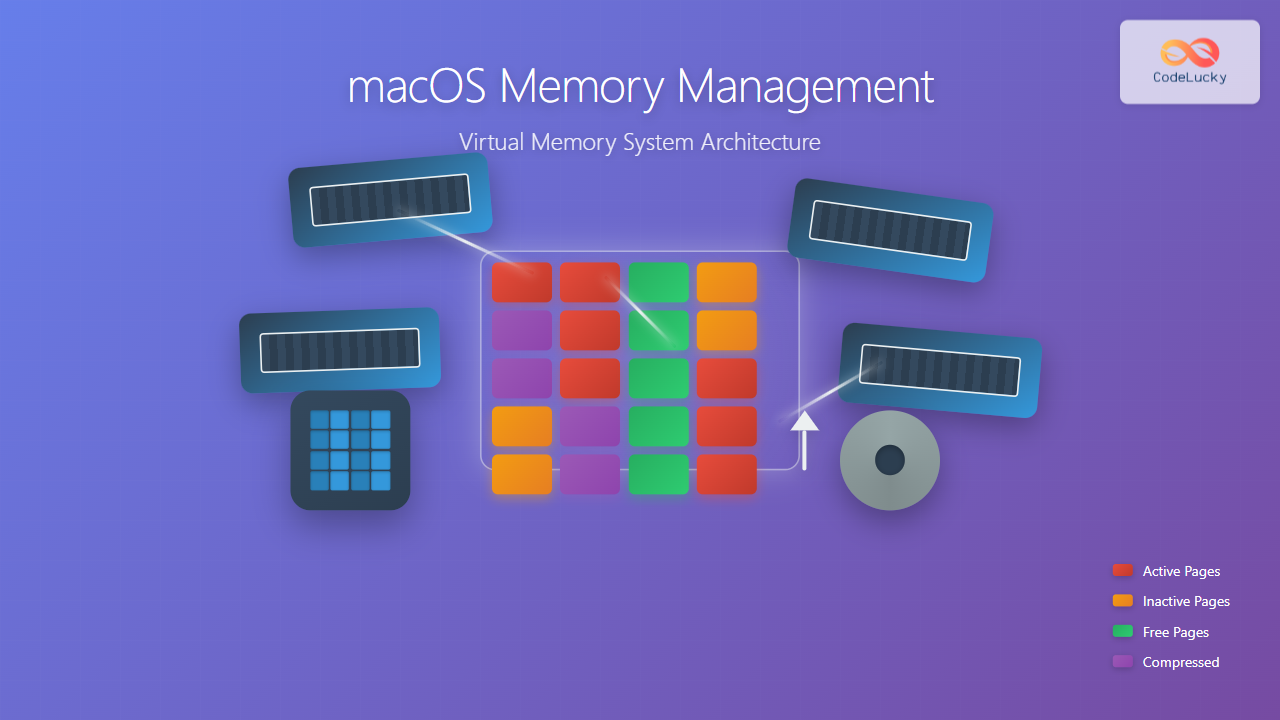
macOS employs one of the most sophisticated memory management systems among modern operating systems, built upon the Mach microkernel and enhanced by Apple’s XNU (X is Not Unix) kernel. The virtual memory system in macOS provides efficient memory allocation, protection, and optimization through advanced techniques like memory compression, lazy loading, and intelligent paging strategies.
Understanding macOS memory management is crucial for developers optimizing application performance and system administrators managing memory-intensive workloads. This comprehensive guide explores the architecture, mechanisms, and practical aspects of macOS virtual memory system.
Virtual Memory Architecture Overview
The macOS virtual memory system creates an abstraction layer between applications and physical RAM, allowing each process to operate as if it has exclusive access to a large, contiguous memory space. This virtualization enables:
- Memory isolation between processes
- Efficient memory utilization through sharing and compression
- Seamless memory expansion beyond physical RAM limits
- Memory protection and security enforcement

Core Components of macOS Virtual Memory
Memory Management Unit (MMU)
The MMU serves as the hardware-software interface for virtual memory operations. On Apple Silicon and Intel-based Macs, the MMU handles:
- Address translation from virtual to physical addresses
- Memory protection enforcement at page level
- Cache management for translation lookaside buffers (TLB)
- Memory attribute handling for different memory regions
VM Subsystem Components
The macOS VM subsystem consists of several interconnected components:
VM Objects and Memory Objects
VM objects represent abstract memory regions that can be mapped into virtual address spaces. These objects encapsulate:
// Example VM object properties
struct vm_object {
    vm_size_t size;           // Object size in bytes
    vm_offset_t offset;       // Offset within backing store
    memory_object_t pager;    // Associated pager
    vm_prot_t protection;     // Access permissions
    boolean_t temporary;      // Temporary object flag
};
Pagers
Pagers handle the movement of data between memory and backing store:
- Default pager: Manages anonymous memory and swap operations
- Vnode pager: Handles file-backed memory mappings
- Device pager: Manages device memory mappings

Virtual Address Space Layout
macOS organizes virtual address space into distinct regions, each serving specific purposes:
64-bit Address Space Layout
| Region | Address Range | Purpose | Size |
|---|---|---|---|
| User Space | 0x0000000000000000 – 0x00007FFFFFFFFFFF | Application code, data, heap, stack | 128 TB |
| Kernel Space | 0xFFFF800000000000 – 0xFFFFFFFFFFFFFFFF | Kernel code, data structures | 128 TB |
| Non-canonical | 0x0000800000000000 – 0xFFFF7FFFFFFFFFFF | Invalid address range | ~16M TB |
Process Virtual Memory Layout
A typical macOS process virtual memory layout includes:
// Sample memory layout inspection
$ vmmap -w [PID]

Virtual Memory Map of process 1234:
__TEXT         0x100000000-0x100004000  r-x/rwx    16K    __TEXT
__DATA         0x100004000-0x100008000  rw-/rwx    16K    __DATA
__LINKEDIT     0x100008000-0x10000c000  r--/rwx    16K    __LINKEDIT
Heap           0x100100000-0x100200000  rw-/rwx     1M    DefaultMallocZone
Stack          0x7fff5fc00000-0x7fff60000000  rw-/rwx  4M    Stack
Shared Libs    0x7fff80000000-0x7fffc0000000  r-x/rwx   1G    dyld_shared_cache
Memory Allocation and Management
Page-Based Memory Management
macOS uses a page-based memory management system with different page sizes depending on the platform:
- Intel Macs: 4KB pages
- Apple Silicon Macs: 16KB pages (with 4KB granularity support)
Memory Zones and Allocation
The system uses multiple memory zones for different allocation types:
// Example: Checking memory zones
$ zprint -w

                        elem    cur    max    cur    max   cur  alloc  alloc
ZONE                    size   elems  elems   size   size  inuse   size  count
vm.objects                88    1024   2048  90112 180224    512    524    512
vm.map.entries            64     512   1024  32768  65536    256    262    256
vm.map.copies             40     256    512  10240  20480    128    131    128
Dynamic Memory Allocation
Applications use various allocation mechanisms:
// malloc zones in macOS
#include <malloc/malloc.h>

// Get default malloc zone
malloc_zone_t *zone = malloc_default_zone();

// Create custom zone with specific properties
malloc_zone_t *custom_zone = malloc_create_zone(0, 0);
malloc_set_zone_name(custom_zone, "CustomZone");

// Allocate from specific zone
void *ptr = malloc_zone_malloc(custom_zone, 1024);
Memory Compression and Swap
Memory Compression System
macOS implements an advanced memory compression system that reduces memory pressure without immediate recourse to disk-based swap:
- Real-time compression of inactive memory pages
- LZ4 algorithm for fast compression/decompression
- Compressed memory pools managed by the kernel
- Automatic decompression on memory access
Memory Pressure and Response
The system monitors memory pressure and responds accordingly:
// Checking memory pressure
$ memory_pressure -l 1

    timestamp       free  active inactive    wired compressed
2024-01-15 10:30:15  2.1G    4.2G      1.8G    2.3G       3.2G

Memory pressure: Normal
Compressor efficiency: 2.3x
Swap File Management
When compression isn’t sufficient, macOS uses dynamic swap files:
- Dynamic creation in /var/vm/swapfile directories
- Automatic sizing based on memory pressure
- Encrypted swap for security
- Lazy deallocation when pressure decreases
// Monitoring swap usage
$ ls -la /var/vm/
-rw------T  1 root  wheel  1073741824 Jan 15 10:30 swapfile0
-rw------T  1 root  wheel  1073741824 Jan 15 10:35 swapfile1

$ sysctl vm.swapusage
vm.swapusage: total = 2048.00M used = 512.50M free = 1535.50M
Advanced Memory Features
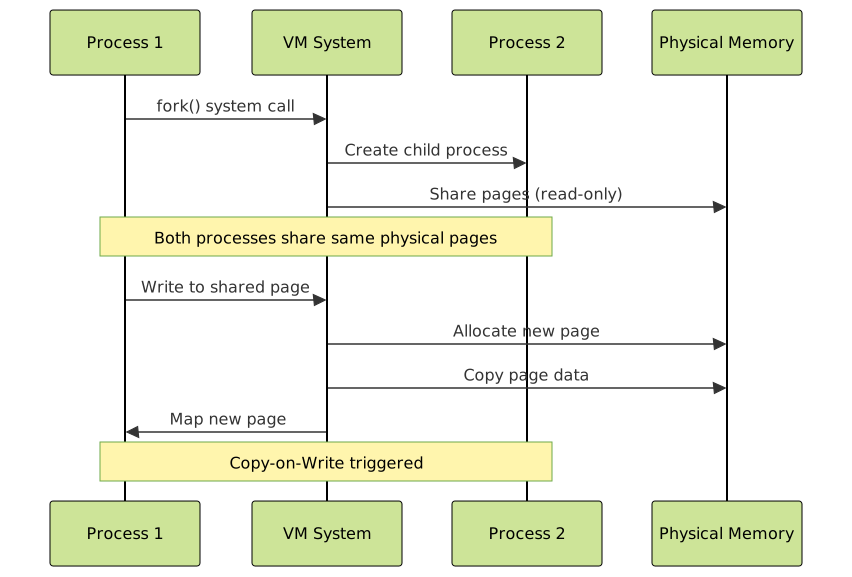
Copy-on-Write (COW) Optimization
macOS extensively uses COW to optimize memory usage:
- Process forking: Child processes share parent memory until modification
- Memory mapping: Multiple processes can share read-only mappings
- Dynamic libraries: Shared library code segments
Memory-Mapped Files
File mapping provides efficient file I/O through virtual memory:
// Memory-mapped file example
#include <sys/mman.h>
#include <fcntl.h>

int fd = open("data.bin", O_RDONLY);
struct stat st;
fstat(fd, &st);

// Map file into virtual memory
void *mapped = mmap(NULL, st.st_size, PROT_READ, MAP_PRIVATE, fd, 0);

// Access file data through memory operations
char first_byte = *((char*)mapped);

// Unmap when done
munmap(mapped, st.st_size);
close(fd);
Unified Buffer Cache
macOS implements a unified buffer cache that integrates file system caching with virtual memory:
- Automatic caching of recently accessed files
- Memory pressure response for cache eviction
- Write-behind caching for improved performance
- Coherency maintenance between cache and memory mappings
Memory Monitoring and Debugging
System-Level Memory Information
macOS provides several tools for memory analysis:
// Activity Monitor equivalent command line
$ vm_stat 1
Mach Virtual Memory Statistics: (page size of 16384 bytes)
Pages free:                     131072.
Pages active:                   262144.
Pages inactive:                 131072.
Pages speculative:               32768.
Pages throttled:                     0.
Pages wired down:               196608.
Pages purgeable:                 16384.
"Translation faults":        123456789.
Pages copy-on-write:           1234567.
Pages zero filled:             2345678.
Pages reactivated:              123456.
Pages purged:                    12345.
Process-Specific Memory Analysis
Analyzing individual process memory usage:
// Detailed process memory map
$ vmmap -w 1234 | head -20

Virtual Memory Map of process 1234:
Output report format:  64-bit process
==== Non-writable regions for process 1234
REGION TYPE        START - END         [ VSIZE  RSIZE] PRT/MAX SHRMOD PURGE
__TEXT             100000000-100004000 [   16K    16K] r-x/rwx SM=COW
__LINKEDIT         100008000-10000c000 [   16K     4K] r--/rwx SM=COW
dyld               7fff5fc00000-7fff5fc40000 [  256K   256K] r-x/rwx SM=COW

// Memory usage summary
$ ps -o pid,rss,vsz,pmem,comm 1234
  PID   RSS    VSZ %MEM COMM
 1234 45312 123456  2.8 MyApplication
Memory Leak Detection
Using built-in tools for memory leak detection:
// Heap analysis with leaks tool
$ leaks 1234
Process 1234: 1 leak for 64 total leaked bytes.

Leak: 0x600001234567  size=64  zone: DefaultMallocZone
        0x00007fff12345678: malloc + 24
        0x0000000100001234: -[MyClass allocateBuffer] + 45
        0x0000000100002345: -[MyClass initialize] + 123
Performance Optimization Techniques
Memory Alignment and Locality
Optimizing memory access patterns for better performance:
// Memory alignment example
#include <stdlib.h>

// Aligned allocation for better cache performance
void *aligned_buffer = aligned_alloc(64, 4096);  // 64-byte aligned

// Structure packing for memory efficiency
struct __attribute__((packed)) OptimizedStruct {
    char flag;        // 1 byte
    int value;        // 4 bytes (no padding)
    double data;      // 8 bytes
};  // Total: 13 bytes instead of 16
Memory Pool Management
Custom memory pools for specific allocation patterns:
// Simple memory pool implementation
typedef struct {
    void *pool;
    size_t size;
    size_t used;
    size_t block_size;
} memory_pool_t;

memory_pool_t* create_pool(size_t pool_size, size_t block_size) {
    memory_pool_t *pool = malloc(sizeof(memory_pool_t));
    pool->pool = valloc(pool_size);  // Page-aligned allocation
    pool->size = pool_size;
    pool->used = 0;
    pool->block_size = block_size;
    return pool;
}
Memory Security and Protection
Address Space Layout Randomization (ASLR)
macOS implements ASLR to prevent memory-based attacks:
- Stack randomization: Random stack base addresses
- Heap randomization: Random heap allocation addresses
- Library randomization: Random shared library load addresses
- Code randomization: PIE (Position Independent Executable) support
Memory Protection Mechanisms
Hardware and software memory protection features:
// Setting memory protection
#include <sys/mman.h>

// Make memory region executable
if (mprotect(code_buffer, code_size, PROT_READ | PROT_EXEC) != 0) {
    perror("mprotect");
}

// Create guard pages to detect buffer overflows
void *guard = mmap(NULL, PAGE_SIZE, PROT_NONE, MAP_ANON | MAP_PRIVATE, -1, 0);
Pointer Authentication (Apple Silicon)
Apple Silicon Macs include hardware pointer authentication:
- Return address protection: Authenticated return addresses
- Function pointer protection: Signed function pointers
- Data pointer signing: Optional data pointer authentication
- Hardware acceleration: Minimal performance overhead
Conclusion
macOS virtual memory system represents a sophisticated balance of performance, security, and efficiency. Its advanced features like memory compression, intelligent paging, and hardware-assisted protection mechanisms provide a robust foundation for modern computing needs.
Understanding these mechanisms enables developers to write more efficient applications and helps system administrators optimize system performance. The integration of hardware features like Apple Silicon’s pointer authentication with software innovations like real-time memory compression demonstrates Apple’s commitment to advancing memory management technology.
As memory requirements continue to grow with increasingly complex applications, macOS memory management continues to evolve, incorporating new techniques and hardware capabilities to maintain optimal system performance and security.