The macOS Cocoa Framework serves as the foundational application development environment for creating native macOS applications. Built on decades of evolution from NeXTSTEP, Cocoa provides developers with a comprehensive suite of APIs, design patterns, and tools that enable the creation of sophisticated, user-friendly applications that seamlessly integrate with the macOS ecosystem.
Understanding the Cocoa Framework Architecture
The Cocoa Framework represents a collection of object-oriented frameworks that form the backbone of macOS application development. At its core, Cocoa consists of two primary frameworks working in harmony:

Foundation Framework: The Cornerstone
The Foundation Framework provides essential services and primitive object classes that form the basis of all Cocoa applications. This framework handles fundamental operations including:
- Data Management: NSString, NSArray, NSDictionary, NSData
- Date and Time: NSDate, NSCalendar, NSTimeZone
- Networking: NSURLSession, NSURLConnection
- File System: NSFileManager, NSURL
- Threading: NSThread, NSOperation, GCD integration
AppKit Framework: User Interface Foundation
The AppKit Framework handles all user interface elements and user interaction management. It provides:
- Window Management: NSWindow, NSViewController
- User Interface Controls: NSButton, NSTextField, NSTableView
- Event Processing: Mouse, keyboard, and touch events
- Graphics and Drawing: Core Graphics integration
- Document Architecture: NSDocument-based applications
Core Design Patterns in Cocoa Development
Cocoa development relies heavily on established design patterns that promote code reusability, maintainability, and adherence to Apple’s Human Interface Guidelines. Understanding these patterns is crucial for effective Cocoa development.
Model-View-Controller (MVC) Pattern
The MVC pattern forms the architectural foundation of Cocoa applications, separating concerns into three distinct layers:

Practical MVC Implementation Example
// Model
class Person: NSObject {
    @objc dynamic var name: String = ""
    @objc dynamic var age: Int = 0

    init(name: String, age: Int) {
        self.name = name
        self.age = age
    }
}

// Controller
class PersonViewController: NSViewController {
    @IBOutlet weak var nameTextField: NSTextField!
    @IBOutlet weak var ageTextField: NSTextField!

    var person: Person = Person(name: "", age: 0)

    override func viewDidLoad() {
        super.viewDidLoad()
        setupBindings()
    }

    func setupBindings() {
        nameTextField.bind(.value, to: person, withKeyPath: "name", options: nil)
        ageTextField.bind(.value, to: person, withKeyPath: "age", options: nil)
    }
}
Delegation Pattern
The delegation pattern enables objects to communicate and customize behavior without tight coupling. This pattern is extensively used throughout Cocoa frameworks:
// Protocol Definition
protocol DataSourceDelegate: AnyObject {
    func dataDidUpdate(_ data: [String])
    func dataUpdateFailed(with error: Error)
}

// Implementation
class DataManager {
    weak var delegate: DataSourceDelegate?

    func fetchData() {
        // Simulate async operation
        DispatchQueue.main.asyncAfter(deadline: .now() + 2.0) {
            let mockData = ["Item 1", "Item 2", "Item 3"]
            self.delegate?.dataDidUpdate(mockData)
        }
    }
}

class MainViewController: NSViewController, DataSourceDelegate {
    let dataManager = DataManager()

    override func viewDidLoad() {
        super.viewDidLoad()
        dataManager.delegate = self
    }

    func dataDidUpdate(_ data: [String]) {
        // Update UI with new data
        print("Received data: \(data)")
    }

    func dataUpdateFailed(with error: Error) {
        // Handle error
        print("Data update failed: \(error)")
    }
}
Key-Value Observing (KVO)
KVO provides a mechanism for observing changes to object properties, enabling reactive programming patterns:
class ObservableModel: NSObject {
    @objc dynamic var status: String = "Ready"
    @objc dynamic var progress: Double = 0.0
}

class Observer: NSObject {
    private var model: ObservableModel
    private var observations: [NSKeyValueObservation] = []

    init(model: ObservableModel) {
        self.model = model
        super.init()
        setupObservations()
    }

    private func setupObservations() {
        let statusObservation = model.observe(\.status, options: [.new, .old]) { model, change in
            print("Status changed from \(change.oldValue ?? "nil") to \(change.newValue ?? "nil")")
        }

        let progressObservation = model.observe(\.progress) { model, _ in
            print("Progress updated: \(model.progress)")
        }

        observations.append(contentsOf: [statusObservation, progressObservation])
    }
}
Essential Cocoa Components and Classes
Application Lifecycle Management
Every Cocoa application follows a well-defined lifecycle managed by the NSApplication class and its delegate:
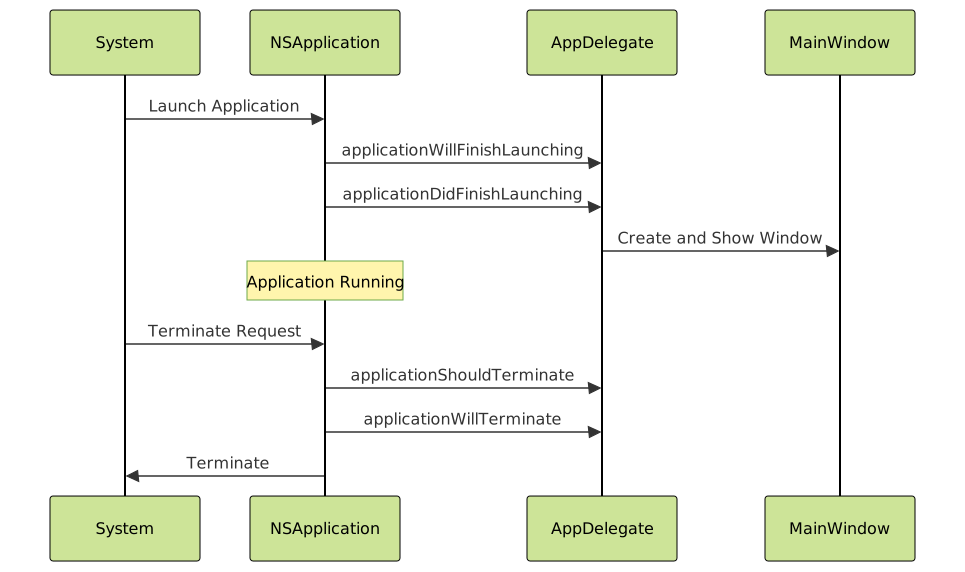
Application Delegate Implementation
@NSApplicationMain
class AppDelegate: NSObject, NSApplicationDelegate {
    var window: NSWindow!

    func applicationDidFinishLaunching(_ notification: Notification) {
        // Create main window
        window = NSWindow(contentRect: NSMakeRect(100, 100, 800, 600),
                         styleMask: [.titled, .closable, .resizable, .miniaturizable],
                         backing: .buffered,
                         defer: false)

        window.title = "My Cocoa Application"
        window.center()
        window.makeKeyAndOrderFront(nil)

        // Set up main content
        let viewController = MainViewController()
        window.contentViewController = viewController
    }

    func applicationShouldTerminateAfterLastWindowClosed(_ sender: NSApplication) -> Bool {
        return true
    }

    func applicationShouldTerminate(_ sender: NSApplication) -> NSApplication.TerminateReply {
        // Perform cleanup operations
        return .terminateNow
    }
}
Window and View Management
Windows serve as the primary containers for application content, while views handle the actual content presentation and user interaction:
class CustomView: NSView {
    override func draw(_ dirtyRect: NSRect) {
        super.draw(dirtyRect)

        // Fill background
        NSColor.windowBackgroundColor.setFill()
        dirtyRect.fill()

        // Draw custom content
        let path = NSBezierPath(ovalIn: NSRect(x: 50, y: 50, width: 200, height: 150))
        NSColor.systemBlue.setFill()
        path.fill()

        // Add text
        let attributes: [NSAttributedString.Key: Any] = [
            .font: NSFont.systemFont(ofSize: 16),
            .foregroundColor: NSColor.labelColor
        ]

        let text = "Hello, Cocoa!"
        let textSize = text.size(withAttributes: attributes)
        let textRect = NSRect(x: (bounds.width - textSize.width) / 2,
                             y: (bounds.height - textSize.height) / 2,
                             width: textSize.width,
                             height: textSize.height)

        text.draw(in: textRect, withAttributes: attributes)
    }

    override func mouseDown(with event: NSEvent) {
        let point = convert(event.locationInWindow, from: nil)
        print("Mouse clicked at: \(point)")

        // Trigger redraw
        needsDisplay = true
    }
}
Menu System Integration
Cocoa provides comprehensive menu system support that integrates seamlessly with macOS conventions:
class MenuManager: NSObject {
    func setupApplicationMenu() -> NSMenu {
        let mainMenu = NSMenu(title: "Main Menu")

        // Application Menu
        let appMenuItem = NSMenuItem()
        let appMenu = NSMenu(title: "MyApp")

        appMenu.addItem(NSMenuItem(title: "About MyApp",
                                  action: #selector(showAbout),
                                  keyEquivalent: ""))
        appMenu.addItem(NSMenuItem.separator())
        appMenu.addItem(NSMenuItem(title: "Preferences...",
                                  action: #selector(showPreferences),
                                  keyEquivalent: ","))
        appMenu.addItem(NSMenuItem.separator())
        appMenu.addItem(NSMenuItem(title: "Quit MyApp",
                                  action: #selector(NSApplication.terminate(_:)),
                                  keyEquivalent: "q"))

        appMenuItem.submenu = appMenu
        mainMenu.addItem(appMenuItem)

        // File Menu
        let fileMenuItem = NSMenuItem()
        let fileMenu = NSMenu(title: "File")

        fileMenu.addItem(NSMenuItem(title: "New",
                                   action: #selector(newDocument),
                                   keyEquivalent: "n"))
        fileMenu.addItem(NSMenuItem(title: "Open...",
                                   action: #selector(openDocument),
                                   keyEquivalent: "o"))

        fileMenuItem.submenu = fileMenu
        mainMenu.addItem(fileMenuItem)

        return mainMenu
    }

    @objc func showAbout() {
        let alert = NSAlert()
        alert.messageText = "About MyApp"
        alert.informativeText = "A sample Cocoa application demonstrating menu integration."
        alert.runModal()
    }

    @objc func showPreferences() {
        // Implementation for preferences window
    }

    @objc func newDocument() {
        // Implementation for new document
    }

    @objc func openDocument() {
        let panel = NSOpenPanel()
        panel.allowsMultipleSelection = false
        panel.canChooseDirectories = false
        panel.canChooseFiles = true

        panel.begin { response in
            if response == .OK, let url = panel.url {
                // Handle selected file
                print("Selected file: \(url.path)")
            }
        }
    }
}
Advanced Cocoa Development Techniques
Core Data Integration
Core Data provides powerful object graph management and persistence capabilities for Cocoa applications:

import CoreData

class CoreDataManager {
    lazy var persistentContainer: NSPersistentContainer = {
        let container = NSPersistentContainer(name: "DataModel")
        container.loadPersistentStores { _, error in
            if let error = error as NSError? {
                fatalError("Core Data error: \(error), \(error.userInfo)")
            }
        }
        return container
    }()

    var context: NSManagedObjectContext {
        return persistentContainer.viewContext
    }

    func saveContext() {
        if context.hasChanges {
            do {
                try context.save()
            } catch {
                let nsError = error as NSError
                print("Save error: \(nsError), \(nsError.userInfo)")
            }
        }
    }

    func createPerson(name: String, age: Int) -> Person? {
        guard let entity = NSEntityDescription.entity(forEntityName: "Person", in: context) else {
            return nil
        }

        let person = Person(entity: entity, insertInto: context)
        person.name = name
        person.age = Int16(age)
        person.createdAt = Date()

        saveContext()
        return person
    }

    func fetchPersons() -> [Person] {
        let request: NSFetchRequest = Person.fetchRequest()
        request.sortDescriptors = [NSSortDescriptor(key: "name", ascending: true)]

        do {
            return try context.fetch(request)
        } catch {
            print("Fetch error: \(error)")
            return []
        }
    }
}
Animation and Core Animation Integration
Cocoa provides sophisticated animation capabilities through Core Animation integration:
class AnimatedView: NSView {
    override func awakeFromNib() {
        super.awakeFromNib()
        wantsLayer = true
        layer?.backgroundColor = NSColor.systemBlue.cgColor
        layer?.cornerRadius = 10
    }

    func performBounceAnimation() {
        guard let layer = self.layer else { return }

        // Scale animation
        let scaleAnimation = CAKeyframeAnimation(keyPath: "transform.scale")
        scaleAnimation.values = [1.0, 1.2, 0.9, 1.0]
        scaleAnimation.keyTimes = [0, 0.3, 0.7, 1.0]
        scaleAnimation.duration = 0.6
        scaleAnimation.timingFunction = CAMediaTimingFunction(name: .easeInEaseOut)

        // Position animation
        let moveAnimation = CABasicAnimation(keyPath: "position.y")
        moveAnimation.fromValue = layer.position.y
        moveAnimation.toValue = layer.position.y - 50
        moveAnimation.duration = 0.3
        moveAnimation.autoreverses = true
        moveAnimation.timingFunction = CAMediaTimingFunction(name: .easeOut)

        // Group animations
        let groupAnimation = CAAnimationGroup()
        groupAnimation.animations = [scaleAnimation, moveAnimation]
        groupAnimation.duration = 0.6

        layer.add(groupAnimation, forKey: "bounceAnimation")
    }

    override func mouseDown(with event: NSEvent) {
        performBounceAnimation()
    }
}
Notification Center Integration
The Notification Center provides a powerful mechanism for decoupled communication between objects:
extension Notification.Name {
    static let dataDidUpdate = Notification.Name("DataDidUpdate")
    static let userPreferencesChanged = Notification.Name("UserPreferencesChanged")
}

class NotificationManager {
    static let shared = NotificationManager()
    private let notificationCenter = NotificationCenter.default

    private init() {}

    func postDataUpdate(with data: Any) {
        notificationCenter.post(name: .dataDidUpdate,
                               object: self,
                               userInfo: ["data": data])
    }

    func observeDataUpdates(target: Any, selector: Selector) {
        notificationCenter.addObserver(target,
                                      selector: selector,
                                      name: .dataDidUpdate,
                                      object: nil)
    }

    func removeObserver(_ observer: Any) {
        notificationCenter.removeObserver(observer)
    }
}

class DataObserver {
    init() {
        NotificationManager.shared.observeDataUpdates(target: self,
                                                     selector: #selector(handleDataUpdate))
    }

    @objc private func handleDataUpdate(_ notification: Notification) {
        guard let data = notification.userInfo?["data"] else { return }
        print("Received data update: \(data)")
    }

    deinit {
        NotificationManager.shared.removeObserver(self)
    }
}
Performance Optimization and Best Practices
Memory Management
Modern Cocoa development benefits from Automatic Reference Counting (ARC), but understanding memory management principles remains crucial:
- Strong References: Default reference type that retains objects
- Weak References: Non-retaining references that prevent retain cycles
- Unowned References: Non-retaining references for guaranteed non-nil scenarios
Threading and Concurrency
Cocoa provides several mechanisms for handling concurrent operations:

class ConcurrencyManager {
    func performBackgroundTask() {
        DispatchQueue.global(qos: .background).async {
            // Heavy computation
            let result = self.performHeavyComputation()

            // Update UI on main thread
            DispatchQueue.main.async {
                self.updateUI(with: result)
            }
        }
    }

    func performHeavyComputation() -> String {
        // Simulate heavy work
        Thread.sleep(forTimeInterval: 2.0)
        return "Computation Complete"
    }

    func updateUI(with result: String) {
        // UI updates must happen on main thread
        print("UI Update: \(result)")
    }
}
Debugging and Development Tools
Interface Builder Integration
Interface Builder provides visual development capabilities that integrate seamlessly with code:
- IBOutlet: Connects interface elements to code properties
- IBAction: Connects interface events to code methods
- Auto Layout: Responsive interface design system
- Storyboards: Visual application flow representation
Debugging Techniques
class DebuggingHelper {
    func debugWithPrint() {
        let debugInfo = [
            "Class": String(describing: type(of: self)),
            "Function": #function,
            "Line": #line,
            "File": #file
        ]
        print("Debug Info: \(debugInfo)")
    }

    func conditionalDebugging() {
        #if DEBUG
        print("This only prints in debug builds")
        assert(someCondition, "Assertion failed in debug mode")
        #endif
    }
}
Future of Cocoa Development
As Apple continues to evolve its development ecosystem, several trends are shaping the future of Cocoa development:
- SwiftUI Integration: Modern declarative UI framework working alongside traditional Cocoa
- Catalyst Technology: Bringing iOS apps to macOS using Cocoa foundations
- Metal Performance: GPU-accelerated computing integration
- Machine Learning: Core ML framework integration for intelligent applications
Conclusion
The macOS Cocoa Framework remains an essential and powerful foundation for creating sophisticated macOS applications. Its mature architecture, comprehensive APIs, and integration with modern development practices make it an excellent choice for developers targeting the macOS platform. Understanding Cocoa’s design patterns, component architecture, and best practices enables developers to create applications that not only function effectively but also provide exceptional user experiences that align with macOS conventions and expectations.
By mastering the concepts, patterns, and techniques outlined in this guide, developers can leverage the full potential of the Cocoa Framework to build professional, performant, and maintainable macOS applications that stand out in today’s competitive software landscape.