
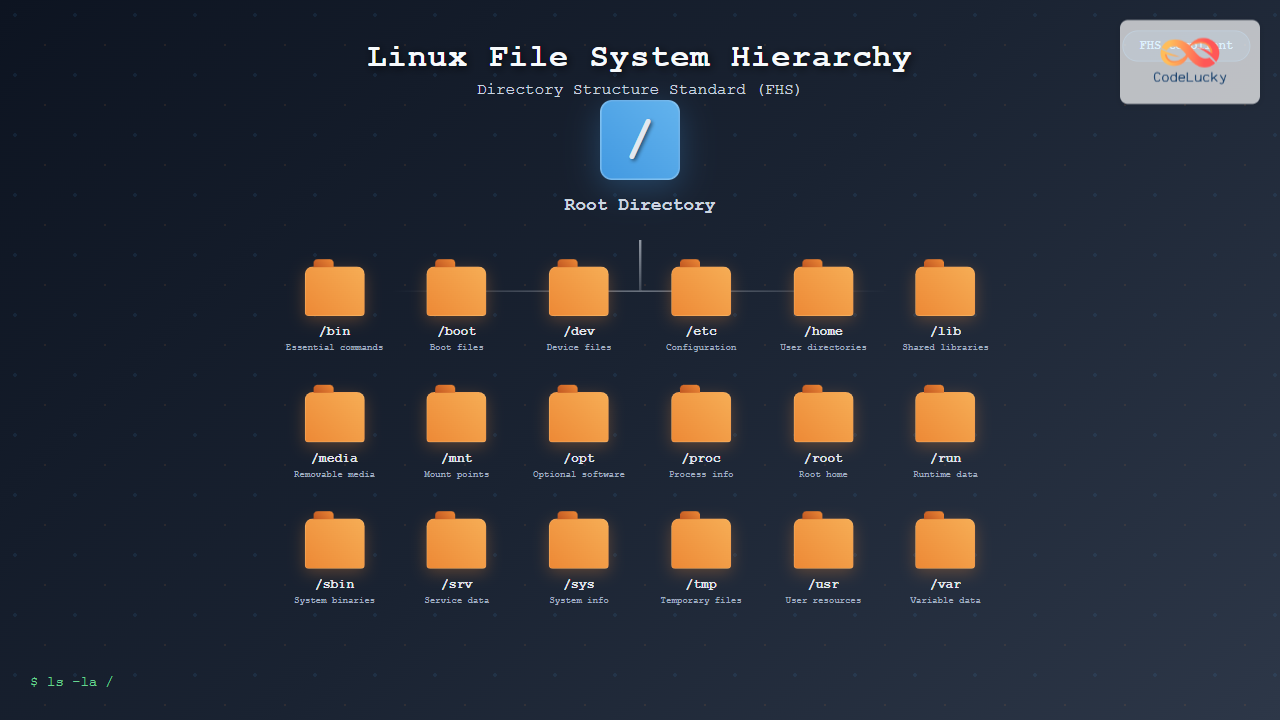
The Linux File System Hierarchy Standard (FHS) defines the directory structure and directory contents in Unix-like operating systems. Understanding this hierarchy is crucial for system administrators, developers, and anyone working with Linux systems. This comprehensive guide explores every aspect of the Linux directory structure, providing practical examples and visual representations.
What is the File System Hierarchy Standard (FHS)?
The File System Hierarchy Standard is a reference describing the conventions used for the layout of Unix-like file systems. Maintained by the Linux Foundation, FHS defines the primary directories and their contents, ensuring consistency across different Linux distributions.
The FHS serves several important purposes:
- Provides a consistent file system layout across distributions
- Enables software packages to predict file and directory locations
- Facilitates system administration and maintenance
- Supports interoperability between different Unix-like systems

The Root Directory (/)
The root directory is the top-level directory of the file system hierarchy. Every file and directory stems from this single point, represented by a forward slash (/). All other directories are subdirectories of the root directory, regardless of their physical storage location.
$ ls -la /
total 64
drwxr-xr-x  20 root root  4096 Aug 28 10:30 .
drwxr-xr-x  20 root root  4096 Aug 28 10:30 ..
drwxr-xr-x   2 root root  4096 Aug 25 14:20 bin
drwxr-xr-x   3 root root  4096 Aug 25 14:25 boot
drwxr-xr-x  19 root root  3860 Aug 28 10:30 dev
drwxr-xr-x 130 root root 12288 Aug 28 10:30 etc
drwxr-xr-x   3 root root  4096 Aug 25 14:20 home
Essential System Directories
/bin – Essential Command Binaries
The /bin directory contains essential command-line utilities required for basic system operation. These commands must be available to all users and are needed for system recovery and repair operations.
Common commands found in /bin:
ls– List directory contentscp– Copy files and directoriesmv– Move/rename files and directoriesrm– Remove files and directoriescat– Display file contentsgrep– Search text patternsbash– Bash shell
$ ls -l /bin | head -10
-rwxr-xr-x 1 root root 1183448 Feb  8  2022 bash
-rwxr-xr-x 1 root root   43216 Sep  5  2021 cat
-rwxr-xr-x 1 root root   68656 Sep  5  2021 chgrp
-rwxr-xr-x 1 root root   64448 Sep  5  2021 chmod
-rwxr-xr-x 1 root root   72784 Sep  5  2021 chown
-rwxr-xr-x 1 root root  151136 Sep  5  2021 cp
-rwxr-xr-x 1 root root  125560 Jan 31  2022 dash
/sbin – System Administration Binaries
The /sbin directory stores system administration commands and utilities. These programs are typically used by the system administrator and require root privileges to execute properly.
Key utilities in /sbin:
fsck– File system check and repairmount– Mount file systemsumount– Unmount file systemsiptables– Configure firewall rulessystemctl– Control systemd services
/etc – Configuration Files
The /etc directory contains system-wide configuration files and shell scripts used during system startup. This directory is crucial for system configuration and should be regularly backed up.

Important configuration files:
/etc/passwd– User account information/etc/shadow– Encrypted passwords/etc/group– Group definitions/etc/fstab– File system mount information/etc/hosts– Static hostname resolution/etc/resolv.conf– DNS configuration
$ head -5 /etc/passwd
root:x:0:0:root:/root:/bin/bash
daemon:x:1:1:daemon:/usr/sbin:/usr/sbin/nologin
bin:x:2:2:bin:/bin:/usr/sbin/nologin
sys:x:3:3:sys:/dev:/usr/sbin/nologin
sync:x:4:65534:sync:/bin:/bin/sync
User and Data Directories
/home – User Home Directories
The /home directory contains personal directories for regular users. Each user has a subdirectory under /home where they store personal files, configurations, and data.
$ ls -la /home/
total 12
drwxr-xr-x  3 root root 4096 Aug 25 14:20 .
drwxr-xr-x 20 root root 4096 Aug 28 10:30 ..
drwxr-xr-x  5 john john 4096 Aug 28 10:25 john
drwxr-xr-x  4 mary mary 4096 Aug 27 15:30 mary
/root – Root User Home Directory
The /root directory serves as the home directory for the root user (system administrator). It’s separated from /home to ensure root access even if /home is mounted from a separate partition.
/tmp – Temporary Files
The /tmp directory stores temporary files created by applications and users. Files in this directory are typically cleared on system reboot or periodically by system cleanup processes.
$ ls -la /tmp/
total 24
drwxrwxrwt 10 root root 4096 Aug 28 10:35 .
drwxr-xr-x 20 root root 4096 Aug 28 10:30 ..
drwx------  2 john john 4096 Aug 28 10:33 ssh-agent-john
-rw-rw-r--  1 mary mary  156 Aug 28 10:35 temp_data.txt
System Information and Hardware
/dev – Device Files
The /dev directory contains special device files that represent hardware devices and virtual devices. These files provide an interface for communicating with system hardware.
Common device files:
/dev/sda1– First partition of the first SATA disk/dev/tty– Terminal devices/dev/null– Null device (discards all data)/dev/random– Random number generator/dev/zero– Produces null bytes
/proc – Process Information
The /proc directory is a virtual file system that provides information about running processes and system resources. Files in /proc are generated dynamically by the kernel.
$ ls /proc/
1     15    2     25    35    45    55    cmdline    interrupts  modules
10    16    20    26    36    46    56    cpuinfo    iomem       mounts
11    17    21    27    37    47    57    devices    ioports     net
12    18    22    28    38    48    58    diskstats  irq         partitions
13    19    23    29    39    49    59    dma        loadavg     stat
14    1975  24    3     4     5     6     filesystems meminfo    uptime
/sys – System Information
The /sys directory exposes kernel data structures and device information through a virtual file system. It provides a modern interface for accessing system and hardware information.

Boot and Library Directories
/boot – Boot Files
The /boot directory contains files necessary for system startup, including the kernel, initial ramdisk (initrd), and bootloader configuration.
$ ls -l /boot/
total 98304
-rw-r--r-- 1 root root   262144 Aug 15 10:20 config-5.15.0-78-generic
drwxr-xr-x 2 root root     4096 Aug 25 14:25 grub
-rw-r--r-- 1 root root 87654321 Aug 15 10:20 initrd.img-5.15.0-78-generic
-rw-r--r-- 1 root root  8388608 Aug 15 10:20 vmlinuz-5.15.0-78-generic
/lib – Shared Libraries
The /lib directory contains essential shared libraries and kernel modules required by programs in /bin and /sbin. These libraries are crucial for basic system functionality.
Variable and Application Data
/var – Variable Data
The /var directory stores variable data that changes during system operation, including logs, databases, caches, and spool files.

Key subdirectories in /var:
/var/log– System and application log files/var/cache– Application cache data/var/lib– State information for programs/var/spool– Queued data (mail, print jobs)/var/run– Runtime data (often symlinked to /run)
$ ls -l /var/log/ | head -5
total 2048
-rw-r--r--  1 root root     0 Aug 25 00:00 alternatives.log
-rw-r-----  1 syslog adm 1024 Aug 28 10:35 auth.log
-rw-r--r--  1 root root     0 Aug 25 00:00 bootstrap.log
-rw-rw-r--  1 root utmp 2048 Aug 28 10:30 btmp
/usr – User System Resources
The /usr directory contains user utilities, applications, and data. It’s one of the largest directories and can often be mounted from a separate partition.
Important subdirectories:
/usr/bin– User command binaries/usr/sbin– Non-essential system binaries/usr/lib– Libraries for /usr/bin and /usr/sbin/usr/share– Architecture-independent data/usr/local– Local software installations/usr/src– Source code

Mount Points and External Storage
/mnt – Mount Point
The /mnt directory serves as a temporary mount point for file systems. System administrators commonly use this directory to manually mount storage devices.
/media – Removable Media
The /media directory contains mount points for removable media devices such as USB drives, CDs, and DVDs. Modern systems automatically create subdirectories here when devices are inserted.
$ ls -l /media/
total 4
drwxr-xr-x 3 root root 4096 Aug 28 09:15 john
lrwxrwxrwx 1 root root    6 Aug 25 14:20 cdrom -> cdrom0
drwxr-xr-x 2 root root 4096 Aug 25 14:20 cdrom0
Optional and Service Directories
/opt – Optional Software
The /opt directory stores optional software packages that are not part of the default system installation. Third-party applications are often installed here to keep them separate from system software.
/srv – Service Data
The /srv directory contains data served by the system, such as web server content, FTP data, and other service-specific information.
/run – Runtime Data
The /run directory stores runtime data for services and applications. This directory is typically mounted as a tmpfs (temporary file system) and is cleared on each boot.
Practical Navigation Examples
Here are practical examples of navigating the Linux file system hierarchy:
Finding System Information
# Check CPU information
$ cat /proc/cpuinfo | grep "model name" | head -1
model name      : Intel(R) Core(TM) i7-10750H CPU @ 2.60GHz

# Check memory usage
$ cat /proc/meminfo | grep MemTotal
MemTotal:       16384000 kB

# View system uptime
$ cat /proc/uptime
1234567.89 9876543.21
Managing User Files
# Navigate to user directory
$ cd /home/john
$ pwd
/home/john

# List hidden configuration files
$ ls -la | grep "^\."
drwxr-xr-x  5 john john 4096 Aug 28 10:25 .
drwxr-xr-x  3 root root 4096 Aug 25 14:20 ..
-rw-------  1 john john 1234 Aug 28 09:30 .bash_history
-rw-r--r--  1 john john  220 Aug 25 14:20 .bash_logout
Examining System Logs
# View recent system messages
$ sudo tail /var/log/syslog
Aug 28 10:30:01 hostname systemd[1]: Started Session 123 of user john
Aug 28 10:30:15 hostname kernel: USB disconnect, address 2

# Check authentication logs
$ sudo grep "Failed password" /var/log/auth.log | tail -3
Aug 28 10:25:30 hostname sshd[12345]: Failed password for invalid user test
Best Practices for File System Navigation
Understanding the FHS enables efficient system administration and troubleshooting:
Security Considerations
- Protect /etc – Regular backups of configuration files
- Monitor /var/log – Regular log analysis for security events
- Secure /tmp – Proper permissions and cleanup policies
- Limit /root access – Restrict direct root directory access
Maintenance Tasks
- Regularly clean /tmp and /var/tmp directories
- Monitor disk usage in /var/log to prevent log flooding
- Back up critical configuration files in /etc
- Keep /boot partition adequately sized for kernel updates
Performance Optimization
- Mount /var on separate partition for better I/O performance
- Use /run for frequently accessed temporary data
- Implement proper log rotation in /var/log
- Monitor /proc/meminfo and /proc/cpuinfo for system resources
Common File System Commands
Essential commands for navigating and managing the file system hierarchy:
# Directory operations
$ pwd                    # Print current directory
$ ls -la                 # List detailed directory contents
$ cd /path/to/directory  # Change directory
$ mkdir new_directory    # Create directory
$ rmdir empty_directory  # Remove empty directory

# File operations
$ find /etc -name "*.conf" # Find configuration files
$ du -sh /var/log          # Check directory size
$ df -h                    # Display file system usage
$ lsof /var/log/syslog     # List open files

# Permission management
$ chmod 755 /path/to/file  # Set file permissions
$ chown user:group file    # Change file ownership
$ umask 022               # Set default permissions
Troubleshooting File System Issues
Common file system problems and their solutions:
Disk Space Issues
# Check disk usage by directory
$ du -h --max-depth=1 / 2>/dev/null | sort -hr

# Find large files
$ find / -type f -size +100M 2>/dev/null | head -10

# Clean temporary files
$ sudo find /tmp -type f -atime +7 -delete
Permission Problems
# Fix common permission issues
$ sudo chmod -R 755 /var/www/html
$ sudo chown -R www-data:www-data /var/www

# Restore default permissions
$ sudo chmod 644 /etc/passwd
$ sudo chmod 600 /etc/shadow
The Linux File System Hierarchy Standard provides a logical, organized structure that promotes consistency across different Linux distributions. By understanding each directory’s purpose and contents, system administrators and users can navigate, troubleshoot, and maintain Linux systems more effectively. This standardization ensures that knowledge gained on one Linux distribution transfers seamlessly to others, making the learning investment valuable across the entire Linux ecosystem.





