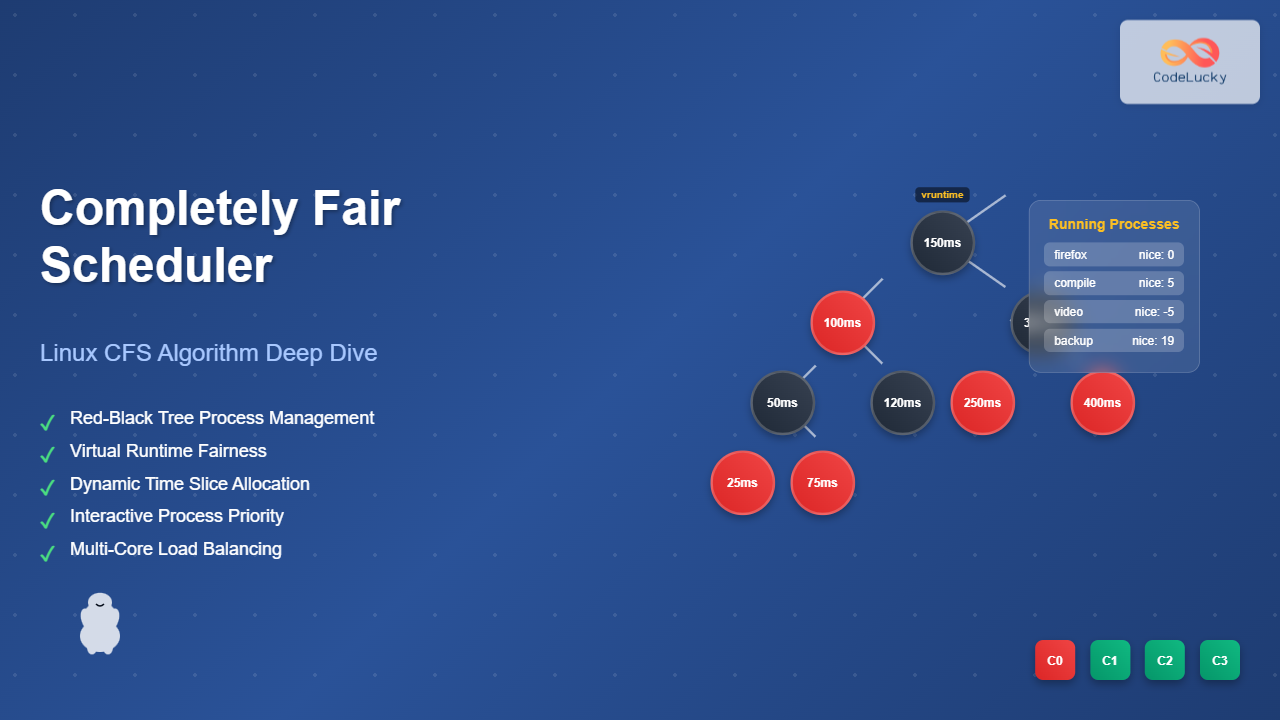
The Linux Completely Fair Scheduler (CFS) revolutionized process scheduling in the Linux kernel when it was introduced in version 2.6.23. Unlike traditional schedulers that rely on complex priority calculations and time slice allocations, CFS implements an elegant approach based on the concept of “fairness” – ensuring each process receives its fair share of CPU time.
What is the Completely Fair Scheduler?
The Completely Fair Scheduler is the default process scheduler for normal (non-real-time) tasks in Linux. It was designed by Ingo Molnár to address the limitations of the previous O(1) scheduler, providing better interactive performance and fairness across all processes.
Key principles of CFS:
- Every process should receive equal CPU time over the long term
- Interactive processes should respond quickly to user input
- Scheduling decisions should be made efficiently
- The scheduler should scale well with increasing number of processes
Core Concepts of CFS
Virtual Runtime (vruntime)
The most fundamental concept in CFS is virtual runtime. Each process tracks how much CPU time it has consumed, adjusted by its priority. The process with the lowest vruntime is considered to have received the least amount of CPU time and should run next.
// Simplified vruntime calculation
vruntime += delta_exec * (NICE_0_LOAD / se->load.weight);
Where:
delta_exec: Actual time the process ranNICE_0_LOAD: Load weight for nice level 0se->load.weight: Process weight based on nice value

Red-Black Tree Data Structure
CFS uses a red-black tree (a self-balancing binary search tree) to maintain runnable processes. Processes are ordered by their vruntime values, with the leftmost node always containing the process that should run next.
Red-black tree properties:
- O(log n) insertion and deletion
- Self-balancing ensures consistent performance
- Leftmost node access in O(1)
- Maintains fairness by vruntime ordering

Time Slices and Latency
Unlike traditional schedulers with fixed time slices, CFS dynamically calculates time slices based on the target latency and number of running processes.
# CFS tuning parameters (in /proc/sys/kernel/)
sched_latency_ns=6000000        # Target latency (6ms)
sched_min_granularity_ns=750000 # Minimum time slice (0.75ms)
sched_wakeup_granularity_ns=1000000 # Wakeup preemption threshold
Time slice calculation:
time_slice = sched_latency * (se->load.weight / cfs_rq->load.weight);
if (time_slice < sched_min_granularity)
    time_slice = sched_min_granularity;
CFS Algorithm Workflow

Process Selection Algorithm
The heart of CFS lies in its simple yet effective process selection:
static struct sched_entity *pick_next_entity(struct cfs_rq *cfs_rq)
{
    struct sched_entity *se = __pick_first_entity(cfs_rq);
    if (se) {
        // Update statistics
        update_stats_wait_end(cfs_rq, se);
        // Remove from tree (will be re-inserted when preempted)
        __dequeue_entity(cfs_rq, se);
    }
    return se;
}
Practical Examples
Example 1: Basic CFS Behavior
Let’s trace how CFS handles three processes with different nice values:
# Create test processes with different priorities
nice -n 0 ./cpu_intensive_task &   # Normal priority
nice -n 5 ./cpu_intensive_task &   # Lower priority
nice -n -5 ./cpu_intensive_task &  # Higher priority
Process weights (based on nice values):
- Nice -5: weight = 3121 (higher weight = more CPU time)
- Nice 0: weight = 1024 (baseline)
- Nice 5: weight = 335 (lower weight = less CPU time)
| Time | Process (Nice) | vruntime Before | Time Slice | vruntime After |
|---|---|---|---|---|
| 0ms | Process A (-5) | 0 | 4.1ms | 1.34ms |
| 4.1ms | Process B (0) | 0 | 2.4ms | 2.4ms |
| 6.5ms | Process C (5) | 0 | 1.2ms | 3.66ms |
| 7.7ms | Process A (-5) | 1.34ms | 4.1ms | 2.68ms |
Example 2: Interactive Process Handling
CFS provides excellent responsiveness for interactive processes through sleeper fairness:
// When a process wakes up from sleep
static void place_entity(struct cfs_rq *cfs_rq, struct sched_entity *se)
{
    u64 vruntime = cfs_rq->min_vruntime;

    // Sleeper fairness: don't penalize processes that sleep
    if (se->sleep_start_fair) {
        vruntime -= sched_latency;
    }

    se->vruntime = max(se->vruntime, vruntime);
}
Example 3: Monitoring CFS in Action
You can observe CFS behavior using various tools:
# View scheduler statistics
cat /proc/sched_debug

# Monitor process scheduling with perf
perf sched record -a sleep 10
perf sched latency

# Check individual process statistics
cat /proc/PID/sched
Sample output from /proc/PID/sched:
se.exec_start                                :      12345.678901
se.vruntime                                  :           123.456
se.sum_exec_runtime                          :          1234.567
nr_switches                                  :               145
nr_voluntary_switches                        :               120
nr_involuntary_switches                      :                25
CFS vs Other Scheduling Algorithms

| Algorithm | Time Complexity | Fairness | Interactive Response | Scalability |
|---|---|---|---|---|
| Round Robin | O(1) | Poor | Poor | Good |
| Priority Queue | O(1) | Poor | Good | Good |
| CFS | O(log n) | Excellent | Excellent | Very Good |
Advanced CFS Features
Group Scheduling
CFS supports hierarchical scheduling through control groups (cgroups), allowing fair scheduling between groups of processes:
# Create CPU cgroup
mkdir /sys/fs/cgroup/cpu/high_priority
echo 2048 > /sys/fs/cgroup/cpu/high_priority/cpu.shares

# Assign process to group
echo $PID > /sys/fs/cgroup/cpu/high_priority/cgroup.procs
Load Balancing
On multi-core systems, CFS performs load balancing to distribute processes across CPU cores:
// Simplified load balancing trigger
if (this_rq->nr_running > 1 && idle_balance(this_rq)) {
    // Move processes from busy to idle cores
    pull_task(busiest_rq, this_rq, target_task);
}
Tuning CFS Performance
Key Parameters
# Target latency - lower values improve responsiveness
echo 4000000 > /proc/sys/kernel/sched_latency_ns

# Minimum granularity - prevents thrashing
echo 500000 > /proc/sys/kernel/sched_min_granularity_ns

# Migration cost - affects load balancing
echo 250000 > /proc/sys/kernel/sched_migration_cost_ns
Workload-Specific Tuning
Interactive workloads:
- Decrease
sched_latency_nsfor better responsiveness - Increase
sched_wakeup_granularity_nsfor smoother experience
Batch workloads:
- Increase
sched_latency_nsto reduce context switching overhead - Decrease
sched_min_granularity_nsfor better throughput
Common CFS Issues and Solutions
High Context Switch Rate
Problem: Too many processes competing for CPU
Solution: Increase minimum granularity or use CPU affinity
# Check context switch rate
vmstat 1

# Set CPU affinity to reduce migrations
taskset -c 0,1 ./my_process
Poor Interactive Performance
Problem: Batch processes affecting interactive response
Solution: Use nice values or control groups
# Lower priority for batch jobs
nice -n 19 ./batch_job

# Higher priority for interactive apps
nice -n -10 ./interactive_app
CFS Implementation Details
Virtual Runtime Calculation
The precise vruntime calculation accounts for different process weights:
static void update_curr(struct cfs_rq *cfs_rq)
{
    struct sched_entity *curr = cfs_rq->curr;
    u64 delta_exec = rq_clock_task(rq_of(cfs_rq)) - curr->exec_start;

    if (unlikely((s64)delta_exec <= 0))
        return;

    curr->exec_start = rq_clock_task(rq_of(cfs_rq));
    curr->sum_exec_runtime += delta_exec;
    curr->vruntime += calc_delta_fair(delta_exec, curr);
    update_min_vruntime(cfs_rq);
}
Tree Operations
Efficient red-black tree operations maintain O(log n) complexity:
// Enqueue entity (process) into the tree
static void enqueue_entity(struct cfs_rq *cfs_rq, struct sched_entity *se)
{
    update_curr(cfs_rq);
    place_entity(cfs_rq, se, 0);
    account_entity_enqueue(cfs_rq, se);
    __enqueue_entity(cfs_rq, se);
    se->on_rq = 1;
}
The Completely Fair Scheduler represents a significant advancement in process scheduling, providing excellent fairness and interactive performance while maintaining good scalability. Its elegant design based on virtual runtime and red-black trees has made it the foundation of Linux process scheduling for over a decade, continuously evolving to meet the demands of modern computing workloads.
Understanding CFS helps system administrators optimize Linux systems and developers write more efficient applications that work harmoniously with the kernel’s scheduling decisions.
Related Posts
Process Scheduling in Operating System: Algorithms, Types & Implementation Guide
Process scheduling is one of the most critical components of an operating system that determines how the CPU time is...

Fair Share Scheduling: Resource Allocation by User Groups in Operating Systems
Introduction to Fair Share Scheduling Fair Share Scheduling (FSS) is a sophisticated CPU scheduling algorithm designed to allocate computing resources...

Priority Scheduling Algorithm: Complete Implementation Guide with Examples
What is Priority Scheduling Algorithm? Priority scheduling is a CPU scheduling algorithm where each process is assigned a priority value,...
Nice Command Linux: Complete Guide to Process Priority Management
The nice command in Linux is a powerful system administration tool that allows you to control the priority of processes,...
CPU Scheduling Algorithms: FCFS, SJF, Round Robin Complete Guide
CPU scheduling is a fundamental concept in operating systems that determines how processes are allocated processor time. The CPU scheduler...
Virtual CPU Scheduling: Complete Guide to Time-sharing Physical Processors
Virtual CPU scheduling is the cornerstone of modern operating systems, enabling multiple processes to share limited physical processors efficiently. This...
renice Command Linux: Complete Guide to Changing Process Priority
The renice command in Linux is a powerful system administration tool that allows you to modify the scheduling priority of...

Real-time Scheduling: Hard and Soft Real-time Systems in Operating Systems
Real-time scheduling is a critical component of operating systems that manage tasks with strict timing requirements. Unlike traditional scheduling systems...

Shortest Job First Scheduling: SJF Algorithm Explained with Examples and Implementation
What is Shortest Job First (SJF) Scheduling? Shortest Job First (SJF) scheduling is a CPU scheduling algorithm that selects the...

Preemptive vs Non-Preemptive Scheduling: Complete Guide to CPU Scheduling in Operating Systems
Understanding CPU Scheduling in Operating Systems CPU scheduling is one of the most critical functions of an operating system, determining...
ionice Command Linux: Master IO Scheduling Priority for Optimal System Performance
The ionice command is a powerful Linux utility that allows system administrators and developers to control the Input/Output (IO) scheduling...
Multilevel Queue Scheduling: Multiple Priority Levels in Operating Systems
Introduction to Multilevel Queue Scheduling Multilevel queue scheduling is a sophisticated CPU scheduling algorithm used in operating systems to manage...