Introduction to Katello Linux
Katello is a powerful open-source content and configuration management platform that serves as the upstream project for Red Hat Satellite. It provides comprehensive lifecycle management for Linux systems, combining the capabilities of Foreman, Pulp, and Candlepin to deliver enterprise-grade content management, provisioning, and configuration management solutions.
Built specifically for managing large-scale Linux environments, Katello enables organizations to efficiently handle software repositories, automate system provisioning, manage configurations, and maintain compliance across thousands of systems. Whether you’re managing a small development environment or a massive enterprise infrastructure, Katello provides the tools necessary to streamline operations and maintain consistency.
Core Components and Architecture
Primary Components
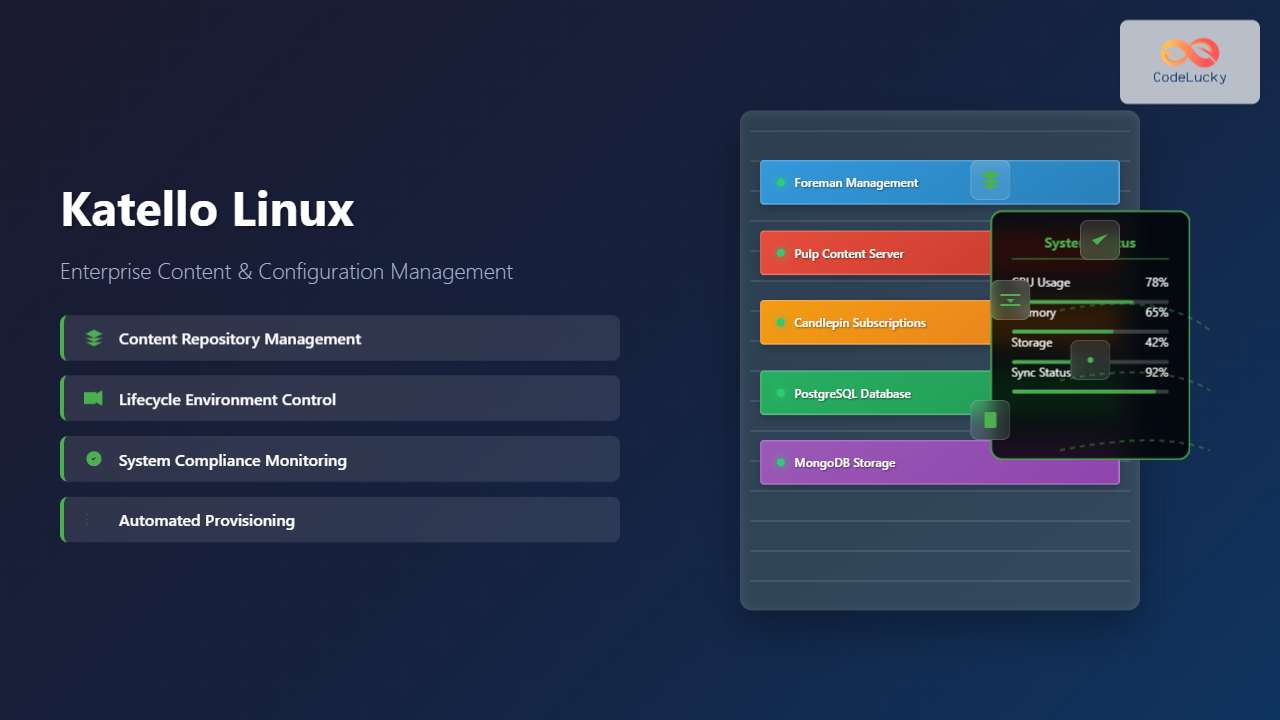
Katello integrates several key components to provide its comprehensive functionality:
- Foreman: Provides the web interface, provisioning capabilities, and configuration management integration
- Pulp: Handles content management, repository synchronization, and content distribution
- Candlepin: Manages subscriptions, entitlements, and compliance reporting
- PostgreSQL: Primary database backend for storing configuration and metadata
- MongoDB: Used by Pulp for content metadata storage
Architecture Overview
The Katello architecture follows a modular design where each component handles specific responsibilities while maintaining seamless integration. The web interface provides unified access to all functionality, while backend services handle the heavy lifting of content synchronization, system management, and compliance monitoring.
Installation and Setup
System Requirements
Before installing Katello, ensure your system meets the minimum requirements:
- Red Hat Enterprise Linux 8 or CentOS Stream 8
- Minimum 20 GB RAM (32 GB recommended for production)
- 4 CPU cores minimum (8 cores recommended)
- 500 GB available disk space (varies based on content volume)
- Fully qualified domain name (FQDN) properly configured
Installation Process
The installation process involves several steps to ensure all components are properly configured:
# Enable required repositories
sudo dnf install -y https://yum.theforeman.org/releases/3.7/el8/x86_64/foreman-release.rpm
sudo dnf install -y https://yum.katello.org/katello/4.9/katello/el8/x86_64/katello-repos-latest.rpm

# Install Katello
sudo dnf module enable katello:el8
sudo dnf install -y katello

# Configure firewall
sudo firewall-cmd --add-port="80/tcp" --add-port="443/tcp" \
--add-port="5647/tcp" --add-port="8000/tcp" \
--add-port="8140/tcp" --add-port="9090/tcp" --permanent
sudo firewall-cmd --reload

# Run the installer
sudo foreman-installer --scenario katello \
--foreman-initial-admin-username admin \
--foreman-initial-admin-password changeme
The installation process typically takes 15-30 minutes depending on system performance. Upon completion, you’ll receive the web interface URL and initial login credentials.
Content Management
Repository Management
Katello excels at managing software repositories from various sources. Repository management involves creating products, adding repositories, and synchronizing content.
Creating Products and Repositories
Products serve as containers for related repositories. Here’s how to create and manage them:
# Create a new product using hammer CLI
hammer product create --name "CentOS 8" --organization "Default Organization"

# Add a repository to the product
hammer repository create \
--name "CentOS 8 BaseOS" \
--product "CentOS 8" \
--content-type "yum" \
--url "http://mirror.centos.org/centos/8/BaseOS/x86_64/os/" \
--organization "Default Organization"

# Synchronize the repository
hammer repository synchronize \
--name "CentOS 8 BaseOS" \
--product "CentOS 8" \
--organization "Default Organization"
Content Synchronization
Synchronization can be performed manually or scheduled automatically:
# Check synchronization status
hammer repository info \
--name "CentOS 8 BaseOS" \
--product "CentOS 8" \
--organization "Default Organization"

# Create a sync plan for automatic updates
hammer sync-plan create \
--name "Daily Sync" \
--description "Daily repository synchronization" \
--interval "daily" \
--sync-date "2025-08-27 02:00:00" \
--organization "Default Organization"

# Associate products with sync plan
hammer product set-sync-plan \
--name "CentOS 8" \
--sync-plan "Daily Sync" \
--organization "Default Organization"
Content Views
Content Views provide version control for your repositories, allowing you to create snapshots of content and promote them through different lifecycle environments.
Creating Content Views
# Create a content view
hammer content-view create \
--name "CentOS 8 Base" \
--description "Base CentOS 8 content view" \
--organization "Default Organization"

# Add repositories to content view
hammer content-view add-repository \
--name "CentOS 8 Base" \
--repository "CentOS 8 BaseOS" \
--product "CentOS 8" \
--organization "Default Organization"

# Publish the content view
hammer content-view publish \
--name "CentOS 8 Base" \
--description "Initial publication" \
--organization "Default Organization"
Composite Content Views
Composite Content Views combine multiple content views, useful for complex environments:
# Create composite content view
hammer content-view create \
--name "Production Stack" \
--composite \
--description "Production environment stack" \
--organization "Default Organization"

# Add component content views
hammer content-view component add \
--composite-content-view "Production Stack" \
--component-content-view "CentOS 8 Base" \
--latest \
--organization "Default Organization"
Lifecycle Environments
Lifecycle environments represent different stages in your content promotion workflow, typically following a pattern like Development → Testing → Production.
Creating Lifecycle Environments
# Create development environment
hammer lifecycle-environment create \
--name "Development" \
--description "Development environment" \
--prior "Library" \
--organization "Default Organization"

# Create testing environment
hammer lifecycle-environment create \
--name "Testing" \
--description "Testing environment" \
--prior "Development" \
--organization "Default Organization"

# Create production environment
hammer lifecycle-environment create \
--name "Production" \
--description "Production environment" \
--prior "Testing" \
--organization "Default Organization"
Content Promotion
Content promotion moves content view versions through lifecycle environments:
# Promote content view to development
hammer content-view version promote \
--content-view "CentOS 8 Base" \
--version "1.0" \
--to-lifecycle-environment "Development" \
--organization "Default Organization"

# Promote to testing after validation
hammer content-view version promote \
--content-view "CentOS 8 Base" \
--version "1.0" \
--to-lifecycle-environment "Testing" \
--organization "Default Organization"
Host Management
System Registration
Systems can be registered with Katello using subscription-manager or activation keys:
Using Subscription Manager
# On the client system
sudo subscription-manager register \
--org="Default_Organization" \
--activationkey="centos8-dev" \
--serverurl=https://katello.example.com:8443/rhsm \
--baseurl=https://katello.example.com/pulp/repos

# Install katello-ca-consumer package first
sudo rpm -Uvh http://katello.example.com/pub/katello-ca-consumer-latest.noarch.rpm
Bootstrap Script
Katello provides a bootstrap script for easier registration:
# Generate bootstrap script
curl -O https://katello.example.com/pub/bootstrap.py

# Execute on client systems
sudo python bootstrap.py \
--login=admin \
--server=katello.example.com \
--organization="Default Organization" \
--location="Default Location" \
--hostgroup="Base" \
--activationkey="centos8-dev"
Activation Keys
Activation keys simplify system registration by pre-configuring subscriptions and content:
# Create activation key
hammer activation-key create \
--name "centos8-dev" \
--description "CentOS 8 Development Systems" \
--lifecycle-environment "Development" \
--content-view "CentOS 8 Base" \
--organization "Default Organization"

# Add subscriptions to activation key
hammer activation-key add-subscription \
--name "centos8-dev" \
--subscription-id "1" \
--organization "Default Organization"

# Set content overrides
hammer activation-key content-override \
--name "centos8-dev" \
--content-label "centos-8-baseos" \
--override-name "enabled" \
--value "1" \
--organization "Default Organization"
Configuration Management
Puppet Integration
Katello integrates with Puppet for configuration management:
# Install puppet modules
hammer puppet-module install --name "puppetlabs-apache"

# Create hostgroup with puppet classes
hammer hostgroup create \
--name "Web Servers" \
--environment "production" \
--puppet-classes "apache" \
--organization "Default Organization"

# Assign puppet class parameters
hammer hostgroup set-parameter \
--hostgroup "Web Servers" \
--name "apache::default_vhost" \
--value "false"
Ansible Integration
Recent versions support Ansible for configuration management:
# Import Ansible roles
foreman-rake foreman_ansible:roles:sync

# Create job template for Ansible playbook
hammer job-template create \
--name "Update System Packages" \
--job-category "Commands" \
--provider-type "Ansible" \
--file "/path/to/update-packages.yml"

# Execute job on hosts
hammer job-invocation create \
--job-template "Update System Packages" \
--search-query "hostgroup = Web Servers"
Monitoring and Reporting
System Compliance
Monitor system compliance and generate reports:
# Generate compliance report
hammer report-template generate \
--name "Host - Registered Content Hosts" \
--organization "Default Organization"

# Check subscription status
hammer subscription list \
--organization "Default Organization" \
--available

# View system information
hammer host list \
--organization "Default Organization" \
--search "lifecycle_environment = Production"
Content Usage Reports
# Generate content view usage report
hammer report-template generate \
--name "Content Views - Usage Report" \
--organization "Default Organization"

# Check repository synchronization status
hammer repository list \
--organization "Default Organization" \
--product "CentOS 8"
Advanced Features
Remote Execution
Execute commands remotely on managed systems:
# Run command on specific hosts
hammer job-invocation create \
--job-template "Run Command - SSH Default" \
--inputs "command=uptime" \
--search-query "name ~ web"

# Execute package installation
hammer job-invocation create \
--job-template "Package Action - SSH Default" \
--inputs "package=httpd,action=install" \
--search-query "hostgroup = Web Servers"
Provisioning Templates
Customize system provisioning with templates:
# List available templates
hammer template list --per-page=50

# Create custom provisioning template
hammer template create \
--name "Custom CentOS 8 Kickstart" \
--type "provision" \
--file "/path/to/custom-kickstart.erb"

# Associate template with operating system
hammer os set-default-template \
--id=1 \
--provisioning-template-id=10
Performance Optimization
Database Maintenance
Regular database maintenance ensures optimal performance:
# Clean old audit records
foreman-rake audits:expire days=90

# Clean orphaned records
foreman-rake db:migrate
foreman-rake katello:clean_backend_objects

# Optimize PostgreSQL
sudo -u postgres vacuumdb --all --analyze
Content Storage Optimization
# Clean unused content
foreman-rake katello:delete_orphaned_content

# Reclaim disk space
hammer content-view remove \
--name "Old Content View" \
--organization "Default Organization"

# Optimize Pulp storage
sudo systemctl stop pulp_workers
sudo -u apache pulp-manage migrate
sudo systemctl start pulp_workers
Troubleshooting Common Issues
Synchronization Problems
Common synchronization issues and solutions:
# Check sync task status
hammer task list --search "label ~ Actions::Katello::Repository::Sync"

# View detailed task information
hammer task progress --id TASK_ID

# Resume failed sync
hammer repository synchronize \
--name "CentOS 8 BaseOS" \
--product "CentOS 8" \
--organization "Default Organization"
Service Management
Managing Katello services for troubleshooting:
# Check service status
sudo systemctl status foreman postgresql httpd

# Restart all Katello services
sudo foreman-maintain service restart

# Check logs
sudo journalctl -u foreman -f
sudo tail -f /var/log/foreman/production.log
Security Best Practices
SSL Configuration
Ensure proper SSL configuration for secure communications:
# Generate custom SSL certificates
sudo foreman-proxy-certs-generate \
--foreman-proxy-fqdn katello-proxy.example.com \
--certs-tar /root/katello-proxy-certs.tar

# Update SSL certificates
sudo foreman-installer \
--certs-server-cert /path/to/server.crt \
--certs-server-key /path/to/server.key \
--certs-server-ca-cert /path/to/ca.crt
User Management
# Create user with specific roles
hammer user create \
--login="contentmanager" \
--password="SecurePassword123" \
--mail="[email protected]" \
--organization-ids="1" \
--location-ids="1"

# Assign roles to user
hammer user add-role \
--login="contentmanager" \
--role="Content Manager"
Backup and Recovery
Implement comprehensive backup strategies:
# Create full backup
sudo foreman-maintain backup offline /backup/katello-backup

# List available backups
sudo foreman-maintain backup list

# Restore from backup
sudo foreman-maintain restore /backup/katello-backup/katello-backup-2025-08-26
Conclusion
Katello provides a comprehensive solution for enterprise content and configuration management in Linux environments. Its integration of Foreman, Pulp, and Candlepin creates a powerful platform capable of handling complex infrastructure requirements while maintaining simplicity in day-to-day operations.
Success with Katello depends on proper planning of your content workflows, understanding lifecycle management concepts, and implementing appropriate security measures. Regular maintenance, monitoring, and optimization ensure your Katello deployment continues to meet organizational needs as your infrastructure grows.
Whether managing dozens or thousands of systems, Katello’s scalable architecture and extensive feature set make it an invaluable tool for modern Linux system administrators. The investment in learning and implementing Katello pays dividends through improved operational efficiency, better compliance management, and reduced administrative overhead.
Related Posts

foreman Linux: Complete Lifecycle Management for Enterprise Infrastructure
Foreman is a powerful open-source lifecycle management tool that revolutionizes how system administrators handle infrastructure provisioning, configuration management, and monitoring....

Spacewalk Linux: Complete Systems Management Solution Guide
Spacewalk is a powerful open-source systems management solution that enables administrators to efficiently manage multiple Linux systems from a centralized...

Chef Linux: Complete Infrastructure Automation Platform Guide for DevOps
Chef is a powerful infrastructure automation platform that transforms the way organizations manage their Linux environments. As a configuration management...
Puppet Linux: Complete Configuration Management Guide for System Administrators
Puppet is a powerful configuration management tool that revolutionizes how system administrators manage Linux infrastructure. By automating system configuration, software...

OpenShift Linux: Complete Guide to Enterprise Kubernetes Platform Management
OpenShift represents Red Hat's enterprise-grade Kubernetes platform that revolutionizes how organizations deploy, manage, and scale containerized applications on Linux systems....
nomad Linux: Complete Guide to HashiCorp’s Workload Orchestrator
What is HashiCorp Nomad? HashiCorp Nomad is a simple yet powerful workload orchestrator that enables organizations to deploy and manage...

Kubernetes Linux: Complete Guide to Container Orchestration Platform
Kubernetes has revolutionized how we deploy, manage, and scale containerized applications on Linux systems. As the leading container orchestration platform,...

Zookeeper Linux: Complete Guide to Centralized Service Configuration Management
Apache Zookeeper is a centralized service for maintaining configuration information, naming, providing distributed synchronization, and providing group services in distributed...
Marathon Linux: Complete Guide to Container Orchestration Platform
Marathon is a powerful container orchestration platform built on top of Apache Mesos that enables you to deploy, manage, and...
Vagrant Linux: Complete Guide to Development Environment Management
Vagrant revolutionizes development environment management by providing a consistent, reproducible way to create and manage virtual development environments. This comprehensive...
Configuration Management: Infrastructure as Code – Complete Guide to Modern DevOps Practices
Configuration Management and Infrastructure as Code (IaC) have revolutionized how modern organizations approach infrastructure deployment and management in Agile environments....
mesos Linux: Complete Guide to Distributed Systems Kernel and Cluster Management
Apache Mesos is a powerful distributed systems kernel that abstracts CPU, memory, storage, and other compute resources across machines, enabling...