iOS stands as one of the most sophisticated mobile operating systems in the world, powering millions of iPhones, iPads, and iPod Touch devices globally. Developed by Apple Inc., iOS combines Unix-based architecture with innovative user interface design and robust security features to deliver a seamless mobile computing experience.
What is iOS Operating System?
iOS (initially iPhone OS) is Apple’s proprietary mobile operating system that runs exclusively on Apple hardware. First released in 2007 alongside the original iPhone, iOS has evolved into a comprehensive platform supporting not just smartphones, but tablets, smartwatches, and other Apple devices through various derivatives like iPadOS, watchOS, and tvOS.
The operating system is built on Darwin, Apple’s open-source Unix-like foundation, which provides kernel and low-level services. This architecture ensures stability, security, and performance optimization across all supported devices.
iOS Architecture Overview
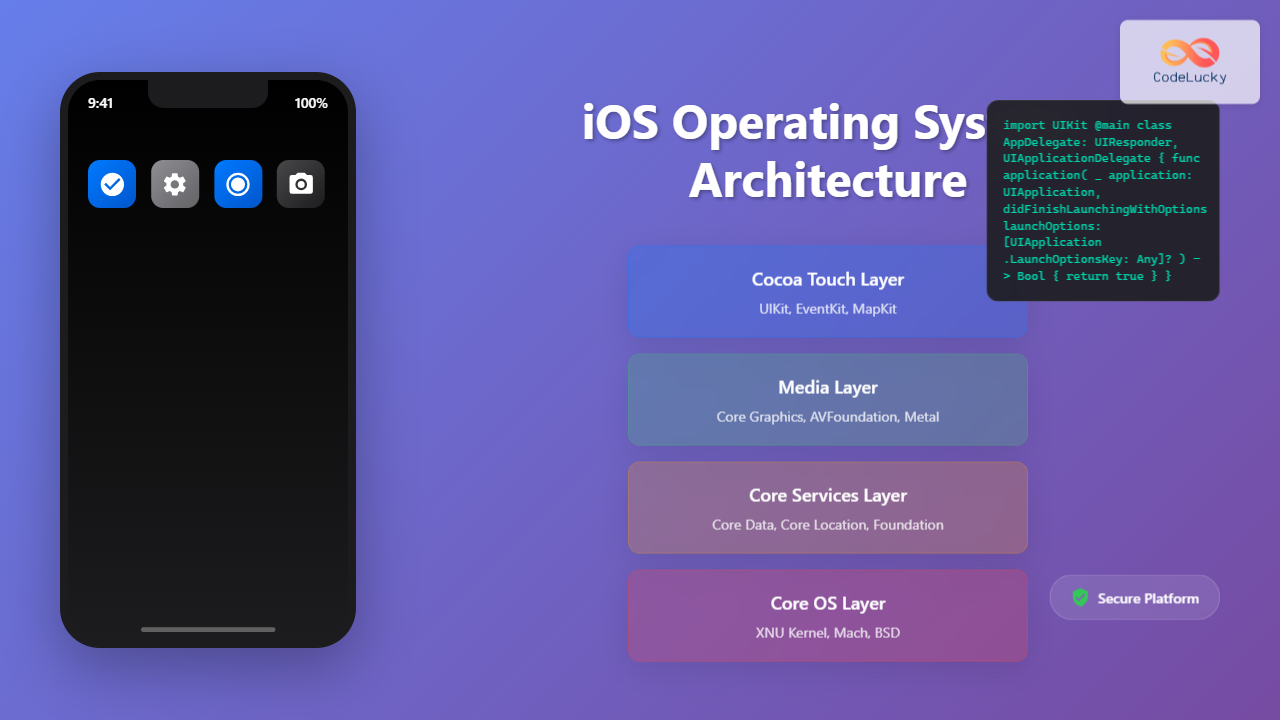
iOS follows a layered architecture design that promotes modularity and efficient resource management. Understanding this architecture is crucial for developers and system administrators working with Apple’s ecosystem.

Core OS Layer
The Core OS layer contains the fundamental components that directly interface with hardware:
- XNU Kernel: Hybrid kernel combining Mach microkernel with BSD subsystem
- Device Drivers: Hardware abstraction layer for device communication
- Security Services: Cryptographic operations and secure storage
- Power Management: Battery optimization and thermal management
// Example: iOS kernel extension structure
#include <IOKit/IOService.h>

class MyIOKitDriver : public IOService {
public:
    virtual bool start(IOService* provider);
    virtual void stop(IOService* provider);
    virtual IOReturn setPowerState(unsigned long powerState, IOService* device);
};

bool MyIOKitDriver::start(IOService* provider) {
    if (!super::start(provider)) {
        return false;
    }

    // Initialize hardware interface
    registerService();
    return true;
}
Core Services Layer
This layer provides essential system services and frameworks that applications rely on:
- Foundation Framework: Basic data types, collections, and utilities
- Core Data: Object graph and persistence framework
- Core Location: GPS and location-based services
- Network Services: TCP/IP, HTTP, and wireless communication
Media Services Layer
Handles multimedia processing and rendering:
- Core Graphics: 2D drawing and image processing
- Core Animation: Hardware-accelerated animations
- AVFoundation: Audio and video playback/recording
- Metal: Low-level GPU programming interface
Cocoa Touch Framework
The primary application development framework providing:
- UIKit: User interface components and event handling
- MapKit: Embedded maps and location display
- GameKit: Multiplayer gaming and social features
- EventKit: Calendar and reminder integration
iOS Security Architecture
iOS implements multiple layers of security to protect user data and system integrity. This comprehensive approach has made iOS one of the most secure mobile platforms available.

Secure Boot Process
iOS implements a chain of trust starting from the device’s first instruction:
- Boot ROM: Immutable code in hardware verifies iBoot
- iBoot: Bootloader verifies kernel signature
- Kernel: Verifies system extensions and drivers
- System Launch: Only signed code executes
// Example: Code signing verification in iOS
#import <Security/Security.h>

OSStatus verifyCodeSignature(NSString *bundlePath) {
    SecStaticCodeRef staticCode = NULL;
    OSStatus status;

    // Create static code reference
    status = SecStaticCodeCreateWithPath((__bridge CFURLRef)[NSURL fileURLWithPath:bundlePath],
                                       kSecCSDefaultFlags, &staticCode);

    if (status != errSecSuccess) {
        return status;
    }

    // Verify signature
    status = SecStaticCodeCheckValidity(staticCode, kSecCSDefaultFlags, NULL);

    CFRelease(staticCode);
    return status;
}
Application Sandboxing
Every iOS application runs in its own sandbox, preventing unauthorized access to system resources and other applications’ data:
- Container Isolation: Each app has its own file system container
- Entitlements: Fine-grained permissions for system access
- Inter-Process Communication: Controlled through XPC services
- Resource Limits: Memory and CPU usage monitoring
iOS Memory Management
iOS employs sophisticated memory management techniques to optimize performance on resource-constrained mobile devices.
Automatic Reference Counting (ARC)
ARC automatically manages memory allocation and deallocation for Objective-C and Swift objects:
// Swift ARC example
class Person {
    let name: String
    var apartment: Apartment?

    init(name: String) {
        self.name = name
    }

    deinit {
        print("\(name) is being deinitialized")
    }
}

class Apartment {
    let unit: String
    weak var tenant: Person? // Weak reference prevents retain cycle

    init(unit: String) {
        self.unit = unit
    }

    deinit {
        print("Apartment \(unit) is being deinitialized")
    }
}

// Usage
var john: Person? = Person(name: "John Appleseed")
var unit4A: Apartment? = Apartment(unit: "4A")

john?.apartment = unit4A
unit4A?.tenant = john

john = nil // Person deallocated
unit4A = nil // Apartment deallocated
Memory Pressure Handling
iOS monitors memory usage and takes action when memory becomes scarce:
- Memory Warnings: Apps receive notifications to free resources
- App Termination: Background apps terminated to free memory
- Compressed Memory: Inactive memory pages compressed
- Disk Paging: Limited swapping to storage (read-only)
iOS Development Frameworks
iOS provides comprehensive frameworks for application development, each serving specific purposes in the mobile ecosystem.

Swift Programming Language
Swift is Apple’s modern programming language designed for iOS, macOS, and other Apple platforms:
// Swift iOS app example
import UIKit

class ViewController: UIViewController {
    @IBOutlet weak var messageLabel: UILabel!
    @IBOutlet weak var userTextField: UITextField!

    override func viewDidLoad() {
        super.viewDidLoad()
        setupUI()
    }

    private func setupUI() {
        messageLabel.text = "Welcome to iOS Development"
        messageLabel.textAlignment = .center

        userTextField.placeholder = "Enter your name"
        userTextField.borderStyle = .roundedRect
    }

    @IBAction func greetButtonTapped(_ sender: UIButton) {
        guard let name = userTextField.text, !name.isEmpty else {
            showAlert(message: "Please enter your name")
            return
        }

        messageLabel.text = "Hello, \(name)!"
        userTextField.resignFirstResponder()
    }

    private func showAlert(message: String) {
        let alert = UIAlertController(title: "Alert",
                                    message: message,
                                    preferredStyle: .alert)
        alert.addAction(UIAlertAction(title: "OK", style: .default))
        present(alert, animated: true)
    }
}
SwiftUI Framework
SwiftUI provides declarative UI development for iOS applications:
// SwiftUI example
import SwiftUI

struct ContentView: View {
    @State private var username = ""
    @State private var isLoggedIn = false

    var body: some View {
        NavigationView {
            VStack(spacing: 20) {
                Image(systemName: "person.circle.fill")
                    .font(.system(size: 100))
                    .foregroundColor(.blue)

                TextField("Username", text: $username)
                    .textFieldStyle(RoundedBorderTextFieldStyle())
                    .padding(.horizontal)

                Button(action: login) {
                    Text("Login")
                        .frame(maxWidth: .infinity)
                        .padding()
                        .background(Color.blue)
                        .foregroundColor(.white)
                        .cornerRadius(10)
                }
                .padding(.horizontal)
                .disabled(username.isEmpty)

                Spacer()
            }
            .navigationTitle("iOS App")
            .alert("Welcome", isPresented: $isLoggedIn) {
                Button("OK") { }
            } message: {
                Text("Hello, \(username)!")
            }
        }
    }

    private func login() {
        isLoggedIn = true
    }
}
iOS File System and Data Storage
iOS implements a sophisticated file system with security and privacy at its core. Understanding how data storage works is essential for iOS development.
Application Bundle Structure
Every iOS application follows a standardized bundle structure:
# iOS App Bundle Structure
MyApp.app/
├── MyApp                    # Executable binary
├── Info.plist              # Application metadata
├── PkgInfo                 # Package information
├── ResourceRules.plist     # Code signing rules
├── _CodeSignature/         # Code signing data
│   └── CodeResources
├── Base.lproj/            # Localization resources
│   ├── Main.storyboard
│   └── LaunchScreen.storyboard
├── Assets.car             # Compiled asset catalog
├── Frameworks/            # Embedded frameworks
└── PlugIns/              # App extensions
Data Protection Classes
iOS provides multiple data protection levels for file encryption:
// Data protection example in Swift
import Foundation

class SecureDataManager {
    private let documentsPath = FileManager.default.urls(for: .documentDirectory,
                                                        in: .userDomainMask).first!

    func saveSecureData(_ data: Data, filename: String) throws {
        let fileURL = documentsPath.appendingPathComponent(filename)

        try data.write(to: fileURL, options: [
            .atomic,
            .completeFileProtection // NSFileProtectionComplete
        ])

        // Set additional protection attributes
        try FileManager.default.setAttributes([
            .protectionKey: FileProtectionType.complete
        ], ofItemAtPath: fileURL.path)
    }

    func loadSecureData(filename: String) throws -> Data {
        let fileURL = documentsPath.appendingPathComponent(filename)
        return try Data(contentsOf: fileURL)
    }

    func createProtectedDirectory(name: String) throws {
        let dirURL = documentsPath.appendingPathComponent(name)

        try FileManager.default.createDirectory(at: dirURL,
                                              withIntermediateDirectories: true,
                                              attributes: [
                                                .protectionKey: FileProtectionType.complete
                                              ])
    }
}
iOS Networking and Communication
iOS provides robust networking capabilities through various frameworks and protocols, ensuring secure and efficient data transmission.

URLSession Networking
URLSession is the primary networking API for iOS applications:
// URLSession networking example
import Foundation

class NetworkManager {
    private let session: URLSession

    init() {
        let config = URLSessionConfiguration.default
        config.timeoutIntervalForRequest = 30
        config.timeoutIntervalForResource = 60
        config.waitsForConnectivity = true

        self.session = URLSession(configuration: config)
    }

    func fetchData(from endpoint: String, type: T.Type) async throws -> T {
        guard let url = URL(string: endpoint) else {
            throw NetworkError.invalidURL
        }

        var request = URLRequest(url: url)
        request.setValue("application/json", forHTTPHeaderField: "Accept")
        request.setValue("iOS-App/1.0", forHTTPHeaderField: "User-Agent")

        let (data, response) = try await session.data(for: request)

        guard let httpResponse = response as? HTTPURLResponse,
              200...299 ~= httpResponse.statusCode else {
            throw NetworkError.serverError
        }

        return try JSONDecoder().decode(type, from: data)
    }

    func uploadFile(to endpoint: String, fileData: Data) async throws -> Bool {
        guard let url = URL(string: endpoint) else {
            throw NetworkError.invalidURL
        }

        var request = URLRequest(url: url)
        request.httpMethod = "POST"
        request.setValue("application/octet-stream", forHTTPHeaderField: "Content-Type")

        let (_, response) = try await session.upload(for: request, from: fileData)

        guard let httpResponse = response as? HTTPURLResponse,
              200...299 ~= httpResponse.statusCode else {
            return false
        }

        return true
    }
}

enum NetworkError: Error {
    case invalidURL
    case serverError
    case noData
}
iOS Performance Optimization
Optimizing iOS applications requires understanding system constraints and implementing efficient coding practices.
Memory Optimization Techniques
// Memory optimization examples
class ImageCache {
    private var cache = NSCache()
    private let queue = DispatchQueue(label: "ImageCache", qos: .utility)

    init() {
        // Configure cache limits
        cache.countLimit = 100
        cache.totalCostLimit = 50 * 1024 * 1024 // 50MB

        // Respond to memory warnings
        NotificationCenter.default.addObserver(
            forName: UIApplication.didReceiveMemoryWarningNotification,
            object: nil,
            queue: .main
        ) { _ in
            self.cache.removeAllObjects()
        }
    }

    func loadImage(from url: URL) async -> UIImage? {
        let key = NSString(string: url.absoluteString)

        // Check cache first
        if let cachedImage = cache.object(forKey: key) {
            return cachedImage
        }

        // Load image asynchronously
        return await withCheckedContinuation { continuation in
            queue.async {
                do {
                    let data = try Data(contentsOf: url)
                    if let image = UIImage(data: data) {
                        self.cache.setObject(image, forKey: key, cost: data.count)
                        continuation.resume(returning: image)
                    } else {
                        continuation.resume(returning: nil)
                    }
                } catch {
                    continuation.resume(returning: nil)
                }
            }
        }
    }

    deinit {
        NotificationCenter.default.removeObserver(self)
    }
}
Battery Optimization
iOS provides several mechanisms to optimize battery usage:
- Background App Refresh: Controlled background processing
- Low Power Mode: System-wide performance adjustments
- Efficient Networking: Batched requests and proper timing
- Location Services: Appropriate accuracy and frequency settings
iOS Ecosystem Integration
iOS seamlessly integrates with Apple’s broader ecosystem, providing users with a cohesive experience across devices.

CloudKit Integration
CloudKit enables seamless data synchronization across Apple devices:
// CloudKit integration example
import CloudKit

class CloudKitManager {
    private let container = CKContainer.default()
    private let database: CKDatabase

    init() {
        self.database = container.privateCloudDatabase
    }

    func saveRecord(_ object: T) async throws {
        let record = object.toCKRecord()
        try await database.save(record)
    }

    func fetchRecords(ofType recordType: String) async throws -> [CKRecord] {
        let query = CKQuery(recordType: recordType, predicate: NSPredicate(value: true))
        let (matchResults, _) = try await database.records(matching: query)

        return matchResults.compactMap { _, result in
            try? result.get()
        }
    }

    func subscribeToChanges(recordType: String) async throws {
        let subscription = CKQuerySubscription(
            recordType: recordType,
            predicate: NSPredicate(value: true),
            options: [.firesOnRecordCreation, .firesOnRecordUpdate, .firesOnRecordDeletion]
        )

        let notificationInfo = CKSubscription.NotificationInfo()
        notificationInfo.shouldSendContentAvailable = true
subscription.notificationInfo = notificationInfo