iOS multitasking has revolutionized how users interact with mobile applications, allowing seamless switching between apps while maintaining performance and battery life. Understanding iOS background app management is crucial for developers creating responsive, efficient applications that provide exceptional user experiences.
Understanding iOS Multitasking Architecture
iOS implements a sophisticated multitasking system that balances user experience with system resources. Unlike desktop operating systems, iOS uses a carefully managed approach to background processing that prioritizes active applications while intelligently handling background tasks.

iOS App States and Lifecycle
iOS applications transition through distinct states that determine their access to system resources and capabilities. Understanding these states is fundamental to effective background app management.
Not Running State
Applications in this state are completely terminated and consume no system resources. The app is either not launched or has been terminated by the system or user.
Active State
Active applications run in the foreground with full access to system resources, including CPU, memory, and network connectivity. These apps can update their user interface and respond to user interactions.
Inactive State
Apps briefly enter this transitional state when moving between active and background states. During this phase, applications receive limited system events but cannot update their interface.
Background State
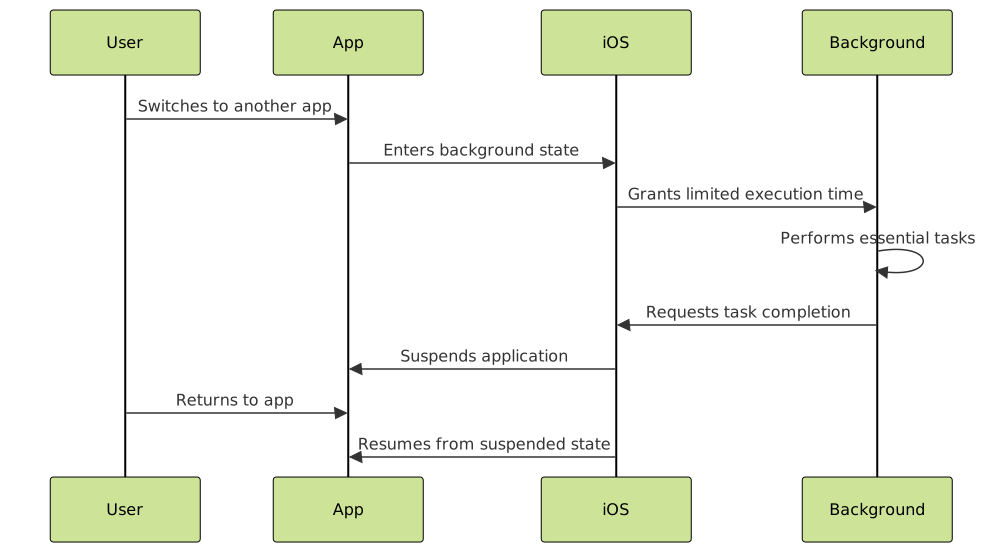
Background applications have limited execution time and restricted access to system resources. iOS provides specific mechanisms for apps to perform essential tasks while backgrounded.
Suspended State
Suspended apps remain in memory but receive no CPU time. The system can quickly resume these applications when users return to them, providing instant app switching.
Background Execution Modes
iOS offers several background execution modes that allow applications to perform specific tasks while not actively displayed to the user.
Background App Refresh
This feature enables apps to update content while in the background, ensuring fresh information when users return. Apps must declare this capability in their Info.plist file:
<key>UIBackgroundModes</key>
<array>
    <string>background-app-refresh</string>
</array>
Background Processing
For tasks requiring more execution time, iOS provides background processing capabilities. Apps can request extended background time using BGTaskScheduler:
import BackgroundTasks

class BackgroundTaskManager {
    func scheduleBackgroundTask() {
        let request = BGAppRefreshTaskRequest(identifier: "com.example.refresh")
        request.earliestBeginDate = Date(timeIntervalSinceNow: 15 * 60)

        try? BGTaskScheduler.shared.submit(request)
    }

    func handleBackgroundTask(task: BGAppRefreshTask) {
        task.expirationHandler = {
            task.setTaskCompleted(success: false)
        }

        // Perform background work
        performDataRefresh { success in
            task.setTaskCompleted(success: success)
        }
    }
}
Background Task Types
Network Background Tasks
Applications can continue network operations while backgrounded, essential for downloading content, uploading data, or maintaining server connections.
class NetworkManager {
    func performBackgroundDownload() {
        let configuration = URLSessionConfiguration.background(
            withIdentifier: "com.example.background-download"
        )
        let session = URLSession(configuration: configuration)

        guard let url = URL(string: "https://api.example.com/data") else { return }
        let downloadTask = session.downloadTask(with: url)
        downloadTask.resume()
    }
}
Location Updates
Apps requiring continuous location tracking can maintain location services while backgrounded, crucial for navigation and fitness applications.
import CoreLocation

class LocationManager: NSObject, CLLocationManagerDelegate {
    private let locationManager = CLLocationManager()

    func setupBackgroundLocationUpdates() {
        locationManager.delegate = self
        locationManager.desiredAccuracy = kCLLocationAccuracyBest
        locationManager.allowsBackgroundLocationUpdates = true
        locationManager.pausesLocationUpdatesAutomatically = false
        locationManager.startUpdatingLocation()
    }
}
Audio Processing
Music and audio applications can continue playback while backgrounded, maintaining uninterrupted user experiences.
State Preservation and Restoration
iOS provides mechanisms for preserving app state when terminated and restoring it upon relaunch, creating seamless user experiences.
class ViewController: UIViewController {
    override func encodeRestorableState(with coder: NSCoder) {
        super.encodeRestorableState(with: coder)

        // Save important state information
        coder.encode(currentUserID, forKey: "currentUserID")
        coder.encode(scrollPosition, forKey: "scrollPosition")
    }

    override func decodeRestorableState(with coder: NSCoder) {
        super.decodeRestorableState(with: coder)

        // Restore saved state
        currentUserID = coder.decodeObject(forKey: "currentUserID") as? String
        scrollPosition = coder.decodeFloat(forKey: "scrollPosition")
    }
}
Memory Management in Background
Effective memory management is crucial for maintaining app performance and preventing system termination while backgrounded.
Memory Pressure Handling
class MemoryManager {
    func setupMemoryWarningObserver() {
        NotificationCenter.default.addObserver(
            forName: UIApplication.didReceiveMemoryWarningNotification,
            object: nil,
            queue: .main
        ) { _ in
            self.handleMemoryWarning()
        }
    }

    private func handleMemoryWarning() {
        // Clear caches
        ImageCache.shared.clearCache()
        DataCache.shared.clearNonEssentialData()

        // Release heavy objects
        releaseHeavyResources()
    }
}
Resource Optimization
Background applications should minimize resource usage by releasing unnecessary objects, clearing caches, and reducing memory footprint.
User Interface Considerations
When apps transition to background, certain UI elements require special handling to maintain security and performance.
App Snapshot Security
class AppDelegate: UIResponder, UIApplicationDelegate {
    func applicationWillResignActive(_ application: UIApplication) {
        // Hide sensitive information before snapshot
        hideSecuritySensitiveViews()
    }

    func applicationDidBecomeActive(_ application: UIApplication) {
        // Restore UI elements
        showSecuritySensitiveViews()
    }

    private func hideSecuritySensitiveViews() {
        // Add overlay or hide sensitive content
        let blurEffect = UIBlurEffect(style: .light)
        let blurView = UIVisualEffectView(effect: blurEffect)
        blurView.frame = window?.bounds ?? CGRect.zero
        blurView.tag = 999
        window?.addSubview(blurView)
    }
}
Performance Optimization Strategies
Implementing effective background app management requires careful consideration of performance implications and optimization strategies.

Battery Life Optimization
Background applications must balance functionality with battery conservation:
class PowerManager {
    func optimizeForBackground() {
        // Reduce location accuracy
        locationManager.desiredAccuracy = kCLLocationAccuracyHundredMeters

        // Pause non-essential timers
        pauseNonEssentialTimers()

        // Reduce network request frequency
        adjustNetworkPollingInterval()
    }

    private func pauseNonEssentialTimers() {
        uiUpdateTimer?.invalidate()
        animationTimer?.invalidate()
    }
}
Testing Background App Behavior
Thorough testing ensures reliable background app behavior across various scenarios and device conditions.
Xcode Debugging Tools
Xcode provides specialized tools for testing background app behavior:
- Simulate Background App Refresh: Test background update functionality
- Memory Graph Debugger: Analyze memory usage patterns
- Energy Impact Profiler: Monitor power consumption
Device Testing Scenarios
Real device testing covers scenarios impossible to simulate:
- Low memory conditions
- Poor network connectivity
- Extended background periods
- Battery optimization modes
Best Practices for Background App Management
Efficient Background Tasks
Design background tasks to be lightweight, focused, and time-conscious:
class EfficientBackgroundTask {
    func performBackgroundUpdate() {
        var backgroundTask: UIBackgroundTaskIdentifier = .invalid

        backgroundTask = UIApplication.shared.beginBackgroundTask {
            // Clean up when time expires
            UIApplication.shared.endBackgroundTask(backgroundTask)
            backgroundTask = .invalid
        }

        // Perform essential work quickly
        DispatchQueue.global().async {
            self.updateCriticalData()

            DispatchQueue.main.async {
                UIApplication.shared.endBackgroundTask(backgroundTask)
                backgroundTask = .invalid
            }
        }
    }
}
User Settings Respect
Always respect user preferences for background app refresh and provide clear explanations for background functionality requirements.
Graceful Degradation
Implement fallback mechanisms when background capabilities are restricted or unavailable.
Future of iOS Multitasking
iOS multitasking continues evolving with each system update, introducing new capabilities and refining existing mechanisms. Developers must stay informed about changes to background execution policies, new background modes, and performance improvements.
The increasing focus on privacy and battery life will likely influence future multitasking implementations, requiring developers to adopt more efficient and user-respectful background processing approaches.
Conclusion
Mastering iOS multitasking and background app management is essential for creating professional, user-friendly applications. By understanding app states, implementing appropriate background modes, optimizing for performance and battery life, and respecting user preferences, developers can create apps that provide seamless experiences while maintaining system stability and efficiency.
Success in iOS background app management requires balancing functionality with resource conservation, ensuring applications remain responsive and useful without compromising device performance or user privacy. As iOS continues evolving, staying current with best practices and new capabilities will be crucial for maintaining competitive, high-quality applications.