The iOS file system represents one of the most sophisticated mobile security architectures ever implemented. Unlike traditional desktop operating systems where applications can access system-wide resources, iOS employs a sandboxed application environment that isolates each app within its own secure container. This approach ensures robust security while maintaining optimal performance and user experience.
Understanding iOS File System Architecture
The iOS file system is built on Apple File System (APFS), which provides advanced features like encryption, snapshots, and space sharing. However, what makes iOS unique is how it implements application sandboxing at the file system level.

Core File System Components
System Partition: Contains the iOS operating system, kernel, and pre-installed applications. This partition is mounted as read-only and is cryptographically signed to prevent tampering.
Data Partition: Houses all user data, third-party applications, and their associated files. This is where the sandboxing magic happens.
The Sandbox Container Structure
Each iOS application operates within its own sandbox container, a dedicated directory structure that defines the app’s accessible file space. This container includes several predefined directories:
Application Bundle Directory
Contains the app’s executable files, resources, and Info.plist. This directory is read-only after installation.
/var/containers/Bundle/Application/[UUID]/MyApp.app/Data Container Directory
The writable portion of an app’s sandbox, containing three main subdirectories:
- Documents/ – User-generated content that should be backed up
- Library/ – App-specific files that shouldn’t be exposed to users
- tmp/ – Temporary files that may be purged by the system

Sandbox Security Implementation
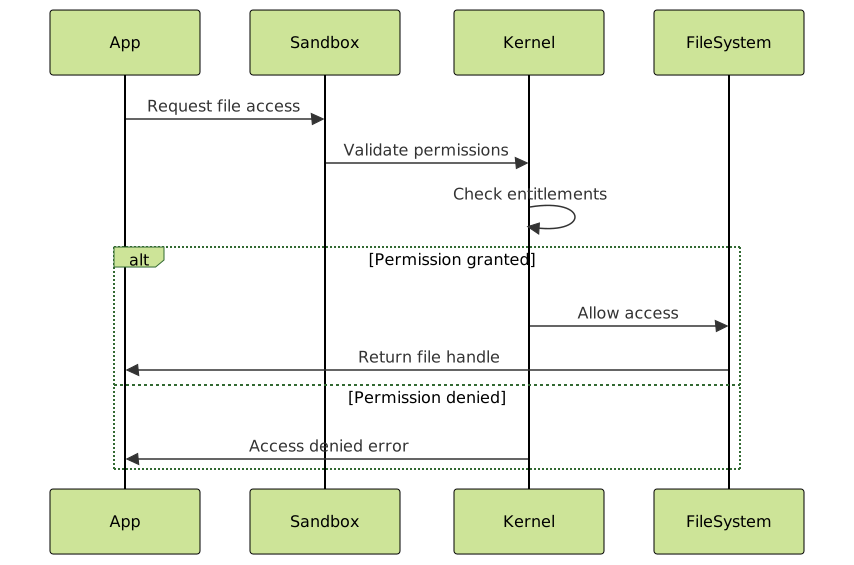
The iOS sandbox operates through multiple layers of security enforcement:
Kernel-Level Enforcement
The iOS kernel enforces sandbox restrictions through mandatory access control (MAC) policies. These policies are loaded at app launch and cannot be modified during runtime.
Entitlements System
Apps must declare specific entitlements to access system resources or shared containers. Common entitlements include:
com.apple.security.application-groups– Shared container accesskeychain-access-groups– Keychain sharingcom.apple.developer.associated-domains– Universal links
Code Signing Verification
Every app must be signed with a valid certificate, and the system continuously verifies code integrity throughout execution.
Directory Access Patterns and Permissions
Understanding iOS file access patterns is crucial for effective app development:
Read-Write Access
Apps have full read-write access to their container directories:
// Swift example - Writing to Documents directory
let documentsPath = FileManager.default.urls(for: .documentDirectory,
                                           in: .userDomainMask).first!
let filePath = documentsPath.appendingPathComponent("userdata.txt")

try "Hello iOS Sandbox".write(to: filePath, atomically: true, encoding: .utf8)
Read-Only Access
System directories and other app containers are strictly off-limits, with rare exceptions for specific entitlements.
Shared Container Access
Apps can share data through App Groups, requiring specific entitlements and configuration:
// Accessing shared container
let sharedContainer = FileManager.default.containerURL(
    forSecurityApplicationGroupIdentifier: "group.com.example.myapp"
)
Inter-App Communication Within Sandbox Constraints
Despite strict sandboxing, iOS provides several mechanisms for controlled inter-app communication:
URL Schemes
Custom URL schemes allow apps to communicate through the system’s URL handling mechanism.
Universal Links
Secure deep linking that associates apps with specific web domains.
App Extensions
Specialized components that extend app functionality into other contexts while maintaining sandbox security.

File System Performance Optimizations
iOS implements several performance optimizations within the sandboxed environment:
Copy-on-Write (COW)
APFS uses copy-on-write semantics, reducing storage overhead and improving performance for file operations.
Unified Buffer Cache
The system maintains a unified cache for file system operations, optimizing memory usage across all sandboxed applications.
Background App Refresh Limitations
File system access for background apps is restricted to preserve battery life and system performance.
Data Protection and Encryption
iOS integrates hardware-level encryption with file system sandboxing:
Data Protection Classes
Files can be assigned protection classes that determine when they’re accessible:
- Complete Protection: Accessible only when device is unlocked
- Protected Unless Open: Remains accessible if opened before device lock
- Protected Until First User Authentication: Accessible after first unlock
- No Protection: Always accessible (not recommended)
Keychain Integration
Sensitive data storage through the iOS Keychain, which operates outside the traditional file system but integrates with sandbox permissions.

Debugging and Development Considerations
Developing within iOS sandbox constraints requires specific approaches:
Simulator vs. Device Behavior
The iOS Simulator provides a less restrictive environment, making device testing crucial for sandbox-related functionality.
Console Logging and File Access
Use Xcode’s console and device logs to debug sandbox permission issues:
// Log current sandbox directory
print("Documents directory: \(NSHomeDirectory())")
Entitlements Debugging
Verify entitlements are properly configured in your app’s provisioning profile and Xcode project settings.
Best Practices for iOS Sandbox Development
Minimize External Dependencies: Reduce reliance on shared resources and external file access.
Efficient Data Management: Use appropriate directories for different data types and implement proper cleanup routines for temporary files.
Security-First Approach: Always assume minimum necessary permissions and request additional entitlements only when absolutely required.
Testing Across Scenarios: Test file operations under various device states including locked, unlocked, and background modes.
Future Evolution of iOS Sandboxing
Apple continues to evolve the iOS sandbox architecture, with recent developments including:
- Enhanced App Privacy Reports: More granular visibility into app resource access
- Improved App Groups: Better performance and security for shared containers
- Advanced Data Protection: Additional encryption options and recovery mechanisms
The iOS sandboxed file system represents a masterclass in balancing security with functionality. By understanding these mechanisms, developers can create more secure, efficient, and user-friendly applications while working within Apple’s carefully designed security framework. This architecture not only protects users but also provides a stable, predictable environment for app development and deployment.
- Understanding iOS File System Architecture
- The Sandbox Container Structure
- Sandbox Security Implementation
- Directory Access Patterns and Permissions
- Inter-App Communication Within Sandbox Constraints
- File System Performance Optimizations
- Data Protection and Encryption
- Debugging and Development Considerations
- Best Practices for iOS Sandbox Development
- Future Evolution of iOS Sandboxing