What is an Inode?
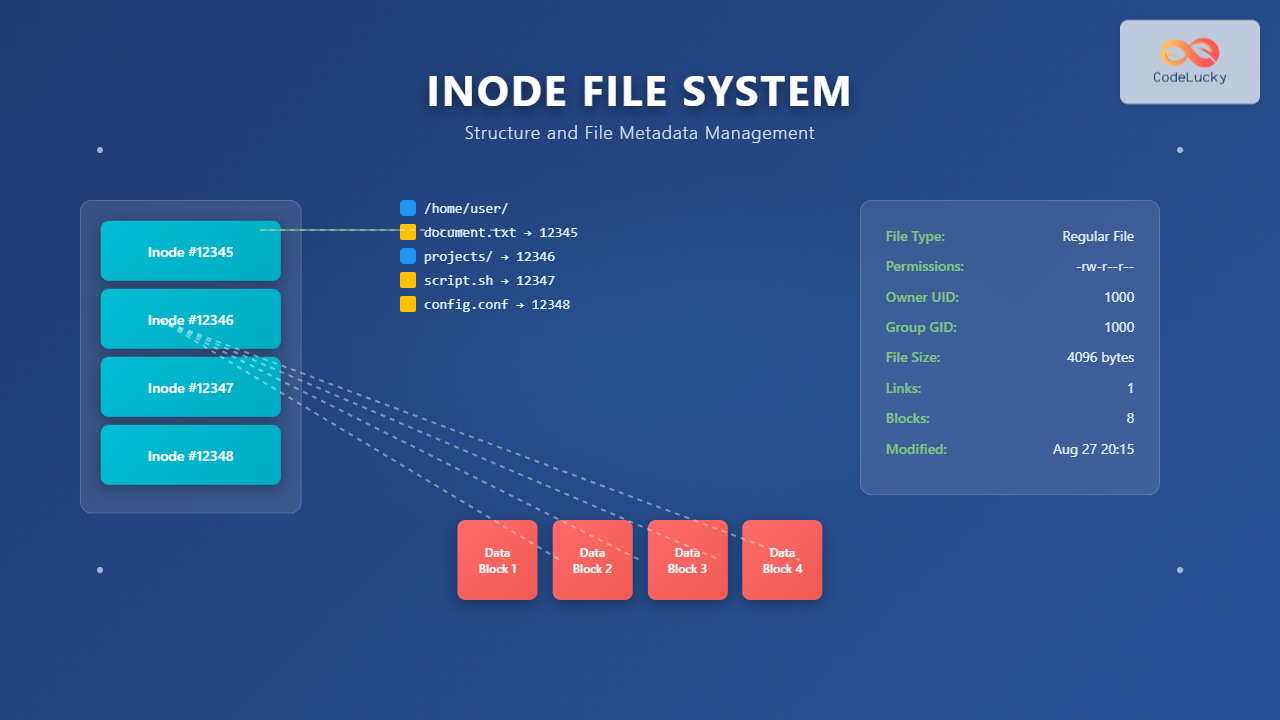
An inode (index node) is a fundamental data structure in Unix-like file systems that stores metadata about files and directories. Unlike the file’s actual content, an inode contains crucial information about the file such as permissions, ownership, timestamps, size, and pointers to the data blocks where the file content is stored.
Every file and directory in a Unix-like system has an associated inode, identified by a unique inode number. This number serves as the file system’s internal identifier, completely separate from the human-readable filename.

Inode Structure and Components
An inode contains several critical pieces of metadata organized in a structured format. Understanding this structure is essential for comprehending how file systems manage data efficiently.
Core Inode Attributes
Each inode stores the following key information:
- File Type and Permissions: Determines if it’s a regular file, directory, symbolic link, or special file, along with read/write/execute permissions
- Owner Information: User ID (UID) and Group ID (GID) of the file owner
- File Size: Size of the file in bytes
- Timestamps: Access time (atime), modification time (mtime), and change time (ctime)
- Link Count: Number of hard links pointing to this inode
- Data Block Pointers: References to the actual data blocks containing file content
Examining Inode Information
You can view inode information using various Linux commands. Here’s a practical example:
# Display inode numbers with ls
$ ls -li /etc/passwd
131074 -rw-r--r-- 1 root root 2847 Aug 15 10:30 /etc/passwd

# Show detailed inode information with stat
$ stat /etc/passwd
  File: /etc/passwd
  Size: 2847      	Blocks: 8          IO Block: 4096   regular file
Device: 801h/2049d	Inode: 131074      Links: 1
Access: (0644/-rw-r--r--)  Uid: (    0/    root)   Gid: (    0/    root)
Access: 2024-08-27 09:15:32.123456789 +0530
Modify: 2024-08-15 10:30:45.987654321 +0530
Change: 2024-08-15 10:30:45.987654321 +0530
 Birth: 2024-08-15 10:30:45.987654321 +0530
Inode Data Block Addressing
One of the most sophisticated aspects of inodes is how they manage data block pointers. This system allows efficient handling of files of varying sizes while maintaining reasonable inode size.

Pointer Types Explained
- Direct Pointers (0-11): Point directly to data blocks, suitable for small files up to 48KB (12 × 4KB blocks)
- Single Indirect (12): Points to a block containing pointers to data blocks, supporting files up to 4MB
- Double Indirect (13): Points to a block containing single indirect pointers, supporting files up to 4GB
- Triple Indirect (14): Points to a block containing double indirect pointers, supporting massive files up to 4TB
Directory Structure and Inode Relationships
Directories are special files whose content consists of directory entries mapping filenames to inode numbers. This separation between names and inodes enables powerful file system features.
Directory Entry Structure
Let’s examine how directories store filename-to-inode mappings:
# Create a test directory and files
$ mkdir test_dir
$ cd test_dir
$ echo "Hello World" > file1.txt
$ echo "Another file" > file2.txt
$ ln file1.txt hardlink.txt

# Show inode numbers
$ ls -li
total 8
2621441 -rw-r--r-- 2 user user 12 Aug 27 20:15 file1.txt
2621442 -rw-r--r-- 1 user user 13 Aug 27 20:15 file2.txt
2621441 -rw-r--r-- 2 user user 12 Aug 27 20:15 hardlink.txt

# Notice: file1.txt and hardlink.txt share the same inode number (2621441)
# and have link count of 2
Hard Links vs Soft Links
Understanding the difference between hard and soft links is crucial for mastering inode concepts.
Hard Links
Hard links are multiple directory entries pointing to the same inode. They share the same data and metadata:
# Create hard link
$ echo "Shared content" > original.txt
$ ln original.txt hardlink.txt

# Both files share the same inode
$ ls -li
2621450 -rw-r--r-- 2 user user 15 Aug 27 20:20 hardlink.txt
2621450 -rw-r--r-- 2 user user 15 Aug 27 20:20 original.txt

# Modifying one affects the other
$ echo "Modified" >> hardlink.txt
$ cat original.txt
Shared content
Modified
Soft Links (Symbolic Links)
Soft links are separate files containing the path to another file:
# Create symbolic link
$ ln -s original.txt symlink.txt

# Different inodes
$ ls -li
2621450 -rw-r--r-- 2 user user 15 Aug 27 20:20 original.txt
2621451 lrwxrwxrwx 1 user user 12 Aug 27 20:25 symlink.txt -> original.txt

# Symbolic link has its own inode and contains the target path
Inode Allocation and Management
File systems maintain inode tables with a fixed number of inodes determined at creation time. Understanding inode allocation helps prevent common file system issues.
Checking Inode Usage
Monitor inode usage to prevent exhaustion:
# Display inode usage by filesystem
$ df -i
Filesystem        Inodes   IUsed   IFree IUse% Mounted on
/dev/sda1        6553600  245832 6307768    4% /
/dev/sda2        1310720   12847 1297873    1% /home

# Find directories using many inodes
$ find /var -type f | head -10 | xargs ls -li
2359298 -rw-r--r-- 1 root root   156 Aug 15 10:30 /var/log/auth.log
2359299 -rw-r--r-- 1 root root  1024 Aug 15 10:30 /var/log/syslog
2359300 -rw-r--r-- 1 root root   512 Aug 15 10:30 /var/log/kern.log
Special File Types and Inodes
Inodes handle various file types beyond regular files and directories:
Device Files
# Character and block device files
$ ls -li /dev/null /dev/sda1
   1028 crw-rw-rw- 1 root root 1,   3 Aug 27 20:00 /dev/null
   8193 brw-rw---- 1 root disk 8,   1 Aug 27 20:00 /dev/sda1

# c = character device, b = block device
# Major and minor device numbers instead of file size
Named Pipes (FIFOs)
# Create and examine named pipe
$ mkfifo mypipe
$ ls -li mypipe
2621455 prw-r--r-- 1 user user 0 Aug 27 20:30 mypipe

# p indicates pipe/FIFO
Inode Performance Considerations
Understanding inode behavior helps optimize file system performance:
- Inode Caching: Operating systems cache frequently accessed inodes in memory
- Locality: Files in the same directory often have nearby inode numbers, improving cache performance
- Fragmentation: Scattered inodes can impact performance on traditional spinning drives
Monitoring Inode Performance
# Monitor inode-related system calls
$ strace -e trace=stat,lstat,fstat ls -l /etc/ 2>&1 | head -5
stat("/etc/", {st_mode=S_IFDIR|0755, st_size=4096, ...}) = 0
lstat("/etc/alternatives", {st_mode=S_IFDIR|0755, st_size=4096, ...}) = 0
lstat("/etc/apache2", {st_mode=S_IFDIR|0755, st_size=4096, ...}) = 0

# Each lstat call retrieves inode information
Advanced Inode Features
Modern file systems extend basic inode functionality with advanced features:
Extended Attributes
Inodes can store additional metadata beyond standard attributes:
# Set extended attribute
$ setfattr -n user.description -v "Important configuration file" /etc/hosts

# View extended attributes
$ getfattr -d /etc/hosts
# file: etc/hosts
user.description="Important configuration file"

# Extended attributes are stored with the inode
Access Control Lists (ACLs)
# Set ACL permissions
$ setfacl -m u:alice:rw- myfile.txt

# View ACL information
$ getfacl myfile.txt
# file: myfile.txt
# owner: user
# group: user
user::rw-
user:alice:rw-
group::r--
mask::rw-
other::r--
Troubleshooting Inode Issues
Common inode-related problems and solutions:
Inode Exhaustion
# Identify directories with many files
$ find /var -type d -exec sh -c 'echo "$(ls -1 "$1" | wc -l) files in $1"' _ {} \; | sort -nr | head -5
15847 files in /var/cache/apt/archives
8923 files in /var/log/nginx
3456 files in /tmp

# Clean up unnecessary files to free inodes
Orphaned Inodes
Files with no directory entries but non-zero link counts indicate file system inconsistencies:
# Check file system for errors
$ sudo fsck -f /dev/sda1

# fsck will identify and fix orphaned inodes
Conclusion
Inodes form the backbone of Unix-like file systems, providing an elegant separation between file metadata and content. This architecture enables powerful features like hard links, efficient space allocation, and robust file management. Understanding inode structure and behavior is essential for system administrators, developers, and anyone working with Unix-like systems.
Key takeaways include:
- Inodes store file metadata separately from content, enabling flexible file management
- The multi-level pointer system efficiently handles files from bytes to terabytes
- Directory entries map human-readable names to inode numbers
- Hard links share inodes, while soft links create separate inodes with path references
- Monitoring inode usage prevents file system exhaustion and performance issues
Mastering these concepts provides a solid foundation for understanding file system internals, troubleshooting storage issues, and optimizing system performance in Unix-like environments.
Related Posts

File System in Operating System: Complete Guide to Structure and Organization
Introduction to File Systems A file system is a fundamental component of any operating system that provides a structured way...

File System Implementation: Boot Block, Super Block and Inodes Explained
Understanding File System Implementation File system implementation is a critical component of operating systems that manages how data is stored,...

stat Command Linux: Complete Guide to Display File and Filesystem Status Information
The stat command is a powerful Linux utility that displays detailed information about files and filesystems. Unlike basic commands like...

Directory Structure: Single-level, Two-level, and Tree Structure in Operating Systems
Understanding Directory Structures in Operating Systems Directory structures are fundamental components of file systems that organize and manage files in...

xattr Command Linux: Complete Guide to Extended File Attributes Management
Extended file attributes in Linux provide a powerful mechanism to store additional metadata beyond traditional file permissions and ownership. The...

File System Types: FAT32, NTFS, ext4 and Modern Linux Filesystems Explained
Understanding File Systems: The Foundation of Data Storage A file system is the method and data structure that an operating...
proc filesystem Linux: Complete Guide to Understanding /proc Directory Structure and Commands
What is the Linux /proc Filesystem? The /proc filesystem is a virtual filesystem in Linux that provides a window into...
xfs_info Command Linux: Complete Guide to Display XFS Filesystem Information
The xfs_info command is a powerful utility in Linux systems that provides comprehensive information about XFS filesystems. This command is...
Python File fileno() Method: Getting File Descriptor
The fileno() method is a powerful tool in Python for working with files at a lower level. It allows you...

sysfs Linux: Complete Guide to Understanding and Using /sys Filesystem
The sysfs filesystem is one of Linux's most powerful yet underutilized features, providing a window into the kernel's internal operations...

tripwire Linux: Complete Guide to File Integrity Monitoring and Security
Tripwire is a powerful file integrity monitoring (FIM) tool that helps system administrators detect unauthorized changes to critical system files,...

file Command Advanced Linux: Master Detailed File Type Analysis and Detection
The file command is one of the most powerful and underutilized utilities in Linux for determining file types and analyzing...