
HTML5 AppCache (Application Cache) provides developers with powerful capabilities to create offline web applications. While deprecated in favor of Service Workers, understanding how to programmatically access and manipulate AppCache file content remains valuable for maintaining legacy applications and understanding web caching fundamentals.
Understanding HTML5 AppCache Architecture
The HTML5 AppCache system consists of three main components that work together to enable offline functionality:

AppCache Manifest Structure
Before accessing cached content programmatically, you need a properly structured manifest file:
CACHE MANIFEST
# Version 1.0

CACHE:
index.html
styles/main.css
scripts/app.js
images/logo.png

NETWORK:
api/
*

FALLBACK:
/ offline.html
Programmatic Access Methods
Using the ApplicationCache API
The primary method for accessing AppCache content programmatically involves the window.applicationCache object:
// Check if ApplicationCache is supported
if (window.applicationCache) {
    const appCache = window.applicationCache;

    // Get current cache status
    function getCacheStatus() {
        switch (appCache.status) {
            case appCache.UNCACHED:
                return 'UNCACHED';
            case appCache.IDLE:
                return 'IDLE';
            case appCache.CHECKING:
                return 'CHECKING';
            case appCache.DOWNLOADING:
                return 'DOWNLOADING';
            case appCache.UPDATEREADY:
                return 'UPDATEREADY';
            case appCache.OBSOLETE:
                return 'OBSOLETE';
            default:
                return 'UNKNOWN';
        }
    }

    console.log('Cache Status:', getCacheStatus());
}
Event-Driven Cache Management
AppCache provides several events for monitoring cache operations:
function setupCacheEventListeners() {
    const appCache = window.applicationCache;

    // Cache is being checked for updates
    appCache.addEventListener('checking', function() {
        console.log('Checking for cache updates...');
    });

    // Cache is being downloaded
    appCache.addEventListener('downloading', function() {
        console.log('Downloading cache resources...');
    });

    // All resources successfully cached
    appCache.addEventListener('cached', function() {
        console.log('Application successfully cached');
    });

    // Cache update is available
    appCache.addEventListener('updateready', function() {
        console.log('Cache update ready');
        if (confirm('New version available. Load it?')) {
            window.location.reload();
        }
    });

    // Cache is obsolete
    appCache.addEventListener('obsolete', function() {
        console.log('Cache is obsolete');
    });

    // Error occurred during caching
    appCache.addEventListener('error', function() {
        console.log('Cache error occurred');
    });
}

setupCacheEventListeners();
Advanced Cache Content Access Techniques
Retrieving Cached File Lists
While direct access to cached file lists isn’t available through the AppCache API, you can implement a workaround using manifest parsing:
async function getCachedFileList() {
    try {
        // Get the manifest file content
        const manifestUrl = document.documentElement.getAttribute('manifest');
        const response = await fetch(manifestUrl);
        const manifestContent = await response.text();

        // Parse manifest content
        const lines = manifestContent.split('\n');
        const cachedFiles = [];
        let inCacheSection = false;

        for (let line of lines) {
            line = line.trim();

            // Skip comments and empty lines
            if (line.startsWith('#') || line === '') continue;

            // Check for section headers
            if (line === 'CACHE:') {
                inCacheSection = true;
                continue;
            } else if (line === 'NETWORK:' || line === 'FALLBACK:') {
                inCacheSection = false;
                continue;
            }

            // Add files from CACHE section
            if (inCacheSection) {
                cachedFiles.push(line);
            }
        }

        return cachedFiles;
    } catch (error) {
        console.error('Error reading manifest:', error);
        return [];
    }
}

// Usage example
getCachedFileList().then(files => {
    console.log('Cached files:', files);
    displayCachedFiles(files);
});
Accessing Individual Cached Files
To programmatically access content of cached files, you can use standard fetch operations:
async function getCachedFileContent(filePath) {
    try {
        // Fetch the cached file
        const response = await fetch(filePath);

        if (!response.ok) {
            throw new Error(`HTTP error! status: ${response.status}`);
        }

        // Determine content type and return appropriate data
        const contentType = response.headers.get('content-type');

        if (contentType && contentType.includes('application/json')) {
            return await response.json();
        } else if (contentType && contentType.includes('text/')) {
            return await response.text();
        } else {
            return await response.blob();
        }
    } catch (error) {
        console.error(`Error accessing cached file ${filePath}:`, error);
        return null;
    }
}

// Example usage
async function demonstrateCacheAccess() {
    const files = await getCachedFileList();

    for (const file of files) {
        const content = await getCachedFileContent(file);
        console.log(`Content of ${file}:`, content);
    }
}
Implementing Cache Management Dashboard
Create a comprehensive cache management interface:
<div id="cache-dashboard">
    <h3>AppCache Dashboard</h3>
    <div id="cache-status"></div>
    <div id="cache-files"></div>
    <button id="refresh-cache">Refresh Cache</button>
    <button id="clear-cache">Clear Cache</button>
</div>
class AppCacheManager {
    constructor() {
        this.appCache = window.applicationCache;
        this.statusElement = document.getElementById('cache-status');
        this.filesElement = document.getElementById('cache-files');

        this.init();
    }

    init() {
        this.setupEventListeners();
        this.updateStatus();
        this.loadCacheFiles();

        // Setup UI event listeners
        document.getElementById('refresh-cache').addEventListener('click', () => {
            this.refreshCache();
        });

        document.getElementById('clear-cache').addEventListener('click', () => {
            this.clearCache();
        });
    }

    setupEventListeners() {
        const events = ['checking', 'downloading', 'cached', 'updateready', 'obsolete', 'error'];

        events.forEach(eventType => {
            this.appCache.addEventListener(eventType, () => {
                this.updateStatus();
                this.onCacheEvent(eventType);
            });
        });
    }

    updateStatus() {
        const status = this.getCacheStatus();
        this.statusElement.innerHTML = `<strong>Cache Status:</strong> ${status}`;

        // Add status-specific styling
        this.statusElement.className = `cache-status-${status.toLowerCase()}`;
    }

    getCacheStatus() {
        switch (this.appCache.status) {
            case this.appCache.UNCACHED: return 'UNCACHED';
            case this.appCache.IDLE: return 'IDLE';
            case this.appCache.CHECKING: return 'CHECKING';
            case this.appCache.DOWNLOADING: return 'DOWNLOADING';
            case this.appCache.UPDATEREADY: return 'UPDATEREADY';
            case this.appCache.OBSOLETE: return 'OBSOLETE';
            default: return 'UNKNOWN';
        }
    }

    async loadCacheFiles() {
        try {
            const files = await getCachedFileList();
            this.displayFiles(files);
        } catch (error) {
            console.error('Error loading cache files:', error);
        }
    }

    displayFiles(files) {
        const fileList = files.map(file =>
            `<div class="cache-file">
                <span>${file}</span>
                <button onclick="this.previewFile('${file}')">Preview</button>
            </div>`
        ).join('');

        this.filesElement.innerHTML = `
            <h4>Cached Files (${files.length})</h4>
            ${fileList}
        `;
    }

    async previewFile(filePath) {
        const content = await getCachedFileContent(filePath);

        // Create modal or popup to display content
        const modal = document.createElement('div');
        modal.className = 'file-preview-modal';
        modal.innerHTML = `
            <div class="modal-content">
                <h3>${filePath}</h3>
                <pre><code>${typeof content === 'string' ? content : JSON.stringify(content, null, 2)}</code></pre>
                <button onclick="this.remove()">Close</button>
            </div>
        `;

        document.body.appendChild(modal);
    }

    refreshCache() {
        try {
            this.appCache.update();
        } catch (error) {
            console.error('Error updating cache:', error);
        }
    }

    clearCache() {
        // Note: Direct cache clearing isn't available in AppCache API
        // This would typically involve server-side manifest modification
        console.warn('Direct cache clearing requires server-side manifest update');
        alert('Cache clearing requires updating the manifest file on the server');
    }

    onCacheEvent(eventType) {
        // Handle specific cache events
        switch (eventType) {
            case 'updateready':
                if (confirm('New application version available. Reload now?')) {
                    window.location.reload();
                }
                break;
            case 'error':
                console.error('Cache operation failed');
                break;
            case 'cached':
                console.log('Application cached successfully');
                this.loadCacheFiles(); // Refresh file list
                break;
        }
    }
}

// Initialize the cache manager when DOM is ready
document.addEventListener('DOMContentLoaded', () => {
    if (window.applicationCache) {
        new AppCacheManager();
    } else {
        console.warn('ApplicationCache not supported');
    }
});
Cache Validation and Integrity Checking
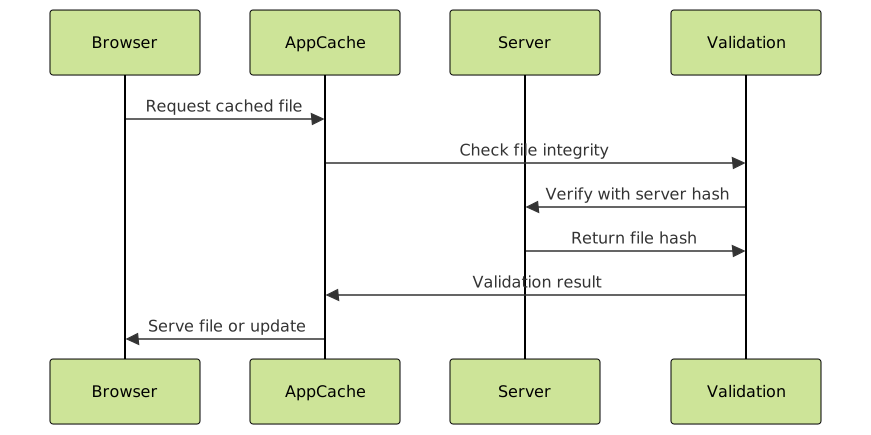
class CacheValidator {
    constructor() {
        this.checksums = new Map();
    }

    async validateCacheIntegrity() {
        const files = await getCachedFileList();
        const validationResults = [];

        for (const file of files) {
            const result = await this.validateFile(file);
            validationResults.push({
                file: file,
                isValid: result.isValid,
                checksum: result.checksum,
                error: result.error
            });
        }

        return validationResults;
    }

    async validateFile(filePath) {
        try {
            // Get cached file content
            const content = await getCachedFileContent(filePath);

            if (!content) {
                return { isValid: false, error: 'File not accessible' };
            }

            // Generate checksum for validation
            const checksum = await this.generateChecksum(content);

            // Compare with stored checksum (if available)
            const storedChecksum = this.checksums.get(filePath);

            return {
                isValid: !storedChecksum || checksum === storedChecksum,
                checksum: checksum,
                error: null
            };
        } catch (error) {
            return { isValid: false, error: error.message };
        }
    }

    async generateChecksum(content) {
        const textContent = typeof content === 'string' ? content : JSON.stringify(content);
        const encoder = new TextEncoder();
        const data = encoder.encode(textContent);
        const hashBuffer = await crypto.subtle.digest('SHA-256', data);
        const hashArray = Array.from(new Uint8Array(hashBuffer));
        return hashArray.map(b => b.toString(16).padStart(2, '0')).join('');
    }

    storeChecksum(filePath, checksum) {
        this.checksums.set(filePath, checksum);
    }

    async performIntegrityCheck() {
        console.log('Starting cache integrity check...');
        const results = await this.validateCacheIntegrity();

        const validFiles = results.filter(r => r.isValid).length;
        const invalidFiles = results.filter(r => !r.isValid);

        console.log(`Integrity Check Results:`);
        console.log(`Valid files: ${validFiles}/${results.length}`);

        if (invalidFiles.length > 0) {
            console.warn('Invalid files detected:', invalidFiles);
            return false;
        }

        return true;
    }
}

// Usage example
const validator = new CacheValidator();
validator.performIntegrityCheck().then(isValid => {
    console.log('Cache integrity:', isValid ? 'VALID' : 'INVALID');
});
Performance Optimization Strategies
Lazy Loading Cache Content
class LazyCache {
    constructor() {
        this.cache = new Map();
        this.loadingPromises = new Map();
    }

    async getContent(filePath) {
        // Return cached content if available
        if (this.cache.has(filePath)) {
            return this.cache.get(filePath);
        }

        // Return existing loading promise if file is being loaded
        if (this.loadingPromises.has(filePath)) {
            return await this.loadingPromises.get(filePath);
        }

        // Create new loading promise
        const loadingPromise = this.loadContent(filePath);
        this.loadingPromises.set(filePath, loadingPromise);

        try {
            const content = await loadingPromise;
            this.cache.set(filePath, content);
            return content;
        } finally {
            this.loadingPromises.delete(filePath);
        }
    }

    async loadContent(filePath) {
        const content = await getCachedFileContent(filePath);

        // Add metadata
        return {
            content: content,
            loadedAt: new Date(),
            filePath: filePath,
            size: this.getContentSize(content)
        };
    }

    getContentSize(content) {
        if (typeof content === 'string') {
            return new Blob([content]).size;
        } else if (content instanceof Blob) {
            return content.size;
        } else {
            return new Blob([JSON.stringify(content)]).size;
        }
    }

    clearCache() {
        this.cache.clear();
        this.loadingPromises.clear();
    }

    getCacheStats() {
        const totalSize = Array.from(this.cache.values())
            .reduce((sum, item) => sum + item.size, 0);

        return {
            itemCount: this.cache.size,
            totalSize: totalSize,
            averageSize: this.cache.size > 0 ? totalSize / this.cache.size : 0
        };
    }
}
Error Handling and Fallback Strategies

class RobustCacheManager {
    constructor() {
        this.fallbackContent = new Map();
        this.retryAttempts = 3;
        this.retryDelay = 1000;
    }

    async getContentWithFallback(filePath) {
        try {
            // Primary: Try to get from cache
            const content = await this.getCachedContentSafely(filePath);
            if (content) return content;

            // Secondary: Try network
            const networkContent = await this.getFromNetwork(filePath);
            if (networkContent) return networkContent;

            // Tertiary: Use fallback
            return this.getFallbackContent(filePath);
        } catch (error) {
            console.error(`Error accessing content for ${filePath}:`, error);
            return this.getFallbackContent(filePath);
        }
    }

    async getCachedContentSafely(filePath) {
        try {
            for (let attempt = 1; attempt <= this.retryAttempts; attempt++) {
                try {
                    const content = await getCachedFileContent(filePath);
                    if (content) return content;
                } catch (error) {
                    if (attempt === this.retryAttempts) throw error;
                    await this.delay(this.retryDelay * attempt);
                }
            }
        } catch (error) {
            console.warn(`Cache access failed for ${filePath}:`, error);
            return null;
        }
    }

    async getFromNetwork(filePath) {
        if (!navigator.onLine) return null;

        try {
            const response = await fetch(filePath, {
                cache: 'no-cache',
                headers: {
                    'Cache-Control': 'no-cache'
                }
            });

            if (response.ok) {
                return await response.text();
            }
        } catch (error) {
            console.warn(`Network request failed for ${filePath}:`, error);
        }

        return null;
    }

    getFallbackContent(filePath) {
        return this.fallbackContent.get(filePath) || ``;
    }

    setFallbackContent(filePath, content) {
        this.fallbackContent.set(filePath, content);
    }

    delay(ms) {
        return new Promise(resolve => setTimeout(resolve, ms));
    }

    async preloadCriticalResources(criticalFiles) {
        const loadPromises = criticalFiles.map(file =>
            this.getContentWithFallback(file)
        );

        try {
            await Promise.all(loadPromises);
            console.log('Critical resources preloaded successfully');
        } catch (error) {
            console.error('Error preloading critical resources:', error);
        }
    }
}

// Initialize robust cache manager
const robustCache = new RobustCacheManager();

// Set fallback content for critical files
robustCache.setFallbackContent('styles/main.css', '/* Fallback styles */');
robustCache.setFallbackContent('scripts/app.js', '/* Fallback script */');

// Preload critical resources
robustCache.preloadCriticalResources(['index.html', 'styles/main.css', 'scripts/app.js']);
Migration Path to Modern Solutions

While working with AppCache content programmatically, consider planning migration to Service Workers:
// Migration utility to transition from AppCache to Service Workers
class CacheMigrationHelper {
    constructor() {
        this.legacyFiles = [];
        this.migrationStatus = 'pending';
    }

    async analyzeLegacyCache() {
        if (!window.applicationCache) {
            console.log('No AppCache to migrate');
            return [];
        }

        const files = await getCachedFileList();
        this.legacyFiles = files;

        return files.map(file => ({
            path: file,
            type: this.getFileType(file),
            migrationStrategy: this.getMigrationStrategy(file)
        }));
    }

    getFileType(filePath) {
        const extension = filePath.split('.').pop().toLowerCase();
        const typeMap = {
            'html': 'document',
            'css': 'stylesheet',
            'js': 'script',
            'json': 'data',
            'png': 'image',
            'jpg': 'image',
            'jpeg': 'image'
        };

        return typeMap[extension] || 'other';
    }

    getMigrationStrategy(filePath) {
        const type = this.getFileType(filePath);

        switch (type) {
            case 'document':
                return 'cache-first';
            case 'stylesheet':
            case 'script':
                return 'stale-while-revalidate';
            case 'data':
                return 'network-first';
            case 'image':
                return 'cache-first';
            default:
                return 'network-only';
        }
    }

    generateServiceWorkerCode() {
        const analysis = this.analyzeLegacyCache();

        return `
// Generated Service Worker for AppCache migration
const CACHE_NAME = 'migrated-cache-v1';
const urlsToCache = ${JSON.stringify(this.legacyFiles, null, 2)};

self.addEventListener('install', event => {
    event.waitUntil(
        caches.open(CACHE_NAME)
            .then(cache => cache.addAll(urlsToCache))
    );
});

self.addEventListener('fetch', event => {
    // Implementation based on migration strategy
    event.respondWith(
        caches.match(event.request)
            .then(response => {
                return response || fetch(event.request);
            })
    );
});
        `;
    }
}

// Usage for migration planning
const migrationHelper = new CacheMigrationHelper();
migrationHelper.analyzeLegacyCache().then(analysis => {
    console.log('Migration analysis:', analysis);
    console.log('Generated SW code:', migrationHelper.generateServiceWorkerCode());
});
Best Practices and Security Considerations
Security Guidelines:
- Validate all cached content before use to prevent XSS attacks
- Implement content integrity checks using checksums or hashes
- Sanitize user-generated content before caching
- Use HTTPS for all cached resources to prevent man-in-the-middle attacks
- Regularly audit cached files for unauthorized modifications
Performance Optimization:
- Minimize cache size by excluding unnecessary files
- Implement lazy loading for non-critical cached resources
- Use compression for text-based cached files
- Monitor cache hit rates and optimize accordingly
- Implement intelligent prefetching based on user behavior
HTML5 AppCache file content access requires careful consideration of browser limitations, security implications, and performance characteristics. While the technology is deprecated, understanding these concepts provides valuable insights for modern web development and helps in maintaining existing applications while planning migrations to current standards like Service Workers and the Cache API.
The techniques demonstrated in this guide offer comprehensive approaches to programmatically managing cached content, from basic access patterns to advanced validation and migration strategies. Remember to always implement proper error handling and fallback mechanisms to ensure robust offline functionality.





