
Reloading a web page is a fundamental task in web development that can be used to refresh content, reset application state, or re-fetch data from the server. This tutorial will cover how to reload a page using JavaScript with detailed explanations, clear examples, and practical usage tips. By the end, you will understand different methods to reload a page and when to use each effectively in your web projects.
Why Reload a Page Using JavaScript?
Sometimes you want to programmatically refresh a user’s browser window without requiring manual intervention. Common reasons include:
- Refreshing dynamic content after an update or form submission
- Resetting application state in single-page applications
- Ensuring the latest content is loaded from the server, not cache
- Handling error recovery or redirecting users after actions
JavaScript gives developers the power to control page reloads as part of user interaction or automated processes.
JavaScript Methods to Reload a Page
There are several ways in JavaScript to reload a page, each slightly different in behavior:
| Method | Description | Example |
|---|---|---|
location.reload() |
Reloads the current page from cache or server, depending on parameter. | location.reload(); |
location.reload(true) |
Forces a reload from the server, bypassing cache. (Deprecated in some browsers) | location.reload(true); |
location.href = location.href; |
Assigns current URL to location, causing reload. | location.href = location.href; |
window.location.assign(window.location.href) |
Reloads by reassigning the current URL; similar to previous. | window.location.assign(window.location.href); |
window.location.replace(window.location.href) |
Reloads page without creating a new entry in browser history. | window.location.replace(window.location.href); |
Reload with location.reload()
The most common and recommended way to reload a page in JavaScript is using location.reload(). It reloads the current document. When called without any parameters, the browser may reload from cache or server depending on its cache rules.
function reloadPage() {
  location.reload();
}
Force Reload to Bypass Cache
You can pass true to location.reload(true) to force the browser to reload the page from the server, ignoring the browser cache. Note this parameter is deprecated in some browsers but still works widely.
// This forces the page to re-fetch from the server.
location.reload(true);
Reload by Reassigning Location
Another way to refresh the page is reassigning location.href to itself or using window.location.assign(). This triggers a page load like navigating to the page URL again.
window.location.href = window.location.href;

// or equivalently

window.location.assign(window.location.href);
Replacing Page without History Entry
To reload a page without adding a new entry to the browser history (so back button won’t go to the reloaded page), use window.location.replace():
window.location.replace(window.location.href);
Practical Examples
Reload After Button Click
Here’s an interactive example that reloads the page when a button is clicked:
<button id="reloadBtn">Reload Page</button>

<script>
document.getElementById('reloadBtn').addEventListener('click', function() {
  location.reload();
});
</script>
Automatic Reload After Delay
You can also reload a page automatically after a time delay using setTimeout:
setTimeout(function() {
  location.reload();
}, 5000); // Reload after 5 seconds
This is useful for auto-refreshing dashboards or live content.
Conditional Reload
Sometimes reloads depend on state or conditions, for example:
if (confirm("Do you want to refresh the page?")) {
  location.reload();
}
When to Use Each Reload Method?
location.reload(): Use for most reload needs, simple and widely supported.location.reload(true): When you want to ensure fresh data beyond browser cache (use cautiously due to deprecation).location.href = location.hreforassign(): Alternate approach, behaves like navigating to the page again.location.replace(): When you want to reload without adding extra history record, helpful for single-page apps or redirect scenarios.
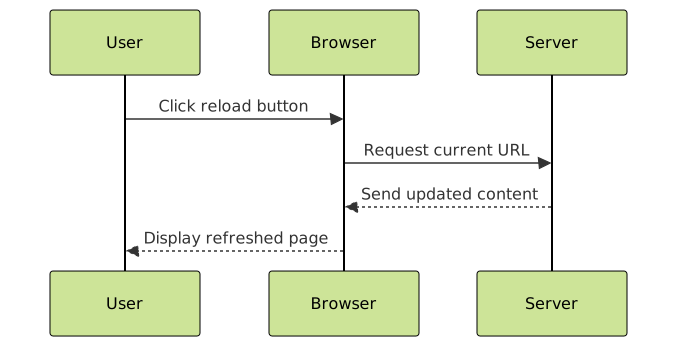
Best Practices for Reloading Pages
- Avoid excessive or automatic reloads that can disrupt user experience.
- Use reloads to update content only when necessary or on user demand.
- For single-page applications, consider state management instead of full reloads.
- Use
location.replace()for reloads that should not create history clutter. - Test reload functionality across browsers to ensure compatibility.
Summary
Reloading a page using JavaScript is straightforward and can be done with various methods tailored to your specific needs. The location.reload() method is the most common way to refresh the page, optionally forcing a full server reload. Alternate options like reassigning location.href or using location.replace() provide additional control over browser history and reload behavior. Using these techniques effectively enhances the interactivity and responsiveness of your web applications.





