
The freshclam command is an essential tool for maintaining up-to-date virus definitions in ClamAV, the popular open-source antivirus engine for Linux systems. This command ensures your system stays protected against the latest malware threats by downloading and installing the most recent virus signature databases.
What is freshclam?
freshclam is the automatic database update tool that comes bundled with ClamAV. It connects to ClamAV’s official mirrors to download updated virus definitions, ensuring your antivirus scanner can detect the latest threats. The tool operates as both a command-line utility and a daemon service.
Basic Syntax
freshclam [OPTIONS]The simplest way to use freshclam is without any options:
sudo freshclamInstallation and Prerequisites
Before using freshclam, ensure ClamAV is installed on your system:
Ubuntu/Debian:
sudo apt update
sudo apt install clamav clamav-daemon
CentOS/RHEL/Fedora:
sudo yum install clamav clamav-update
# or for newer versions
sudo dnf install clamav clamav-update
Essential freshclam Options
| Option | Description |
|---|---|
-v, --verbose |
Enable verbose output |
-d, --daemon |
Run as daemon |
-c, --config-file |
Specify configuration file |
--check |
Check for updates without downloading |
--datadir |
Specify database directory |
--log |
Specify log file |
Practical Examples
Example 1: Basic Database Update
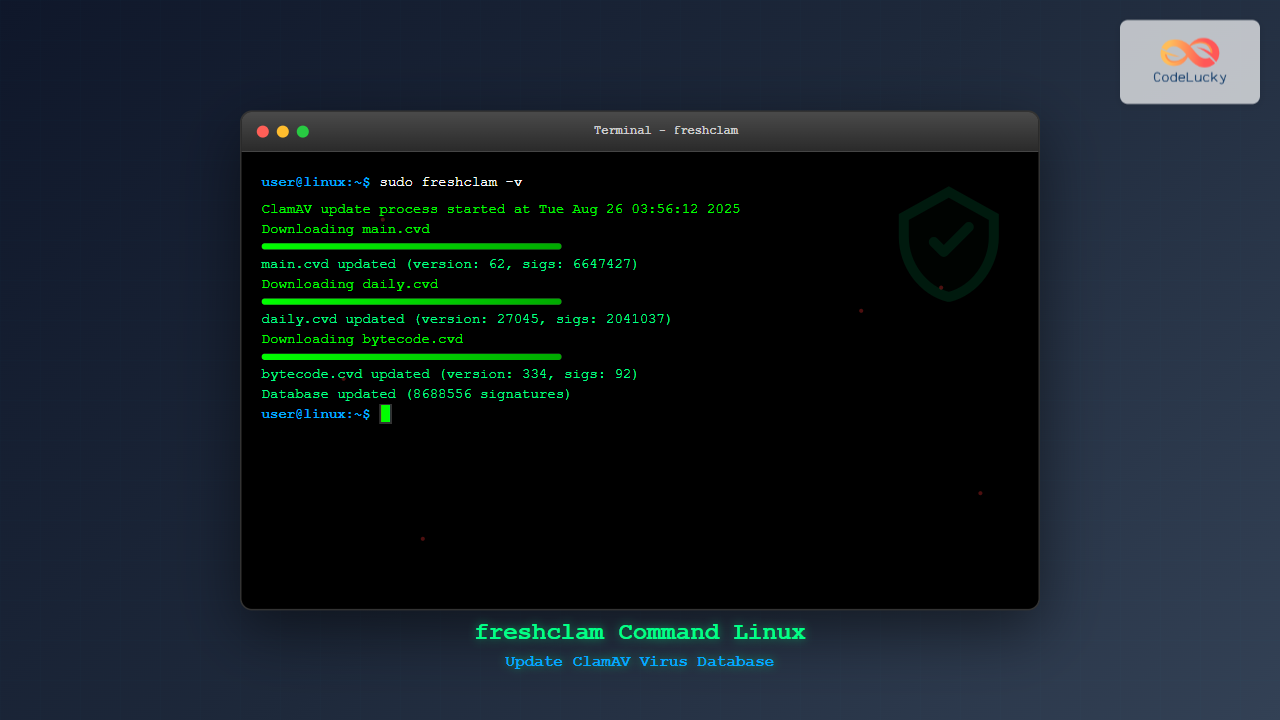
Update the ClamAV virus database with verbose output:
sudo freshclam -vExpected Output:
ClamAV update process started at Tue Aug 26 03:55:12 2025
Downloading main.cvd [100%]
main.cvd updated (version: 62, sigs: 6647427, f-level: 90, builder: sigmgr)
Downloading daily.cvd [100%]
daily.cvd updated (version: 27045, sigs: 2041037, f-level: 90, builder: raynman)
Downloading bytecode.cvd [100%]
bytecode.cvd updated (version: 334, sigs: 92, f-level: 63, builder: anvilleg)
Database updated (8688556 signatures) from db.local.clamav.net
Example 2: Check for Updates Only
Check if updates are available without downloading:
sudo freshclam --checkExpected Output:
Current database version: main-62, daily-27045, bytecode-334
Available update: daily-27046
Database update available
Example 3: Run as Daemon
Start freshclam as a background daemon for automatic updates:
sudo freshclam -dThis runs freshclam continuously, checking for updates at regular intervals defined in the configuration file.
Example 4: Custom Configuration File
Use a custom configuration file:
sudo freshclam -c /etc/clamav/custom-freshclam.conf -vExample 5: Specify Database Directory
Update databases in a custom directory:
sudo freshclam --datadir=/custom/path/to/db -vConfiguration File
The main configuration file for freshclam is typically located at:
/etc/clamav/freshclam.conf(Debian/Ubuntu)/etc/freshclam.conf(CentOS/RHEL)
Key Configuration Options:
# Database update frequency (in hours)
Checks 24

# Database mirror
DatabaseMirror db.local.clamav.net

# Log file location
UpdateLogFile /var/log/clamav/freshclam.log

# Enable logging time
LogTime yes

# Maximum number of attempts
MaxAttempts 3
Setting Up Automatic Updates
Method 1: Using Cron
Create a cron job for regular updates:
sudo crontab -eAdd the following line to update every 4 hours:
0 */4 * * * /usr/bin/freshclam --quietMethod 2: Using systemd Service
Enable and start the freshclam daemon service:
sudo systemctl enable clamav-freshclam
sudo systemctl start clamav-freshclam
Check service status:
sudo systemctl status clamav-freshclamMonitoring freshclam Activity
View Log Files
sudo tail -f /var/log/clamav/freshclam.logCheck Database Information
sigtool --info /var/lib/clamav/main.cvdExpected Output:
File: /var/lib/clamav/main.cvd
Build time: 26 Aug 2025 01-23 +0000
Version: 62
Signatures: 6647427
Functionality level: 90
Builder: sigmgr
MD5: 8b71c5e8e4d2a1f9c3e7b2d4a6f8e1c9
Troubleshooting Common Issues
Permission Denied Error
Problem: Error updating database due to permissions
Solution:
sudo chown clamav:clamav /var/lib/clamav/
sudo chmod 755 /var/lib/clamav/
Network Connection Issues
Problem: Cannot connect to update servers
Solution: Check network connectivity and configure proxy if needed:
# Add to freshclam.conf
HTTPProxyServer your-proxy-server
HTTPProxyPort 8080
Mirror Selection
Problem: Slow or unreliable mirror
Solution: Use a different mirror in configuration:
DatabaseMirror db.us.clamav.net
DatabaseMirror db.eu.clamav.net
Advanced Usage
Creating Update Scripts
Create a comprehensive update script:
#!/bin/bash
LOG_FILE="/var/log/clamav/update.log"
DATE=$(date '+%Y-%m-%d %H:%M:%S')

echo "[$DATE] Starting ClamAV database update" >> $LOG_FILE

if /usr/bin/freshclam --verbose >> $LOG_FILE 2>&1; then
    echo "[$DATE] Database update successful" >> $LOG_FILE
    # Restart ClamAV daemon if running
    systemctl is-active --quiet clamav-daemon && systemctl restart clamav-daemon
else
    echo "[$DATE] Database update failed" >> $LOG_FILE
    exit 1
fi
Monitoring Database Freshness
Check when databases were last updated:
stat /var/lib/clamav/*.cvd | grep ModifySecurity Best Practices
- Regular Updates: Keep databases updated at least daily
- Secure Configuration: Protect configuration files from unauthorized access
- Log Monitoring: Regularly check update logs for errors
- Backup Strategy: Maintain backups of database files
- Network Security: Use secure connections when possible
Integration with System Monitoring
Monitor freshclam with system monitoring tools by checking exit codes:
freshclam --quiet
if [ $? -eq 0 ]; then
    echo "Update successful"
else
    echo "Update failed" | mail -s "ClamAV Update Alert" [email protected]
fi
Conclusion
The freshclam command is crucial for maintaining an effective ClamAV antivirus system. Regular database updates ensure your Linux system stays protected against emerging threats. By properly configuring automated updates and monitoring the process, you can maintain a robust security posture with minimal manual intervention.
Remember to regularly check logs, monitor update frequency, and ensure your configuration aligns with your security requirements. With proper setup and maintenance, freshclam will keep your ClamAV installation current and effective against malware threats.
Related Posts
ClamAV Command Linux: Complete Antivirus Scanner Guide for System Security
ClamAV (Clam AntiVirus) is a powerful, open-source antivirus engine designed specifically for Unix-like systems, including Linux. As one of the...

updatedb Command Linux: Complete Guide to Update Locate Database
The updatedb command is a crucial system utility in Linux that updates the database used by the locate command for...
wipe Command Linux: Complete Guide to Secure File Deletion and Data Wiping
The wipe command in Linux is a powerful utility designed for secure file deletion that goes far beyond the standard...
chkrootkit Command Linux: Complete Guide to Rootkit Detection and System Security
System security is paramount in Linux administration, and rootkits pose one of the most serious threats to system integrity. The...
tiger Command Linux: Complete Security Audit and Intrusion Detection Guide
The tiger command is a powerful security auditing tool designed specifically for Unix-like systems, including Linux distributions. This comprehensive security...
aide Command Linux: Complete Guide to Advanced Intrusion Detection Environment
The AIDE (Advanced Intrusion Detection Environment) command is a powerful security tool for Linux systems that monitors file and directory...

rc-update Command Linux: Complete Guide to Managing OpenRC Services
The rc-update command is a powerful utility in Linux systems that use OpenRC as their init system, primarily found in...

mlocate Command Linux: Complete Guide to Secure File Search and Database Management
The mlocate command is a powerful and secure implementation of the traditional locate utility in Linux systems. Unlike its predecessor,...
lynis Command Linux: Complete Security Auditing Tool Guide
The lynis command is a powerful, open-source security auditing tool designed specifically for Unix-based systems including Linux, macOS, and BSD....
rkhunter Command Linux: Complete Guide to Rootkit Detection and System Security
The rkhunter (Rootkit Hunter) is a powerful Unix-based security scanner designed to detect rootkits, backdoors, and local exploits on Linux...
chkconfig Command Linux: Complete Guide to System Service Management
The chkconfig command is a powerful system administration tool in Red Hat-based Linux distributions that allows you to configure system...
vim Command Linux: Master the Ultimate Text Editor with Advanced Techniques
The vim command is one of the most powerful and versatile text editors available in Linux systems. Originally created as...





