
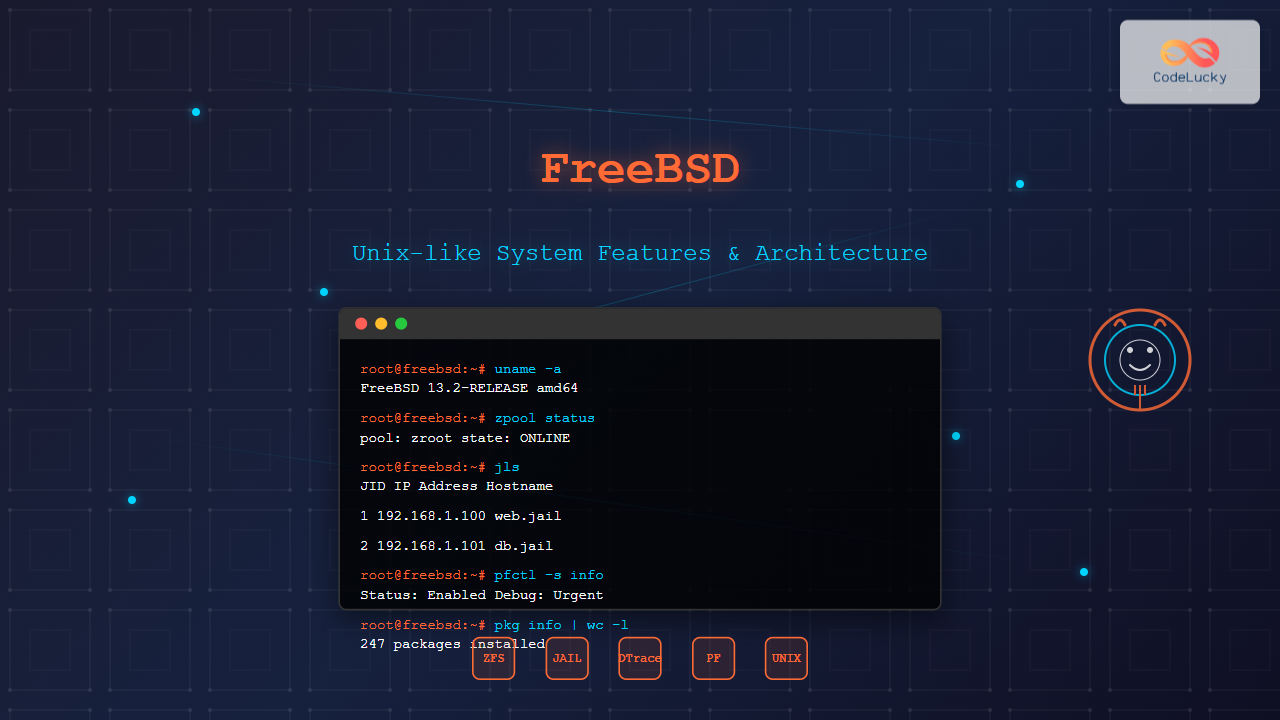
FreeBSD stands as one of the most robust and mature Unix-like operating systems available today, offering exceptional performance, security, and reliability. Derived from Berkeley Software Distribution (BSD), FreeBSD has evolved into a sophisticated platform that powers millions of servers, embedded systems, and desktop computers worldwide.
What is FreeBSD?
FreeBSD is a free and open-source Unix-like operating system descended from the Berkeley Software Distribution (BSD), which was based on Research Unix. Unlike Linux, which is just a kernel, FreeBSD provides a complete operating system including kernel, device drivers, userland utilities, and documentation as a cohesive package.

Core Architecture and Design Philosophy
FreeBSD follows a monolithic kernel design with modular components that can be loaded and unloaded dynamically. The system emphasizes:
- Security by Design: Built-in security features from the ground up
- Performance Optimization: Highly optimized for server and network workloads
- Code Quality: Rigorous code review and testing processes
- Documentation Excellence: Comprehensive and well-maintained documentation
Kernel Architecture

Advanced File System Features
FreeBSD supports multiple advanced file systems, with ZFS (Zettabyte File System) being one of its standout features.
ZFS Integration
ZFS provides enterprise-level features including:
- Data Integrity: Checksums for all data and metadata
- Snapshots: Instant, space-efficient snapshots
- Compression: Built-in transparent compression
- RAID-Z: Software RAID with parity protection
Creating a ZFS Pool Example
# Create a ZFS pool named 'storage' with two disks
zpool create storage /dev/da1 /dev/da2

# Create a ZFS dataset with compression
zfs create -o compression=lz4 storage/data

# Create a snapshot
zfs snapshot storage/data@backup-2025-08-28

# List ZFS filesystems
zfs list
Expected Output:
NAME            USED  AVAIL     REFER  MOUNTPOINT
storage         142K  1.81T       96K  /storage
storage/data     96K  1.81T       96K  /storage/data
UFS (Unix File System)
FreeBSD’s traditional UFS file system offers:
- Soft Updates: Maintains file system consistency
- Background fsck: File system checking without downtime
- Journaling: SUJ (Soft Updates Journaling) for faster recovery
Network Stack and Security Features
FreeBSD’s network stack is renowned for its performance and includes advanced features:
Packet Filter (pf)
FreeBSD includes pf, a sophisticated packet filtering system:
# Basic pf configuration (/etc/pf.conf)
ext_if = "em0"
int_if = "em1"

# Block all by default
block all

# Allow loopback
pass on lo0

# Allow outbound traffic
pass out on $ext_if from any to any

# Allow SSH inbound
pass in on $ext_if proto tcp to port 22

# Enable pf
pfctl -ef /etc/pf.conf
Network Performance Features
- TCP BBR: Advanced congestion control
- LAGG: Link aggregation and failover
- VLAN Support: 802.1Q VLAN tagging
- Netgraph: Modular networking framework

Process Management and Scheduling
FreeBSD implements an advanced process scheduler with several key features:
ULE Scheduler
The ULE (Unix Low-latency Environment) scheduler provides:
- SMP Scaling: Efficient multi-processor support
- Load Balancing: Automatic load distribution across CPUs
- Priority Inheritance: Prevents priority inversion
- Real-time Support: Real-time scheduling capabilities
Process Management Commands
# View detailed process information
ps auxww

# Monitor system processes with top
top -SH

# View process tree
pstree

# Set process priority
nice -n 10 command
renice +5 -p 1234
Sample top output:
PID USERNAME    THR PRI NICE   SIZE    RES STATE   C   TIME   CPU COMMAND
1234 root         1  20    0  12345K  5678K sleep   0   0:05  0.00% sshd
5678 user         1  20    0  67890K 12345K run     1   1:23  5.67% firefox
Jails: Operating System-level Virtualization
FreeBSD Jails provide lightweight virtualization and security isolation:
Creating and Managing Jails
# Create jail directory structure
mkdir -p /usr/jails/webserver

# Extract base system to jail
tar -xf /usr/freebsd-dist/base.txz -C /usr/jails/webserver/

# Configure jail in /etc/jail.conf
webserver {
    host.hostname = "web.example.com";
    ip4.addr = "192.168.1.100";
    path = "/usr/jails/webserver";
    exec.start = "/bin/sh /etc/rc";
    exec.stop = "/bin/sh /etc/rc.shutdown";
    mount.devfs;
}

# Start the jail
jail -c webserver

# List running jails
jls

Package Management: Ports and pkg
FreeBSD offers two primary methods for software installation:
Binary Package System (pkg)
# Update package repository
pkg update

# Search for packages
pkg search apache

# Install packages
pkg install apache24

# List installed packages
pkg info

# Upgrade all packages
pkg upgrade

# Remove packages
pkg delete apache24
Ports Collection
The Ports Collection provides source-based package management:
# Update ports tree
portsnap fetch update

# Navigate to port directory
cd /usr/ports/www/apache24

# Install from source with custom options
make config
make install clean

# Search ports
make search name=apache

# Show port dependencies
make all-depends-list
System Monitoring and Performance Tuning
FreeBSD provides extensive monitoring and tuning capabilities:
System Statistics Commands
# System load and performance
vmstat 1
iostat -x 1

# Network statistics
netstat -i
sockstat -4l

# Memory usage
fstat
swapinfo

# System configuration
sysctl -a | grep vm.
Performance Tuning Examples
# Kernel tuning in /boot/loader.conf
kern.ipc.shmmni=256
kern.ipc.semmni=256
net.inet.tcp.sendspace=65536
net.inet.tcp.recvspace=65536

# Runtime tuning with sysctl
sysctl net.inet.tcp.cc.algorithm=bbr
sysctl kern.ipc.maxsockbuf=16777216
Boot Process and System Initialization
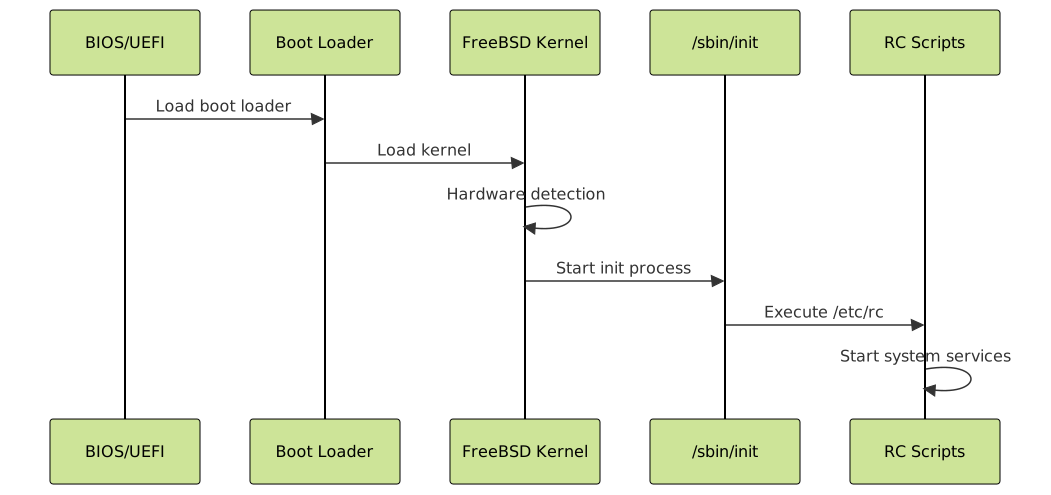
FreeBSD’s boot process is highly configurable through various files:
- /boot/loader.conf: Kernel modules and parameters
- /etc/rc.conf: System configuration
- /etc/rc.local: Local startup scripts
Boot Configuration Example
# /etc/rc.conf
hostname="freebsd.example.com"
ifconfig_em0="inet 192.168.1.10 netmask 255.255.255.0"
defaultrouter="192.168.1.1"
sshd_enable="YES"
zfs_enable="YES"
jail_enable="YES"
Advanced Security Features
MAC Framework (Mandatory Access Controls)
FreeBSD includes a comprehensive MAC framework for fine-grained security policies:
- mac_bsdextended: Extended file permissions
- mac_partition: Process partitioning
- mac_seeotheruids: User isolation
- mac_portacl: Port access control
Capsicum Capability Mode
Capsicum provides capability-based security for applications:
# Enable Capsicum in kernel configuration
options CAPABILITY_MODE
options CAPABILITIES

# Example: Sandboxed file operations
cap_enter();  // Enter capability mode
int fd = cap_open(filename, O_RDONLY);
cap_rights_limit(fd, CAP_READ | CAP_SEEK);
Development and Debugging Tools
FreeBSD includes comprehensive development tools:
DTrace Integration
# Monitor system calls
dtrace -n 'syscall:::entry { @[execname] = count(); }'

# Track file operations
dtrace -n 'syscall::open*:entry { printf("%s opened %s\n", execname, copyinstr(arg0)); }'

# Monitor network connections
dtrace -n 'tcp:::connect-request { printf("Connection from %s to %s\n", args[2]->ip_saddr, args[2]->ip_daddr); }'
Kernel Debugging
# Build debug kernel
make -j$(sysctl -n hw.ncpu) buildworld
make -j$(sysctl -n hw.ncpu) buildkernel KERNCONF=DEBUG

# Enable crash dumps
dumpon /dev/da0s1b

# Analyze crash dumps
kgdb /boot/kernel/kernel /var/crash/vmcore.0
Conclusion
FreeBSD continues to set the standard for Unix-like operating systems through its commitment to performance, security, and reliability. Its advanced features like ZFS integration, Jails virtualization, comprehensive networking stack, and robust security frameworks make it an excellent choice for servers, embedded systems, and desktop environments.
The operating system’s mature codebase, excellent documentation, and active community ensure that FreeBSD remains relevant and competitive in today’s computing landscape. Whether you’re managing enterprise servers, developing embedded systems, or seeking a stable desktop platform, FreeBSD’s Unix-like features provide the foundation for robust, secure, and high-performance computing solutions.
As technology continues to evolve, FreeBSD adapts while maintaining its core principles of stability and performance, making it a trusted platform for critical infrastructure and innovative applications worldwide.





