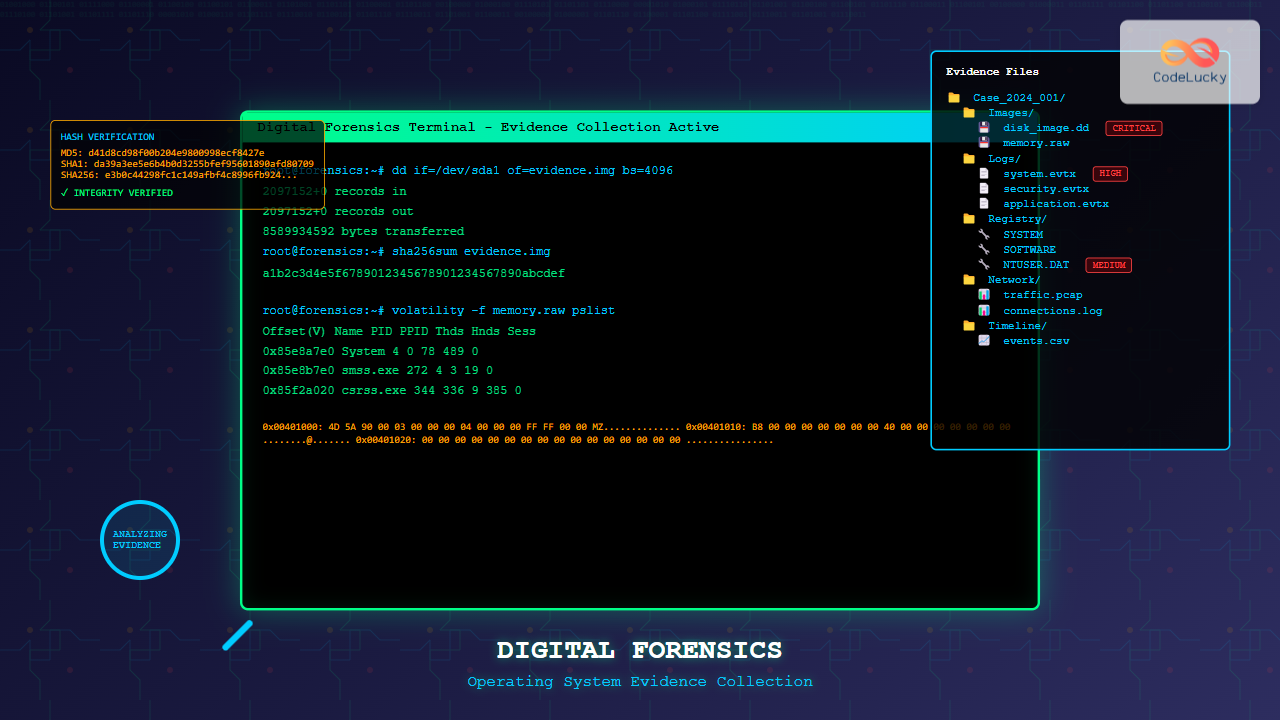
Digital forensics has become a critical discipline in modern cybersecurity and law enforcement. Operating system forensics specifically focuses on extracting, preserving, and analyzing digital evidence from computer systems. This comprehensive guide explores the fundamental concepts, methodologies, and tools used in digital evidence collection across various operating systems.
Understanding Digital Forensics in Operating Systems
Digital forensics in operating systems involves the systematic examination of computer systems to recover and analyze digital evidence. This process requires deep understanding of how operating systems store, manage, and delete data. The primary goal is to maintain the integrity of evidence while extracting maximum information for investigation purposes.

Types of Digital Evidence in Operating Systems
File System Evidence
File systems contain the most abundant source of digital evidence. Each operating system uses different file system structures that forensic investigators must understand:
- NTFS (Windows): Stores metadata in Master File Table (MFT), including timestamps, file attributes, and allocation status
- ext4 (Linux): Uses inode structures to store file metadata and journaling for transaction recovery
- APFS/HFS+ (macOS): Provides advanced features like snapshots and encryption that affect evidence collection
Registry Evidence (Windows)
The Windows Registry contains crucial system and user configuration data. Key areas for forensic examination include:
- HKEY_CURRENT_USER: User-specific settings and recently accessed files
- HKEY_LOCAL_MACHINE: System-wide configuration and installed software
- HKEY_USERS: All user profiles and their associated settings
Memory Evidence
Volatile memory analysis can reveal running processes, network connections, encryption keys, and malware that may not exist on disk. Memory forensics is particularly valuable for detecting fileless malware and understanding system state at the time of incident.
Evidence Collection Methodologies
Live vs. Dead Analysis

Live Analysis
Live analysis involves examining a running system without shutting it down. This approach is crucial when:
- System uptime is critical for business operations
- Encrypted volumes are mounted and accessible
- Volatile evidence needs immediate collection
- Network connections and processes require real-time analysis
Dead Analysis
Dead analysis examines a system after shutdown, typically using forensic imaging. This method provides:
- Complete bit-for-bit copy of storage devices
- Preservation of evidence integrity
- Access to unallocated disk space
- Recovery of deleted files and file fragments
Digital Evidence Collection Process
Phase 1: Preparation and Planning
Successful forensic investigation begins with proper preparation:
- Legal Authorization: Obtain proper warrants or consent
- Tool Preparation: Verify forensic tools and write-blocking devices
- Documentation Setup: Prepare evidence logs and chain of custody forms
- Team Coordination: Assign roles and responsibilities
Phase 2: Evidence Identification and Preservation
Identify all potential sources of digital evidence:
# Example: Linux system information gathering
uname -a                    # System information
ps aux                     # Running processes
netstat -tulpn            # Network connections
lsof                      # Open files
mount                     # Mounted filesystems
df -h                     # Disk usage
Phase 3: Evidence Acquisition
Create forensically sound copies of digital evidence:
# Linux dd command for disk imaging
dd if=/dev/sda of=/media/evidence/case001_disk1.img bs=4096 conv=noerror,sync

# Calculate hash for verification
sha256sum /media/evidence/case001_disk1.img > case001_disk1.sha256

# Windows equivalent using PowerShell
Get-FileHash -Path "C:\Evidence\case001_disk1.img" -Algorithm SHA256
Operating System Specific Considerations
Windows Forensics
Windows systems provide rich sources of forensic evidence through various artifacts:
Event Logs
Windows Event Logs contain detailed system activity records:
- Security Log: Authentication attempts and security events
- System Log: Hardware and driver events
- Application Log: Software-specific events
Prefetch Files
Windows prefetch files (.pf) provide evidence of program execution:
Location: C:\Windows\Prefetch\
Contains: Program execution history, timestamps, file paths
Limitation: Typically stores last 1024 executed programs
Registry Forensics
Key registry locations for forensic evidence:
# Recent documents
HKEY_CURRENT_USER\Software\Microsoft\Windows\CurrentVersion\Explorer\RecentDocs

# USB devices
HKEY_LOCAL_MACHINE\SYSTEM\CurrentControlSet\Enum\USBSTOR

# Network drives
HKEY_CURRENT_USER\Network
Linux Forensics
Linux systems require understanding of Unix-like file structures and logging mechanisms:
Log Files
Critical log files for forensic analysis:
- /var/log/auth.log: Authentication and authorization events
- /var/log/syslog: System messages and events
- /var/log/apache2/access.log: Web server access records
- /var/log/kern.log: Kernel messages
Shell History
Command history files provide insight into user activities:
# Bash history
~/.bash_history

# Zsh history
~/.zsh_history

# Fish shell history
~/.local/share/fish/fish_history
macOS Forensics
macOS combines Unix foundations with proprietary Apple technologies:
System Logs
macOS unified logging system stores extensive system information:
# View system logs
log show --predicate 'process == "kernel"' --last 1h

# Export logs
log collect --output /tmp/system_logs.logarchive
Spotlight Database
Spotlight maintains indexed file metadata useful for forensic analysis:
Location: /.Spotlight-V100/
Contains: File metadata, content indexing, search history
Tool: mdls command to query metadata
Advanced Forensic Techniques

Memory Analysis
Memory forensics involves analyzing RAM dumps to understand system state:
# Volatility Framework examples
volatility -f memory.dmp --profile=Win10x64 pslist        # List processes
volatility -f memory.dmp --profile=Win10x64 netscan       # Network connections
volatility -f memory.dmp --profile=Win10x64 malfind       # Detect malware
volatility -f memory.dmp --profile=Win10x64 hashdump      # Extract password hashes
Data Recovery and Carving
File carving recovers files from unallocated disk space without relying on file system metadata:
# Foremost file carving tool
foremost -t all -i /dev/sda1 -o /recovery/output/

# Scalpel configuration for specific file types
scalpel -b -o /recovery/carved/ /images/evidence.dd
Timeline Analysis
Creating comprehensive timelines helps reconstruct events:
# Plaso/log2timeline for comprehensive timeline creation
log2timeline.py /tmp/timeline.plaso /evidence/image.dd

# Convert to readable format
psort.py -o dynamic /tmp/timeline.plaso > /tmp/timeline.csv
Digital Evidence Preservation and Chain of Custody
Hash Verification
Cryptographic hashing ensures evidence integrity throughout the investigation:
# Multiple hash algorithms for verification
md5sum evidence.img > evidence.md5
sha1sum evidence.img > evidence.sha1
sha256sum evidence.img > evidence.sha256

# Verify integrity later
md5sum -c evidence.md5
Documentation Requirements
Proper documentation is crucial for legal admissibility:
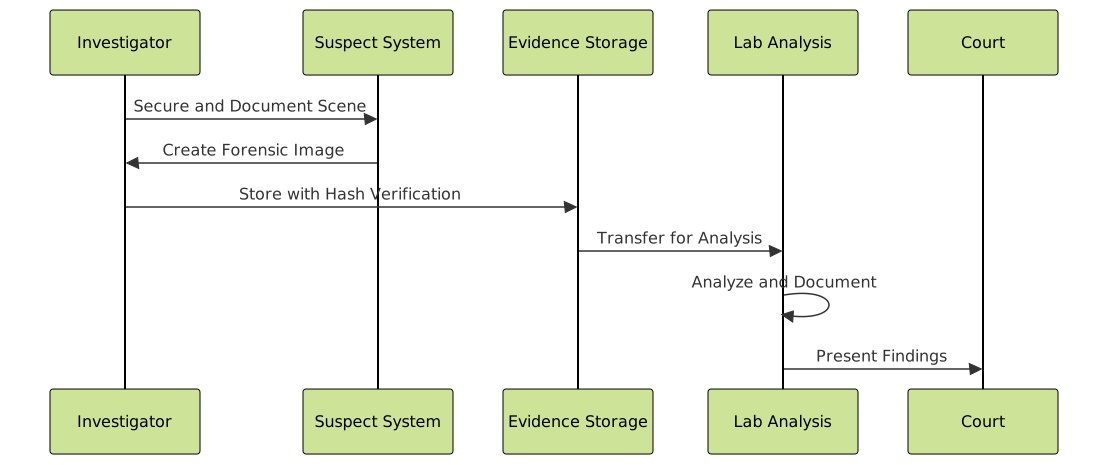
- Chain of Custody: Track evidence handling from collection to analysis
- Acquisition Log: Document imaging process and tool configurations
- Analysis Notes: Record all examination steps and findings
- Tool Verification: Verify forensic tool accuracy and reliability
Common Forensic Tools and Technologies
Commercial Tools
- EnCase: Comprehensive forensic suite with advanced analysis capabilities
- FTK (Forensic Toolkit): Full-featured forensic platform with database integration
- X-Ways Forensics: Efficient hex editor and forensic tool
- Cellebrite UFED: Mobile device forensics and extraction
Open Source Tools
- Autopsy: Graphical interface for The Sleuth Kit
- Volatility: Memory forensics framework
- SIFT Workstation: Ubuntu-based forensic distribution
- Foremost/Scalpel: File carving utilities
Command Line Utilities
# Essential Linux forensic commands
dd           # Disk imaging and copying
strings      # Extract text strings from binary files
file         # Determine file types
hexdump      # Display file contents in hexadecimal
grep         # Search text patterns
find         # Locate files and directories
stat         # Display detailed file information
Legal and Ethical Considerations
Fourth Amendment Compliance
Digital forensic investigations must comply with constitutional protections:
- Warrant Requirements: Obtain proper legal authorization
- Scope Limitations: Stay within authorized investigation boundaries
- Privilege Considerations: Respect attorney-client and other privileges
- International Jurisdictions: Understand cross-border legal implications
Industry Standards and Best Practices
- ISO/IEC 27037: Guidelines for digital evidence identification and handling
- NIST SP 800-86: Guide to integrating forensic techniques into incident response
- RFC 3227: Guidelines for evidence collection and archiving
- ACPO Guidelines: Good practice guide for digital evidence
Challenges in Modern Digital Forensics
Encryption and Security
Modern systems implement strong encryption that complicates forensic analysis:
- Full Disk Encryption: BitLocker, FileVault, and LUKS protection
- Application Encryption: End-to-end messaging and file encryption
- Hardware Security Modules: TPM and secure enclaves
- Cloud Storage: Remote data storage and encryption keys
Anti-Forensic Techniques
Sophisticated adversaries employ various anti-forensic methods:
- Secure Deletion: Overwriting data multiple times
- Steganography: Hiding data within other files
- Rootkits: Kernel-level hiding mechanisms
- Virtual Machines: Isolated environments that complicate analysis

Emerging Technologies and Future Trends
Artificial Intelligence in Forensics
AI and machine learning are transforming digital forensics:
- Automated Analysis: Pattern recognition and anomaly detection
- Image Classification: Automated categorization of recovered images
- Natural Language Processing: Text analysis and sentiment detection
- Behavioral Analysis: User behavior pattern identification
Cloud Forensics
Cloud computing presents new challenges and opportunities:
- Multi-Tenancy: Shared infrastructure complicates evidence isolation
- Virtualization: Abstract layers hide physical evidence location
- APIs and Logs: New sources of digital evidence
- Jurisdiction: Cross-border legal and technical challenges
Best Practices for Digital Evidence Collection
Pre-Investigation Preparation
- Legal Preparation: Ensure proper authorization and documentation
- Technical Preparation: Verify tools, hardware, and procedures
- Team Coordination: Brief team members on roles and procedures
- Risk Assessment: Identify potential challenges and mitigation strategies
During Investigation
- Document Everything: Photograph, log, and timestamp all activities
- Maintain Chain of Custody: Track evidence handling continuously
- Use Write Protection: Prevent modification of original evidence
- Create Multiple Copies: Working copies and archive copies
- Verify Integrity: Hash verification at each transfer
Post-Investigation
- Secure Storage: Proper evidence storage and access controls
- Detailed Reporting: Comprehensive analysis and findings documentation
- Peer Review: Independent verification of methods and conclusions
- Legal Preparation: Prepare for testimony and cross-examination
Case Study: Malware Investigation
Consider a scenario where malware is suspected on a Windows workstation. The investigation process would involve:
Initial Response
# Collect volatile information before shutdown
wmic process list full > running_processes.txt
netstat -an > network_connections.txt
ipconfig /all > network_config.txt
net session > active_sessions.txt

# Create memory dump
winpmem -o memory.raw
Disk Analysis
# Create forensic image
dd if=\\.\PhysicalDrive0 of=E:\case001\workstation.img bs=4096

# Calculate verification hash
certutil -hashfile workstation.img SHA256 > workstation.sha256
Timeline Creation
# Use log2timeline for comprehensive analysis
log2timeline.py --parsers win7 timeline.plaso workstation.img

# Filter for suspicious activity
psort.py -o l2tcsv timeline.plaso "date > '2024-01-01' AND (parser contains 'prefetch' OR parser contains 'winevtx')"
Conclusion
Digital forensics in operating systems requires a comprehensive understanding of system architecture, file structures, and investigative methodologies. Success depends on proper preparation, adherence to legal requirements, and continuous adaptation to evolving technologies. As systems become more complex and security-aware, forensic investigators must stay current with new tools, techniques, and legal precedents.
The field continues to evolve with emerging technologies like artificial intelligence, cloud computing, and IoT devices. Investigators must balance technical capabilities with legal requirements while maintaining the highest standards of evidence integrity and professional ethics. Proper training, certification, and continuous learning are essential for effective digital forensic practice.
Remember that digital forensics is both an art and a science, requiring technical expertise, attention to detail, and the ability to tell a coherent story from digital artifacts. The evidence you collect and analyze may be crucial in legal proceedings, making accuracy, thoroughness, and proper documentation paramount to successful investigations.