
Understanding Firewalls: The First Line of Defense
A firewall serves as a critical barrier between your trusted internal network and untrusted external networks like the internet. It monitors and controls incoming and outgoing network traffic based on predetermined security rules, acting as a gatekeeper that decides which data packets are allowed to pass through.
Modern firewalls operate at multiple layers of the network stack, examining packet headers, payload content, and connection states to make intelligent filtering decisions. Understanding firewall configuration is essential for network administrators and security professionals who need to protect systems from unauthorized access while maintaining legitimate network functionality.

Types of Firewalls and Their Applications
Packet Filtering Firewalls
Packet filtering firewalls examine individual packets and make decisions based on source/destination IP addresses, port numbers, and protocols. They operate at the network layer (Layer 3) and transport layer (Layer 4) of the OSI model.
Advantages:
- Fast processing with minimal latency
- Low resource consumption
- Transparent to applications
- Cost-effective solution
Limitations:
- Cannot inspect packet contents
- Vulnerable to IP spoofing attacks
- Limited application-layer protection
Stateful Inspection Firewalls
Stateful firewalls maintain connection state information, tracking the state of active connections and making decisions based on the context of traffic flow. They remember previous packets and can determine whether a packet is part of an established connection.
# Example: Linux iptables stateful rule
iptables -A INPUT -m state --state ESTABLISHED,RELATED -j ACCEPT
iptables -A INPUT -m state --state NEW -p tcp --dport 80 -j ACCEPT
Application Layer Firewalls
Application layer firewalls (also called proxy firewalls) operate at Layer 7, examining the actual content of packets and understanding application protocols like HTTP, FTP, and SMTP.

Linux Firewall Configuration with iptables
Basic iptables Structure
iptables is the standard firewall management tool for Linux systems. It uses chains of rules to process packets, with three main built-in chains: INPUT, OUTPUT, and FORWARD.
Essential iptables Commands
# View current rules
iptables -L -n -v

# Set default policies
iptables -P INPUT DROP
iptables -P FORWARD DROP
iptables -P OUTPUT ACCEPT

# Allow loopback traffic
iptables -A INPUT -i lo -j ACCEPT
iptables -A OUTPUT -o lo -j ACCEPT

# Allow established connections
iptables -A INPUT -m state --state ESTABLISHED,RELATED -j ACCEPT
Service-Specific Rules
# Allow SSH access from specific subnet
iptables -A INPUT -p tcp -s 192.168.1.0/24 --dport 22 -j ACCEPT

# Allow HTTP and HTTPS traffic
iptables -A INPUT -p tcp --dport 80 -j ACCEPT
iptables -A INPUT -p tcp --dport 443 -j ACCEPT

# Allow DNS queries
iptables -A INPUT -p udp --dport 53 -j ACCEPT
iptables -A INPUT -p tcp --dport 53 -j ACCEPT

# Block specific IP address
iptables -A INPUT -s 203.0.113.10 -j DROP
Advanced iptables Configuration
# Rate limiting for SSH to prevent brute force
iptables -A INPUT -p tcp --dport 22 -m state --state NEW -m recent --set
iptables -A INPUT -p tcp --dport 22 -m state --state NEW -m recent --update --seconds 60 --hitcount 4 -j DROP

# Log dropped packets
iptables -A INPUT -j LOG --log-prefix "DROPPED: " --log-level 4
iptables -A INPUT -j DROP

# Port forwarding example
iptables -t nat -A PREROUTING -p tcp --dport 8080 -j DNAT --to-destination 192.168.1.100:80
Making iptables Rules Persistent
To ensure firewall rules persist after reboot:
# Save current rules (Ubuntu/Debian)
iptables-save > /etc/iptables/rules.v4

# Restore rules on boot
iptables-restore < /etc/iptables/rules.v4

# Alternative: Install iptables-persistent package
apt-get install iptables-persistent
Windows Firewall Configuration
Windows Defender Firewall Management
Windows Defender Firewall provides built-in protection for Windows systems. It can be configured through the graphical interface or command-line tools.
PowerShell Configuration Examples
# Enable firewall for all profiles
Set-NetFirewallProfile -Profile Domain,Public,Private -Enabled True

# Create inbound rule for specific application
New-NetFirewallRule -DisplayName "Allow MyApp" -Direction Inbound -Program "C:\MyApp\app.exe" -Action Allow

# Allow specific port range
New-NetFirewallRule -DisplayName "Allow Port Range" -Direction Inbound -Protocol TCP -LocalPort 8000-8010 -Action Allow

# Block specific IP address
New-NetFirewallRule -DisplayName "Block Malicious IP" -Direction Inbound -RemoteAddress 203.0.113.10 -Action Block

# Allow ping (ICMP)
New-NetFirewallRule -DisplayName "Allow ICMPv4" -Direction Inbound -Protocol ICMPv4 -IcmpType 8 -Action Allow
Command Line Configuration
# Using netsh command
netsh advfirewall firewall add rule name="Web Server" dir=in action=allow protocol=TCP localport=80

# Set firewall state
netsh advfirewall set allprofiles state on

# View all rules
netsh advfirewall firewall show rule name=all

Firewall Best Practices and Security Strategies
Principle of Least Privilege
Implement the principle of least privilege by allowing only the minimum necessary network access. Start with a deny-all policy and explicitly allow required services.
Example Secure Configuration
# Secure iptables configuration template
#!/bin/bash

# Flush existing rules
iptables -F
iptables -X
iptables -t nat -F
iptables -t nat -X

# Set default policies to DROP
iptables -P INPUT DROP
iptables -P FORWARD DROP
iptables -P OUTPUT DROP

# Allow loopback
iptables -A INPUT -i lo -j ACCEPT
iptables -A OUTPUT -o lo -j ACCEPT

# Allow established connections
iptables -A INPUT -m state --state ESTABLISHED,RELATED -j ACCEPT
iptables -A OUTPUT -m state --state NEW,ESTABLISHED,RELATED -j ACCEPT

# Allow SSH from management network only
iptables -A INPUT -p tcp -s 10.0.0.0/8 --dport 22 -m state --state NEW -j ACCEPT

# Allow web traffic
iptables -A INPUT -p tcp --dport 80 -m state --state NEW -j ACCEPT
iptables -A INPUT -p tcp --dport 443 -m state --state NEW -j ACCEPT

# Log denied packets
iptables -A INPUT -m limit --limit 5/min -j LOG --log-prefix "DENIED INPUT: "
iptables -A FORWARD -m limit --limit 5/min -j LOG --log-prefix "DENIED FORWARD: "
Network Segmentation
Network segmentation involves dividing your network into smaller, isolated segments to limit the spread of potential security breaches.

Regular Monitoring and Maintenance
Effective firewall management requires continuous monitoring and regular maintenance:
- Log Analysis: Regularly review firewall logs for suspicious activity
- Rule Auditing: Periodically review and clean up unnecessary rules
- Performance Monitoring: Ensure firewall performance doesn’t impact network speed
- Update Management: Keep firewall software and rule sets current
Log Analysis Example
# Analyze iptables logs
tail -f /var/log/messages | grep "DENIED"

# Count blocked connection attempts by source IP
grep "DENIED" /var/log/messages | awk '{print $9}' | sort | uniq -c | sort -nr

# Monitor firewall performance
iptables -L -n -v --line-numbers
Advanced Firewall Configurations
Deep Packet Inspection (DPI)
Deep Packet Inspection examines packet contents beyond headers, enabling detection of malicious content, protocol violations, and application-specific threats.
Snort Integration Example
# Configure iptables to send packets to Snort
iptables -A INPUT -j NFQUEUE --queue-num 0

# Snort rule example
alert tcp any any -> 192.168.1.0/24 80 (msg:"Possible SQL Injection"; content:"SELECT"; nocase; sid:1000001;)
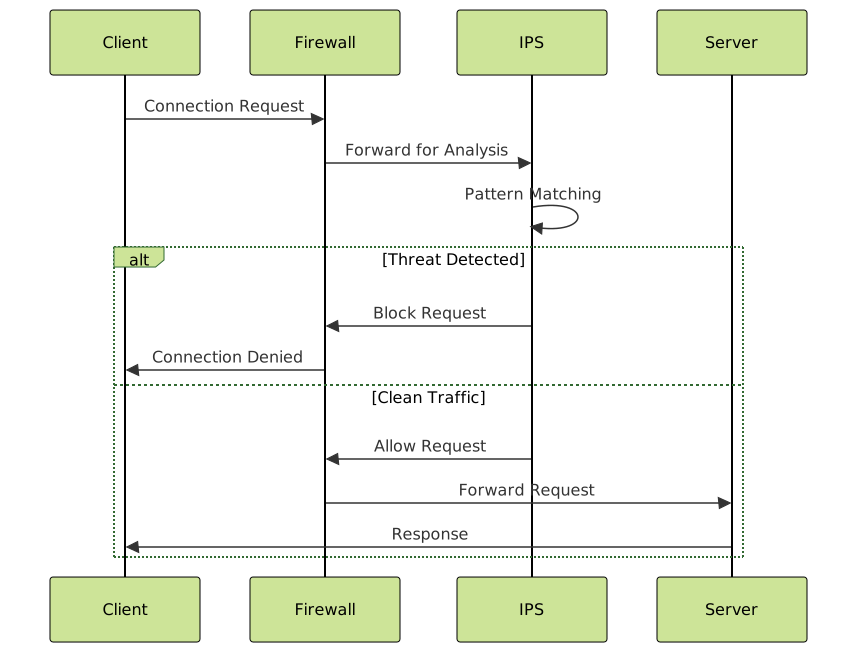
Intrusion Prevention System (IPS) Integration
Combining firewalls with Intrusion Prevention Systems provides comprehensive network protection by automatically blocking detected threats.
Troubleshooting Common Firewall Issues
Connectivity Problems
When network connectivity issues arise, systematic troubleshooting helps identify firewall-related problems:
# Test connectivity
ping 8.8.8.8
telnet target-server 80
nmap -p 80,443 target-server

# Check iptables rules
iptables -L -n -v | grep target-port
iptables -t nat -L -n -v

# Temporary rule testing
iptables -I INPUT 1 -p tcp --dport 80 -j LOG --log-prefix "TEST: "
Performance Optimization
Firewall performance can impact network speed. Optimization strategies include:
- Rule Ordering: Place frequently matched rules at the top
- Rule Consolidation: Combine similar rules to reduce processing overhead
- Hardware Acceleration: Use dedicated firewall hardware for high-traffic environments
Compliance and Documentation
Proper firewall documentation is essential for compliance with security standards like PCI DSS, HIPAA, and SOX. Maintain detailed records of:
- Firewall rule configurations and their business justifications
- Change management procedures and approval processes
- Regular security assessments and penetration testing results
- Incident response procedures and lessons learned
Configuration Backup and Recovery
# Backup iptables configuration
iptables-save > /backup/iptables-$(date +%Y%m%d).rules

# Automated backup script
#!/bin/bash
BACKUP_DIR="/backup/firewall"
DATE=$(date +%Y%m%d-%H%M%S)
mkdir -p $BACKUP_DIR
iptables-save > $BACKUP_DIR/iptables-$DATE.rules
find $BACKUP_DIR -name "iptables-*.rules" -mtime +30 -delete
Effective firewall configuration requires a deep understanding of network protocols, security principles, and organizational requirements. By implementing comprehensive firewall policies, maintaining regular monitoring practices, and following security best practices, administrators can create robust network defenses that protect against evolving cyber threats while enabling legitimate business operations.
Remember that firewall configuration is not a one-time task but an ongoing process that requires continuous attention, regular updates, and adaptation to changing security landscapes. The combination of proper planning, implementation, and maintenance ensures that your firewall serves as an effective guardian of your network infrastructure.





