
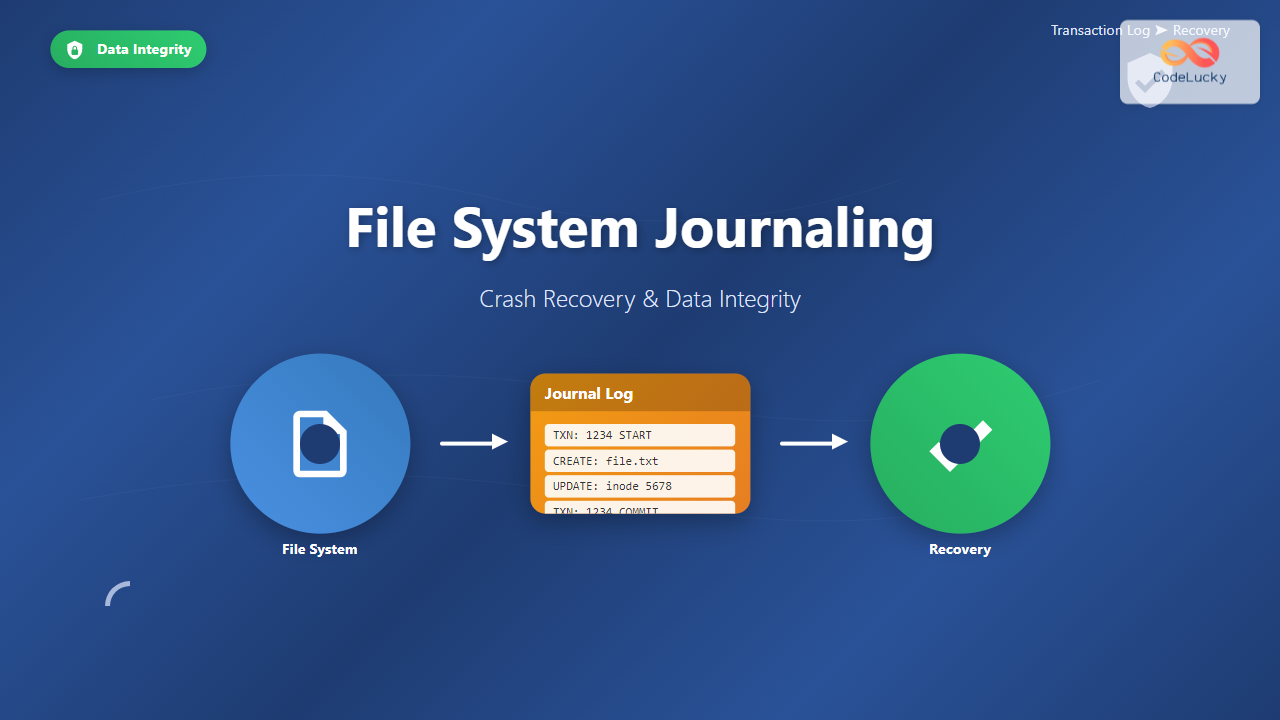
Understanding File System Journaling
File system journaling is a critical mechanism that ensures data integrity and enables rapid crash recovery in modern operating systems. When your computer suddenly loses power or crashes during a file operation, journaling prevents data corruption by maintaining a detailed log of all file system changes before they’re actually applied to disk.
Think of journaling as a transaction log for your file system – similar to how databases maintain transaction logs to ensure ACID properties. Before any metadata changes occur on disk, the file system first writes these changes to a special area called the journal or log.

Types of Journaling
File systems implement different levels of journaling based on performance requirements and data protection needs:
Metadata-Only Journaling
Metadata journaling logs only file system structural information such as directory entries, inode updates, and allocation bitmaps. This approach provides faster performance since actual file data isn’t journaled, but offers limited protection against data corruption.
// Example: ext4 metadata journaling
mount /dev/sda1 /mnt/data -o data=ordered
Full Data Journaling
Full journaling logs both metadata and actual file content changes. While this provides maximum data protection, it significantly impacts performance due to the overhead of writing data twice – once to the journal and once to the final location.
// Example: ext4 full journaling
mount /dev/sda1 /mnt/data -o data=journal
Ordered Journaling
Ordered journaling represents a compromise between performance and safety. Metadata changes are journaled, but data writes are ordered to occur before the corresponding metadata changes are committed to the journal.
// Example: ext4 ordered mode (default)
mount /dev/sda1 /mnt/data -o data=ordered
Journal Structure and Implementation
A typical journal consists of several key components that work together to ensure transaction atomicity:

Journal Superblock
The journal superblock contains essential information about the journal layout, including:
- Journal size and block size
- Sequence numbers for transaction tracking
- Head and tail pointers for circular buffer management
- Feature flags and compatibility information
// Examining ext4 journal superblock
tune2fs -l /dev/sda1 | grep -i journal

# Output example:
# Filesystem features: has_journal ext_attr resize_inode dir_index
# Journal size: 128M
# Journal length: 32768
# Journal sequence: 0x0000001a
Transaction Management
Each transaction in the journal follows a strict protocol:
- Transaction Start: Allocate transaction ID and journal space
- Write Phase: Log all changes to descriptor and data blocks
- Commit Phase: Write commit block to make transaction durable
- Checkpoint Phase: Apply changes to main file system
- Cleanup Phase: Mark journal space as reusable
Crash Recovery Process
When a system recovers from an unexpected shutdown, the file system performs a systematic recovery process:

Recovery Example with ext4
Let’s examine how ext4 handles recovery after a system crash:
# Force an ext4 file system check
fsck.ext4 -f /dev/sda1

# Output during recovery:
# e2fsck 1.46.2 (28-Feb-2021)
# Pass 1: Checking inodes, blocks, and sizes
# Pass 2: Checking directory structure
# Pass 3: Checking directory connectivity
# Pass 4: Checking reference counts
# Pass 5: Checking group summary information
# /dev/sda1: recovering journal
# /dev/sda1: clean, 45123/655360 files, 234567/2621440 blocks
Journal Replay Process
During recovery, the file system kernel module performs these steps:
// Kernel log messages during ext4 recovery
dmesg | grep -i "ext4\|journal"

# Example output:
# [    2.456] EXT4-fs (sda1): mounted filesystem with ordered data mode
# [    2.458] JBD2: recovery started, transaction 1234
# [    2.462] JBD2: replaying transaction 1234
# [    2.465] JBD2: recovery complete, 15 transactions replayed
# [    2.467] EXT4-fs (sda1): recovery complete
Performance Considerations
Journaling introduces performance overhead that varies based on the journaling mode and workload characteristics:
Write Amplification
Write amplification occurs because data must be written multiple times – first to the journal, then to the final location. This is particularly noticeable in full journaling mode:
# Benchmark different journaling modes
# Metadata journaling
echo 3 > /proc/sys/vm/drop_caches
time dd if=/dev/zero of=/mnt/test_meta bs=1M count=1000 oflag=sync

# Full journaling
mount -o remount,data=journal /mnt/data
echo 3 > /proc/sys/vm/drop_caches
time dd if=/dev/zero of=/mnt/test_full bs=1M count=1000 oflag=sync
Journal Size Optimization
Journal size directly impacts both performance and recovery time. Larger journals can buffer more transactions but require more recovery time:
# Create ext4 with custom journal size
mkfs.ext4 -J size=256 /dev/sda1  # 256MB journal

# Tune existing journal size
tune2fs -J size=128 /dev/sda1    # Resize to 128MB
File System Implementations

ext4 Journaling
ext4 uses the JBD2 (Journaling Block Device v2) layer for transaction management:
# View current ext4 journal settings
tune2fs -l /dev/sda1 | grep -E "(journal|Journal)"

# Configure journal options
tune2fs -O ^has_journal /dev/sda1      # Disable journaling
tune2fs -O has_journal /dev/sda1       # Enable journaling
tune2fs -J device=/dev/sdb1 /dev/sda1  # External journal
XFS Journaling
XFS implements metadata-only journaling with excellent performance characteristics:
# XFS journal information
xfs_info /mnt/xfs_mount

# Output example:
# meta-data=/dev/sda1    isize=512    agcount=4, agsize=65536 blks
# data     =              bsize=4096   blocks=262144, imaxpct=25
# naming   =version 2     bsize=4096   ascii-ci=0 ftype=1
# log      =internal      bsize=4096   blocks=2560, version=2
NTFS Journaling
NTFS uses a transaction log file ($LogFile) for metadata journaling:
# Windows: View NTFS journal information
fsutil usn queryjournal C:

# Linux: Mount NTFS with journal recovery
mount -t ntfs-3g /dev/sda1 /mnt/ntfs -o recover
Advanced Journaling Concepts
Barrier Operations
Write barriers ensure proper ordering of journal writes to maintain transaction integrity:
# Check if barriers are enabled
cat /proc/mounts | grep barrier

# Mount with barriers disabled (not recommended)
mount -o nobarrier /dev/sda1 /mnt/data

# Enable barriers for safety
mount -o barrier /dev/sda1 /mnt/data
External Journaling
Some file systems support external journaling where the journal resides on a separate, faster device:
# Create external journal device
mke2fs -O journal_dev /dev/nvme0n1p1

# Create ext4 with external journal
mkfs.ext4 -J device=/dev/nvme0n1p1 /dev/sda1

# Benefits: Journal on SSD, data on HDD
# - Faster journal writes
# - Reduced seek times
# - Better performance isolation
Monitoring and Troubleshooting
Journal Health Monitoring
Regular monitoring helps identify potential journaling issues before they cause problems:
# Check file system and journal health
fsck.ext4 -n /dev/sda1  # Read-only check

# Monitor journal statistics
cat /proc/fs/jbd2/sda1-8/info

# Example output:
# 1234 transactions (5678 requested), each up to 8192 blocks
# average: 234ms waiting for transaction
# 456ms running transaction
# 789ms transaction was being locked
# 123ms flushing data (in ordered mode)
# 456ms logging transaction
# 789ms average transaction commit time
Common Journal Issues
Understanding common journaling problems helps in quick diagnosis:
# Journal corruption symptoms
dmesg | grep -E "(journal|jbd|ext4)" | tail -20

# Common error messages:
# "JBD2: Journal checksum error"
# "EXT4-fs error: Journal transaction X is corrupt"
# "JBD2: IO error reading journal superblock"

# Recovery actions:
# 1. Backup important data
# 2. Run file system check
# 3. Consider journal recreation if corruption persists
Performance Tuning
Optimizing journaling performance requires balancing safety with speed:
# Tune journal commit interval
echo 10 > /proc/sys/fs/jbd2/sda1-8/max_transaction_age

# Configure write-back caching
hdparm -W1 /dev/sda1  # Enable write caching

# Adjust dirty page parameters
echo 15 > /proc/sys/vm/dirty_background_ratio
echo 30 > /proc/sys/vm/dirty_ratio

# Monitor impact
iostat -x 1 10  # Watch I/O patterns
Best Practices
Follow these guidelines for optimal journaling configuration:
- Choose appropriate journaling mode based on workload requirements
- Size journals appropriately – typically 64-128MB for most workloads
- Enable barriers unless using battery-backed RAID controllers
- Regular monitoring of journal health and performance metrics
- Backup strategies that account for journal replay during recovery
File system journaling represents a fundamental advancement in storage reliability, providing the foundation for robust, crash-resistant computing systems. Understanding its implementation and proper configuration ensures optimal balance between performance and data protection in modern operating environments.
Related Posts
Log-structured File System: Sequential Write Optimization for High-Performance Storage
Log-structured File Systems (LFS) represent a revolutionary approach to data storage that fundamentally changes how operating systems handle file operations....
Backup and Recovery: Complete Guide to Data Protection Strategies in Operating Systems
Data loss can be catastrophic for individuals and organizations alike. Modern operating systems provide robust backup and recovery mechanisms to...
Copy-on-Write File System: Complete Guide to ZFS and Btrfs Implementation
Copy-on-Write (COW) file systems represent a revolutionary approach to data storage and management, fundamentally changing how operating systems handle file...

File System in Operating System: Complete Guide to Structure and Organization
Introduction to File Systems A file system is a fundamental component of any operating system that provides a structured way...

File System Types: FAT32, NTFS, ext4 and Modern Linux Filesystems Explained
Understanding File Systems: The Foundation of Data Storage A file system is the method and data structure that an operating...

fsck Command Linux: Complete Guide to Filesystem Check and Repair
The fsck (file system check) command is one of the most crucial system administration tools in Linux, designed to check...
tripwire Linux: Complete Guide to File Integrity Monitoring and Security
Tripwire is a powerful file integrity monitoring (FIM) tool that helps system administrators detect unauthorized changes to critical system files,...

File Locking Mechanisms: Complete Guide to Advisory and Mandatory Locking in Operating Systems
File locking mechanisms are essential components of modern operating systems that prevent data corruption and ensure data integrity when multiple...
journalctl Command Linux: Complete Guide to Query Systemd Journal Logs
The journalctl command is one of the most powerful tools in modern Linux systems for viewing and analyzing system logs....
Inode in File System: Complete Guide to Structure and File Metadata
What is an Inode? An inode (index node) is a fundamental data structure in Unix-like file systems that stores metadata...

File System Implementation: Boot Block, Super Block and Inodes Explained
Understanding File System Implementation File system implementation is a critical component of operating systems that manages how data is stored,...
btrfs Command Linux: Complete Guide to Advanced Filesystem Management
The btrfs command is a powerful utility for managing the B-tree filesystem (Btrfs) in Linux, offering advanced features like snapshots,...





