
Introduction to Fair Share Scheduling
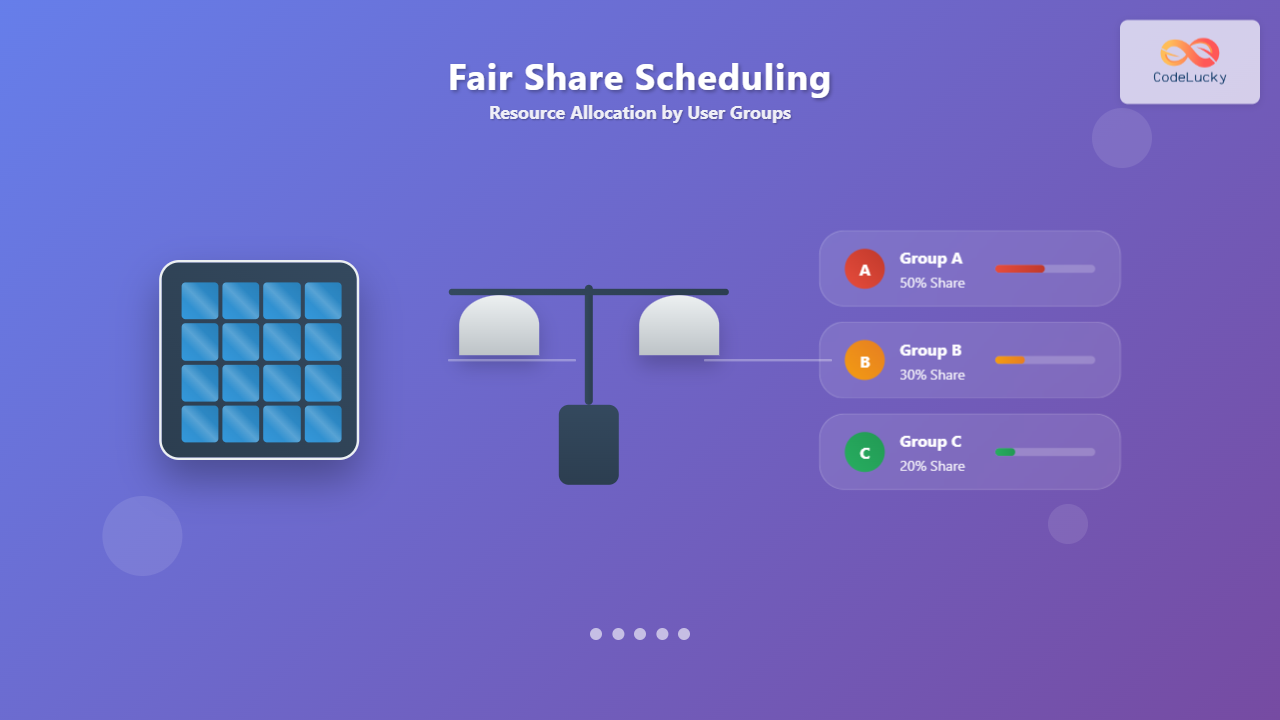
Fair Share Scheduling (FSS) is a sophisticated CPU scheduling algorithm designed to allocate computing resources equitably among different user groups rather than individual processes. Unlike traditional scheduling algorithms that focus on process-level fairness, FSS ensures that system resources are distributed proportionally based on predefined shares assigned to users or groups, preventing any single user from monopolizing system resources.
This scheduling mechanism becomes particularly crucial in multi-user environments where system administrators need to guarantee that critical users or departments receive their allocated portion of CPU time, regardless of how many processes they run simultaneously.
Core Concepts and Terminology
User Groups and Shares
In fair share scheduling, the system divides users into groups, and each group receives a specific share of the total CPU resources. A share represents the percentage of CPU time that should be allocated to a particular group over a given time period.

Usage Tracking
FSS continuously monitors the actual CPU usage of each group and compares it against their allocated shares. This tracking involves:
- Recent Usage: CPU time consumed by each group in recent time intervals
- Share Allocation: The predetermined percentage of CPU time each group should receive
- Priority Adjustment: Dynamic modification of process priorities based on usage patterns
How Fair Share Scheduling Works
The FSS Algorithm
The fair share scheduler operates through the following mechanism:
- Initialize Shares: System administrator defines CPU shares for each user group
- Monitor Usage: Scheduler tracks actual CPU consumption per group
- Calculate Ratios: Compare actual usage with allocated shares
- Adjust Priorities: Increase priority for under-utilizing groups, decrease for over-utilizing groups
- Schedule Processes: Select processes based on adjusted priorities

Priority Calculation Formula
The FSS algorithm typically uses a formula similar to:
Priority = Base_Priority + (Usage_Ratio - Fair_Share_Ratio) * Weight_Factor

Where:
- Usage_Ratio = (Group's CPU Usage) / (Total CPU Usage)
- Fair_Share_Ratio = (Group's Allocated Share) / (Total Shares)
- Weight_Factor = Adjustment sensitivity parameter
Practical Implementation Example
Scenario Setup
Let’s examine a practical example with three departments in a university computing system:
| Department | Allocated Share | Number of Users | Active Processes |
|---|---|---|---|
| Computer Science | 50% | 15 | 8 |
| Mathematics | 30% | 10 | 12 |
| Physics | 20% | 8 | 4 |
Usage Monitoring Over Time
Here’s how the scheduler would adjust priorities based on actual usage:

Priority Adjustments
Based on the usage patterns above:
# Computer Science Department
Usage_Ratio = 35/100 = 0.35
Fair_Share_Ratio = 50/100 = 0.50
Priority_Adjustment = (0.35 - 0.50) * Weight = Negative (Higher Priority)

# Mathematics Department
Usage_Ratio = 45/100 = 0.45
Fair_Share_Ratio = 30/100 = 0.30
Priority_Adjustment = (0.45 - 0.30) * Weight = Positive (Lower Priority)

# Physics Department
Usage_Ratio = 20/100 = 0.20
Fair_Share_Ratio = 20/100 = 0.20
Priority_Adjustment = (0.20 - 0.20) * Weight = Zero (No Change)
Configuration and Implementation
Unix/Linux Implementation
Most Unix-like systems implement FSS through configuration files. Here’s an example configuration:
# /etc/security/shares
# Format: username:group:share_value

# Computer Science Department (50% total)
cs_user1:cs_group:167
cs_user2:cs_group:167
cs_user3:cs_group:166

# Mathematics Department (30% total)
math_user1:math_group:100
math_user2:math_group:100
math_user3:math_group:100

# Physics Department (20% total)
phy_user1:phy_group:67
phy_user2:phy_group:67
phy_user3:phy_group:66
Enabling Fair Share Scheduling
To enable FSS on a Linux system:
# Check current scheduler
cat /sys/kernel/debug/sched_features

# Enable fair share scheduling
echo FSS > /sys/kernel/debug/sched/current_policy

# Configure group shares
echo "group_a 512" > /proc/sys/kernel/sched_group_shares
echo "group_b 256" > /proc/sys/kernel/sched_group_shares
echo "group_c 256" > /proc/sys/kernel/sched_group_shares
Advantages and Benefits
Resource Guarantee
FSS provides several key advantages:
- Predictable Performance: Users can rely on receiving their allocated CPU share
- Prevention of Monopolization: No single user can consume all system resources
- Workload Isolation: Heavy users in one group don’t affect other groups’ performance
- Administrative Control: System administrators can prioritize critical departments

Real-World Applications
Fair share scheduling proves invaluable in:
- Academic Institutions: Ensuring each department receives fair computing resources
- Corporate Environments: Prioritizing critical business applications
- Cloud Computing: Implementing service level agreements (SLAs)
- High-Performance Computing: Allocating supercomputer time among research groups
Limitations and Considerations
Implementation Challenges
While FSS offers significant benefits, it also presents certain challenges:
- Overhead: Additional computational cost for tracking and adjusting priorities
- Configuration Complexity: Requires careful planning and ongoing adjustment
- Short-term Unfairness: May temporarily favor certain groups during adjustment periods
- Resource Waste: Allocated but unused shares may go unutilized
Performance Impact
The scheduler overhead typically includes:
Overhead Components:
├── Usage Tracking: ~2-5% CPU
├── Priority Calculations: ~1-3% CPU
├── Queue Management: ~1-2% CPU
└── Context Switching: ~2-4% CPU

Total Overhead: 6-14% depending on system load
Advanced Features and Variations
Hierarchical Fair Share
Advanced implementations support hierarchical group structures:

Dynamic Share Adjustment
Some systems support runtime adjustment of shares:
# Dynamic share adjustment example
#!/bin/bash

# Monitor system load
current_load=$(uptime | awk '{print $10}' | sed 's/,//')

# Adjust shares based on time of day and load
if [ $(date +%H) -ge 9 ] && [ $(date +%H) -le 17 ]; then
    # Business hours: prioritize production groups
    echo "production 512" > /proc/sys/kernel/sched_group_shares
    echo "development 256" > /proc/sys/kernel/sched_group_shares
    echo "testing 128" > /proc/sys/kernel/sched_group_shares
else
    # Off hours: equal sharing
    echo "production 341" > /proc/sys/kernel/sched_group_shares
    echo "development 341" > /proc/sys/kernel/sched_group_shares
    echo "testing 342" > /proc/sys/kernel/sched_group_shares
fi
Monitoring and Troubleshooting
Performance Metrics
Key metrics to monitor in FSS implementations:
- Share Utilization: Percentage of allocated shares actually used
- Response Time Distribution: Average response times per group
- Queue Lengths: Number of waiting processes per group
- Context Switch Frequency: Rate of process switching between groups
Common Issues and Solutions
| Issue | Symptoms | Solution |
|---|---|---|
| Share Starvation | Some groups never get CPU time | Adjust minimum guarantee thresholds |
| Excessive Overhead | High system CPU usage | Increase scheduling intervals |
| Unfair Distribution | Actual usage doesn’t match shares | Tune priority adjustment weights |
| Poor Responsiveness | Interactive processes feel sluggish | Implement priority boost for interactive tasks |
Best Practices and Recommendations
Configuration Guidelines
Follow these best practices when implementing FSS:
- Start Conservative: Begin with equal shares and adjust gradually
- Monitor Continuously: Track actual usage patterns and adjust accordingly
- Reserve Emergency Capacity: Keep 10-15% unallocated for system processes
- Document Changes: Maintain a log of share adjustments and reasons
- Test Thoroughly: Validate performance under various load conditions
Integration with Other Schedulers
FSS often works in conjunction with other scheduling mechanisms:
# Multi-level scheduling example
Level 1: Fair Share Scheduler (Group-level allocation)
    └── Level 2: Completely Fair Scheduler (Process-level within groups)
        └── Level 3: Real-time scheduler (Time-critical processes)
Conclusion
Fair Share Scheduling represents a crucial advancement in resource management for multi-user systems. By focusing on group-level fairness rather than individual process fairness, FSS provides predictable performance guarantees and prevents resource monopolization. While implementation requires careful planning and ongoing monitoring, the benefits of improved resource allocation and user satisfaction make FSS an essential tool for system administrators managing shared computing environments.
The key to successful FSS implementation lies in understanding your system’s usage patterns, carefully configuring initial shares, and continuously monitoring and adjusting the allocation based on actual performance metrics. With proper implementation, Fair Share Scheduling can transform chaotic resource contention into predictable, fair, and efficient system utilization.
Related Posts

Lottery Scheduling: Fair CPU Allocation Through Proportional Sharing
Introduction to Lottery Scheduling Lottery scheduling is a probabilistic CPU scheduling algorithm that provides proportional share resource allocation by assigning...

Process Scheduling in Operating System: Algorithms, Types & Implementation Guide
Process scheduling is one of the most critical components of an operating system that determines how the CPU time is...
Virtual CPU Scheduling: Complete Guide to Time-sharing Physical Processors
Virtual CPU scheduling is the cornerstone of modern operating systems, enabling multiple processes to share limited physical processors efficiently. This...

Completely Fair Scheduler: Linux CFS Algorithm Deep Dive
The Linux Completely Fair Scheduler (CFS) revolutionized process scheduling in the Linux kernel when it was introduced in version 2.6.23....

Preemptive vs Non-Preemptive Scheduling: Complete Guide to CPU Scheduling in Operating Systems
Understanding CPU Scheduling in Operating Systems CPU scheduling is one of the most critical functions of an operating system, determining...

CPU Scheduling Algorithms: FCFS, SJF, Round Robin Complete Guide
CPU scheduling is a fundamental concept in operating systems that determines how processes are allocated processor time. The CPU scheduler...

Multilevel Queue Scheduling: Multiple Priority Levels in Operating Systems
Introduction to Multilevel Queue Scheduling Multilevel queue scheduling is a sophisticated CPU scheduling algorithm used in operating systems to manage...
Thread in Operating System: Lightweight Processes and Multithreading Explained
What are Threads in Operating Systems? A thread is the smallest unit of execution within a process that can be...

Priority Scheduling Algorithm: Complete Implementation Guide with Examples
What is Priority Scheduling Algorithm? Priority scheduling is a CPU scheduling algorithm where each process is assigned a priority value,...

Round Robin Scheduling: Time Quantum and Performance Analysis in Operating Systems
What is Round Robin Scheduling? Round Robin (RR) scheduling is a preemptive CPU scheduling algorithm that assigns equal time slices,...
Nice Command Linux: Complete Guide to Process Priority Management
The nice command in Linux is a powerful system administration tool that allows you to control the priority of processes,...
taskset Command Linux: Master CPU Affinity for Optimal Process Performance
The taskset command is a powerful Linux utility that allows system administrators and developers to control which CPU cores or...





