In today’s digital and interconnected world, disaster recovery planning is no longer optional — it is essential. Whether due to natural disasters, cyberattacks, hardware failures, or human errors, unplanned outages or data loss can cripple businesses. Proper disaster recovery prepares organizations to quickly restore operations, minimize downtime, and protect vital assets. This article offers a comprehensive guide to disaster recovery planning, including actionable steps, practical examples, and visual illustrations with mermaid diagrams to help technical teams and business leaders prepare for the worst.
What is Disaster Recovery Planning?
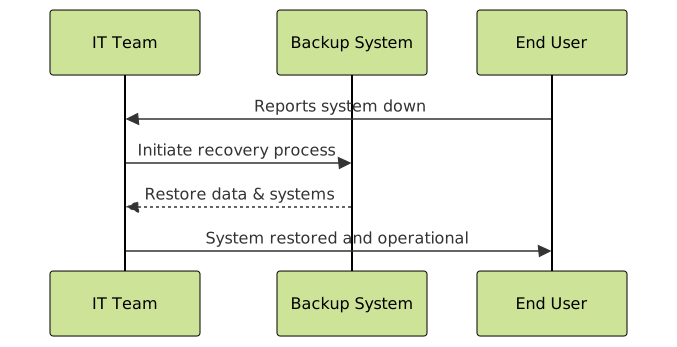
Disaster recovery planning (DRP) is a documented, structured approach with policies and procedures to recover and protect a business IT infrastructure in the event of a disaster. The aim is to restore hardware, applications, and data quickly after disruptions.
Unlike business continuity, which focuses on keeping critical operations running continuously, DRP focuses on restoring IT systems and data after a disruption.
Key Components of a Disaster Recovery Plan
- Risk Assessment: Identify potential threats and vulnerabilities affecting IT infrastructure.
- Impact Analysis: Determine how disasters impact business functions and prioritize recovery.
- Recovery Strategies: Define procedures to restore hardware, software, data, and network connectivity.
- Backup and Data Protection: Establish backup schedules, storage locations, and data validation.
- Plan Testing and Maintenance: Regularly test the DR plan and update it for evolving threats and business changes.
Steps to Create a Disaster Recovery Plan
Step 1: Conduct a Business Impact Analysis (BIA)
The BIA identifies critical business systems and quantifies the impact of downtime. It answers:
- Which systems are essential for operations?
- What is the maximum tolerable downtime (MTD)?
- What are the financial and operational impacts of outages?
Step 2: Identify Risks and Threats
Analyze risks such as power failures, natural disasters, cyber threats, and human errors. Categorize them by likelihood and severity.
Step 3: Define Recovery Objectives
Set out recovery time objectives (RTO) and recovery point objectives (RPO) for each system:
- RTO – Maximum time systems can be down before causing unacceptable harm.
- RPO – Maximum tolerable data loss measured in time.
Step 4: Develop Recovery Strategies
Implement strategies that align with RTO and RPO requirements, such as:
- On-site backups and redundant hardware.
- Off-site backups or cloud-based disaster recovery services.
- Virtualized environments for rapid failover.

Step 5: Backup Planning and Data Protection
Establish data backup policies tailored to critical data and systems:
- Frequency (e.g., daily, hourly incremental backups).
- Storage types (local, off-site tape/cloud storage).
- Data encryption and integrity verification.
Example Backup Schedule:
+------------+------------------+-----------------+
| Data Type  | Backup Frequency | Backup Location |
+------------+------------------+-----------------+
| Databases  | Hourly Incremental | Cloud Storage  |
| File Shares| Daily Full Backup  | Off-site Tape  |
| Applications | Weekly Backup     | On-site Server|
+------------+------------------+-----------------+
Step 6: Plan Testing and Training
Regularly test the disaster recovery plan to identify gaps and talk through scenarios with key personnel. Example tests include:
- Tabletop exercises simulating disaster events.
- Failover tests to backup systems.
- Data restoration drills from backup media.
Example: Interactive Disaster Recovery Workflow
Below is an interactive example of a simplified disaster recovery decision flow:
  function DRWorkflow(event) {
    switch(event) {
      case 'hardware_failure':
        console.log('Redirecting to backup infrastructure...');
        break;
      case 'cyberattack':
        console.log('Isolating affected network segments and restoring data...');
        break;
      case 'natural_disaster':
        console.log('Activating off-site disaster recovery center...');
        break;
      default:
        console.log('Restoring from latest backup...');
    }
    console.log('Verifying system integrity and resuming operations.');
  }

  // Trigger example
  DRWorkflow('hardware_failure');
Best Practices for Disaster Recovery Planning
- Documentation: Keep the DR plan clear, detailed, and easily accessible.
- Automation: Automate backup and failover processes where possible to reduce human error.
- Continuous Improvement: Update the DR plan regularly to reflect infrastructure changes and new threats.
- Communication: Define roles and communication channels before, during, and after a disaster.
Common Challenges & How to Overcome Them
- Incomplete Risk Assessment: Use cross-functional teams to ensure all risks are covered.
- Lack of Plan Testing: Schedule regular drills and incorporate lessons learned.
- Insufficient Budget: Prioritize critical systems and leverage cost-effective cloud DR solutions.
Conclusion
Disaster recovery planning is a vital safeguard to ensure business resilience amid inevitable disruptions. By understanding risks, prioritizing recovery objectives, implementing strong backup strategies, and continually testing plans, organizations can prepare effectively for the worst. The investment in DR planning reduces downtime costs and protects reputation, making it a cornerstone of modern IT and business continuity strategy.
Start building or refining your disaster recovery plan today to keep your business ready for any crisis.