
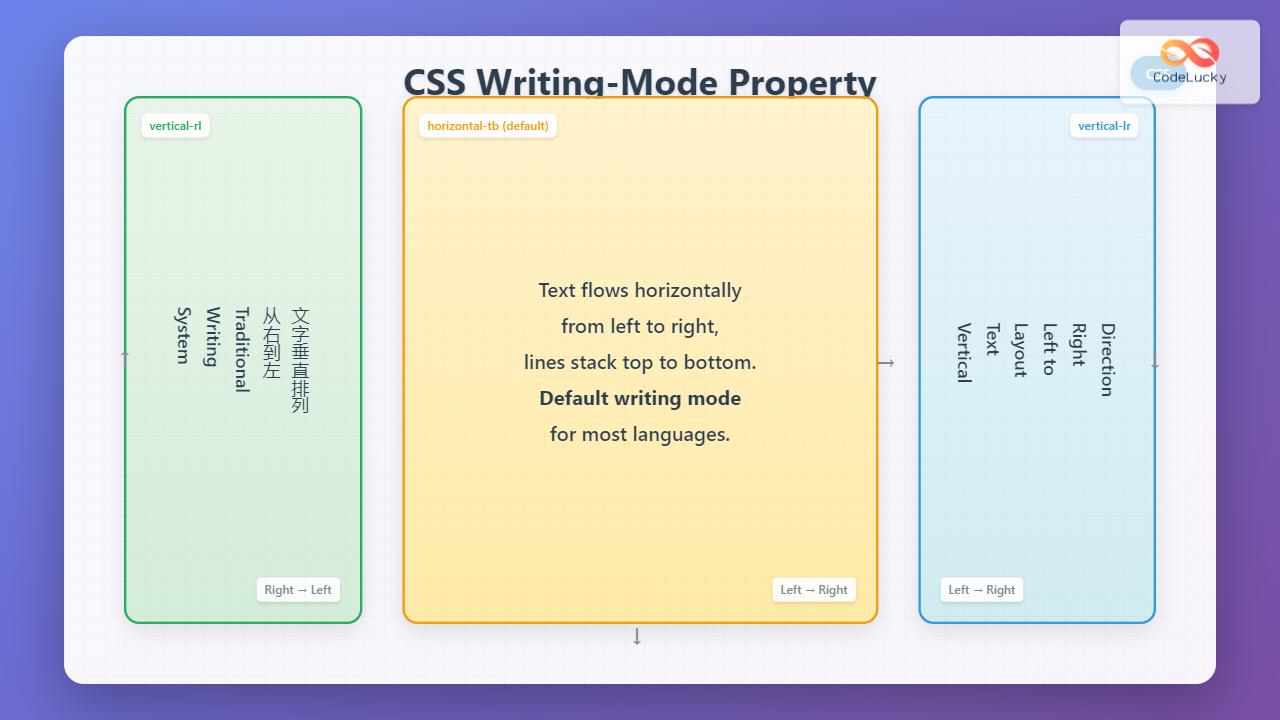
The CSS writing-mode property is a powerful tool that controls the direction and orientation of text flow on web pages. While most Western languages flow horizontally from left to right, many Asian languages traditionally flow vertically, and the writing-mode property gives developers precise control over these text directions.
What is CSS Writing-Mode Property?
The writing-mode property defines whether text lines are laid out horizontally or vertically and the direction in which blocks progress. This property is essential for creating multilingual websites, artistic text layouts, and accommodating different writing systems used across the globe.
Syntax and Values
The writing-mode property accepts the following values:
writing-mode: horizontal-tb | vertical-rl | vertical-lr | sideways-rl | sideways-lr;- horizontal-tb: Default value – text flows horizontally from left to right, lines stack top to bottom
- vertical-rl: Text flows vertically from top to bottom, lines stack right to left
- vertical-lr: Text flows vertically from top to bottom, lines stack left to right
- sideways-rl: Text flows sideways from bottom to top, lines stack right to left
- sideways-lr: Text flows sideways from top to bottom, lines stack left to right
Understanding Different Writing Modes
Horizontal Top-to-Bottom (horizontal-tb)
This is the default writing mode for most Western languages. Text flows horizontally from left to right, and lines stack vertically from top to bottom.
Example: Default Horizontal Writing
This is normal horizontal text flow. Each line progresses from left to right, and subsequent lines appear below the previous ones. This is how most Western languages are naturally written and read.
Vertical Right-to-Left (vertical-rl)
In this mode, text flows vertically from top to bottom, and columns progress from right to left. This is commonly used in traditional Chinese, Japanese, and Korean writing systems.
Example: Vertical Right-to-Left
This text flows vertically from top to bottom. Each new line appears to the left of the previous line, creating a right-to-left column progression. This mimics traditional East Asian writing systems.
Vertical Left-to-Right (vertical-lr)
Similar to vertical-rl, but columns progress from left to right instead of right to left. This is less common but useful for specific design requirements.
Example: Vertical Left-to-Right
This text also flows vertically from top to bottom, but each new line appears to the right of the previous line. This creates a left-to-right column progression.
Interactive Writing Mode Demonstration
Interactive Writing Mode Selector
This is a sample text that demonstrates different writing modes. Notice how the text direction and flow changes when you select different writing modes from the dropdown above. The writing-mode property affects not just the text direction but also how the entire block-level content is oriented within its container.
Practical Applications
1. Multilingual Websites
When building websites that support multiple languages, the writing-mode property becomes crucial for providing authentic reading experiences for users of different language systems.
Example: Language-Specific Layouts
English (horizontal-tb)
Welcome to our website. This content flows naturally for English readers from left to right, top to bottom.
Traditional Layout (vertical-rl)
Traditional vertical text layout commonly used in East Asian typography and design systems.
2. Creative Typography and Design
The writing-mode property opens up creative possibilities for unique layouts, headers, and artistic text arrangements that can make your design stand out.
Example: Creative Header Design
Modern Web Design
Using writing-mode for innovative layouts and typography that capture attention and create memorable user experiences.
3. Sidebar and Navigation Design
Vertical text can be particularly effective in sidebars, navigation elements, and space-constrained areas where horizontal text might not fit well.
Example: Vertical Navigation
Browser Support and Compatibility
The CSS writing-mode property enjoys excellent browser support across modern browsers:
- Chrome: Full support since version 48+
- Firefox: Full support since version 41+
- Safari: Full support since version 10.1+
- Edge: Full support since version 12+
- Internet Explorer: Partial support with -ms-writing-mode
Legacy Browser Support
For older browsers, particularly Internet Explorer, you can use vendor prefixes:
.vertical-text {
  /* Standard property */
  writing-mode: vertical-rl;

  /* Legacy support */
  -webkit-writing-mode: vertical-rl;
  -ms-writing-mode: tb-rl;
}
Best Practices and Tips
1. Consider Reading Patterns
When implementing different writing modes, always consider your target audience’s natural reading patterns and cultural expectations. Don’t use vertical text just for aesthetic purposes if it hinders usability.
2. Test Across Devices
Different writing modes can behave differently across various devices and screen sizes. Always test your implementations on mobile devices, tablets, and desktops.
3. Combine with Text Direction
The writing-mode property works well with the direction and text-orientation properties for fine-tuned control over text layout.
Example: Combined Properties
4. Accessibility Considerations
Ensure that your use of writing-mode doesn’t negatively impact accessibility. Screen readers and other assistive technologies should still be able to navigate and read your content effectively. Always test with accessibility tools and consider providing alternative layouts when necessary.
Common Issues and Solutions
Layout Shifts and Container Sizing
When changing writing modes, containers may not adjust their dimensions appropriately. Always explicitly set heights and widths when working with vertical text layouts.
Font Selection
Not all fonts render well in vertical orientations. Test your chosen fonts in different writing modes and consider using fonts specifically designed for vertical text when working with multilingual content.
Performance Considerations
Changing writing modes can trigger layout recalculations. For dynamic changes, consider using CSS transforms or transitions to smooth the visual experience.
Advanced Techniques
Responsive Writing Modes
You can use media queries to change writing modes based on screen size or orientation:
/* Default horizontal layout */
.content {
  writing-mode: horizontal-tb;
}

/* Vertical layout for wider screens */
@media (min-width: 1024px) {
  .sidebar {
    writing-mode: vertical-rl;
  }
}

/* Adjust for portrait orientation */
@media (orientation: portrait) {
  .header-text {
    writing-mode: vertical-lr;
  }
}
Animation with Writing Modes
While you cannot directly animate the writing-mode property, you can create smooth transitions by animating related properties like transform, opacity, and dimensions.
Conclusion
The CSS writing-mode property is a powerful tool for creating inclusive, accessible, and visually interesting web layouts. Whether you’re building multilingual websites, creating unique design elements, or accommodating different cultural reading patterns, understanding and properly implementing writing-mode can significantly enhance your web development capabilities.
By mastering the different writing mode values and understanding their practical applications, you can create more engaging and culturally appropriate web experiences. Remember to always test across different browsers and devices, consider accessibility implications, and use writing modes purposefully rather than just for decoration.
As web development continues to evolve toward more inclusive and globally-minded practices, properties like writing-mode become increasingly important for creating truly universal web experiences that serve users from all linguistic and cultural backgrounds.
Related Posts
CSS Text-Orientation Property: Complete Guide to Vertical Text Character Control
The CSS text-orientation property controls how individual characters are oriented within vertical text layouts. This powerful property becomes essential when...
CSS Direction Property: Complete Guide to LTR and RTL Text Direction
Introduction to CSS Direction Property The CSS direction property is a fundamental tool for controlling text flow and layout direction...
CSS Style direction Property: CSS Direction
Understanding the CSS direction Property The CSS direction property specifies the text direction/writing direction. It is used to set the...
HTML Canvas direction Property: Text Direction
HTML Canvas direction Property: Controlling Text Direction The HTML Canvas direction property allows you to specify the text direction when...
HTML dir Property: Element Text Direction
HTML dir Property: Controlling Element Text Direction The HTML dir property specifies the text direction for the content within an...
CSS Logical Properties: Master Inline-Start, Inline-End, Block-Start, Block-End for Modern Web Design
CSS logical properties revolutionize how we approach layout and spacing in modern web development. Unlike traditional physical properties that rely...
CSS Style left Property: CSS Left
CSS left Property: A Comprehensive Guide The CSS left property is a fundamental tool for web developers, enabling precise horizontal...
CSS Style right Property: CSS Right
Understanding the CSS right Property The CSS right property plays a crucial role in positioning elements within a web page....
CSS Style textOverflow Property: CSS Text Overflow
CSS text-overflow Property: Managing Overflowing Text The CSS text-overflow property specifies how overflowed content that is not displayed should be...
HTML Block and Inline Elements: Understanding Display Properties
Introduction Have you ever wondered why some HTML elements stack vertically while others flow horizontally? Understanding the difference between block-level...
HTML bdo dir Property: Bidi Override Direction
HTML bdo dir Property: Bidi Override Direction The bdo (Bi-Directional Override) element in HTML, combined with the dir attribute, provides...
CSS Style textAlign Property: CSS Text Align
Understanding the CSS textAlign Property: Aligning Text in Web Layouts The textAlign property in CSS specifies the horizontal alignment of...





