
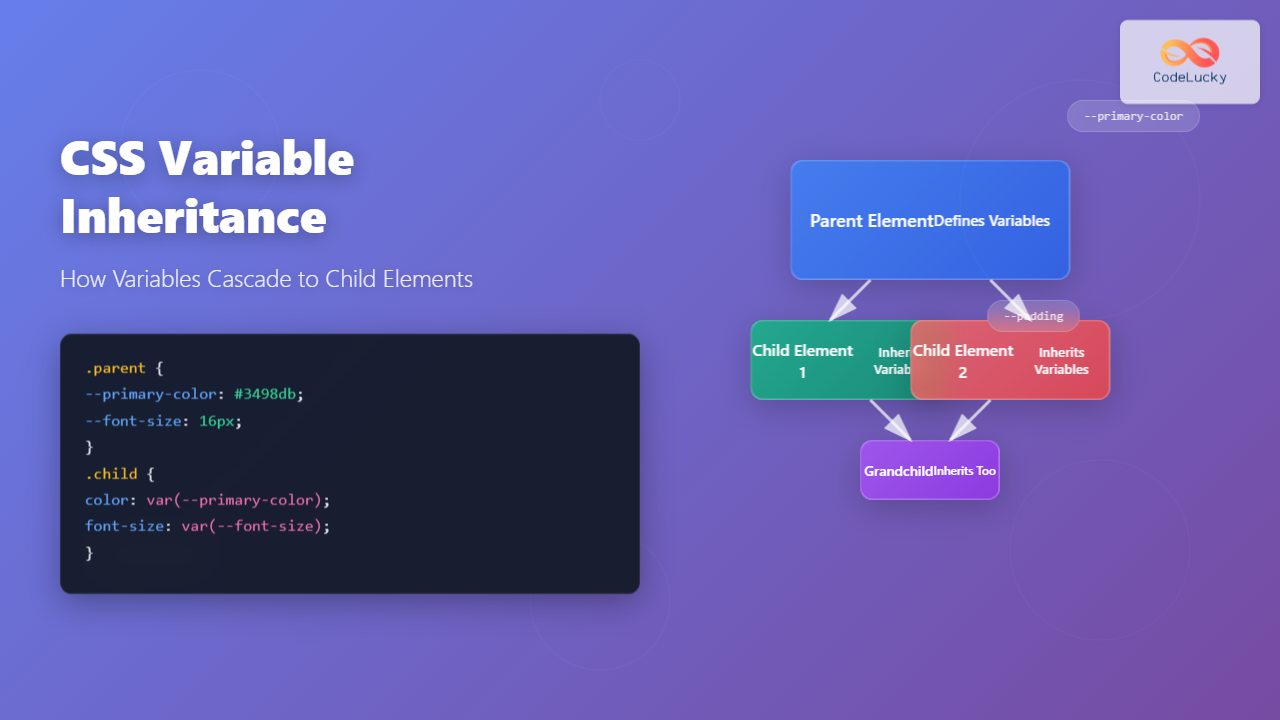
CSS variables, also known as custom properties, revolutionized how we write maintainable stylesheets. One of their most powerful features is inheritance – the ability for child elements to automatically receive variable values from their parents. Understanding this mechanism is crucial for building scalable CSS architectures.
Understanding CSS Variable Inheritance
CSS variables follow the same inheritance rules as other CSS properties. When you define a custom property on a parent element, all its descendants can access and use that variable unless explicitly overridden.
Key Point: CSS variables inherit by default, unlike regular CSS properties which may or may not inherit depending on the property type.
Basic Inheritance Example
Let’s start with a simple example to demonstrate how CSS variables cascade from parent to child elements:
.parent {
  --primary-color: #3498db;
  --font-size: 16px;
  --padding: 20px;
}

.child {
  background-color: var(--primary-color);
  font-size: var(--font-size);
  padding: var(--padding);
}
Parent Element
The Cascade in Action
CSS variables respect the cascade order. When multiple elements in the inheritance chain define the same variable, the closest ancestor’s value takes precedence:
.grandparent {
  --text-color: red;
}

.parent {
  --text-color: blue; /* Overrides grandparent */
}

.child {
  color: var(--text-color); /* Uses blue from parent */
}
Grandparent (–text-color: red)
Parent (–text-color: blue)
Global vs Local Variable Scope
CSS variables can be defined globally on the :root selector or locally on specific elements. Global variables are accessible throughout the entire document:
:root {
  --global-primary: #2ecc71;
  --global-spacing: 1rem;
}

.component {
  --local-accent: #e74c3c;
  background: var(--global-primary);
  margin: var(--global-spacing);
}

.component .nested {
  border-color: var(--local-accent);
  padding: var(--global-spacing);
}
Interactive Inheritance Demo
This interactive example shows how changing a parent’s CSS variable affects all its children:
16px
Overriding Inherited Variables
Child elements can override inherited variables by redefining them. This creates a new inheritance chain for that element’s descendants:
.theme-container {
  --primary: #3498db;
  --secondary: #2ecc71;
}

.special-section {
  --primary: #e74c3c; /* Override parent's primary */
  background: var(--primary);
}

.nested-element {
  border-color: var(--primary); /* Uses #e74c3c from special-section */
  color: var(--secondary); /* Uses #2ecc71 from theme-container */
}
Theme Container (–primary: blue, –secondary: green)
Special Section (–primary: red override)
Fallback Values and Inheritance
When using CSS variables, you can provide fallback values. If a variable isn’t defined in the inheritance chain, the fallback is used:
.component {
  background: var(--theme-bg, #ffffff); /* Fallback to white */
  color: var(--theme-text, #333333); /* Fallback to dark gray */
  border: 1px solid var(--theme-border, #cccccc); /* Fallback to light gray */
}
Practical Use Cases
Theme Systems
CSS variable inheritance is perfect for creating theme systems where color schemes cascade throughout your application:
.theme-light {
  --bg-primary: #ffffff;
  --bg-secondary: #f8f9fa;
  --text-primary: #212529;
  --text-secondary: #6c757d;
  --border-color: #dee2e6;
}

.theme-dark {
  --bg-primary: #212529;
  --bg-secondary: #343a40;
  --text-primary: #ffffff;
  --text-secondary: #adb5bd;
  --border-color: #495057;
}

.card {
  background: var(--bg-primary);
  color: var(--text-primary);
  border: 1px solid var(--border-color);
}
Light Theme
Card Component
This card inherits all theme variables automatically.
Dark Theme
Card Component
Same component, different theme – no CSS changes needed!
Component Sizing Systems
Create consistent spacing and sizing across component hierarchies:
.size-small {
  --component-padding: 8px;
  --component-font-size: 14px;
  --component-border-radius: 4px;
}

.size-large {
  --component-padding: 24px;
  --component-font-size: 18px;
  --component-border-radius: 8px;
}

.button, .input, .card {
  padding: var(--component-padding);
  font-size: var(--component-font-size);
  border-radius: var(--component-border-radius);
}
Common Pitfalls and Solutions
Specificity Issues
CSS variables don’t increase specificity, but their values do. Be careful when overriding:
Pitfall: Trying to override a CSS variable that’s defined with higher specificity won’t work as expected.
/* Won't work - lower specificity */
.container {
  --color: blue;
}

/* Higher specificity wins */
.container.theme-red {
  --color: red;
}
Undefined Variable Handling
Always provide fallback values for variables that might not be defined:
Best Practice: Use fallback values to prevent broken layouts when variables are undefined.
Browser Support and Performance
CSS variables have excellent browser support in all modern browsers. They’re also performant because:
- Variables are resolved at runtime, allowing for dynamic updates
- The inheritance mechanism is built into the CSS engine
- No JavaScript is required for basic inheritance functionality
- Changes to parent variables automatically update all children
Advanced Inheritance Patterns
Conditional Inheritance
You can create conditional inheritance using CSS variables and the var() function:
.container {
  --is-dark-theme: 1;
  --light-bg: #ffffff;
  --dark-bg: #333333;
}

.element {
  background: var(--theme-bg,
    var(--is-dark-theme) and var(--dark-bg) or var(--light-bg)
  );
}
Scoped Variable Systems
Create isolated variable scopes for different parts of your application:
.modal-scope {
  --primary: #007bff;
  --success: #28a745;
  --danger: #dc3545;
}

.sidebar-scope {
  --primary: #6c757d;
  --success: #20c997;
  --danger: #fd7e14;
}
Debugging CSS Variable Inheritance
Use browser developer tools to debug variable inheritance:
Debugging Tips:
- Check the Computed tab to see resolved variable values
- Look for variable definitions in the Styles panel
- Use the inheritance chain to trace variable sources
- Temporarily add
outlinestyles to visualize inheritance scope
Conclusion
CSS variable inheritance is a powerful feature that enables maintainable, scalable stylesheets. By understanding how variables cascade through the DOM tree, you can create flexible design systems that adapt to different contexts while maintaining consistency.
The key principles to remember are:
- CSS variables inherit by default from parent to child elements
- Child elements can override inherited variables for their subtree
- Global variables defined on
:rootare available everywhere - Always provide fallback values for robust styling
- Use inheritance for theme systems and component libraries
Master these concepts, and you’ll be able to build more maintainable and flexible CSS architectures that scale with your projects.
Related Posts

CSS Variable Declaration: Master :root and Local Scope for Better Styling
CSS Variables, also known as CSS Custom Properties, revolutionize how we manage and reuse values in our stylesheets. Understanding variable...

CSS Custom Properties: Complete Guide to CSS Variables and Dynamic Styling
CSS Custom Properties, commonly known as CSS Variables, revolutionize how we write and maintain stylesheets by introducing dynamic values that...

CSS Variable Usage: Complete Guide to var() Function and Fallback Values
CSS Custom Properties, commonly known as CSS variables, revolutionized how we write maintainable and dynamic stylesheets. The var() function serves...
CSS Preprocessors: Sass Variables and Nesting – Complete Guide for Modern Web Development
CSS preprocessors have revolutionized how developers write and maintain stylesheets. Among the most popular preprocessors, Sass (Syntactically Awesome StyleSheets) stands...

CSS currentColor Keyword: Complete Guide to Dynamic Color Inheritance
The currentColor keyword in CSS is a powerful yet underutilized feature that allows elements to inherit the current computed value...

CSS Class Selectors: Master Targeting Elements with Class Attributes
What Are CSS Class Selectors? CSS class selectors are fundamental tools that allow you to target and style HTML elements...
CSS Cascade: Understanding Style Priority and Inheritance Rules
The CSS cascade is the fundamental mechanism that determines which styles are applied to HTML elements when multiple CSS rules...
CSS Syntax: Complete Guide to Rules, Selectors, Properties and Values
CSS (Cascading Style Sheets) is the cornerstone of web design, transforming plain HTML into visually stunning websites. Understanding CSS syntax...

CSS :root Pseudo-Class: Complete Guide to Targeting Document Root Element
The CSS :root pseudo-class is a fundamental selector that targets the root element of a document. In HTML documents, this...
CSS Descendant Selectors: Master Targeting Nested Elements with Practical Examples
CSS descendant selectors are fundamental tools that allow you to target elements nested within other elements in your HTML structure....
CSS Specificity: Complete Guide to Style Priority and Cascade Resolution
CSS specificity is one of the most crucial concepts every web developer must master. It determines which styles the browser...

CSS Attribute Selectors: Master Targeting Elements by Attribute Values
What Are CSS Attribute Selectors? CSS attribute selectors allow you to target HTML elements based on their attributes and attribute...
- Understanding CSS Variable Inheritance
- Basic Inheritance Example
- The Cascade in Action
- Global vs Local Variable Scope
- Interactive Inheritance Demo
- Overriding Inherited Variables
- Fallback Values and Inheritance
- Practical Use Cases
- Common Pitfalls and Solutions
- Browser Support and Performance
- Advanced Inheritance Patterns
- Debugging CSS Variable Inheritance
- Conclusion





