
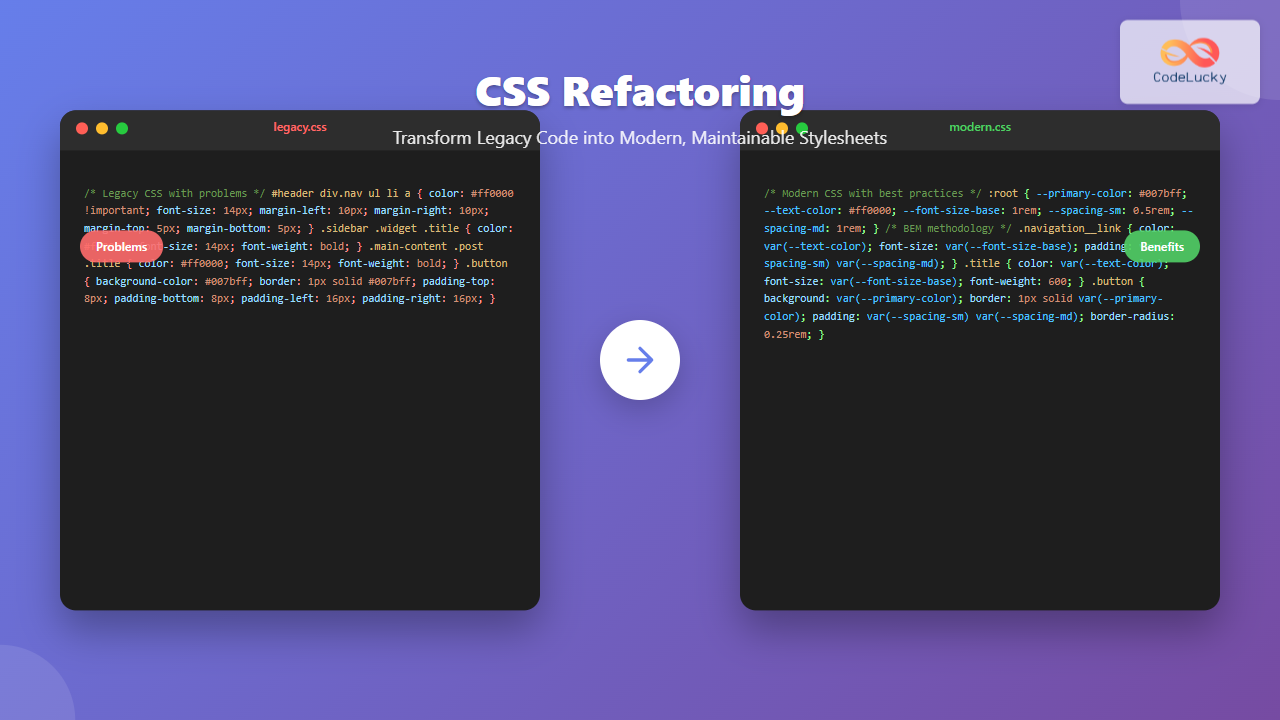
Legacy CSS codebases can become a significant burden on development teams, slowing down feature delivery and creating maintenance nightmares. CSS refactoring is the systematic process of restructuring existing stylesheets to improve code quality, performance, and maintainability without changing the visual appearance of your website.
This comprehensive guide will walk you through proven strategies, practical techniques, and real-world examples to transform your legacy CSS into modern, maintainable code that your team will thank you for.
Understanding Legacy CSS Problems
Before diving into refactoring strategies, it’s crucial to identify common issues that plague legacy stylesheets:
Code Smell Indicators
- Excessive specificity wars: Selectors with multiple IDs and nested classes
- Magic numbers: Random pixel values without context
- Redundant code: Duplicate styles scattered throughout files
- Overly specific selectors: Deep nesting that’s hard to override
- No naming conventions: Inconsistent class names and structure
Legacy CSS Example (Before Refactoring)
/* Poor legacy CSS */
#header div.nav ul li a {
  color: #ff0000 !important;
  font-size: 14px;
  text-decoration: none;
  margin-left: 10px;
  margin-right: 10px;
  margin-top: 5px;
  margin-bottom: 5px;
}

#header div.nav ul li a:hover {
  color: #cc0000 !important;
  text-decoration: underline;
}

.sidebar .widget .title {
  color: #ff0000;
  font-size: 14px;
  font-weight: bold;
}

.main-content .post .title {
  color: #ff0000;
  font-size: 14px;
  font-weight: bold;
}
Phase 1: Assessment and Planning
CSS Audit Checklist
Start your refactoring journey with a comprehensive audit:
- Inventory existing styles: Document all CSS files and their purposes
- Identify unused CSS: Use tools like PurgeCSS or Chrome DevTools Coverage tab
- Measure specificity: Flag overly specific selectors
- Document dependencies: Note which styles depend on others
- Test coverage: Ensure you have visual regression tests
Creating a Refactoring Strategy
Develop a systematic approach:
- Incremental refactoring: Work in small, manageable chunks
- Component-based approach: Refactor one UI component at a time
- Establish coding standards: Define naming conventions and structure
- Set performance goals: Target specific metrics for improvement
Phase 2: Structural Refactoring
1. Implementing a CSS Architecture
Choose and implement a CSS methodology like BEM (Block Element Modifier) to create consistent, scalable code:
BEM Implementation Example
/* Refactored using BEM methodology */
.navigation {
  /* Block styles */
}

.navigation__item {
  /* Element styles */
  color: var(--primary-color);
  font-size: var(--font-size-base);
  text-decoration: none;
  padding: var(--spacing-xs) var(--spacing-sm);
}

.navigation__item--active {
  /* Modifier styles */
  font-weight: bold;
}

.navigation__item:hover {
  color: var(--primary-color-dark);
  text-decoration: underline;
}
2. CSS Custom Properties (Variables)
Replace hard-coded values with CSS custom properties for consistency and maintainability:
CSS Variables Implementation
:root {
  /* Color system */
  --primary-color: #007bff;
  --primary-color-dark: #0056b3;
  --secondary-color: #6c757d;

  /* Typography */
  --font-family-base: 'Inter', sans-serif;
  --font-size-base: 1rem;
  --font-size-lg: 1.25rem;
  --line-height-base: 1.5;

  /* Spacing system */
  --spacing-xs: 0.25rem;
  --spacing-sm: 0.5rem;
  --spacing-md: 1rem;
  --spacing-lg: 1.5rem;
  --spacing-xl: 2rem;

  /* Border radius */
  --border-radius-sm: 0.25rem;
  --border-radius-md: 0.5rem;

  /* Shadows */
  --shadow-sm: 0 1px 3px rgba(0, 0, 0, 0.1);
  --shadow-md: 0 4px 6px rgba(0, 0, 0, 0.1);
}

/* Usage example */
.card {
  background: white;
  border-radius: var(--border-radius-md);
  padding: var(--spacing-lg);
  box-shadow: var(--shadow-md);
}

.card__title {
  color: var(--primary-color);
  font-size: var(--font-size-lg);
  margin-bottom: var(--spacing-md);
}
3. Utility Classes System
Create a utility-first approach for common styling patterns:
Utility Classes
/* Typography utilities */
.text-primary { color: var(--primary-color); }
.text-secondary { color: var(--secondary-color); }
.text-center { text-align: center; }
.text-bold { font-weight: bold; }

/* Spacing utilities */
.m-0 { margin: 0; }
.mt-1 { margin-top: var(--spacing-xs); }
.mb-2 { margin-bottom: var(--spacing-sm); }
.p-3 { padding: var(--spacing-md); }

/* Layout utilities */
.d-flex { display: flex; }
.justify-center { justify-content: center; }
.align-items-center { align-items: center; }
.gap-2 { gap: var(--spacing-sm); }
Phase 3: Performance Optimization
1. Reducing CSS Specificity
Lower specificity makes CSS more maintainable and easier to override:
❌ High Specificity (Before)
/* Specificity: 0,2,1,3 */
#header div.nav ul li a {
  color: red;
}

/* Specificity: 0,1,2,1 */
.sidebar .widget h3 {
  font-size: 18px;
}
✅ Low Specificity (After)
/* Specificity: 0,0,1,0 */
.nav-link {
  color: red;
}

/* Specificity: 0,0,1,0 */
.widget-title {
  font-size: 18px;
}
2. Eliminating Unused CSS
Remove dead code to reduce file size and improve performance:
💡 Tools for Unused CSS Detection
- PurgeCSS: Automatically removes unused CSS
- UnCSS: Analyzes HTML and removes unused styles
- Chrome DevTools Coverage: Built-in browser tool
- Webpack Bundle Analyzer: Visualizes bundle contents
3. CSS Minification and Optimization
Optimize CSS for production with proper build tools:
Build Process Example
// webpack.config.js
const MiniCssExtractPlugin = require('mini-css-extract-plugin');
const CssMinimizerPlugin = require('css-minimizer-webpack-plugin');

module.exports = {
  optimization: {
    minimizer: [
      new CssMinimizerPlugin({
        minimizerOptions: {
          preset: [
            'default',
            {
              discardComments: { removeAll: true },
            },
          ],
        },
      }),
    ],
  },
  plugins: [
    new MiniCssExtractPlugin({
      filename: 'styles.[contenthash].css',
    }),
  ],
};
Phase 4: Modern CSS Features
1. CSS Grid and Flexbox Migration
Replace legacy layout techniques with modern CSS layout systems:
❌ Legacy Layout
/* Float-based layout */
.container {
  width: 100%;
  overflow: hidden;
}

.sidebar {
  float: left;
  width: 25%;
}

.content {
  float: right;
  width: 75%;
}

.clearfix::after {
  content: "";
  display: table;
  clear: both;
}
✅ Modern Grid Layout
/* CSS Grid layout */
.container {
  display: grid;
  grid-template-columns: 1fr 3fr;
  gap: var(--spacing-lg);
}

.sidebar {
  grid-column: 1;
}

.content {
  grid-column: 2;
}

/* Responsive adjustment */
@media (max-width: 768px) {
  .container {
    grid-template-columns: 1fr;
  }
}
2. Container Queries for Component-Driven Design
Use container queries for truly responsive components:
Container Query Example
.card-container {
  container-type: inline-size;
}

.card {
  padding: var(--spacing-md);
  background: white;
  border-radius: var(--border-radius-md);
}

/* Adjust card layout based on container size */
@container (min-width: 300px) {
  .card {
    display: flex;
    gap: var(--spacing-lg);
  }

  .card__image {
    flex-shrink: 0;
    width: 120px;
  }

  .card__content {
    flex: 1;
  }
}
Interactive Refactoring Demo
Before and After Comparison
Click the toggle button below to see the transformation from legacy CSS to refactored CSS:
Phase 5: Testing and Validation
1. Visual Regression Testing
Ensure your refactoring doesn’t break existing designs:
Testing Tools Setup
// package.json
{
  "devDependencies": {
    "backstopjs": "^6.2.2",
    "percy-cli": "^1.27.0"
  },
  "scripts": {
    "test:visual": "backstop test",
    "test:visual:approve": "backstop approve"
  }
}

// backstop.json
{
  "id": "css_refactoring_test",
  "viewports": [
    {"label": "desktop", "width": 1024, "height": 768},
    {"label": "tablet", "width": 768, "height": 1024},
    {"label": "mobile", "width": 320, "height": 568}
  ],
  "scenarios": [
    {
      "label": "Homepage",
      "url": "http://localhost:3000/",
      "selectors": ["document"]
    },
    {
      "label": "Navigation Component",
      "url": "http://localhost:3000/",
      "selectors": [".navigation"]
    }
  ]
}
2. Performance Metrics
Measure the impact of your refactoring:
| Metric | Before Refactoring | After Refactoring | Improvement |
|---|---|---|---|
| CSS File Size | 245 KB | 89 KB | 64% reduction |
| Unused CSS | 78% | 12% | 85% reduction |
| CSS Rules | 3,421 | 1,287 | 62% reduction |
| Time to First Paint | 2.1s | 1.4s | 33% faster |
Common Refactoring Pitfalls to Avoid
⚠️ Warning Signs
- Big bang refactoring: Attempting to refactor everything at once
- Ignoring browser support: Using modern features without fallbacks
- Breaking existing functionality: Not testing thoroughly enough
- Over-engineering: Creating unnecessarily complex abstractions
- Inconsistent naming: Not following established conventions
Maintaining Refactored CSS
1. Documentation and Style Guides
Create comprehensive documentation for your refactored CSS architecture:
Style Guide Example
/* ==========================================================================
   COMPONENT: Card
   ========================================================================== */

/**
 * Card component for displaying content blocks
 *
 * 1. Base card container
 * 2. Card variants for different contexts
 * 3. Card elements (header, body, footer)
 *
 * Usage:
 *
*
*
Card Title
*
*
*
Card content goes here…
*
*
*/ .card { background: white; border-radius: var(–border-radius-md); box-shadow: var(–shadow-sm); overflow: hidden; } .card–featured { border-top: 4px solid var(–primary-color); } .card__header { padding: var(–spacing-lg); border-bottom: 1px solid var(–gray-200); } .card__title { margin: 0; color: var(–gray-900); font-size: var(–font-size-lg); }
2. Automated Code Quality
Set up linting and formatting tools to maintain code quality:
Stylelint Configuration
// .stylelintrc.json
{
  "extends": [
    "stylelint-config-standard",
    "stylelint-config-recess-order"
  ],
  "rules": {
    "selector-class-pattern": "^[a-z]([a-z0-9-]+)?(__([a-z0-9]+-?)+)?(--([a-z0-9]+-?)+)?$",
    "max-nesting-depth": 3,
    "selector-max-specificity": "0,3,0",
    "declaration-no-important": true,
    "color-named": "never"
  }
}
Measuring Success
Key Performance Indicators
Track these metrics to measure the success of your CSS refactoring efforts:
- Bundle size reduction: Measure CSS file size before and after
- Build time improvement: Faster compilation and processing
- Developer productivity: Time to implement new features
- Maintenance overhead: Time spent on CSS-related bug fixes
- Code coverage: Percentage of CSS rules actually used
- Performance metrics: First Contentful Paint, Largest Contentful Paint
Conclusion
CSS refactoring is an investment in your codebase’s future. By following a systematic approach—starting with assessment, implementing modern CSS architecture, optimizing performance, and maintaining quality standards—you can transform legacy stylesheets into maintainable, performant code.
Remember that refactoring is not a one-time activity but an ongoing process. Regular code reviews, automated testing, and adherence to established conventions will keep your CSS codebase healthy and scalable as your project grows.
The strategies outlined in this guide provide a roadmap for tackling even the most challenging legacy CSS codebases. Start small, measure your progress, and gradually work through your entire stylesheet collection. Your future self—and your development team—will thank you for the effort.
💡 Next Steps
- Audit your current CSS codebase using the checklist provided
- Choose a refactoring methodology that fits your project needs
- Set up automated testing and quality tools
- Start with a small, low-risk component for your first refactoring
- Document your progress and share learnings with your team
Related Posts
CSS File Organization: Master Folder Structure and Import Strategies for Scalable Projects
Managing CSS files in large projects can quickly become overwhelming without proper organization. Professional developers rely on structured approaches to...
CSS Syntax: Complete Guide to Rules, Selectors, Properties and Values
CSS (Cascading Style Sheets) is the cornerstone of web design, transforming plain HTML into visually stunning websites. Understanding CSS syntax...

CSS Documentation: Complete Guide to Style Guide Creation and Maintenance
Creating comprehensive CSS documentation isn't just about writing comments—it's about building a living style guide that serves as the single...

CSS Purge: Ultimate Guide to Removing Unused CSS for Lightning-Fast Performance
Website performance is crucial for user experience and SEO rankings. One of the most effective ways to improve loading times...

CSS Graceful Degradation: Essential Fallback Strategies for Modern Web Development
CSS graceful degradation is a fundamental web development strategy that ensures your website remains functional and accessible across all browsers,...

HTML Classes: Styling Multiple Elements with CSS
Introduction Have you ever found yourself needing to apply the same styles to multiple elements on your webpage? If you're...
CSS Specificity: Complete Guide to Style Priority and Cascade Resolution
CSS specificity is one of the most crucial concepts every web developer must master. It determines which styles the browser...
CSS Linting: Stylelint Configuration and Rules – Complete Developer Guide
What is CSS Linting and Why It Matters CSS linting is the process of analyzing your CSS code to identify...
CSS Naming Conventions: Complete Guide to Class and ID Naming Best Practices
Proper CSS naming conventions are the foundation of maintainable, scalable, and collaborative web development. Whether you're working on a small...
CSS Preprocessors: Sass Variables and Nesting – Complete Guide for Modern Web Development
CSS preprocessors have revolutionized how developers write and maintain stylesheets. Among the most popular preprocessors, Sass (Syntactically Awesome StyleSheets) stands...

HTML style Property: Element Style
HTML style Property: Element Style The HTML style property allows you to apply inline CSS styles directly to individual HTML...

CSS Architecture: SMACSS – Complete Guide to Scalable and Modular CSS
What is SMACSS? SMACSS (Scalable and Modular Architecture for CSS) is a comprehensive methodology developed by Jonathan Snook that provides...





