
The CSS line-height property is one of the most fundamental yet underutilized tools for creating readable, visually appealing typography on the web. It controls the vertical spacing between lines of text, directly impacting readability, visual hierarchy, and overall user experience.
What is CSS Line-Height?
CSS line-height defines the minimum height of line boxes within an element. Unlike margin or padding, line-height creates space both above and below the text content, effectively controlling the vertical rhythm of your typography.
Visual Example: Line-Height in Action
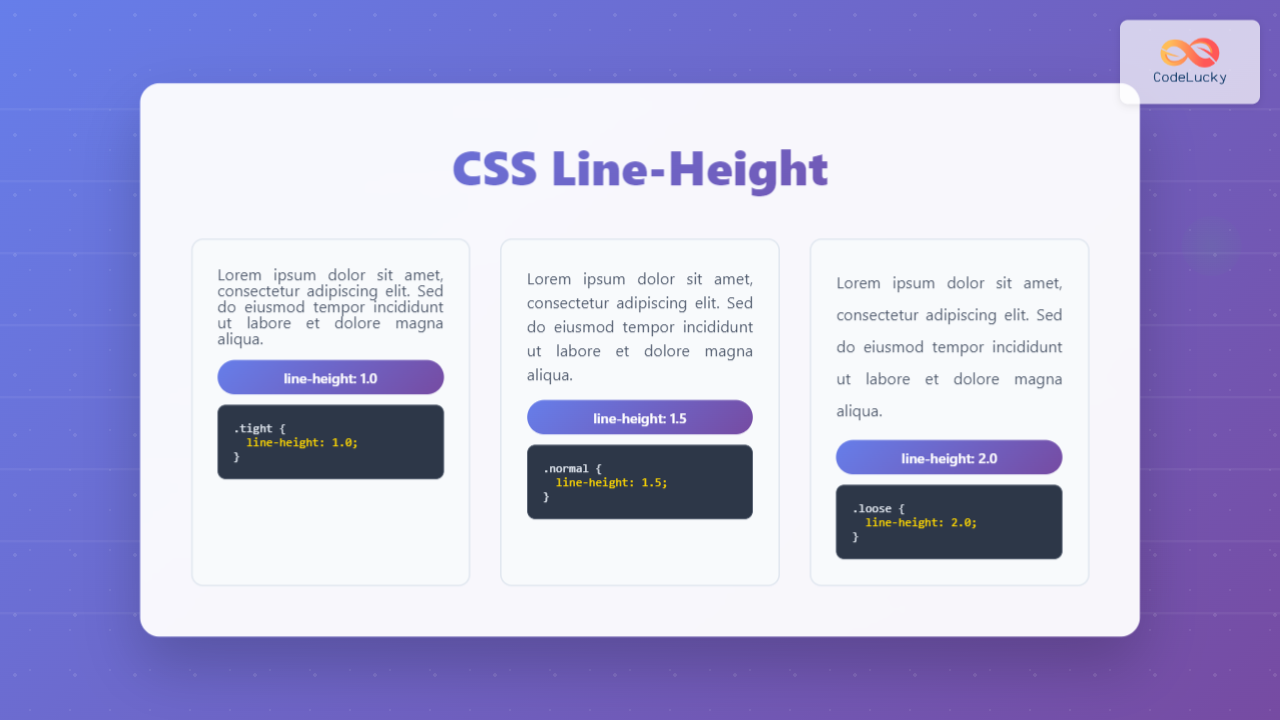
This text has a line-height of 1. Notice how cramped the lines appear when there’s minimal spacing between them.
line-height: 1
This text has a line-height of 1.5. The spacing feels more comfortable and readable for most content.
line-height: 1.5
This text has a line-height of 2. The generous spacing works well for headings or emphasis.
line-height: 2
CSS Line-Height Values and Units
The line-height property accepts several types of values, each with distinct behaviors and use cases.
Unitless Numbers (Recommended)
Unitless values represent a multiplier of the element’s font size. This is the preferred method because it scales proportionally and inherits cleanly.
.text {
  font-size: 16px;
  line-height: 1.5; /* 16px × 1.5 = 24px line height */
}
Length Units (px, em, rem)
Absolute or relative length units set a fixed line height regardless of font size changes.
.fixed-height {
  line-height: 24px; /* Fixed 24px line height */
}

.relative-height {
  line-height: 1.5em; /* 1.5 times current font size */
}
Percentage Values
Percentage values calculate based on the element’s font size but inherit as computed values, which can cause issues in nested elements.
.percentage-height {
  line-height: 150%; /* 150% of font size */
}
Keyword Values
CSS provides several keyword values for common line-height scenarios.
.normal-height {
  line-height: normal; /* Browser default (usually 1.2) */
}

.initial-height {
  line-height: initial; /* Reset to initial value */
}
Interactive Line-Height Demonstrator
Experiment with Line-Height Values
Line-Height Best Practices
Optimal Reading Experience
Research in typography suggests specific line-height ranges for optimal readability:
- Body Text: 1.4 to 1.6 for most fonts
- Headings: 1.1 to 1.3 for better visual impact
- Small Text: 1.3 to 1.5 to compensate for reduced legibility
Typography Example: Hierarchy with Line-Height
Main Heading (line-height: 1.2)
Subheading (line-height: 1.3)
This paragraph demonstrates optimal body text line-height of 1.5. The spacing provides comfortable reading while maintaining visual connection between lines.
Smaller text with line-height: 1.4 maintains readability at reduced size.
Responsive Line-Height
Line-height should adapt to different screen sizes and font sizes for optimal readability across devices.
/* Base line-height */
.responsive-text {
  line-height: 1.6;
}

/* Tighter line-height for larger screens */
@media (min-width: 768px) {
  .responsive-text {
    line-height: 1.5;
  }
}

/* Adjust for very large text */
@media (min-width: 1200px) {
  .responsive-text {
    font-size: 18px;
    line-height: 1.4;
  }
}
Advanced Line-Height Techniques
Vertical Rhythm with Line-Height
Creating consistent vertical spacing throughout your design using a baseline grid approach.
/* Establish base rhythm */
:root {
  --base-line-height: 1.5;
  --base-font-size: 16px;
  --rhythm-unit: calc(var(--base-font-size) * var(--base-line-height)); /* 24px */
}

h1 {
  font-size: 2rem;
  line-height: 1.2;
  margin-bottom: var(--rhythm-unit);
}

p {
  line-height: var(--base-line-height);
  margin-bottom: var(--rhythm-unit);
}
Line-Height for Different Font Families
Different fonts require different line-height adjustments due to their unique characteristics.
Serif Font (Times)
Serif fonts often need slightly more line-height (1.5-1.6) due to their decorative strokes and traditional reading patterns.
Sans-serif Font (Arial)
Sans-serif fonts can work with tighter line-height (1.4-1.5) due to their clean, modern appearance and improved screen readability.
Common Line-Height Mistakes to Avoid
Mistake #1: Using Fixed Pixel Values
/* ❌ Problematic */
.text {
  font-size: 16px;
  line-height: 20px; /* Doesn't scale with font-size changes */
}
/* ✅ Better */
.text {
font-size: 16px;
line-height: 1.25; /* Scales proportionally */
}Mistake #2: Ignoring Font Characteristics
Different fonts have varying x-heights and character shapes that affect optimal line spacing.
Monospace fonts often need more line-height due to uniform character width.
Needs: line-height: 1.5+
CONDENSED FONTS WORK WITH TIGHTER SPACING
Can use: line-height: 1.1-1.2
Line-Height and Accessibility
Proper line-height is crucial for web accessibility, particularly for users with dyslexia or visual impairments.
WCAG Guidelines
The Web Content Accessibility Guidelines recommend:
- Minimum line-height: 1.5 times the font size for body text
- Paragraph spacing: At least 2 times the font size
- User control: Allow users to adjust line spacing up to 2 times the default
Accessibility-First Approach
/* WCAG compliant line-height */
.accessible-text {
  line-height: 1.5; /* Minimum recommended */
  font-size: 16px;
}

/* Allow user customization */
.user-customizable {
  line-height: var(--user-line-height, 1.5);
}
Performance Considerations
Line-height changes can trigger layout recalculations. Use CSS custom properties for dynamic adjustments:
/* Efficient dynamic line-height */
:root {
  --dynamic-line-height: 1.5;
}

.content {
  line-height: var(--dynamic-line-height);
  transition: line-height 0.3s ease;
}

/* JavaScript adjustment */
document.documentElement.style.setProperty('--dynamic-line-height', '1.6');
Browser Compatibility and Fallbacks
Line-height enjoys excellent browser support, but consider fallbacks for advanced features:
/* Progressive enhancement */
.modern-text {
  line-height: 1.5; /* Fallback */
  line-height: clamp(1.4, 2.5vw, 1.6); /* Modern responsive approach */
}

/* CSS custom properties with fallback */
.custom-spacing {
  line-height: 1.5; /* Fallback for older browsers */
  line-height: var(--custom-line-height, 1.5);
}
Real-World Implementation Examples
Blog Post Typography
.blog-post {
  /* Article title */
  h1 {
    line-height: 1.1;
    margin-bottom: 0.5em;
  }

  /* Section headings */
  h2, h3 {
    line-height: 1.2;
    margin: 1.5em 0 0.5em;
  }

  /* Body paragraphs */
  p {
    line-height: 1.6;
    margin-bottom: 1em;
  }

  /* Code blocks */
  pre, code {
    line-height: 1.4;
    font-family: 'Monaco', monospace;
  }
}
Card-Based Layout
.card {
  /* Card title */
  &__title {
    line-height: 1.2;
    font-size: 1.25rem;
    margin-bottom: 0.5rem;
  }

  /* Card description */
  &__description {
    line-height: 1.5;
    font-size: 0.9rem;
    color: #666;
  }

  /* Compact card variant */
  &--compact {
    .card__title {
      line-height: 1.1;
    }
    .card__description {
      line-height: 1.4;
    }
  }
}
Testing and Optimization
Use browser developer tools to fine-tune line-height values:
- Visual inspection: Use browser DevTools to adjust line-height in real-time
- Readability testing: Test with actual content and various font sizes
- Device testing: Verify appearance across different screen sizes and resolutions
- Accessibility validation: Use tools like axe-core to check WCAG compliance
Quick Reference: Line-Height Values
| Use Case | Recommended Value | Notes |
|---|---|---|
| Body Text | 1.4 - 1.6 |
Optimal readability |
| Headings | 1.1 - 1.3 |
Tighter for impact |
| Small Text | 1.3 - 1.5 |
Compensate for size |
| Code/Monospace | 1.4 - 1.6 |
Account for width |
Future of Line-Height in CSS
Emerging CSS features are expanding line-height capabilities:
- CSS Logical Properties:
line-height-stepfor consistent vertical rhythm - Container Queries: Dynamic line-height based on container size
- CSS Nesting: More maintainable line-height organization
/* Future CSS capabilities */
.container {
  container-type: inline-size;
}

@container (min-width: 400px) {
  .responsive-text {
    line-height: 1.4;
  }
}
Mastering CSS line-height is essential for creating professional, readable web typography. By understanding the different value types, following accessibility guidelines, and implementing responsive approaches, you can significantly improve your website’s user experience and visual appeal. Remember to test your line-height choices across different devices and with real content to ensure optimal results.
Related Posts
CSS Style lineHeight Property: CSS Line Height
Understanding the CSS line-height Property: Your Guide to Perfect Text Spacing The line-height property in CSS is a fundamental tool...
CSS Word-Spacing: Master Text Spacing for Better Typography
The word-spacing property in CSS is a powerful tool for controlling the spacing between words in your text content. This...
CSS marginBottom Property: CSS Margin Bottom
Understanding the CSS margin-bottom Property The margin-bottom property in CSS defines the space below an element. This margin is added...
CSS Letter-Spacing: Complete Guide to Character Spacing Control
The letter-spacing property in CSS is a powerful typography tool that controls the horizontal space between characters in text. Whether...
CSS Text-Indent: Complete Guide to First Line Paragraph Indentation
The CSS text-indent property is a fundamental typography tool that controls the indentation of the first line in a block...
CSS Style height Property: CSS Height
Understanding the CSS height Property: A Comprehensive Guide The height property in CSS specifies the height of an element's content...
CSS Style wordSpacing Property: CSS Word Spacing
Understanding CSS word-spacing Property The word-spacing property in CSS is used to specify the amount of space between words. This...
CSS Style padding Property: CSS Padding
CSS Padding Property: A Comprehensive Guide The CSS padding property is a fundamental tool in web development, allowing you to...
CSS Style fontSize Property: CSS Font Size
CSS fontSize Property: Controlling Text Size The fontSize property in CSS specifies the size of the font. This property is...
CSS Style paddingTop Property: CSS Padding Top
Understanding the CSS padding-top Property The padding-top property in CSS defines the amount of space between the top edge of...
CSS Text-Decoration: Complete Guide to Underline, Overline and Strikethrough Effects
CSS text-decoration is a fundamental property that allows developers to add visual emphasis and styling to text through decorative lines....
CSS Style letterSpacing Property: CSS Letter Spacing
CSS letter-spacing Property: A Comprehensive Guide The letter-spacing CSS property controls the horizontal spacing between text characters. It allows you...





