
Introduction to CSS Direction Property
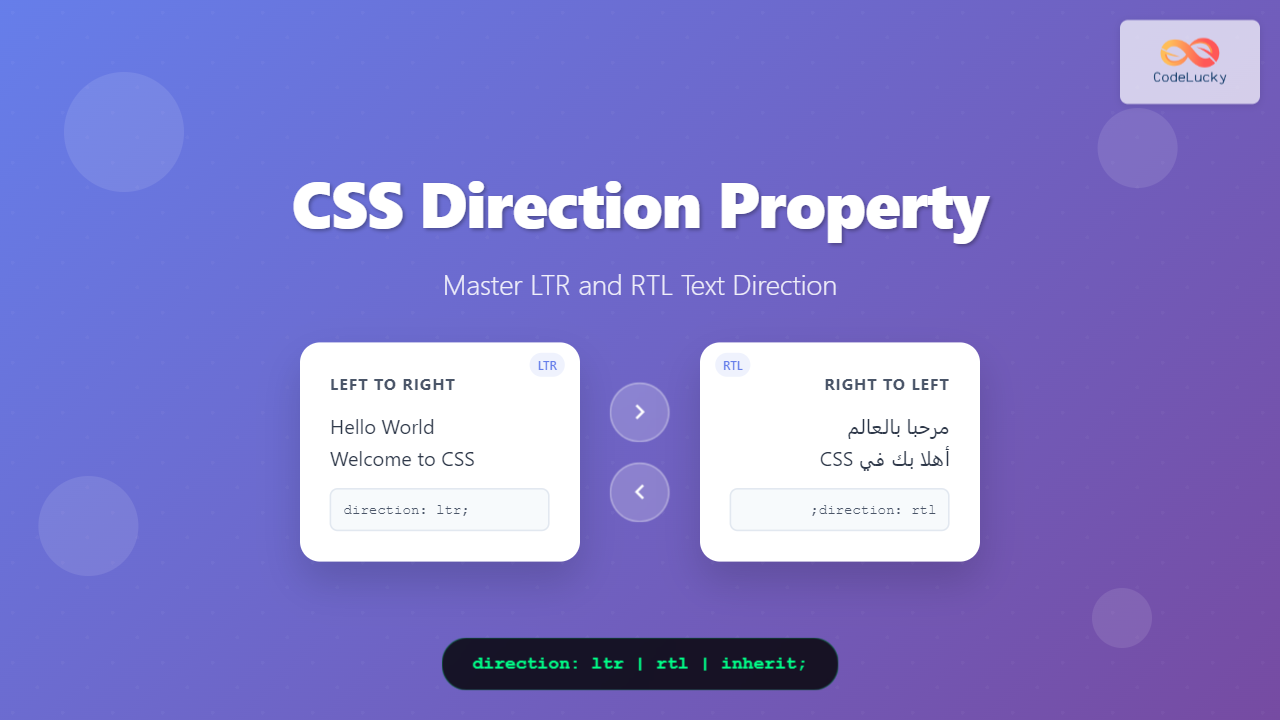
The CSS direction property is a fundamental tool for controlling text flow and layout direction in web pages. This property becomes crucial when developing multilingual websites that support languages with different writing systems, particularly right-to-left (RTL) languages like Arabic, Hebrew, and Persian.
Understanding and implementing proper text direction not only improves user experience for international audiences but also ensures accessibility compliance and professional presentation of multilingual content.
Understanding Text Direction Basics
Text direction refers to the flow of text within a line and the arrangement of lines within a block. Most languages follow left-to-right (LTR) direction, including English, French, Spanish, and many others. However, several languages use right-to-left (RTL) direction, creating unique layout considerations.
LTR vs RTL Languages
Left-to-Right (LTR) Languages:
- English, French, German, Spanish
- Most European and Asian languages
- Text flows from left to right
- Interface elements align to the left
Right-to-Left (RTL) Languages:
- Arabic, Hebrew, Persian, Urdu
- Text flows from right to left
- Interface elements align to the right
- Page layout mirrors horizontally
CSS Direction Property Syntax
The direction property accepts three values:
direction: ltr | rtl | inherit;
Property Values Explained
ltr– Left-to-right text direction (default)rtl– Right-to-left text directioninherit– Inherits direction from parent element
Basic Implementation Examples
Setting LTR Direction
.ltr-text {
  direction: ltr;
  text-align: left;
}

<p class="ltr-text">This is English text flowing left to right.</p>
Output:
Setting RTL Direction
.rtl-text {
  direction: rtl;
  text-align: right;
}

<p class="rtl-text">هذا نص عربي يتدفق من اليمين إلى اليسار</p>
Output:
Interactive Direction Switcher Example
Try It Yourself:
This is sample text that changes direction when you click the button above.
النص العربي: هذا مثال على النص العربي
Mixed content: Hello مرحبا World عالم
Working with Mixed Content
Real-world scenarios often involve mixed content with both LTR and RTL text. The CSS direction property works with the Unicode Bidirectional Algorithm to handle this complexity automatically.
Mixed Language Example
.mixed-content {
  direction: rtl;
  text-align: right;
}

<p class="mixed-content">
  Welcome to مرحبا بك في CodeLucky.com
</p>
Output:
HTML Direction Attribute vs CSS Direction Property
While CSS provides the direction property, HTML also offers the dir attribute. Understanding when to use each is crucial for proper implementation.
HTML dir Attribute
<html dir="rtl">
<body>
  <p dir="ltr">This paragraph is LTR</p>
  <p dir="rtl">هذه الفقرة من اليمين إلى اليسار</p>
</body>
</html>
CSS Direction Property
html {
  direction: rtl;
}

.ltr-override {
  direction: ltr;
}

.rtl-content {
  direction: rtl;
}
Best Practice Comparison
| Aspect | HTML dir Attribute | CSS direction Property |
|---|---|---|
| Semantic | More semantic and accessible | Presentational only |
| Inheritance | Automatically inherited | CSS inheritance rules apply |
| Performance | Faster processing | Requires CSS parsing |
| Use Case | Document structure | Styling and overrides |
Advanced Layout Considerations
Flexbox and Direction
CSS Flexbox behavior changes with the direction property, affecting flex item arrangement and alignment.
.flex-container {
  display: flex;
  direction: rtl;
  gap: 10px;
  padding: 20px;
  border: 2px solid #007bff;
}

.flex-item {
  background-color: #e9ecef;
  padding: 10px;
  border-radius: 4px;
}
Visual Example:
Grid Layout and Direction
CSS Grid also responds to direction changes, affecting grid item placement and flow.
.grid-container {
  display: grid;
  grid-template-columns: repeat(3, 1fr);
  direction: rtl;
  gap: 10px;
}

.grid-item {
  background-color: #28a745;
  color: white;
  padding: 20px;
  text-align: center;
}
Real-World Implementation Strategies
Multilingual Website Setup
For websites supporting multiple languages, implement a systematic approach to direction handling:
/* Base styles */
html {
  direction: ltr; /* Default */
}

/* RTL language support */
html[lang="ar"],
html[lang="he"],
html[lang="fa"] {
  direction: rtl;
}

/* Component-specific overrides */
.logo, .social-media {
  direction: ltr; /* Always LTR regardless of page direction */
}

/* Form elements */
input, textarea {
  text-align: inherit;
}
Dynamic Direction Switching
Implement JavaScript functionality for dynamic language switching:
function setLanguageDirection(lang) {
  const html = document.documentElement;
  const rtlLanguages = ['ar', 'he', 'fa', 'ur'];

  if (rtlLanguages.includes(lang)) {
    html.setAttribute('dir', 'rtl');
    html.style.direction = 'rtl';
  } else {
    html.setAttribute('dir', 'ltr');
    html.style.direction = 'ltr';
  }
}
Common Pitfalls and Solutions
Text Alignment Issues
Problem: Text doesn’t align properly with direction changes.
Solution: Always pair direction with appropriate text-align values:
/* Incorrect */
.rtl-text {
  direction: rtl;
  /* Missing text-align */
}

/* Correct */
.rtl-text {
  direction: rtl;
  text-align: right;
}
Icon and Image Positioning
Problem: Icons and images don’t mirror properly in RTL layouts.
Solution: Use CSS transforms for logical mirroring:
[dir="rtl"] .arrow-icon {
  transform: scaleX(-1);
}

[dir="rtl"] .back-button::before {
  content: "→";
}

[dir="ltr"] .back-button::before {
  content: "←";
}
Browser Support and Compatibility
The CSS direction property enjoys excellent browser support across all modern browsers:
| Browser | Support | Notes |
|---|---|---|
| Chrome | ✅ All versions | Full support |
| Firefox | ✅ All versions | Full support |
| Safari | ✅ All versions | Full support |
| Edge | ✅ All versions | Full support |
| Internet Explorer | ✅ IE 5.5+ | Legacy support |
Best Practices and Recommendations
1. Use Semantic HTML Attributes
Prefer HTML dir attribute for document structure and CSS direction for styling overrides.
2. Plan for Direction Changes
Design layouts that work well in both LTR and RTL directions from the beginning.
3. Test Thoroughly
Always test your implementations with actual RTL content and native speakers when possible.
4. Consider Logical Properties
Use CSS logical properties for better RTL support:
/* Instead of */
margin-left: 20px;

/* Use */
margin-inline-start: 20px;
5. Accessibility Considerations
Ensure screen readers and assistive technologies properly understand text direction by using proper HTML attributes alongside CSS.
Performance Optimization
When implementing direction changes, consider these performance tips:
- Minimize Reflows: Set direction at the document level when possible
- Use CSS Variables: For dynamic direction switching
- Preload Resources: Load RTL-specific assets in advance
- Cache Strategies: Implement proper caching for multilingual content
Conclusion
The CSS direction property is an essential tool for creating inclusive, multilingual web experiences. By understanding its proper implementation alongside HTML direction attributes, developers can create websites that serve global audiences effectively.
Remember to always test your implementations with real content in target languages, consider the semantic implications of your markup choices, and plan for direction changes during the design phase rather than as an afterthought.
Mastering text direction handling not only improves user experience for international audiences but also demonstrates professional attention to detail and cultural sensitivity in web development.
Related Posts
CSS Style direction Property: CSS Direction
Understanding the CSS direction Property The CSS direction property specifies the text direction/writing direction. It is used to set the...
CSS Writing-Mode Property: Master Horizontal and Vertical Text Direction Control
The CSS writing-mode property is a powerful tool that controls the direction and orientation of text flow on web pages....
HTML dir Property: Element Text Direction
HTML dir Property: Controlling Element Text Direction The HTML dir property specifies the text direction for the content within an...
HTML Canvas direction Property: Text Direction
HTML Canvas direction Property: Controlling Text Direction The HTML Canvas direction property allows you to specify the text direction when...
HTML bdo dir Property: Bidi Override Direction
HTML bdo dir Property: Bidi Override Direction The bdo (Bi-Directional Override) element in HTML, combined with the dir attribute, provides...
HTML bdo Tag: Bidirectional Text Override Explained
HTML <bdo> Tag The <bdo> tag in HTML stands for "Bi-Directional Override". It's used to override the current text direction...
CSS Text-Orientation Property: Complete Guide to Vertical Text Character Control
The CSS text-orientation property controls how individual characters are oriented within vertical text layouts. This powerful property becomes essential when...
CSS Logical Properties: Master Inline-Start, Inline-End, Block-Start, Block-End for Modern Web Design
CSS logical properties revolutionize how we approach layout and spacing in modern web development. Unlike traditional physical properties that rely...
CSS Style left Property: CSS Left
CSS left Property: A Comprehensive Guide The CSS left property is a fundamental tool for web developers, enabling precise horizontal...
CSS Style right Property: CSS Right
Understanding the CSS right Property The CSS right property plays a crucial role in positioning elements within a web page....
HTML DOM BDO Object: Accessing Bidi Override Elements
HTML DOM BDO Object: Accessing Bidirectional Override Elements The HTML DOM BDO object provides access to the <bdo> element in...
HTML bdi Tag: Bidirectional Text Isolation
HTML <bdi> Tag The <bdi> (Bidirectional Isolate) tag is an HTML element that isolates a span of text that might...





