
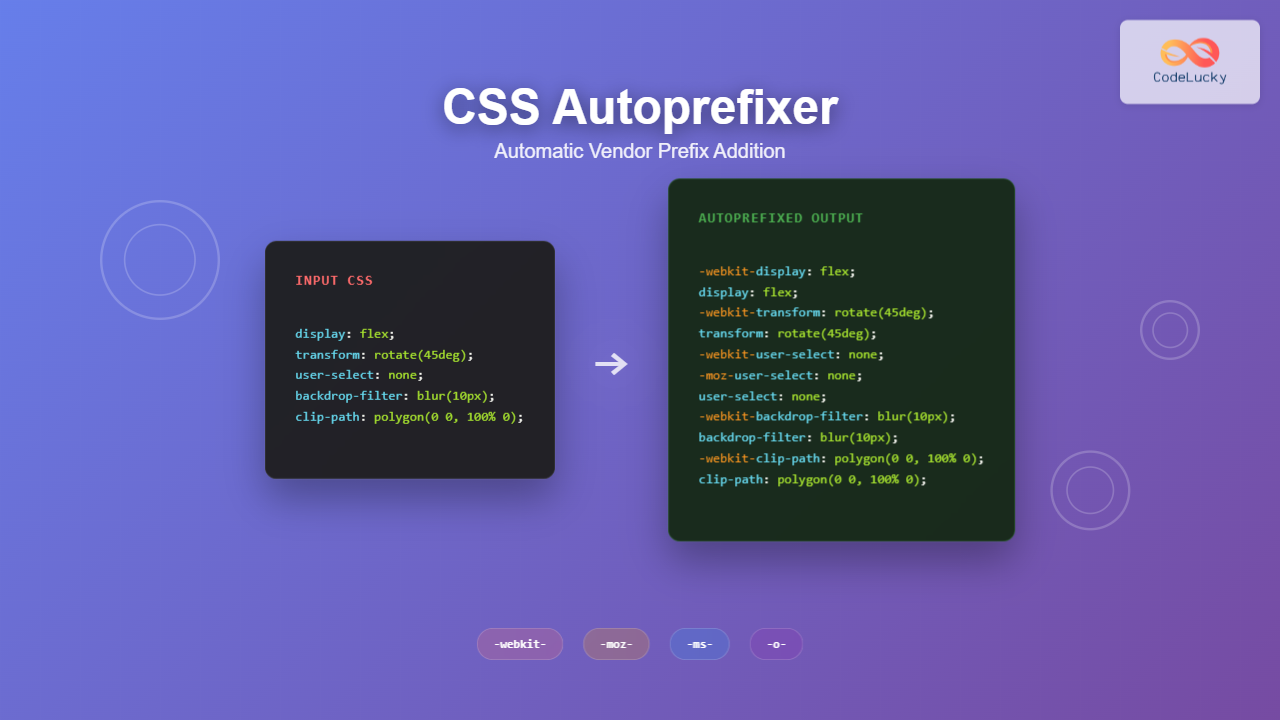
CSS Autoprefixer is a revolutionary PostCSS plugin that automatically adds vendor prefixes to your CSS properties, ensuring perfect cross-browser compatibility without the hassle of manual prefix management. This powerful tool analyzes your CSS and intelligently adds the necessary prefixes based on current browser support data from Can I Use.
What is CSS Autoprefixer?
CSS Autoprefixer is a PostCSS plugin that parses CSS and adds vendor prefixes to CSS rules using values from the Can I Use database. Instead of manually writing multiple vendor-prefixed versions of CSS properties, Autoprefixer automates this process, keeping your source code clean while ensuring maximum browser compatibility.
The tool uses browserslist configuration to determine which browsers to support, making it highly customizable for different project requirements. This means you can target specific browser versions and let Autoprefixer handle the rest.
Why Use CSS Autoprefixer?
Modern web development requires supporting multiple browsers, each with their own implementation quirks and experimental features. Vendor prefixes like -webkit-, -moz-, -ms-, and -o- ensure that CSS properties work across different browser engines.
Writing these prefixes manually is time-consuming, error-prone, and difficult to maintain. CSS Autoprefixer solves these problems by:
- Automating prefix addition based on real browser usage data
- Keeping source code clean by removing the need for manual prefixes
- Staying up-to-date with the latest browser support information
- Reducing bundle size by only adding necessary prefixes
- Improving maintainability by centralizing browser support decisions
Installation and Setup
Installing Autoprefixer
You can install CSS Autoprefixer using npm, yarn, or pnpm. Since Autoprefixer is a PostCSS plugin, you’ll also need PostCSS installed:
# Using npm
npm install --save-dev autoprefixer postcss

# Using yarn
yarn add --dev autoprefixer postcss

# Using pnpm
pnpm add -D autoprefixer postcss
Basic Configuration
Create a postcss.config.js file in your project root:
module.exports = {
  plugins: [
    require('autoprefixer')
  ]
}
Alternatively, you can configure it directly in your build tool or package.json. For example, in package.json:
{
  "browserslist": [
    "> 1%",
    "last 2 versions",
    "not dead"
  ]
}
Browserslist Configuration
Autoprefixer uses browserslist to determine which browsers to support. This configuration can be defined in several ways:
In package.json
{
  "browserslist": [
    "defaults",
    "not IE 11",
    "maintained node versions"
  ]
}
In .browserslistrc file
# Browsers that we support
defaults
not IE 11
maintained node versions
Common Browserslist Queries
defaults– Equivalent to> 0.5%, last 2 versions, Firefox ESR, not dead> 1%– Browsers with more than 1% global usagelast 2 versions– Last 2 versions of each browsernot dead– Exclude browsers without official supportiOS >= 10– iOS Safari 10 and newer
Integration with Build Tools
Webpack Integration
For webpack projects, you can use postcss-loader:
module.exports = {
  module: {
    rules: [
      {
        test: /\.css$/,
        use: [
          'style-loader',
          'css-loader',
          {
            loader: 'postcss-loader',
            options: {
              postcssOptions: {
                plugins: [
                  require('autoprefixer')
                ]
              }
            }
          }
        ]
      }
    ]
  }
}
Vite Integration
Vite has built-in PostCSS support. Just add the postcss.config.js file:
// vite.config.js
import { defineConfig } from 'vite'

export default defineConfig({
  css: {
    postcss: {
      plugins: [
        require('autoprefixer')
      ]
    }
  }
})
Gulp Integration
const gulp = require('gulp');
const postcss = require('gulp-postcss');
const autoprefixer = require('autoprefixer');

gulp.task('css', () => {
  return gulp.src('src/css/*.css')
    .pipe(postcss([autoprefixer()]))
    .pipe(gulp.dest('dist/css'));
});
Practical Examples
Transform Example
Here’s how Autoprefixer transforms your CSS:
Input CSS:
.example {
  display: flex;
  flex-direction: column;
  transform: rotate(45deg);
  transition: all 0.3s ease;
  user-select: none;
}
Output CSS (after Autoprefixer):
.example {
  display: -webkit-box;
  display: -ms-flexbox;
  display: flex;
  -webkit-box-orient: vertical;
  -webkit-box-direction: normal;
  -ms-flex-direction: column;
  flex-direction: column;
  -webkit-transform: rotate(45deg);
  transform: rotate(45deg);
  -webkit-transition: all 0.3s ease;
  transition: all 0.3s ease;
  -webkit-user-select: none;
  -moz-user-select: none;
  -ms-user-select: none;
  user-select: none;
}
Interactive Example
Before Autoprefixer:
.card {
  display: grid;
  grid-template-columns: 1fr 2fr;
  backdrop-filter: blur(10px);
  clip-path: polygon(0 0, 100% 0, 90% 100%, 0 100%);
}
After Autoprefixer:
.card {
  display: -ms-grid;
  display: grid;
  -ms-grid-columns: 1fr 2fr;
  grid-template-columns: 1fr 2fr;
  -webkit-backdrop-filter: blur(10px);
  backdrop-filter: blur(10px);
  -webkit-clip-path: polygon(0 0, 100% 0, 90% 100%, 0 100%);
  clip-path: polygon(0 0, 100% 0, 90% 100%, 0 100%);
}
Advanced Configuration
Grid Support
Autoprefixer can handle CSS Grid with IE 10-11 support using the grid option:
module.exports = {
  plugins: [
    require('autoprefixer')({
      grid: 'autoplace'
    })
  ]
}
Flexbox Support
Configure flexbox handling for older browsers:
module.exports = {
  plugins: [
    require('autoprefixer')({
      flexbox: 'no-2009'
    })
  ]
}
Remove Outdated Prefixes
Autoprefixer can also remove unnecessary prefixes:
module.exports = {
  plugins: [
    require('autoprefixer')({
      remove: true
    })
  ]
}
Common CSS Properties Handled
Autoprefixer automatically handles prefixes for numerous CSS properties:
Layout Properties
display: flexand flexbox propertiesdisplay: gridand grid propertiesposition: sticky
Transform and Animation
transformand transform functionstransitionpropertiesanimationproperties@keyframesrules
Visual Effects
backdrop-filterclip-pathmaskpropertiesfilterfunctions
User Interface
user-selectappearancescroll-behavior
Best Practices
Keep Source Code Clean
Never add vendor prefixes manually in your source CSS. Let Autoprefixer handle all prefixing automatically to maintain clean, readable code.
Configure Browserslist Carefully
Define your browser support requirements clearly. Overly broad support can lead to unnecessary prefixes and larger CSS files.
Regular Updates
Keep Autoprefixer and browserslist data updated to ensure optimal browser support and remove outdated prefixes.
Test Across Browsers
While Autoprefixer handles prefixes automatically, always test your CSS across target browsers to ensure proper functionality.
Performance Considerations
Autoprefixer is designed to be fast and efficient:
- Selective Prefixing: Only adds prefixes when necessary based on browser support data
- Optimized Output: Removes redundant prefixes in supported browsers
- Fast Processing: Minimal impact on build times
- Smart Caching: Browsers list data is cached for performance
Troubleshooting Common Issues
Prefixes Not Being Added
Check your browserslist configuration. If you’re targeting only modern browsers, some prefixes may not be necessary.
Too Many Prefixes
Update your browserslist to target fewer browsers or use more specific queries to reduce unnecessary prefixes.
Grid Issues in IE
Enable grid support explicitly and use the /* autoprefixer grid: on */ comment for complex grid layouts.
Conclusion
CSS Autoprefixer is an essential tool for modern web development, automatically handling vendor prefixes to ensure cross-browser compatibility. By integrating Autoprefixer into your build process, you can write clean, maintainable CSS while ensuring your styles work correctly across all target browsers.
The combination of intelligent prefix addition based on real usage data, flexible browser targeting through browserslist, and seamless integration with popular build tools makes Autoprefixer an indispensable part of any professional web development workflow.
Start using CSS Autoprefixer today to streamline your CSS development process and ensure consistent cross-browser experiences for your users.
Related Posts
CSS Browser Compatibility: Essential Guide to Vendor Prefixes and Fallbacks
Browser compatibility remains one of the most critical challenges in modern web development. Different browsers implement CSS features at varying...
CSS PostCSS: Complete Guide to Modern Plugin-Based CSS Processing
PostCSS has revolutionized how developers write and process CSS by providing a powerful, plugin-based ecosystem that transforms your stylesheets with...

CSS Graceful Degradation: Essential Fallback Strategies for Modern Web Development
CSS graceful degradation is a fundamental web development strategy that ensures your website remains functional and accessible across all browsers,...

CSS Feature Detection: Complete Guide to @supports Rule and Browser Compatibility
CSS feature detection is a crucial technique that allows developers to write robust, future-proof stylesheets that gracefully handle browser compatibility...
CSSStyleDeclaration cssText Property: CSS Text
CSSStyleDeclaration cssText Property: CSS Text The cssText property of the CSSStyleDeclaration interface in CSS allows you to get or set...
CSS Preprocessors: Sass Variables and Nesting – Complete Guide for Modern Web Development
CSS preprocessors have revolutionized how developers write and maintain stylesheets. Among the most popular preprocessors, Sass (Syntactically Awesome StyleSheets) stands...
CSS Linting: Stylelint Configuration and Rules – Complete Developer Guide
What is CSS Linting and Why It Matters CSS linting is the process of analyzing your CSS code to identify...
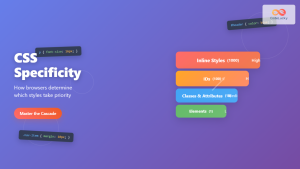
CSS Specificity: Complete Guide to Style Priority and Cascade Resolution
CSS specificity is one of the most crucial concepts every web developer must master. It determines which styles the browser...
CSS Style cssText Property: CSS Text
CSS Style cssText Property: Comprehensive Guide The CSS cssText property in JavaScript is a powerful way to get or set...
CSS Security: Content Security Policy and Inline Styles – Complete Developer Guide
Web security has become more critical than ever, and CSS is no exception to security vulnerabilities. Content Security Policy (CSP)...
CSS Refactoring: Complete Guide to Modernizing Legacy Stylesheets
Legacy CSS codebases can become a significant burden on development teams, slowing down feature delivery and creating maintenance nightmares. CSS...

CSS Custom Properties: Complete Guide to CSS Variables and Dynamic Styling
CSS Custom Properties, commonly known as CSS Variables, revolutionize how we write and maintain stylesheets by introducing dynamic values that...





