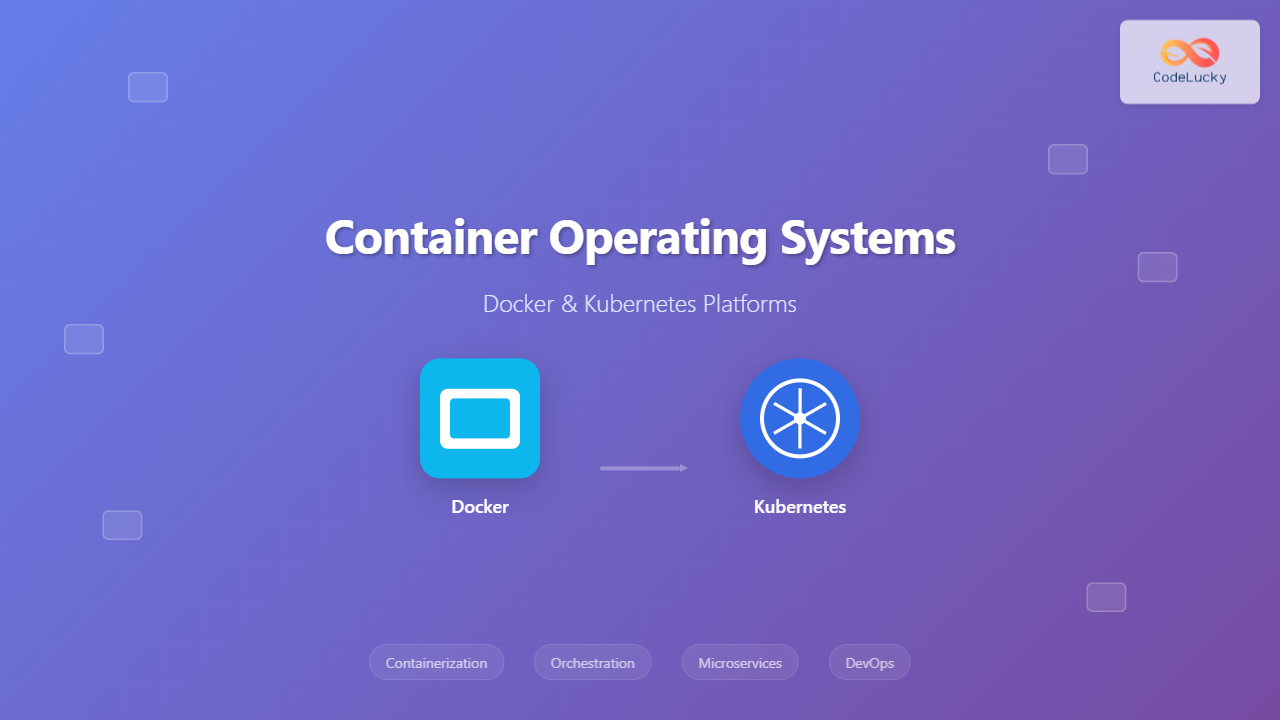
Container operating systems have revolutionized how we deploy, manage, and scale applications in modern computing environments. Unlike traditional operating systems that manage hardware resources directly, container operating systems focus on efficiently running containerized applications while providing isolation, security, and resource management.
Understanding Container Operating Systems
A container operating system is a lightweight, specialized operating system designed specifically to run containers. These systems strip away unnecessary components found in traditional operating systems, focusing solely on container runtime, security, and networking capabilities.
Key Characteristics
- Minimal footprint: Reduced attack surface and faster boot times
- Immutable infrastructure: Read-only file systems with atomic updates
- Container-first design: Optimized for container workloads
- Automatic updates: Simplified patch management and security updates
- Declarative configuration: Infrastructure as code principles
Docker Platform Architecture
Docker is a containerization platform that enables developers to package applications and their dependencies into lightweight, portable containers. The Docker platform consists of several key components working together to provide a complete container solution.

Docker Components
Docker Engine
The Docker Engine is the core runtime that manages containers, images, networks, and storage volumes. It consists of:
- Docker Daemon (dockerd): Background service managing Docker objects
- Docker CLI: Command-line interface for interacting with Docker
- REST API: Interface for programmatic interaction
Docker Images and Containers
Docker images are read-only templates used to create containers. Here’s a practical example of creating a simple web application container:
# Dockerfile example
FROM node:16-alpine
WORKDIR /app
COPY package*.json ./
RUN npm install
COPY . .
EXPOSE 3000
CMD ["npm", "start"]
# Building and running the container
docker build -t my-web-app .
docker run -p 3000:3000 my-web-appDocker Networking
Docker provides several networking options:
- Bridge Network: Default network for standalone containers
- Host Network: Removes network isolation between container and host
- Overlay Network: Enables communication between containers across multiple hosts
- Custom Networks: User-defined networks for specific requirements
# Creating a custom network
docker network create --driver bridge my-network

# Running containers on the custom network
docker run -d --name web-server --network my-network nginx
docker run -d --name database --network my-network postgres
Kubernetes Platform Overview
Kubernetes is an open-source container orchestration platform that automates the deployment, scaling, and management of containerized applications. It provides a robust framework for running distributed systems resiliently.

Kubernetes Architecture Components
Master Node Components
- API Server: Central management entity exposing Kubernetes API
- etcd: Distributed key-value store for cluster state
- Scheduler: Assigns pods to appropriate worker nodes
- Controller Manager: Runs controller processes for cluster state management
Worker Node Components
- kubelet: Primary node agent communicating with master
- kube-proxy: Network proxy maintaining network rules
- Container Runtime: Software responsible for running containers
Kubernetes Objects and Resources
Pods
Pods are the smallest deployable units in Kubernetes, containing one or more containers:
# pod-example.yaml
apiVersion: v1
kind: Pod
metadata:
  name: web-pod
  labels:
    app: web
spec:
  containers:
  - name: web-container
    image: nginx:1.21
    ports:
    - containerPort: 80
    resources:
      limits:
        memory: "128Mi"
        cpu: "500m"
Deployments
Deployments manage replica sets and provide declarative updates:
# deployment-example.yaml
apiVersion: apps/v1
kind: Deployment
metadata:
  name: web-deployment
spec:
  replicas: 3
  selector:
    matchLabels:
      app: web
  template:
    metadata:
      labels:
        app: web
    spec:
      containers:
      - name: web
        image: nginx:1.21
        ports:
        - containerPort: 80
Services
Services provide stable network endpoints for accessing pods:
# service-example.yaml
apiVersion: v1
kind: Service
metadata:
  name: web-service
spec:
  selector:
    app: web
  ports:
  - protocol: TCP
    port: 80
    targetPort: 80
  type: LoadBalancer
Container Orchestration Workflow
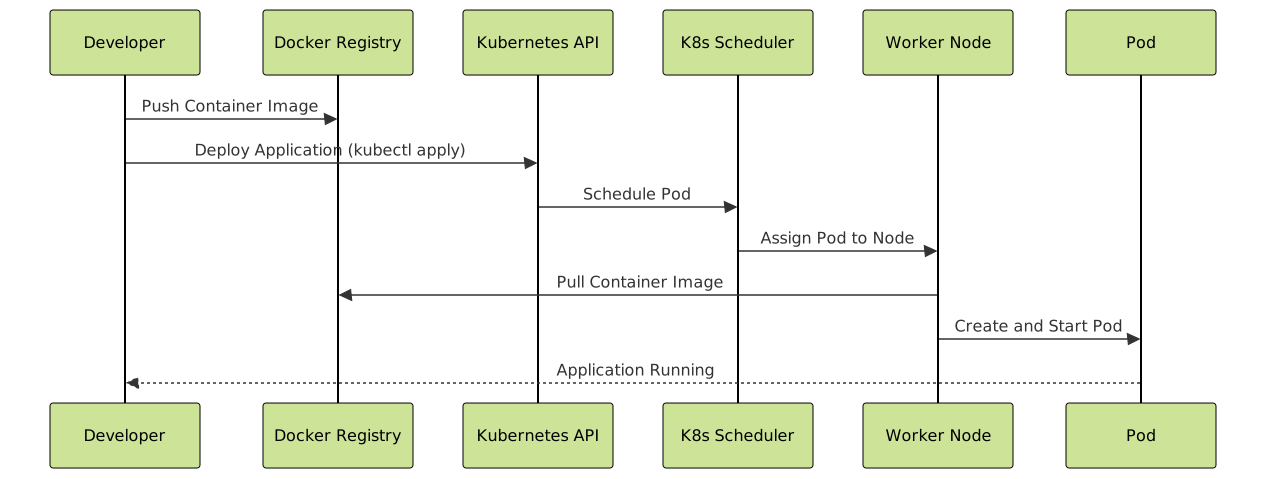
Deployment Process
Here’s a complete example of deploying a microservice application:
# Step 1: Create namespace
kubectl create namespace microservice-app

# Step 2: Apply deployment
kubectl apply -f deployment.yaml -n microservice-app

# Step 3: Expose service
kubectl apply -f service.yaml -n microservice-app

# Step 4: Check deployment status
kubectl get pods -n microservice-app
kubectl get services -n microservice-app
Container Security Best Practices
Docker Security
- Use official base images: Start with trusted, regularly updated images
- Minimize attack surface: Use minimal base images like Alpine Linux
- Non-root users: Run containers with non-privileged users
- Image scanning: Regularly scan images for vulnerabilities
# Security-focused Dockerfile
FROM node:16-alpine
RUN addgroup -g 1001 -S nodejs
RUN adduser -S nextjs -u 1001
WORKDIR /app
COPY --chown=nextjs:nodejs . .
USER nextjs
EXPOSE 3000
CMD ["npm", "start"]
Kubernetes Security
- Network Policies: Control traffic between pods
- RBAC: Role-based access control for API resources
- Pod Security Standards: Enforce security policies at pod level
- Secrets Management: Secure handling of sensitive data
# Network Policy example
apiVersion: networking.k8s.io/v1
kind: NetworkPolicy
metadata:
  name: deny-all
spec:
  podSelector: {}
  policyTypes:
  - Ingress
  - Egress
Monitoring and Observability

Monitoring Stack Implementation
# Prometheus configuration
apiVersion: v1
kind: ConfigMap
metadata:
  name: prometheus-config
data:
  prometheus.yml: |
    global:
      scrape_interval: 15s
    scrape_configs:
    - job_name: 'kubernetes-pods'
      kubernetes_sd_configs:
      - role: pod
      relabel_configs:
      - source_labels: [__meta_kubernetes_pod_annotation_prometheus_io_scrape]
        action: keep
        regex: true
Scaling Strategies
Horizontal Pod Autoscaling (HPA)
# HPA example
apiVersion: autoscaling/v2
kind: HorizontalPodAutoscaler
metadata:
  name: web-hpa
spec:
  scaleTargetRef:
    apiVersion: apps/v1
    kind: Deployment
    name: web-deployment
  minReplicas: 2
  maxReplicas: 10
  metrics:
  - type: Resource
    resource:
      name: cpu
      target:
        type: Utilization
        averageUtilization: 70
Vertical Pod Autoscaling (VPA)
# VPA example
apiVersion: autoscaling.k8s.io/v1
kind: VerticalPodAutoscaler
metadata:
  name: web-vpa
spec:
  targetRef:
    apiVersion: apps/v1
    kind: Deployment
    name: web-deployment
  updatePolicy:
    updateMode: "Auto"
Container Operating System Distributions
Popular Container OS Options
- CoreOS Container Linux: Immutable OS designed for containers
- RancherOS: Lightweight OS where everything runs in containers
- Ubuntu Core: Snap-based OS for IoT and containers
- Flatcar Container Linux: Community-driven CoreOS successor
- Bottlerocket: AWS-purpose-built container OS
Selection Criteria
- Security posture: Immutable filesystems and automatic updates
- Resource efficiency: Minimal overhead and fast boot times
- Ecosystem compatibility: Support for container runtimes
- Management tools: Configuration and deployment mechanisms
Production Deployment Considerations
High Availability Setup

Performance Optimization
- Resource limits: Set appropriate CPU and memory constraints
- Image optimization: Use multi-stage builds and layer caching
- Network optimization: Configure proper CNI plugins
- Storage optimization: Choose appropriate storage classes
# Multi-stage build example
# Build stage
FROM node:16-alpine AS builder
WORKDIR /app
COPY package*.json ./
RUN npm ci --only=production

# Production stage
FROM node:16-alpine AS production
WORKDIR /app
COPY --from=builder /app/node_modules ./node_modules
COPY . .
EXPOSE 3000
CMD ["npm", "start"]
Troubleshooting Common Issues
Docker Troubleshooting
# Check container logs
docker logs container-name

# Inspect container details
docker inspect container-name

# Execute commands in running container
docker exec -it container-name /bin/bash

# Check resource usage
docker stats
Kubernetes Troubleshooting
# Check pod status and events
kubectl describe pod pod-name

# View pod logs
kubectl logs pod-name -f

# Check cluster events
kubectl get events --sort-by=.metadata.creationTimestamp

# Debug networking issues
kubectl exec -it pod-name -- nslookup service-name
Future Trends and Innovations
Emerging Technologies
- WebAssembly (WASM): Portable binary instruction format for containers
- Serverless containers: Function-as-a-Service with container flexibility
- Edge computing: Lightweight container orchestration at edge locations
- AI/ML workloads: Specialized container runtimes for machine learning
Industry Adoption Patterns
- Multi-cloud strategies: Portable container workloads across cloud providers
- GitOps workflows: Infrastructure and application deployment automation
- Service mesh integration: Advanced traffic management and security
- Observability-first design: Built-in monitoring and tracing capabilities
Conclusion
Container operating systems, powered by Docker and Kubernetes platforms, have fundamentally transformed modern application deployment and management. By understanding the architecture, components, and best practices outlined in this guide, you can leverage these technologies to build scalable, resilient, and efficient containerized applications.
The combination of Docker’s simplicity in containerization and Kubernetes’ powerful orchestration capabilities provides a robust foundation for modern cloud-native applications. As these technologies continue to evolve, staying current with best practices and emerging trends will be crucial for successful implementation in production environments.
Remember that successful container adoption requires careful consideration of security, monitoring, scaling, and operational practices. Start with simple use cases and gradually build expertise before tackling complex, mission-critical deployments.
Related Posts
Container Virtualization: Complete Guide to OS-level Virtualization Technology
Container virtualization represents a revolutionary approach to application deployment and resource management through OS-level virtualization. Unlike traditional hardware virtualization, containers...
docker Linux: Complete Container Platform Guide for Developers
Docker has revolutionized software development and deployment by introducing lightweight containerization technology. As a platform that enables developers to package...
containerd Linux: Complete Guide to Industry-Standard Container Runtime
Containerd has emerged as the industry-standard container runtime, serving as the foundation for modern containerization platforms like Docker and Kubernetes....

Kubernetes Linux: Complete Guide to Container Orchestration Platform
Kubernetes has revolutionized how we deploy, manage, and scale containerized applications on Linux systems. As the leading container orchestration platform,...

CRI-O Linux: Complete Guide to Lightweight Container Runtime for Kubernetes
CRI-O (Container Runtime Interface - Open Container Initiative) is a lightweight, OCI-compliant container runtime specifically designed for Kubernetes. Unlike Docker,...
Rancher Linux: Complete Container Management Platform for DevOps Teams
Rancher Linux revolutionizes container management by providing a comprehensive platform that simplifies Kubernetes orchestration, multi-cloud deployments, and enterprise-grade container operations....

OpenShift Linux: Complete Guide to Enterprise Kubernetes Platform Management
OpenShift represents Red Hat's enterprise-grade Kubernetes platform that revolutionizes how organizations deploy, manage, and scale containerized applications on Linux systems....

podman Command Linux: Complete Container Management Guide
Podman (Pod Manager) is a powerful, daemonless container engine that provides a Docker-compatible command-line interface for managing containers and pods...

kind Linux: Complete Guide to Running Kubernetes in Docker Containers
What is kind (Kubernetes in Docker)? kind (Kubernetes in Docker) is a powerful tool designed for running local Kubernetes clusters...

machinectl Command Linux: Complete Guide to Managing systemd Containers and VMs
The machinectl command is a powerful utility in Linux systems that provides comprehensive management capabilities for systemd containers and virtual...
PHP Docker: Containerizing PHP Applications
In today's fast-paced development world, containerization has become a game-changer. Docker, the leading containerization platform, has revolutionized how we develop,...
Cloud Operating System: Complete Guide to Virtualized Infrastructure Management
Cloud Operating Systems represent a paradigm shift in how we manage and orchestrate computing resources across distributed environments. Unlike traditional...