
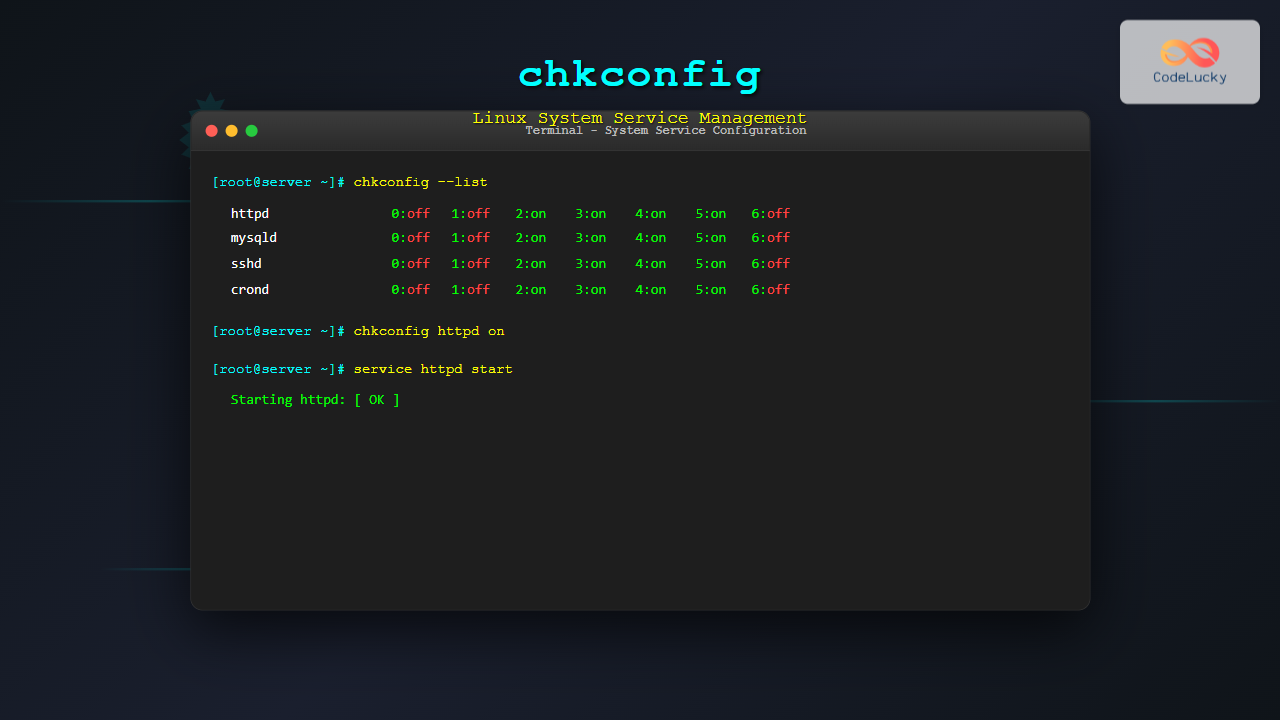
The chkconfig command is a powerful system administration tool in Red Hat-based Linux distributions that allows you to configure system services to start automatically at different runlevels. While modern systems have largely migrated to systemctl, understanding chkconfig remains crucial for managing legacy systems and understanding Linux service architecture.
What is chkconfig?
chkconfig is a command-line utility that provides a simple way to maintain the /etc/rc[0-6].d directory structure. It’s primarily used on Red Hat Enterprise Linux (RHEL), CentOS, and Fedora systems to:
- Enable or disable system services
- Configure services for specific runlevels
- Query the current status of services
- Add or remove services from the chkconfig management
Understanding Linux Runlevels
Before diving into chkconfig usage, it’s essential to understand Linux runlevels:
| Runlevel | Description |
|---|---|
| 0 | System halt |
| 1 | Single-user mode (recovery mode) |
| 2 | Multi-user mode without networking |
| 3 | Multi-user mode with networking (text mode) |
| 4 | User-defined |
| 5 | Multi-user mode with GUI |
| 6 | System reboot |
Basic chkconfig Syntax
The basic syntax of the chkconfig command follows this pattern:
chkconfig [options] [service_name] [on|off|reset]Installing chkconfig
On most Red Hat-based systems, chkconfig comes pre-installed. If it’s missing, you can install it using:
# On RHEL/CentOS/Fedora
sudo yum install chkconfig

# On newer systems with DNF
sudo dnf install chkconfig
Essential chkconfig Commands
1. Listing All Services
To view all services and their current status across all runlevels:
chkconfig --listSample Output:
NetworkManager  0:off   1:off   2:on    3:on    4:on    5:on    6:off
acpid          0:off   1:off   2:on    3:on    4:on    5:on    6:off
atd            0:off   1:off   2:off   3:on    4:on    5:on    6:off
auditd         0:off   1:off   2:on    3:on    4:on    5:on    6:off
crond          0:off   1:off   2:on    3:on    4:on    5:on    6:off
2. Checking Specific Service Status
To check the status of a specific service:
chkconfig --list httpdSample Output:
httpd 0:off 1:off 2:off 3:off 4:off 5:off 6:off3. Enabling a Service
To enable a service to start automatically at boot:
sudo chkconfig httpd onThis enables the service for runlevels 2, 3, 4, and 5 by default.
4. Disabling a Service
To disable a service from starting automatically:
sudo chkconfig httpd off5. Configuring Specific Runlevels
To enable or disable a service for specific runlevels:
# Enable httpd only for runlevels 3 and 5
sudo chkconfig --level 35 httpd on

# Disable httpd for runlevel 5
sudo chkconfig --level 5 httpd off
Advanced chkconfig Operations
Adding a Custom Service
Before using chkconfig with a custom service, the service script must include specific headers:
#!/bin/bash
# chkconfig: 35 80 20
# description: My Custom Service
#
# The first line after the shebang must contain:
# chkconfig: [runlevels] [start_priority] [stop_priority]
To add a service to chkconfig management:
sudo chkconfig --add myserviceRemoving a Service
To remove a service from chkconfig management:
sudo chkconfig --del myserviceResetting Service Configuration
To reset a service to its default configuration:
sudo chkconfig httpd resetWorking with SysV Init Scripts
chkconfig works with System V init scripts located in /etc/init.d/. Here’s how to create a compatible service script:
#!/bin/bash
# chkconfig: 35 99 99
# description: Sample service script
#
. /etc/rc.d/init.d/functions

case "$1" in
start)
    echo -n "Starting myservice: "
    daemon /usr/local/bin/myservice
    RETVAL=$?
    echo
    [ $RETVAL -eq 0 ] && touch /var/lock/subsys/myservice
    ;;
stop)
    echo -n "Shutting down myservice: "
    pid=`ps -aefw | grep DAEMON | grep -v " grep " | awk '{print $2}'`
    kill -9 $pid
    [ $? -eq 0 ] && echo "OK" || echo "Failed"
    ;;
*)
    echo "Usage: {start|stop}"
    exit 1
esac

exit $?
Common Use Cases and Examples
Web Server Configuration
Setting up Apache HTTP server to start automatically:
# Install Apache
sudo yum install httpd

# Enable Apache for automatic startup
sudo chkconfig httpd on

# Verify the configuration
chkconfig --list httpd

# Start the service immediately
sudo service httpd start
Database Service Management
Configuring MySQL/MariaDB service:
# Enable MySQL for runlevels 3 and 5 only
sudo chkconfig --level 35 mysqld on

# Check current status
chkconfig --list mysqld

# Disable for all runlevels
sudo chkconfig mysqld off
Network Services
Managing network-related services:
# Enable SSH daemon
sudo chkconfig sshd on

# Configure firewall service for specific runlevels
sudo chkconfig --level 345 iptables on

# Disable unnecessary services
sudo chkconfig bluetooth off
sudo chkconfig cups off
Troubleshooting Common Issues
Service Not Listed
If a service doesn’t appear in chkconfig --list:
- Check if the service script exists in
/etc/init.d/ - Verify the script has proper chkconfig headers
- Add the service manually:
sudo chkconfig --add servicename
Permission Denied Errors
Always use sudo when modifying service configurations:
# Correct way
sudo chkconfig httpd on

# This will fail
chkconfig httpd on
Service Fails to Start
If a service is enabled but fails to start:
# Check service status
service servicename status

# Review system logs
tail -f /var/log/messages

# Check service-specific logs
tail -f /var/log/httpd/error_log
chkconfig vs systemctl
Modern Linux distributions use systemd instead of SysV init. Here’s a comparison:
| chkconfig Command | systemctl Equivalent |
|---|---|
chkconfig --list |
systemctl list-unit-files --type=service |
chkconfig httpd on |
systemctl enable httpd |
chkconfig httpd off |
systemctl disable httpd |
service httpd start |
systemctl start httpd |
service httpd status |
systemctl status httpd |
Best Practices and Security Considerations
1. Principle of Least Privilege
Only enable services that are absolutely necessary:
# Audit currently enabled services
chkconfig --list | grep ":on"

# Disable unnecessary services
sudo chkconfig unwanted-service off
2. Regular Service Auditing
Create a script to regularly audit service configurations:
#!/bin/bash
# Service audit script
echo "=== Enabled Services ==="
chkconfig --list | grep "3:on" | awk '{print $1}'

echo "=== Running Services ==="
service --status-all 2>/dev/null | grep running
3. Backup Service Configurations
Before making changes, backup current configurations:
# Create backup of current service states
chkconfig --list > /root/chkconfig-backup-$(date +%Y%m%d).txt
Performance Optimization
Boot Time Optimization
Improve system boot time by disabling unnecessary services:
# Common services that can be safely disabled on servers
sudo chkconfig bluetooth off
sudo chkconfig cups off
sudo chkconfig avahi-daemon off
sudo chkconfig ModemManager off
Service Dependencies
Understand service dependencies before disabling:
# Check what services depend on a particular service
grep -r "Required-Start.*servicename" /etc/init.d/
Monitoring and Logging
Service Status Monitoring
Create monitoring scripts to track service states:
#!/bin/bash
# Monitor critical services
SERVICES="httpd mysqld sshd"

for service in $SERVICES; do
    if chkconfig --list $service | grep -q "3:on"; then
        echo "$service is enabled"
    else
        echo "WARNING: $service is not enabled!"
    fi
done
Migration Strategies
When migrating from chkconfig to systemctl:
- Document current service configurations
- Create equivalent systemd service files
- Test thoroughly in a development environment
- Plan rollback procedures
# Document current chkconfig state
chkconfig --list > current-services.txt

# For each enabled service, create systemd equivalent
sudo systemctl enable servicename.service
Conclusion
The chkconfig command remains an essential tool for Linux system administrators, especially when working with Red Hat-based systems or legacy infrastructure. While systemd has become the standard init system for modern Linux distributions, understanding chkconfig provides valuable insights into system service management and ensures compatibility with older systems.
Key takeaways include:
- Always use
sudowhen modifying service configurations - Regularly audit enabled services for security
- Understand runlevels and their implications
- Follow the principle of least privilege
- Plan migration strategies for modern systems
By mastering chkconfig, you’ll have the skills necessary to effectively manage system services, optimize boot performance, and maintain secure, efficient Linux systems across various enterprise environments.
Related Posts

update-rc.d Command Linux: Complete Guide to Managing System Services and Run Levels
The update-rc.d command is a powerful utility in Debian-based Linux distributions that manages the symbolic links for System V init...
service Command Linux: Complete Guide to Managing System Services
The service command is a fundamental tool in Linux system administration that allows you to manage system services and daemons...
systemctl Command Linux: Complete Guide to Control Systemd Services
The systemctl command is the primary tool for controlling systemd services in modern Linux distributions. As the central management utility...

init Command Linux: Complete Guide to Process Control and System Initialization
The init command in Linux serves as the cornerstone of system initialization and process control. As the first process started...

rc-update Command Linux: Complete Guide to Managing OpenRC Services
The rc-update command is a powerful utility in Linux systems that use OpenRC as their init system, primarily found in...
sysctl Command Linux: Complete Guide to Kernel Parameter Configuration
The sysctl command is a powerful Linux utility that allows system administrators to view, modify, and configure kernel parameters at...
ifconfig Command Linux: Complete Guide to Network Interface Configuration (Deprecated)
The ifconfig (interface configuration) command has been a cornerstone of Linux network administration for decades. While officially deprecated in favor...

launchd Linux: Understanding the Service Management Framework for System Administrators
The launchd service management framework has become an essential tool for Linux system administrators who need robust process and service...

systemd Linux: Complete Guide to System and Service Manager
systemd is a powerful system and service manager that has become the default init system for most modern Linux distributions....
runlevel Command Linux: Complete Guide to Display Current and Previous System States
The runlevel command is a fundamental system administration tool in Linux that displays the current and previous system runlevels. Understanding...
chkrootkit Command Linux: Complete Guide to Rootkit Detection and System Security
System security is paramount in Linux administration, and rootkits pose one of the most serious threats to system integrity. The...
telinit Command Linux: Complete Guide to System Runlevel Management
The telinit command is a powerful Linux utility that allows system administrators to change the current runlevel of a Linux...





