
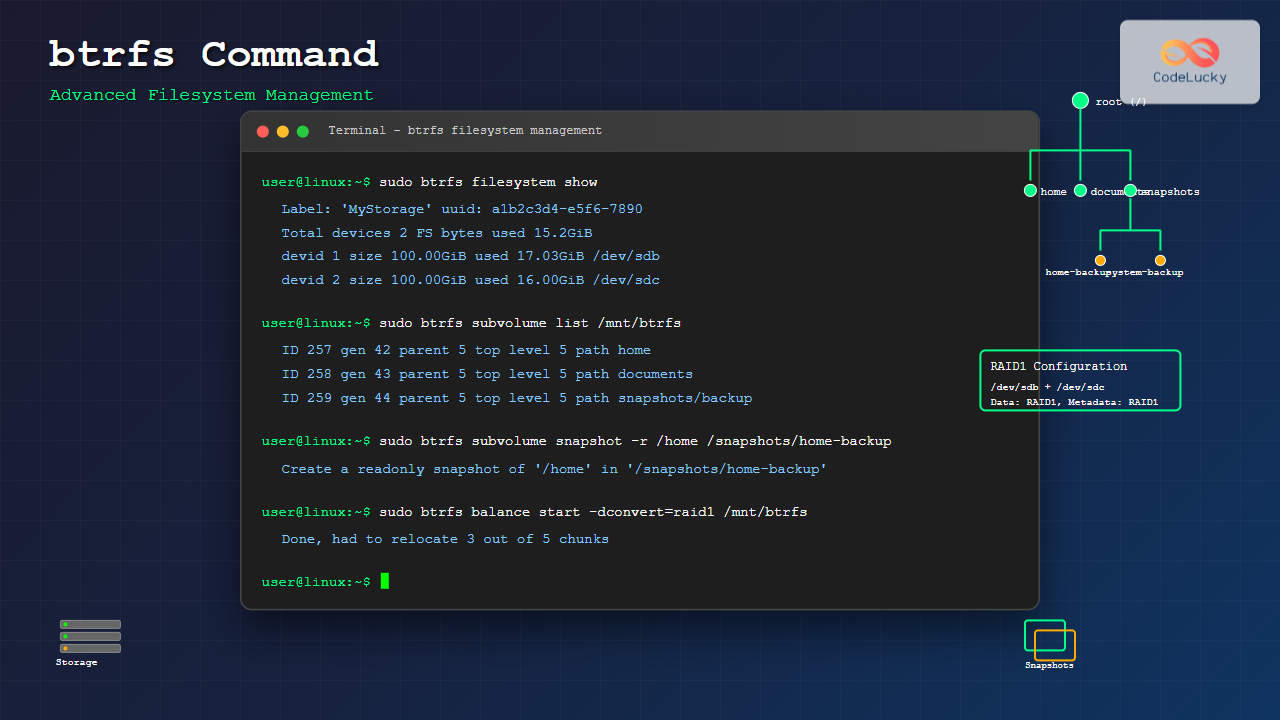
The btrfs command is a powerful utility for managing the B-tree filesystem (Btrfs) in Linux, offering advanced features like snapshots, subvolumes, built-in RAID, and dynamic storage management. This comprehensive guide covers everything you need to know about using btrfs effectively.
What is Btrfs?
Btrfs (B-tree filesystem) is a modern copy-on-write (CoW) filesystem for Linux that provides advanced features including:
- Snapshots and subvolumes
- Built-in RAID support
- Online filesystem defragmentation
- Compression
- Checksumming for data integrity
- Dynamic inode allocation
Basic btrfs Command Syntax
btrfs [options] <command> [<args>]The btrfs command uses subcommands to perform different operations. Here’s the general structure:
# General format
btrfs <subcommand> [options] <path/device>

# Examples
btrfs filesystem show
btrfs subvolume create /mnt/mysubvol
btrfs device add /dev/sdb /mnt/btrfs
Installing btrfs Tools
Before using btrfs commands, ensure the tools are installed:
# Ubuntu/Debian
sudo apt update
sudo apt install btrfs-progs

# CentOS/RHEL/Fedora
sudo yum install btrfs-progs
# or
sudo dnf install btrfs-progs

# Arch Linux
sudo pacman -S btrfs-progs
Creating and Managing Btrfs Filesystems
Creating a Btrfs Filesystem
# Create a single-device filesystem
sudo mkfs.btrfs /dev/sdb

# Create with label
sudo mkfs.btrfs -L "MyStorage" /dev/sdb

# Create multi-device filesystem
sudo mkfs.btrfs /dev/sdb /dev/sdc
Expected Output:
btrfs-progs v5.16.2
See http://btrfs.wiki.kernel.org for more information.

Label:              MyStorage
UUID:               a1b2c3d4-e5f6-7890-abcd-ef1234567890
Node size:          16384
Sector size:        4096
Filesystem size:    100.00GiB
Block group profiles:
  Data:             single            8.00MiB
  Metadata:         DUP               1.00GiB
  System:           DUP               8.00MiB
SSD detected:       no
Incompat features:  extref, skinny-metadata
Runtime features:
Checksum:           crc32c
Number of devices:  1
Devices:
   ID        SIZE  PATH
    1   100.00GiB  /dev/sdb
Mounting Btrfs Filesystem
# Mount the filesystem
sudo mount /dev/sdb /mnt/btrfs

# Mount with options
sudo mount -o compress=zstd,noatime /dev/sdb /mnt/btrfs

# Add to /etc/fstab for permanent mounting
echo "UUID=a1b2c3d4-e5f6-7890-abcd-ef1234567890 /mnt/btrfs btrfs defaults,compress=zstd 0 0" | sudo tee -a /etc/fstab
Filesystem Information and Statistics
Viewing Filesystem Information
# Show all btrfs filesystems
sudo btrfs filesystem show

# Show specific filesystem
sudo btrfs filesystem show /dev/sdb

# Display filesystem usage
sudo btrfs filesystem usage /mnt/btrfs
Sample Output for filesystem usage:
Overall:
    Device size:                 100.00GiB
    Device allocated:             2.02GiB
    Device unallocated:          97.98GiB
    Device missing:                  0.00B
    Used:                       512.00KiB
    Free (estimated):            98.99GiB
    Free (statfs, df):           98.99GiB
    Data ratio:                      1.00
    Metadata ratio:                  2.00
    Global reserve:              16.00MiB

Data,single: Size:8.00MiB, Used:0.00B (0.00%)
   /dev/sdb        8.00MiB

Metadata,DUP: Size:1.00GiB, Used:256.00KiB (0.02%)
   /dev/sdb        2.00GiB

System,DUP: Size:8.00MiB, Used:16.00KiB (0.20%)
   /dev/sdb       16.00MiB

Unallocated:
   /dev/sdb       97.98GiB
Checking Filesystem Health
# Check filesystem (unmounted)
sudo btrfs check /dev/sdb

# Check filesystem with repair (DANGEROUS - backup first!)
sudo btrfs check --repair /dev/sdb

# Scrub filesystem (while mounted)
sudo btrfs scrub start /mnt/btrfs

# Check scrub status
sudo btrfs scrub status /mnt/btrfs
Subvolume Management
Subvolumes are one of btrfs’s most powerful features, acting as independent file trees within the filesystem.
Creating Subvolumes
# Create a subvolume
sudo btrfs subvolume create /mnt/btrfs/documents

# Create nested subvolumes
sudo btrfs subvolume create /mnt/btrfs/home
sudo btrfs subvolume create /mnt/btrfs/home/user1
Output:
Create subvolume '/mnt/btrfs/documents'
Create subvolume '/mnt/btrfs/home'
Create subvolume '/mnt/btrfs/home/user1'
Listing Subvolumes
# List all subvolumes
sudo btrfs subvolume list /mnt/btrfs

# List with more details
sudo btrfs subvolume list -p /mnt/btrfs

# Show subvolume information
sudo btrfs subvolume show /mnt/btrfs/documents
Sample Output:
ID 257 gen 8 parent 5 top level 5 path documents
ID 258 gen 9 parent 5 top level 5 path home
ID 259 gen 10 parent 258 top level 5 path home/user1
Deleting Subvolumes
# Delete a subvolume
sudo btrfs subvolume delete /mnt/btrfs/documents

# Delete subvolume by ID
sudo btrfs subvolume delete -i 257 /mnt/btrfs
Snapshot Management
Snapshots are read-only or writable copies of subvolumes, perfect for backups and system recovery.
Creating Snapshots
# Create read-only snapshot
sudo btrfs subvolume snapshot -r /mnt/btrfs/home /mnt/btrfs/snapshots/home-$(date +%Y%m%d)

# Create writable snapshot
sudo btrfs subvolume snapshot /mnt/btrfs/home /mnt/btrfs/snapshots/home-backup

# Snapshot the entire filesystem
sudo btrfs subvolume snapshot -r /mnt/btrfs /mnt/btrfs/snapshots/full-$(date +%Y%m%d)
Managing Snapshots
# List snapshots (they appear as subvolumes)
sudo btrfs subvolume list /mnt/btrfs | grep snapshots

# Delete old snapshots
sudo btrfs subvolume delete /mnt/btrfs/snapshots/home-20240815

# Set snapshot as default subvolume
sudo btrfs subvolume set-default 257 /mnt/btrfs
Device Management
Adding Devices
# Add device to filesystem
sudo btrfs device add /dev/sdc /mnt/btrfs

# Add multiple devices
sudo btrfs device add /dev/sdc /dev/sdd /mnt/btrfs
Removing Devices
# Remove device (data will be migrated)
sudo btrfs device remove /dev/sdc /mnt/btrfs

# Remove device by ID
sudo btrfs device remove 2 /mnt/btrfs
Device Statistics
# Show device statistics
sudo btrfs device stats /mnt/btrfs

# Reset device statistics
sudo btrfs device stats -z /mnt/btrfs
RAID Configuration
Converting to RAID
# Convert data to RAID1
sudo btrfs balance start -dconvert=raid1 /mnt/btrfs

# Convert metadata to RAID1
sudo btrfs balance start -mconvert=raid1 /mnt/btrfs

# Convert to RAID10
sudo btrfs balance start -dconvert=raid10 -mconvert=raid10 /mnt/btrfs
RAID Status
# Check RAID status
sudo btrfs filesystem usage /mnt/btrfs

# Monitor balance progress
sudo btrfs balance status /mnt/btrfs
Compression and Optimization
Enabling Compression
# Mount with compression
sudo mount -o compress=zstd /dev/sdb /mnt/btrfs

# Compress existing files
sudo btrfs filesystem defragment -r -czstd /mnt/btrfs

# Different compression algorithms
sudo mount -o compress=lzo /dev/sdb /mnt/btrfs
sudo mount -o compress=zlib /dev/sdb /mnt/btrfs
Defragmentation
# Defragment entire filesystem
sudo btrfs filesystem defragment -r /mnt/btrfs

# Defragment specific directory
sudo btrfs filesystem defragment -r /mnt/btrfs/home

# Defragment with compression
sudo btrfs filesystem defragment -r -czstd /mnt/btrfs
Quota Management
Enabling Quotas
# Enable quotas
sudo btrfs quota enable /mnt/btrfs

# Create quota group
sudo btrfs qgroup create 1/100 /mnt/btrfs

# Assign subvolume to quota group
sudo btrfs qgroup assign 257 1/100 /mnt/btrfs
Setting Limits
# Set size limit (10GB)
sudo btrfs qgroup limit 10G 1/100 /mnt/btrfs

# Show quota information
sudo btrfs qgroup show /mnt/btrfs
Backup and Send/Receive
Send/Receive Operations
# Create incremental backup stream
sudo btrfs send /mnt/btrfs/snapshots/home-20240825 | sudo btrfs receive /mnt/backup

# Send incremental changes
sudo btrfs send -p /mnt/btrfs/snapshots/home-20240824 /mnt/btrfs/snapshots/home-20240825 | sudo btrfs receive /mnt/backup
Troubleshooting Common Issues
Filesystem Full Issues
# Check space allocation
sudo btrfs filesystem usage /mnt/btrfs

# Balance to free up space
sudo btrfs balance start -dusage=50 /mnt/btrfs

# Emergency balance
sudo btrfs balance start -dusage=0 /mnt/btrfs
Recovery Operations
# Mount with recovery options
sudo mount -o ro,recovery /dev/sdb /mnt/btrfs

# Try alternative superblocks
sudo mount -o ro,usebackuproot /dev/sdb /mnt/btrfs

# Zero-log for corruption recovery
sudo btrfs rescue zero-log /dev/sdb
Best Practices and Tips
Performance Optimization
- Use noatime mount option to reduce disk writes
- Enable compression for better space utilization
- Regular scrubbing to maintain data integrity
- Proper RAID configuration for your use case
# Optimal mount options
sudo mount -o noatime,compress=zstd,space_cache=v2 /dev/sdb /mnt/btrfs

# Schedule regular scrubs
echo "0 2 1 * * root btrfs scrub start /mnt/btrfs" | sudo tee -a /etc/crontab
Monitoring and Maintenance
# Create monitoring script
cat << 'EOF' | sudo tee /usr/local/bin/btrfs-monitor.sh
#!/bin/bash
echo "=== Btrfs Filesystem Status ==="
btrfs filesystem usage /mnt/btrfs
echo "=== Device Statistics ==="
btrfs device stats /mnt/btrfs
echo "=== Scrub Status ==="
btrfs scrub status /mnt/btrfs
EOF

sudo chmod +x /usr/local/bin/btrfs-monitor.sh
Security Considerations
- Regular backups using snapshots and send/receive
- Monitor checksums for data corruption detection
- Use RAID for redundancy in critical systems
- Test recovery procedures regularly
Advanced Use Cases
System Administration
# Create system snapshot before updates
sudo btrfs subvolume snapshot -r / /snapshots/system-$(date +%Y%m%d)-pre-update

# Rollback system (boot from live system)
sudo btrfs subvolume set-default 256 /mnt/root
Development Workflows
# Create development environment snapshots
sudo btrfs subvolume create /mnt/btrfs/dev
sudo btrfs subvolume snapshot /mnt/btrfs/dev /mnt/btrfs/dev-experiments

# Quick environment switching
sudo umount /mnt/dev
sudo mount -o subvol=dev-experiments /dev/sdb /mnt/dev
Conclusion
The btrfs command provides powerful filesystem management capabilities that go far beyond traditional filesystems. With features like snapshots, subvolumes, built-in RAID, and advanced data integrity checking, btrfs is an excellent choice for modern Linux systems requiring advanced storage management.
Remember to always test btrfs operations in non-production environments first, maintain regular backups, and monitor filesystem health through scrubs and statistics. With proper understanding and implementation, btrfs can significantly enhance your system’s storage capabilities and data protection strategies.
Related Posts
Copy-on-Write File System: Complete Guide to ZFS and Btrfs Implementation
Copy-on-Write (COW) file systems represent a revolutionary approach to data storage and management, fundamentally changing how operating systems handle file...
File System Implementation: Boot Block, Super Block and Inodes Explained
Understanding File System Implementation File system implementation is a critical component of operating systems that manages how data is stored,...

zfs Command Linux: Complete Guide to ZFS Filesystem Administration
The ZFS (Zettabyte File System) is a revolutionary filesystem that combines traditional filesystem capabilities with logical volume management, RAID functionality,...
Log-structured File System: Sequential Write Optimization for High-Performance Storage
Log-structured File Systems (LFS) represent a revolutionary approach to data storage that fundamentally changes how operating systems handle file operations....
File System Types: FAT32, NTFS, ext4 and Modern Linux Filesystems Explained
Understanding File Systems: The Foundation of Data Storage A file system is the method and data structure that an operating...
tmpfs Linux: Complete Guide to Temporary Filesystem in Memory for Better Performance
tmpfs (temporary file system) is a powerful Linux feature that creates a virtual filesystem stored entirely in RAM and swap...

File System in Operating System: Complete Guide to Structure and Organization
Introduction to File Systems A file system is a fundamental component of any operating system that provides a structured way...
sysfs Linux: Complete Guide to Understanding and Using /sys Filesystem
The sysfs filesystem is one of Linux's most powerful yet underutilized features, providing a window into the kernel's internal operations...
lvm Command Linux: Complete Guide to Logical Volume Manager Operations
The Logical Volume Manager (LVM) is a powerful disk management tool in Linux that provides flexible storage management by abstracting...

Storage Virtualization: Complete Guide to Logical Volume Management in Linux
Storage virtualization through Logical Volume Management (LVM) represents one of the most powerful features in modern Linux systems, providing administrators...
File System Journaling: Complete Guide to Crash Recovery and Data Integrity
Understanding File System Journaling File system journaling is a critical mechanism that ensures data integrity and enables rapid crash recovery...
devfs Linux: Complete Guide to Device Filesystem Management
The Device Filesystem (devfs) represents a revolutionary approach to device management in Linux systems, providing dynamic creation and removal of...





