
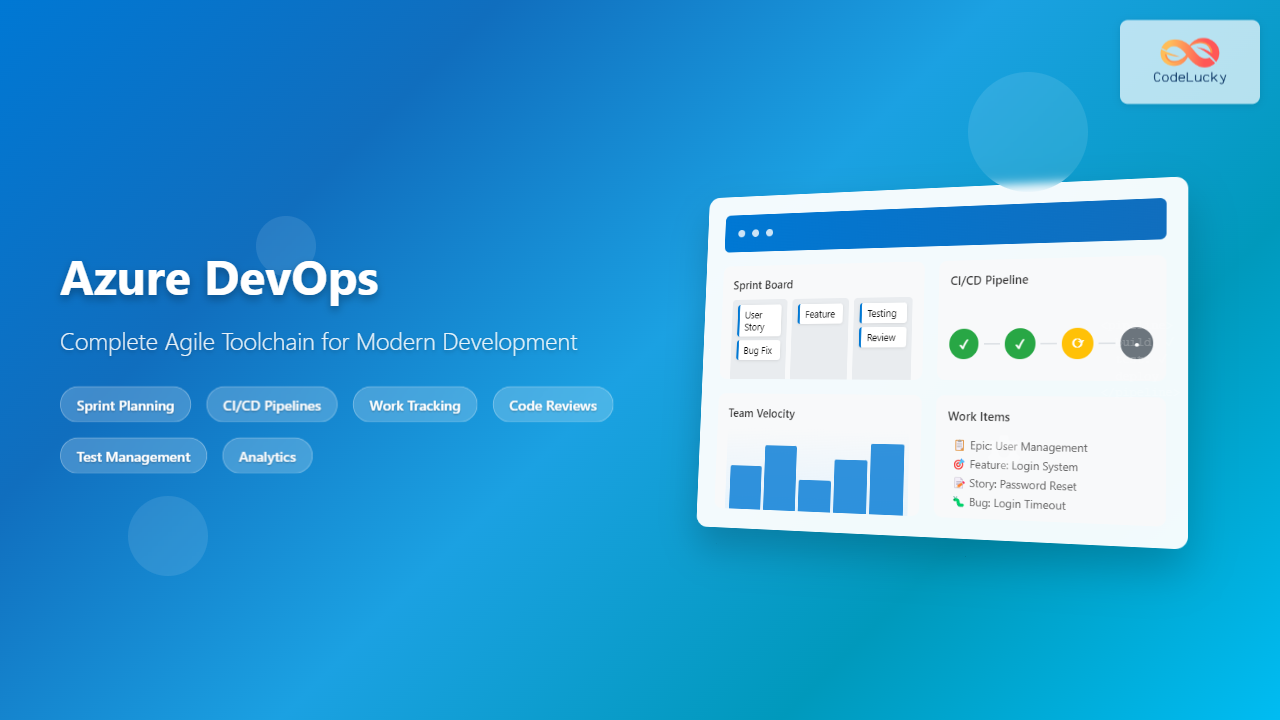
Azure DevOps has emerged as one of the most comprehensive platforms for implementing Agile methodologies in modern software development. This Microsoft-powered toolchain integrates seamlessly with existing workflows while providing everything teams need to plan, develop, test, and deploy applications efficiently.
Whether you’re transitioning from traditional development approaches or looking to optimize your current Agile practices, Azure DevOps offers a unified ecosystem that supports both Scrum and Kanban methodologies. Let’s explore how this platform can transform your development process.
What Makes Azure DevOps Perfect for Agile Teams?
Azure DevOps stands out in the crowded DevOps landscape because it was designed with Agile principles at its core. Unlike fragmented toolchains that require multiple integrations, Azure DevOps provides five integrated services that work together seamlessly:
- Azure Boards – Work item tracking and project management
- Azure Repos – Git repositories and version control
- Azure Pipelines – CI/CD automation and deployment
- Azure Test Plans – Testing and quality assurance
- Azure Artifacts – Package management and distribution
This integration eliminates the common pain points of managing multiple tools, ensuring that your Agile ceremonies, development work, and deployment processes remain synchronized throughout the entire software development lifecycle.
Setting Up Your Agile Foundation with Azure Boards
Azure Boards serves as the command center for your Agile operations. The platform supports both Scrum and Kanban processes out of the box, allowing teams to choose the methodology that best fits their workflow.
Configuring Your Agile Process
When creating a new project in Azure DevOps, you’ll select from several process templates:
- Agile – Perfect for teams using user stories and features
- Scrum – Ideal for teams following Scrum methodology with product backlogs
- CMMI – Suited for organizations requiring formal processes
- Basic – Simplified approach for smaller teams
The Scrum template is particularly powerful, providing pre-configured work item types including Epics, Features, Product Backlog Items (PBIs), Tasks, and Bugs. Each work item type includes customizable fields that align with Agile best practices.
Sprint Planning and Management
Azure Boards excels at sprint planning with its intuitive drag-and-drop interface. Product owners can easily prioritize the backlog, while development teams can estimate effort using story points, hours, or custom metrics. The sprint planning view provides real-time capacity planning, helping teams avoid overcommitment.
During active sprints, the taskboard view gives teams a clear Kanban-style visualization of work progress. Team members can update task status, log hours, and add comments directly from the board, ensuring transparency and accountability.
Version Control Excellence with Azure Repos
Modern Agile development relies heavily on collaborative coding practices, and Azure Repos delivers enterprise-grade Git repositories with powerful branching strategies that support Agile workflows.
Branch Policies for Agile Teams
Azure Repos allows teams to implement sophisticated branching policies that enforce code quality without slowing down development velocity. You can configure automatic build validation, require pull request reviews, and set up path-based permissions that align with your team structure.
The platform’s pull request workflow integrates seamlessly with work items, automatically linking code changes to user stories or tasks. This traceability is crucial for Agile teams that need to demonstrate progress and maintain audit trails.
Code Review and Collaboration
Built-in code review tools support Agile practices like pair programming and collective code ownership. Reviewers can leave inline comments, suggest changes, and approve pull requests directly within the Azure DevOps interface. The integration with Microsoft Teams and Slack ensures that team communication remains fluid and immediate.
Automating Agile Delivery with Azure Pipelines
Perhaps the most powerful aspect of Azure DevOps for Agile teams is Azure Pipelines, which enables continuous integration and continuous deployment (CI/CD) that supports rapid iteration cycles.
Building CI/CD for Agile Sprints
Azure Pipelines supports YAML-based pipeline definitions that can be version-controlled alongside your application code. This “pipeline as code” approach aligns perfectly with Agile principles of transparency and collaboration.
The platform provides pre-built templates for popular frameworks and languages, allowing teams to establish CI/CD pipelines within minutes rather than days. These templates include best practices for testing, security scanning, and deployment automation.
Multi-Stage Deployments and Environments
Agile teams often need to deploy to multiple environments (development, staging, production) with different approval gates. Azure Pipelines’ environment management features allow teams to define deployment strategies that match their release cadence.
You can configure automatic deployments to development environments while requiring manual approval for production releases. This flexibility supports both continuous deployment for faster feedback and controlled releases for critical applications.
Quality Assurance with Azure Test Plans
Testing is integral to Agile development, and Azure Test Plans provides comprehensive test management capabilities that integrate with your development workflow.
Test Case Management
Azure Test Plans allows teams to create and organize test cases that link directly to user stories and requirements. Test cases can be executed manually or automated, with results tracked and reported in real-time.
The platform supports exploratory testing, which is particularly valuable for Agile teams that need to quickly validate new features and gather user feedback. Testers can create rich bug reports with screenshots, annotations, and system information automatically captured.
Integration with Development Workflow
Test results integrate seamlessly with Azure Pipelines, enabling teams to implement quality gates that prevent buggy code from reaching production. Failed tests can automatically create work items, ensuring that issues are tracked and resolved within the Agile process.
Package Management with Azure Artifacts
Azure Artifacts rounds out the toolchain by providing package management for dependencies and internal libraries. This service supports NuGet, npm, Maven, and Python packages, enabling teams to share and reuse code components across projects.
For Agile teams working on multiple related projects, Azure Artifacts ensures that shared components are versioned and distributed consistently, reducing integration issues and supporting faster development cycles.
Agile Reporting and Analytics
One of Azure DevOps’ strongest features for Agile teams is its comprehensive analytics and reporting capabilities. The platform provides both built-in reports and custom dashboard creation tools.
Sprint and Release Tracking
Built-in reports include sprint burndown charts, velocity tracking, and cycle time analysis. These reports provide the insights that Agile teams need for retrospectives and continuous improvement.
The cumulative flow diagram helps teams identify bottlenecks in their workflow, while the velocity chart enables more accurate sprint planning over time.
Custom Dashboards
Teams can create custom dashboards that combine multiple data sources and visualizations. These dashboards can display real-time information about build status, deployment success rates, work item progress, and team performance metrics.
Integration Ecosystem
Azure DevOps’ extensive integration capabilities make it compatible with virtually any existing toolchain. The platform offers connectors for popular tools like Jira, Jenkins, GitHub, and Slack, ensuring that teams don’t need to abandon their current workflows.
Third-Party Tool Integration
The Azure DevOps marketplace contains hundreds of extensions that add functionality for specific use cases. Whether you need advanced security scanning, performance monitoring, or specialized reporting, there’s likely an extension available.
REST APIs and webhooks enable custom integrations, allowing organizations to connect Azure DevOps with proprietary systems or specialized tools.
Scaling Agile with Azure DevOps
As organizations grow, their Agile practices need to scale efficiently. Azure DevOps supports scaled Agile frameworks like SAFe (Scaled Agile Framework) and manages multiple teams working on related projects.
Portfolio Management
The platform’s portfolio management features allow organizations to track progress across multiple teams and projects. Program managers can view high-level progress while individual teams maintain autonomy over their specific workflows.
Dependencies between teams can be tracked and managed, ensuring that integration points are identified and addressed proactively.
Security and Compliance for Agile Teams
Modern Agile development must balance speed with security, and Azure DevOps provides comprehensive security features that don’t slow down development velocity.
Built-in Security Scanning
Azure Pipelines can integrate security scanning tools that run automatically as part of the CI/CD process. These tools can detect vulnerabilities in dependencies, perform static code analysis, and validate compliance requirements.
The platform maintains detailed audit logs that support compliance requirements while providing the transparency that Agile teams need.
Getting Started: Implementation Strategy
Successfully implementing Azure DevOps for Agile development requires a thoughtful approach. Here’s a recommended implementation strategy:
Phase 1: Foundation Setup
Begin by setting up Azure Boards with your chosen Agile process template. Configure work item types, custom fields, and team settings. Establish your initial product backlog and conduct your first sprint planning session within the platform.
Phase 2: Source Control Migration
Migrate your source code to Azure Repos and establish branching policies that support your team’s workflow. Configure pull request requirements and integrate with your communication tools.
Phase 3: CI/CD Implementation
Implement basic CI/CD pipelines using Azure Pipelines. Start with simple build and test automation, then gradually add deployment automation and quality gates.
Phase 4: Testing and Quality
Integrate Azure Test Plans into your development process. Begin with manual test case management, then progress to automated testing integration.
Phase 5: Optimization and Scaling
Use Azure DevOps analytics to identify bottlenecks and optimization opportunities. Implement advanced features like package management and custom integrations as needed.
Best Practices for Azure DevOps Agile Implementation
To maximize the benefits of Azure DevOps for Agile development, consider these best practices:
Work Item Hierarchy
Maintain a clear hierarchy from Epics to Features to User Stories to Tasks. This structure provides the granularity needed for sprint planning while maintaining the big-picture view required for product management.
Definition of Done
Use Azure DevOps’ customizable work item templates to embed your team’s Definition of Done directly into user stories and tasks. This ensures consistency and helps maintain quality standards.
Automation Strategy
Implement automation gradually, focusing first on the most time-consuming and error-prone activities. Build pipeline templates that can be reused across projects to maintain consistency.
Communication Integration
Configure notifications and integrations with your team’s communication tools. Azure DevOps can send updates to Microsoft Teams, Slack, or email, ensuring that team members stay informed without being overwhelmed.
Common Challenges and Solutions
While Azure DevOps provides powerful capabilities for Agile teams, implementation isn’t without challenges. Here are common issues and their solutions:
User Adoption
Teams may resist changing from familiar tools. Address this by providing comprehensive training and highlighting how Azure DevOps’ integration reduces context switching and improves productivity.
Process Customization
Over-customization can make the platform difficult to maintain. Start with standard templates and only customize when there’s a clear business need.
Performance at Scale
Large organizations may experience performance issues with complex queries and large datasets. Implement proper indexing, use query optimization techniques, and consider Azure DevOps Server for on-premises deployments if needed.
Future-Proofing Your Agile Toolchain
Azure DevOps continues to evolve with regular updates and new features. Microsoft’s commitment to the platform ensures that your investment in Azure DevOps will continue to provide value as Agile practices and DevOps technologies advance.
The platform’s cloud-native architecture means that teams automatically receive updates and new features without the overhead of manual upgrades. This aligns perfectly with Agile principles of embracing change and continuous improvement.
Conclusion
Azure DevOps represents a mature, comprehensive solution for organizations serious about implementing Agile development practices. Its integrated approach eliminates the complexity of managing multiple tools while providing enterprise-grade capabilities that scale with your organization’s growth.
The platform’s strength lies not just in its individual components, but in how those components work together to create a seamless development experience. From initial planning through production deployment, Azure DevOps provides the visibility, automation, and collaboration tools that modern Agile teams require.
For organizations looking to modernize their development practices, Azure DevOps offers a clear path forward that doesn’t require abandoning existing investments or drastically altering successful workflows. Instead, it provides a foundation for continuous improvement that aligns with Agile values and principles.
By implementing Azure DevOps as your complete Agile toolchain, you’re not just adopting a set of tools – you’re embracing a platform that supports the cultural and procedural changes necessary for truly effective Agile development.
Related Posts
Agile Tools: Complete Jira vs Azure DevOps vs Trello Comparison Guide 2025
Choosing the right Agile tool can make or break your team's productivity and project success. With countless options available, three...
DevOps and Agile: Extending Agility to Operations – Complete Guide for Modern Software Delivery
The evolution of software development has witnessed remarkable transformations, from traditional waterfall methodologies to Agile practices, and now to the...
Agile vs DevOps: Understanding the Relationship Between Two Powerful Software Development Methodologies
In today's fast-paced software development landscape, organizations are constantly seeking methodologies that can accelerate delivery while maintaining quality. Two prominent...

Tools for Remote Agile: Essential Collaboration Platforms for Distributed Teams
Remote Agile development has become the norm for countless software teams worldwide. The success of distributed Agile teams heavily depends...

Cloud-Native Agile: Revolutionizing Born-in-the-Cloud Development Practices
Cloud-native agile development represents a paradigm shift that fundamentally transforms how software teams approach application development, deployment, and maintenance. This...
Miro for Agile: Complete Guide to Visual Collaboration and Team Productivity
Visual collaboration has become the cornerstone of successful Agile teams, especially in today's distributed work environment. Miro stands out as...
Trello for Agile: Complete Guide to Simple Kanban Implementation for Development Teams
Trello has revolutionized how development teams implement Agile methodologies, offering an intuitive visual approach to project management that makes Kanban...
Microservices and Agile: Complete Guide to Architectural Agility in Modern Development
The convergence of microservices architecture and Agile development methodologies represents one of the most significant shifts in modern software engineering....

Agile Philosophy: Understanding Core Principles and Values for Modern Software Development
Introduction to Agile Philosophy Agile philosophy represents a fundamental shift in how software development teams approach project management, collaboration, and...

Remote Agile Teams: Complete Guide to Distributed Development Success
Remote Agile teams have become the backbone of modern software development, enabling organizations to tap into global talent while maintaining...
Scrumban: The Ultimate Hybrid Methodology for Agile Teams
What is Scrumban? Scrumban is a hybrid agile methodology that combines the structured framework of Scrum with the visual workflow...
Kanban vs Scrum: Complete Guide to Choosing the Right Agile Framework
Introduction to Agile Methodologies In today's fast-paced software development landscape, choosing the right project management methodology can make or break...





