
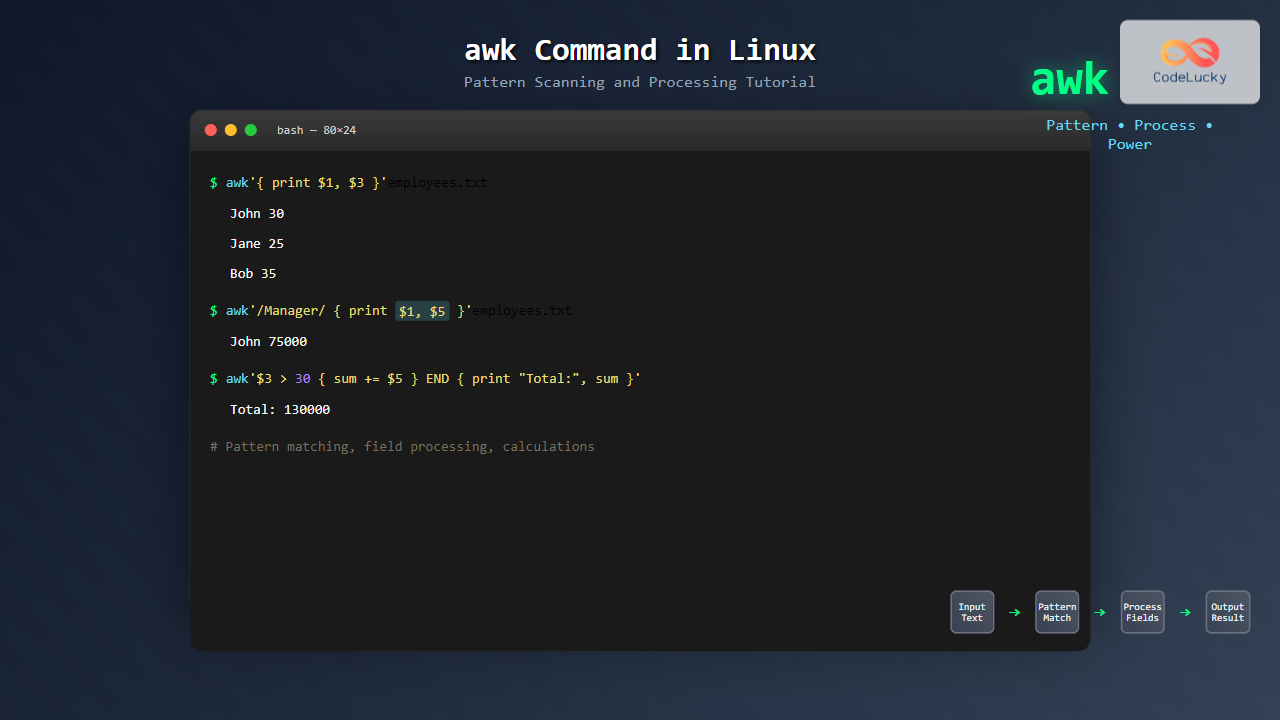
The awk command is one of the most powerful text processing tools available in Linux and Unix systems. Named after its creators Alfred Aho, Peter Weinberger, and Brian Kernighan, awk is a pattern-scanning and data extraction language that excels at processing structured text files and generating formatted reports.
What is awk and Why Use It?
AWK is a programming language designed for text processing and typically used as a data extraction and reporting tool. It operates by scanning files line by line, searching for patterns that match conditions you specify, and performing actions on those lines.
Key Features of awk:
- Pattern matching and text processing
- Built-in variables and functions
- Field and record processing
- Mathematical operations
- Conditional statements and loops
- User-defined functions
Basic awk Syntax
The general syntax of the awk command is:
awk 'pattern { action }' filenameWhere:
- pattern: Specifies when the action should be performed
- action: Defines what to do when the pattern matches
- filename: The input file to process
Built-in Variables in awk
AWK provides several built-in variables that make text processing easier:
| Variable | Description |
|---|---|
$0 |
Entire current line |
$1, $2, $3... |
First, second, third field, etc. |
NF |
Number of fields in current record |
NR |
Number of records processed so far |
FS |
Field separator (default: whitespace) |
RS |
Record separator (default: newline) |
OFS |
Output field separator |
ORS |
Output record separator |
Getting Started with Basic Examples
Let’s start with simple examples using a sample file called employees.txt:
John Doe 30 Manager 75000
Jane Smith 25 Developer 65000
Bob Johnson 35 Analyst 55000
Alice Brown 28 Designer 60000
Mike Wilson 32 Developer 70000
Example 1: Print Entire File
awk '{ print }' employees.txtOutput:
John Doe 30 Manager 75000
Jane Smith 25 Developer 65000
Bob Johnson 35 Analyst 55000
Alice Brown 28 Designer 60000
Mike Wilson 32 Developer 70000
Example 2: Print Specific Fields
awk '{ print $1, $2 }' employees.txtOutput:
John Doe
Jane Smith
Bob Johnson
Alice Brown
Mike Wilson
Example 3: Print with Custom Formatting
awk '{ print "Name: " $1 " " $2 ", Age: " $3 }' employees.txtOutput:
Name: John Doe, Age: 30
Name: Jane Smith, Age: 25
Name: Bob Johnson, Age: 35
Name: Alice Brown, Age: 28
Name: Mike Wilson, Age: 32
Pattern Matching in awk
Regular Expression Patterns
You can use regular expressions to match specific patterns:
awk '/Developer/ { print $1, $2, $5 }' employees.txtOutput:
Jane Smith 65000
Mike Wilson 70000
Conditional Patterns
Use comparison operators for conditional matching:
awk '$3 > 30 { print $1, $2, "is over 30" }' employees.txtOutput:
Bob Johnson is over 30
Mike Wilson is over 30
Multiple Conditions
awk '$3 > 25 && $5 > 60000 { print $1, $2, $4, $5 }' employees.txtOutput:
John Doe Manager 75000
Jane Smith Developer 65000
Alice Brown Designer 60000
Mike Wilson Developer 70000
Field Separators and Delimiters
By default, awk uses whitespace as the field separator. You can change this using the -F option:
Example with CSV File
Create a CSV file data.csv:
Name,Age,Department,Salary
John,30,IT,75000
Jane,25,HR,65000
Bob,35,Finance,55000
awk -F',' '{ print $1, $4 }' data.csvOutput:
Name Salary
John 75000
Jane 65000
Bob 55000
BEGIN and END Patterns
Special patterns that execute before processing any input (BEGIN) or after processing all input (END):
awk 'BEGIN { print "Employee Report" }
     { print $1, $2, $5 }
     END { print "Report Complete" }' employees.txt
Output:
Employee Report
John Doe 75000
Jane Smith 65000
Bob Johnson 55000
Alice Brown 60000
Mike Wilson 70000
Report Complete
Mathematical Operations and Calculations
Calculate Average Salary
awk '{ sum += $5; count++ }
     END { print "Average Salary: " sum/count }' employees.txt
Output:
Average Salary: 65000Find Maximum Salary
awk 'BEGIN { max = 0 }
     { if ($5 > max) max = $5 }
     END { print "Maximum Salary: " max }' employees.txt
Output:
Maximum Salary: 75000Built-in Functions
AWK provides numerous built-in functions for string manipulation, mathematical operations, and more:
String Functions
awk '{ print toupper($1), length($2) }' employees.txtOutput:
JOHN 3
JANE 5
BOB 7
ALICE 5
MIKE 6
Substring Function
awk '{ print substr($1, 1, 3) }' employees.txtOutput:
Joh
Jan
Bob
Ali
Mik
Control Structures
If-Else Statements
awk '{
    if ($5 >= 70000)
        print $1, $2, "High Salary"
    else if ($5 >= 60000)
        print $1, $2, "Medium Salary"
    else
        print $1, $2, "Low Salary"
}' employees.txt
Output:
John Doe High Salary
Jane Smith Medium Salary
Bob Johnson Low Salary
Alice Brown Medium Salary
Mike Wilson High Salary
For Loops
awk '{
    for (i = 1; i <= NF; i++)
        print "Field " i ": " $i
    print "---"
}' employees.txt | head -15
Advanced Pattern Matching
Range Patterns
awk '/Jane/,/Alice/ { print }' employees.txtOutput:
Jane Smith 25 Developer 65000
Bob Johnson 35 Analyst 55000
Alice Brown 28 Designer 60000
Multiple Pattern Actions
awk '/Manager/ { managers++ }
     /Developer/ { developers++ }
     END {
         print "Managers: " managers
         print "Developers: " developers
     }' employees.txt
Output:
Managers: 1
Developers: 2
Working with Multiple Files
AWK can process multiple files simultaneously:
awk '{ print FILENAME, $1, $2 }' employees.txt data.csvPractical Use Cases
Log File Analysis
Analyze Apache log files to count requests by IP:
awk '{ ip[$1]++ } END { for (i in ip) print i, ip[i] }' access.logSystem Monitoring
Monitor disk usage from df command output:
df -h | awk '$5 > 80 { print $1, $5, "WARNING: High disk usage" }'Data Transformation
Convert space-separated values to CSV:
awk 'BEGIN { OFS="," } { print $1, $2, $3, $4, $5 }' employees.txtUser-Defined Functions
Create custom functions for complex operations:
awk '
function calculate_bonus(salary) {
    if (salary >= 70000) return salary * 0.15
    else if (salary >= 60000) return salary * 0.10
    else return salary * 0.05
}
{
    bonus = calculate_bonus($5)
    print $1, $2, $5, bonus
}' employees.txt
awk Script Files
For complex operations, save your awk program in a file:
Create salary_report.awk:
BEGIN {
    print "EMPLOYEE SALARY REPORT"
    print "====================="
    total = 0
    count = 0
}
{
    print $1, $2, $5
    total += $5
    count++
}
END {
    print "====================="
    print "Total Employees:", count
    print "Total Salary:", total
    print "Average Salary:", total/count
}
Run the script:
awk -f salary_report.awk employees.txtCommon awk Options
| Option | Description |
|---|---|
-F fs |
Set field separator |
-f file |
Read awk program from file |
-v var=value |
Set variable |
-W interactive |
Enable interactive mode |
Performance Tips and Best Practices
Best Practices:
- Use specific patterns instead of processing all lines when possible
- Minimize regular expressions for better performance
- Use built-in variables efficiently
- Comment your scripts for maintainability
- Test with small datasets before processing large files
Performance Example:
# Efficient - processes only relevant lines
awk '/Manager/ { print $1, $5 }' employees.txt

# Less efficient - processes all lines
awk '{ if ($4 == "Manager") print $1, $5 }' employees.txt
Error Handling and Debugging
Common Errors and Solutions:
- Field doesn’t exist: Always check NF before accessing fields
- Division by zero: Check denominators before division
- String vs. numeric comparison: Use appropriate operators
awk '{
    if (NF >= 5 && $5 > 0)
        print $1, $2, $5/1000 "K"
    else
        print $1, $2, "Invalid data"
}' employees.txt
Integration with Other Commands
AWK works excellently with other Unix/Linux commands:
With grep:
grep "Developer" employees.txt | awk '{ print $1, $5 }'With sort:
awk '{ print $5, $1, $2 }' employees.txt | sort -nrWith pipes:
ps aux | awk '$3 > 10 { print $2, $11, $3"%" }'Conclusion
The awk command is an incredibly powerful tool for text processing and data manipulation in Linux. From simple field extraction to complex data analysis, awk provides the flexibility and functionality needed for most text processing tasks. Its pattern-action programming model makes it intuitive for both beginners and advanced users.
Whether you’re processing log files, generating reports, or transforming data formats, mastering awk will significantly enhance your command-line productivity. Start with simple examples and gradually build up to more complex scripts as you become comfortable with its syntax and capabilities.
Remember that awk is not just a command—it’s a complete programming language that can handle sophisticated text processing tasks that would require much more complex solutions in other languages. Practice with real-world data and explore its extensive built-in functions to unlock its full potential.
Related Posts

awk Advanced Linux: Mastering Complex Text Processing and Pattern Matching
The awk command is one of the most powerful text processing tools in Linux, capable of performing complex data manipulation...
grep Command in Linux: Complete Guide to Text Pattern Search and File Operations
The grep command is one of the most powerful and frequently used text processing utilities in Linux and Unix systems....
Regex in Linux: Complete Guide to Regular Expressions and Pattern Matching
Regular expressions (regex) are powerful pattern-matching tools that form the backbone of text processing in Linux systems. Whether you're searching...

sed Advanced Linux: Stream Editor Advanced Techniques for Text Processing
The sed (Stream Editor) command stands as one of the most powerful text processing tools in Linux systems. While basic...

sed Command Linux: Complete Guide to Stream Editor for Text Manipulation
The sed (Stream Editor) command is one of the most powerful text processing utilities in Linux and Unix systems. It...
cut Command Linux: Extract and Process Columns from Text Files Efficiently
The cut command is one of the most powerful and versatile text processing utilities in Linux and Unix systems. It...

find Command Advanced Linux: Master Complex Search Patterns and Powerful Operations
The find command is one of the most powerful and versatile tools in the Linux arsenal, capable of performing complex...

perl Command Linux: Complete Guide to Executing Perl Scripts on Linux Systems
The perl command is a powerful tool in Linux systems that allows you to execute Perl scripts and run Perl...

paste Command Linux: Complete Guide to Merging Lines from Multiple Files
The paste command in Linux is a powerful text processing utility that allows you to merge lines from multiple files...

strings Command Linux: Extract and Analyze Text from Binary Files
The strings command is a powerful Linux utility that extracts printable character sequences from binary files. Whether you're analyzing executables,...
file Command Advanced Linux: Master Detailed File Type Analysis and Detection
The file command is one of the most powerful and underutilized utilities in Linux for determining file types and analyzing...
sort Command in Linux: Complete Guide to Sorting Text Files and Data
The sort command is one of the most essential text processing utilities in Linux, designed to arrange lines of text...





