Android’s runtime environment has evolved significantly since the platform’s inception, transitioning from the Dalvik Virtual Machine to the Android Runtime (ART). This comprehensive guide explores both runtime systems, their architectures, compilation processes, and the performance improvements that led to ART becoming the default runtime for Android applications.
Understanding Android Runtime Systems
Android applications are primarily written in Java or Kotlin, but unlike traditional Java applications that run on the Java Virtual Machine (JVM), Android uses specialized runtime environments optimized for mobile devices with limited resources.

Dalvik Virtual Machine: The Foundation
Dalvik was Android’s original runtime environment, introduced with Android 1.0 and serving as the primary runtime until Android 4.4 KitKat. Named after a fishing village in Iceland, Dalvik was specifically designed for mobile devices with constrained memory and processing power.
Dalvik Architecture
Dalvik operates as a register-based virtual machine, contrasting with the stack-based approach of the traditional JVM. This design choice provides several advantages for mobile execution:
- Register-based execution: Uses virtual registers instead of a stack, reducing instruction count
- DEX format: Dalvik Executable format optimized for minimal memory footprint
- Just-In-Time (JIT) compilation: Compiles frequently executed code during runtime
- Process isolation: Each Android application runs in its own Dalvik instance
DEX File Format
The Dalvik Executable (DEX) format represents a significant optimization over traditional Java class files. While Java bytecode is stored in separate .class files for each class, DEX format consolidates all classes into a single file, eliminating redundancy and reducing overall size.
# Example: Converting Java bytecode to DEX format
javac MyApp.java              # Compile to .class files
dx --dex --output=classes.dex MyApp.class  # Convert to DEX
Dalvik JIT Compilation
Dalvik’s Just-In-Time compiler analyzes code execution patterns and compiles frequently used methods (hotspots) from bytecode to native machine code during runtime. This approach provides a balance between startup time and execution performance.

Android Runtime (ART): The Evolution
Android Runtime (ART) was introduced as an experimental feature in Android 4.4 KitKat and became the default runtime starting with Android 5.0 Lollipop. ART represents a fundamental shift in Android’s execution strategy, moving from just-in-time to ahead-of-time compilation.
ART Architecture
ART maintains backward compatibility with Dalvik while introducing significant architectural improvements:
- Ahead-Of-Time (AOT) compilation: Compiles applications during installation
- Improved garbage collection: Concurrent and generational garbage collection
- Enhanced debugging support: Better profiling and debugging capabilities
- 64-bit support: Native support for 64-bit architectures
AOT Compilation Process
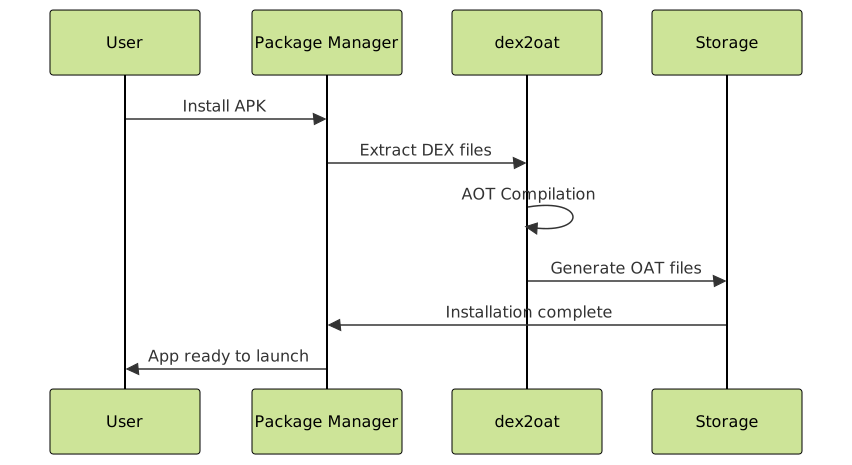
ART’s ahead-of-time compilation occurs during application installation, converting DEX bytecode directly to native machine code. This process, called “dex2oat,” significantly improves runtime performance at the cost of installation time and storage space.
# ART compilation process
dex2oat --dex-file=application.apk \
        --oat-file=application.odex \
        --instruction-set=arm64 \
        --compiler-filter=speed
Performance Comparison: Dalvik vs ART
The transition from Dalvik to ART brings measurable performance improvements across multiple metrics:
| Metric | Dalvik | ART | Improvement |
|---|---|---|---|
| Application Launch Time | Slower (JIT overhead) | Faster (pre-compiled) | 15-30% faster |
| Runtime Performance | Variable (JIT dependent) | Consistent (AOT optimized) | 20-40% faster |
| Memory Usage | Lower (no pre-compilation) | Higher (compiled code) | 10-20% more RAM |
| Storage Usage | Smaller | Larger (OAT files) | 2x storage requirement |
| Battery Life | Moderate (JIT compilation) | Better (less CPU intensive) | 10-15% improvement |
Garbage Collection Improvements
ART introduces significant improvements to garbage collection, addressing one of Dalvik’s major performance bottlenecks:
Dalvik Garbage Collection
- Stop-the-world collection causing application pauses
- Single-threaded mark-and-sweep algorithm
- Unpredictable pause times affecting user experience
ART Garbage Collection
- Concurrent collection reducing pause times
- Generational collection optimizing for object lifecycle patterns
- Multiple specialized collectors for different heap regions

Hybrid Compilation in Modern ART
Starting with Android 7.0 Nougat, ART introduced a hybrid approach combining the benefits of both JIT and AOT compilation:
Profile-Guided Optimization
Modern ART uses a three-tier compilation system:
- Installation: Minimal compilation for quick installation
- Runtime profiling: JIT compilation with execution profiling
- Background optimization: AOT compilation of frequently used code paths
// Example: Code that benefits from profile-guided optimization
public class PerformanceCriticalClass {
    private static final String TAG = "PerfCritical";

    // Frequently called method - likely to be AOT compiled
    public int calculateSum(int[] numbers) {
        int sum = 0;
        for (int number : numbers) {
            sum += number;
        }
        return sum;
    }

    // Rarely called method - may remain interpreted
    public void debugLog(String message) {
        if (BuildConfig.DEBUG) {
            Log.d(TAG, message);
        }
    }
}
Development Implications
The transition from Dalvik to ART affects Android application development in several ways:
Code Optimization Considerations
- AOT-friendly code: Write code that benefits from ahead-of-time compilation
- Reflection usage: Minimize reflection as it can impact AOT optimization
- Memory patterns: Consider garbage collection improvements in memory allocation strategies
Testing and Debugging
ART provides enhanced debugging capabilities:
# Enable ART debugging features
adb shell setprop debug.art.gc.trace 1
adb shell setprop debug.art.compiler.trace 1

# Monitor compilation status
adb shell cmd package compile -m speed com.example.app
Migration Considerations
When migrating applications from Dalvik-optimized code to ART, consider these factors:
- Installation time: First-time installation may take longer due to AOT compilation
- Storage requirements: Applications consume more storage space
- Performance profiling: Re-profile applications as performance characteristics change
- Memory management: Adjust memory allocation patterns for improved garbage collection
Future of Android Runtime
ART continues to evolve with each Android release, incorporating improvements such as:
- Cloud-based profile optimization: Using aggregated usage data for better compilation decisions
- Machine learning integration: AI-powered optimization strategies
- Modular runtime components: Allowing for more targeted optimizations
- Cross-compilation improvements: Better support for diverse hardware architectures
Conclusion
The evolution from Dalvik to ART represents one of Android’s most significant performance improvements. While Dalvik served as an excellent foundation for Android’s early years, ART’s ahead-of-time compilation, improved garbage collection, and hybrid optimization strategies provide the performance characteristics necessary for modern mobile applications.
Understanding both runtime systems helps developers appreciate the platform’s evolution and make informed decisions about application architecture, optimization strategies, and performance expectations. As ART continues to evolve with machine learning integration and cloud-based optimizations, Android’s runtime environment will become even more sophisticated and efficient.
For developers working on Android applications, leveraging ART’s capabilities through proper code organization, minimal reflection usage, and efficient memory management patterns will result in applications that deliver superior performance and user experience across the diverse Android ecosystem.