
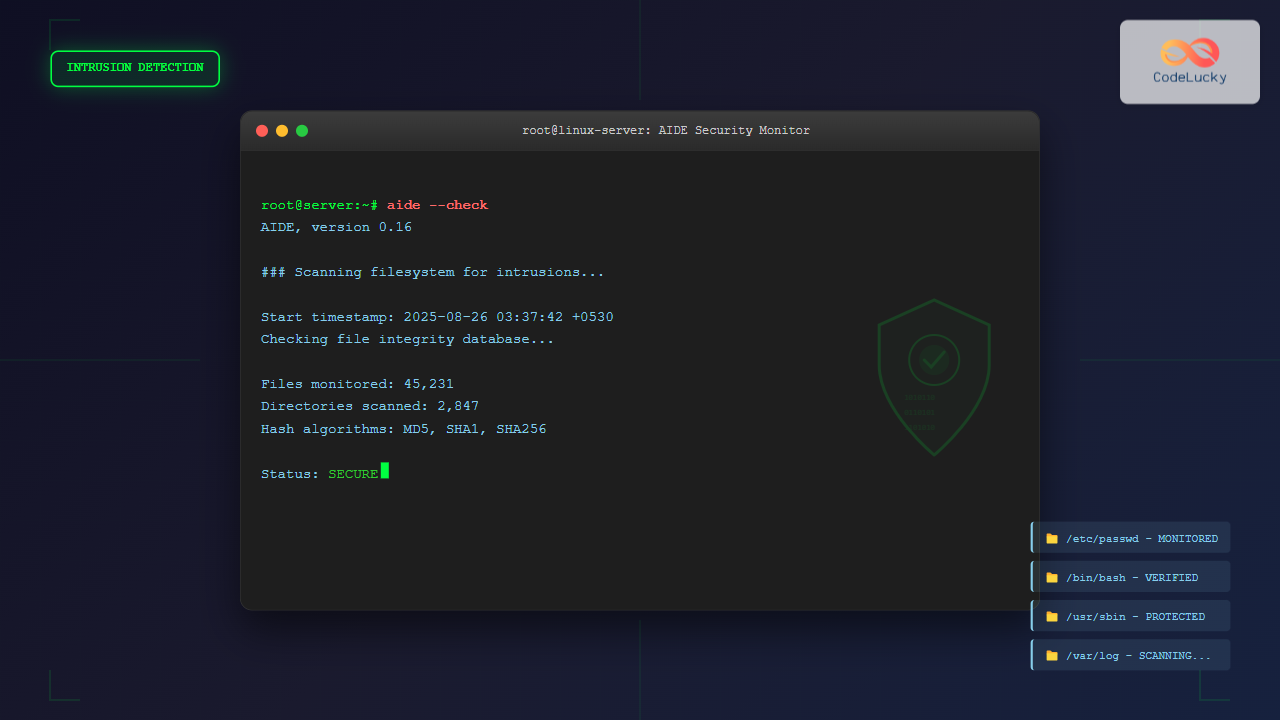
The AIDE (Advanced Intrusion Detection Environment) command is a powerful security tool for Linux systems that monitors file and directory integrity. It creates a database of file attributes and compares them against current system states to detect unauthorized changes, making it essential for system administrators and security professionals.
What is AIDE?
AIDE is a free replacement for Tripwire, designed to check file integrity and detect intrusions by monitoring changes in files and directories. It works by creating a snapshot of your system’s files and their attributes, then comparing future snapshots against this baseline to identify modifications.
Key Features of AIDE
- File Integrity Monitoring: Tracks changes in file contents, permissions, ownership, and timestamps
- Flexible Configuration: Customizable rules for different directories and file types
- Multiple Hash Algorithms: Supports MD5, SHA1, SHA256, and other cryptographic hash functions
- Detailed Reports: Comprehensive output showing exactly what changed
- Regular Expression Support: Pattern matching for file inclusion and exclusion
Installing AIDE
Installation varies depending on your Linux distribution:
Ubuntu/Debian
sudo apt update
sudo apt install aide aide-common
CentOS/RHEL/Fedora
# CentOS/RHEL
sudo yum install aide

# Fedora
sudo dnf install aide
Arch Linux
sudo pacman -S aideBasic AIDE Commands
Initialize AIDE Database
Before using AIDE, you must initialize the database:
sudo aide --initExpected Output:
AIDE, version 0.16

### AIDE database at /var/lib/aide/aide.db.new initialized.

Start timestamp: 2025-08-26 03:37:42 +0530 (AIDE 0.16)
AIDE initialized database at /var/lib/aide/aide.db.new

Number of entries:      45231

---------------------------------------------------
The attributes of the (uncompressed) database(s):
---------------------------------------------------

/var/lib/aide/aide.db.new
  MD5      : XyZ123AbC456DeF789GhI012JkL345Mn
  SHA1     : AbC123DeF456GhI789JkL012MnO345PqR678StU901VwX
  SHA256   : 123AbC456DeF789GhI012JkL345MnO678PqR901StU234VwX567YzA890BcD

End timestamp: 2025-08-26 03:39:15 +0530 (run time: 1m 33s)
Move Database to Production
After initialization, move the database to its production location:
sudo mv /var/lib/aide/aide.db.new /var/lib/aide/aide.dbCheck System Integrity
Run an integrity check against the baseline database:
sudo aide --checkSample Output (No Changes):
AIDE, version 0.16

### All files match AIDE database. Looks okay!

Start timestamp: 2025-08-26 03:40:30 +0530 (AIDE 0.16)
AIDE found NO differences between database and filesystem. Looks okay!!

End timestamp: 2025-08-26 03:40:45 +0530 (run time: 0m 15s)
AIDE Configuration
The main configuration file is typically located at /etc/aide/aide.conf or /etc/aide.conf.
Basic Configuration Structure
# Database and output locations
database=file:/var/lib/aide/aide.db
database_out=file:/var/lib/aide/aide.db.new
gzip_dbout=yes

# Define what to check
All=p+i+n+u+g+s+m+c+md5+sha1+rmd160+tiger+haval+gost+crc32
Norm=s+n+b+md5+sha1+rmd160+tiger+haval+gost+crc32

# Rules for different directories
/boot   Norm
/bin    Norm
/sbin   Norm
/lib    Norm
/opt    Norm
/usr    Norm
/root   Norm
!/var/log/.*
!/var/spool/.*
!/var/cache/.*
/etc    All
Understanding Configuration Attributes
| Attribute | Description |
|---|---|
| p | Permissions |
| i | Inode number |
| n | Number of links |
| u | User ID |
| g | Group ID |
| s | Size |
| m | Modification time |
| c | Creation/change time |
| md5 | MD5 checksum |
| sha1 | SHA1 checksum |
Advanced AIDE Usage
Update Database
When legitimate changes occur, update the database:
sudo aide --updateThen move the updated database:
sudo mv /var/lib/aide/aide.db.new /var/lib/aide/aide.dbCompare Databases
Compare two different database versions:
sudo aide --compareConfiguration Testing
Test your configuration file for syntax errors:
sudo aide --config-checkPractical Examples
Example 1: Detecting File Modifications
Let’s simulate a file change and detect it:
# Create a test file
sudo echo "Original content" > /etc/test-aide.txt

# Initialize AIDE database
sudo aide --init
sudo mv /var/lib/aide/aide.db.new /var/lib/aide/aide.db

# Modify the file
sudo echo "Modified content" > /etc/test-aide.txt

# Check for changes
sudo aide --check
Expected Output:
AIDE, version 0.16

### AIDE detected differences between database and filesystem!!

Start timestamp: 2025-08-26 03:45:30 +0530 (AIDE 0.16)

Summary:
  Total number of entries:      45232
  Added entries:                0
  Removed entries:              0
  Changed entries:              1

---------------------------------------------------
Changed entries:
---------------------------------------------------

f = . . . . . . . . . . changed: /etc/test-aide.txt

---------------------------------------------------
Detailed information about changes:
---------------------------------------------------

File: /etc/test-aide.txt
  Mtime    : 2025-08-26 03:37:42 +0530 , 2025-08-26 03:45:25 +0530
  Ctime    : 2025-08-26 03:37:42 +0530 , 2025-08-26 03:45:25 +0530
  Size     : 17                        , 18
  MD5      : 1a2b3c4d5e6f7g8h9i0j1k2l3m , 9z8y7x6w5v4u3t2s1r0q9p8o7n6m
  SHA1     : AbC123DeF456GhI789JkL012MnO , XyZ987WvU654TsR321QpO098NmL

End timestamp: 2025-08-26 03:45:45 +0530 (run time: 0m 15s)
Example 2: Custom Configuration for Web Server
# Custom configuration for web server monitoring
/var/www/html   All
/etc/apache2    All
/etc/nginx      All
!/var/log/apache2/.*
!/var/log/nginx/.*

# Monitor only critical system files
/etc/passwd     All
/etc/shadow     All
/etc/sudoers    All
Example 3: Automated Monitoring Script
#!/bin/bash
# aide-check.sh - Automated AIDE checking script

AIDE_LOG="/var/log/aide-check.log"
EMAIL="[email protected]"

echo "$(date): Starting AIDE check" >> $AIDE_LOG

if aide --check >> $AIDE_LOG 2>&1; then
    echo "$(date): AIDE check completed - No changes detected" >> $AIDE_LOG
else
    echo "$(date): AIDE check completed - CHANGES DETECTED!" >> $AIDE_LOG
    # Send email notification
    mail -s "AIDE Alert: File changes detected" $EMAIL < $AIDE_LOG
fi
Setting Up Automated Monitoring
Cron Job Configuration
Set up regular AIDE checks using cron:
# Edit crontab
sudo crontab -e

# Add daily AIDE check at 2 AM
0 2 * * * /usr/bin/aide --check | mail -s "Daily AIDE Report" [email protected]
Systemd Timer (Modern Alternative)
Create a systemd service and timer:
# /etc/systemd/system/aide-check.service
[Unit]
Description=AIDE Integrity Check
After=network.target

[Service]
Type=oneshot
ExecStart=/usr/bin/aide --check
User=root
# /etc/systemd/system/aide-check.timer
[Unit]
Description=Run AIDE check daily
Requires=aide-check.service
[Timer]
OnCalendar=daily
Persistent=true
[Install]
WantedBy=timers.targetEnable and start the timer:
sudo systemctl enable aide-check.timer
sudo systemctl start aide-check.timer
Troubleshooting Common Issues
Database Corruption
If the database becomes corrupted:
sudo rm /var/lib/aide/aide.db
sudo aide --init
sudo mv /var/lib/aide/aide.db.new /var/lib/aide/aide.db
Configuration Errors
Test configuration syntax:
sudo aide --config-check
# Fix any reported syntax errors in /etc/aide/aide.conf
Performance Optimization
For large systems, optimize performance by:
- Excluding unnecessary directories (logs, caches, temporary files)
- Using selective attribute checking
- Compressing the database with gzip
- Running checks during off-peak hours
Security Best Practices
Database Security
- Store database on read-only media: Prevent unauthorized modifications
- Use separate storage: Keep database on different partition or server
- Regular backups: Maintain multiple database versions
- Access control: Restrict database access to authorized users only
Configuration Security
# Secure configuration file permissions
sudo chmod 600 /etc/aide/aide.conf
sudo chown root:root /etc/aide/aide.conf
Integration with Other Security Tools
AIDE with Tripwire
AIDE can work alongside or replace Tripwire:
# Migration from Tripwire to AIDE
sudo tripwire --check  # Final Tripwire check
sudo aide --init       # Initialize AIDE
# Update monitoring scripts to use AIDE
AIDE with OSSEC/Wazuh
Integrate AIDE reports with SIEM systems:
# Configure OSSEC to monitor AIDE logs
<localfile>
  <log_format>syslog</log_format>
  <location>/var/log/aide/aide.log</location>
</localfile>
Command Reference
| Command | Description |
|---|---|
aide --init |
Initialize AIDE database |
aide --check |
Check system integrity |
aide --update |
Update database with current state |
aide --compare |
Compare two databases |
aide --config-check |
Validate configuration file |
aide --version |
Display AIDE version |
aide --help |
Show help information |
Conclusion
The AIDE command is an essential tool for maintaining Linux system security through file integrity monitoring. By creating baseline snapshots and regularly comparing system states, AIDE helps detect unauthorized changes, potential intrusions, and system corruption. When properly configured and automated, AIDE provides continuous security monitoring that complements other security measures.
Regular database updates, proper configuration management, and integration with monitoring systems make AIDE a powerful component of a comprehensive security strategy. Whether you’re managing a single server or multiple systems, AIDE’s flexibility and reliability make it an invaluable tool for system administrators and security professionals.
Related Posts
tripwire Linux: Complete Guide to File Integrity Monitoring and Security
Tripwire is a powerful file integrity monitoring (FIM) tool that helps system administrators detect unauthorized changes to critical system files,...

samhain Linux: Complete Guide to Host-based Intrusion Detection System
Samhain is a powerful host-based intrusion detection system (HIDS) designed specifically for Linux and Unix-like systems. This comprehensive security tool...
rkhunter Command Linux: Complete Guide to Rootkit Detection and System Security
The rkhunter (Rootkit Hunter) is a powerful Unix-based security scanner designed to detect rootkits, backdoors, and local exploits on Linux...
chkrootkit Command Linux: Complete Guide to Rootkit Detection and System Security
System security is paramount in Linux administration, and rootkits pose one of the most serious threats to system integrity. The...
Intrusion Detection System: Complete Guide to OS-Level Security Monitoring
Understanding Intrusion Detection Systems An Intrusion Detection System (IDS) is a critical security tool that monitors network traffic and system...
tiger Command Linux: Complete Security Audit and Intrusion Detection Guide
The tiger command is a powerful security auditing tool designed specifically for Unix-like systems, including Linux distributions. This comprehensive security...
lynis Command Linux: Complete Security Auditing Tool Guide
The lynis command is a powerful, open-source security auditing tool designed specifically for Unix-based systems including Linux, macOS, and BSD....
file Command Advanced Linux: Master Detailed File Type Analysis and Detection
The file command is one of the most powerful and underutilized utilities in Linux for determining file types and analyzing...

stat Command Linux: Complete Guide to Display File and Filesystem Status Information
The stat command is a powerful Linux utility that displays detailed information about files and filesystems. Unlike basic commands like...
xattr Command Linux: Complete Guide to Extended File Attributes Management
Extended file attributes in Linux provide a powerful mechanism to store additional metadata beyond traditional file permissions and ownership. The...
inotifywait Command Linux: Complete Guide to Real-Time File System Monitoring
The inotifywait command is a powerful Linux utility that enables real-time monitoring of file system events. Whether you're tracking file...

OSSEC Linux: Complete Guide to Host-based Intrusion Detection System for Enterprise Security
What is OSSEC Linux? OSSEC (Open Source Security Event Correlator) is a powerful, open-source Host-based Intrusion Detection System (HIDS) that...





