
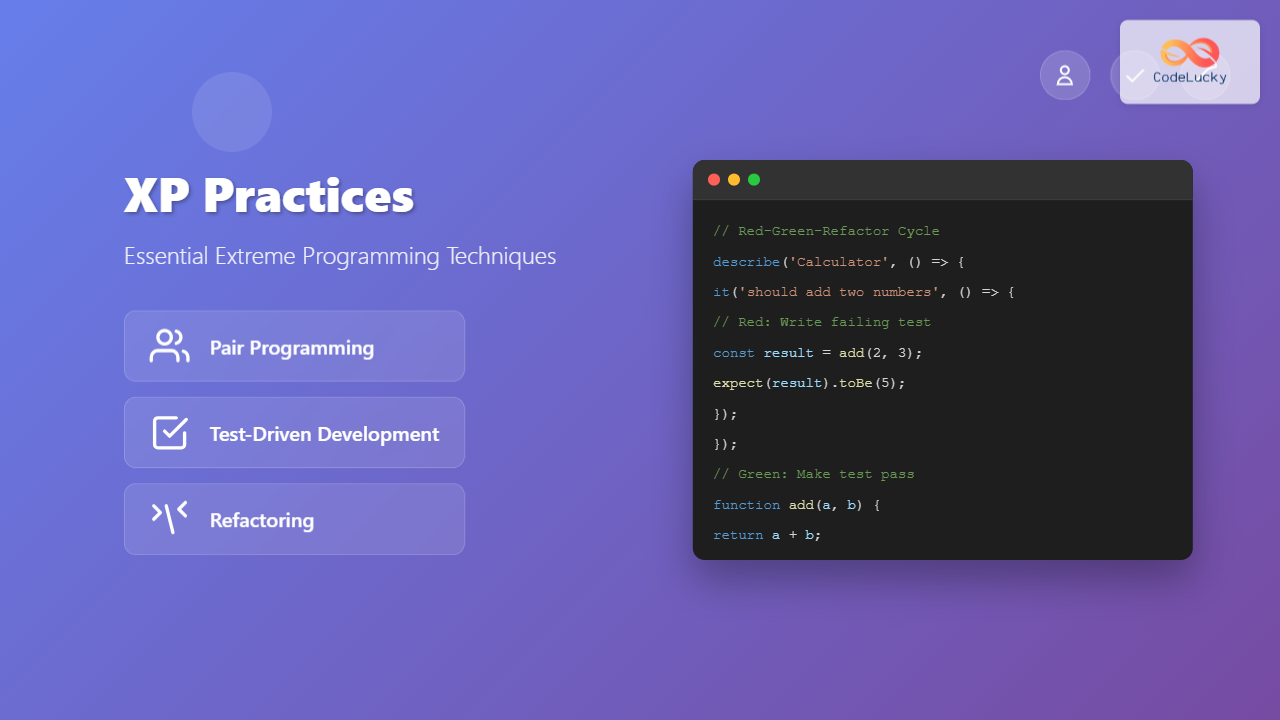
Extreme Programming (XP) has transformed how development teams approach software creation through its emphasis on technical excellence and collaborative practices. At the heart of XP lie three fundamental practices that work synergistically to deliver high-quality software: Pair Programming, Test-Driven Development (TDD), and Refactoring. These practices don’t just improve code quality—they reshape how developers think, collaborate, and deliver value.
Understanding Extreme Programming (XP) Foundations
Before diving into specific practices, it’s crucial to understand XP’s core philosophy. XP prioritizes simplicity, communication, feedback, and courage. These values manifest through technical practices that ensure code remains clean, functional, and adaptable to changing requirements.
The three practices we’ll explore form a powerful trinity: Pair Programming enhances collaboration and knowledge sharing, TDD ensures robust testing and design, while Refactoring maintains code quality over time. Together, they create a sustainable development rhythm that balances speed with quality.
Pair Programming: The Art of Collaborative Coding
What is Pair Programming?
Pair Programming involves two developers working together at a single workstation, with one actively writing code (the Driver) while the other reviews and guides the process (the Navigator). This isn’t just about having two people look at the same screen—it’s a structured approach to collaborative problem-solving.
The Driver-Navigator Dynamic
The Driver focuses on the tactical aspects: typing code, handling syntax, and implementing the immediate solution. Meanwhile, the Navigator maintains strategic oversight, considering architecture, potential issues, and alternative approaches. This separation allows for both detailed implementation and big-picture thinking simultaneously.
Effective pairs switch roles regularly, typically every 15-30 minutes, ensuring both developers remain engaged and contribute equally to the solution. This rotation prevents one person from dominating while keeping both minds actively involved in the problem-solving process.
Types of Pair Programming
Expert-Novice Pairing accelerates learning by allowing experienced developers to mentor newcomers while gaining fresh perspectives on familiar problems. The expert guides architectural decisions while the novice asks clarifying questions that often reveal assumptions or improvements.
Expert-Expert Pairing tackles complex problems requiring deep technical knowledge. Two experienced developers can explore sophisticated solutions, challenge each other’s assumptions, and produce highly optimized code through collaborative expertise.
Novice-Novice Pairing encourages exploration and learning through shared discovery. While potentially slower initially, this pairing builds confidence and problem-solving skills as both developers work through challenges together.
Benefits of Pair Programming
Immediate Code Review occurs naturally as the Navigator continuously reviews the Driver’s work, catching errors, suggesting improvements, and ensuring adherence to coding standards. This real-time feedback loop dramatically reduces defects compared to traditional post-development code reviews.
Knowledge Transfer happens organically as developers share techniques, explain reasoning, and expose each other to different approaches. This cross-pollination of ideas strengthens the entire team’s capabilities and reduces knowledge silos.
Improved Focus results from the social pressure and accountability of working with a partner. Distractions decrease significantly when someone else depends on your attention and contribution to the task at hand.
Better Design Decisions emerge from the constant dialogue between two minds approaching the same problem. The Navigator can spot design issues, suggest refactoring opportunities, and ensure the code follows established patterns and principles.
Common Pair Programming Challenges
Personality Conflicts can arise when developers have different working styles, communication preferences, or technical philosophies. Successful pair programming requires patience, respect, and willingness to compromise on non-essential preferences.
Skill Level Disparities may create frustration if not managed properly. The key is establishing clear expectations, focusing on learning objectives, and ensuring both developers contribute meaningfully to the solution.
Fatigue and Intensity result from the concentrated nature of pair programming. The constant communication and collaboration can be mentally exhausting, requiring regular breaks and rotation between solo and paired work.
Best Practices for Effective Pair Programming
Establish clear communication protocols before beginning. Agree on when to speak up, how to suggest changes, and how to handle disagreements. Good pairs communicate continuously, explaining their thought process and reasoning behind decisions.
Create a comfortable physical environment with dual monitors, adjustable seating, and easy access to keyboard and mouse for both developers. The workspace should accommodate both people without creating physical strain or awkward positioning.
Define role switching intervals and stick to them. Whether using a timer or natural breakpoints in the work, regular rotation ensures both developers remain engaged and prevents one person from dominating the session.
Focus on specific objectives for each pairing session. Whether implementing a feature, fixing a bug, or exploring a new technology, clear goals help maintain focus and measure progress effectively.
Test-Driven Development (TDD): Building Quality from the Ground Up
The TDD Philosophy
Test-Driven Development represents a fundamental shift in how developers approach code creation. Instead of writing tests after implementation, TDD requires writing tests first, then writing just enough code to make those tests pass. This reversal transforms testing from a validation activity into a design tool.
The Red-Green-Refactor Cycle
TDD follows a strict three-step cycle that becomes second nature with practice:
Red Phase: Write a failing test that describes the desired behavior. This test should be specific, focused, and initially fail because the functionality doesn’t exist yet. The failing test clarifies exactly what needs to be built.
Green Phase: Write the minimal code necessary to make the test pass. This isn’t about elegant solutions—it’s about quickly achieving the desired behavior. The goal is to move from red to green as efficiently as possible.
Refactor Phase: Improve the code’s structure, readability, and design while keeping all tests passing. This is where elegant solutions emerge, technical debt gets addressed, and code quality improves without changing functionality.
Types of Tests in TDD
Unit Tests form the foundation of TDD, testing individual functions, methods, or classes in isolation. These tests run quickly, provide immediate feedback, and help developers understand component behavior at a granular level.
Integration Tests verify that different components work together correctly. While slower than unit tests, they catch issues that arise from component interactions and ensure the system functions as a cohesive whole.
Acceptance Tests validate that the system meets business requirements and user expectations. These high-level tests often use natural language descriptions and help ensure development efforts align with actual needs.
Benefits of Test-Driven Development
Design Improvement occurs naturally as writing tests first forces developers to consider interfaces, dependencies, and component interactions before implementation. This leads to more modular, loosely coupled designs that are easier to maintain and extend.
Comprehensive Test Coverage emerges automatically since every piece of functionality requires a test before implementation. This eliminates the common problem of writing tests after the fact and struggling to achieve adequate coverage.
Rapid Feedback Loops provide immediate notification when changes break existing functionality. Developers can catch and fix issues within minutes rather than discovering them days or weeks later during integration or user testing.
Documentation Through Tests creates living documentation that stays current with the codebase. Well-written tests describe expected behavior and provide examples of how to use different components effectively.
Confidence in Changes allows developers to modify, extend, and refactor code without fear of breaking existing functionality. The comprehensive test suite acts as a safety net that catches regressions immediately.
TDD Implementation Strategies
Start Small with simple, obvious tests that build confidence in the process. Begin with basic functionality before tackling complex edge cases or integration scenarios. This gradual approach helps teams adapt to the TDD mindset.
Focus on Behavior rather than implementation details when writing tests. Tests should describe what the code should do, not how it should do it. This keeps tests stable even as implementation changes during refactoring.
Maintain Test Quality with the same rigor applied to production code. Tests should be readable, maintainable, and follow consistent patterns. Poor test quality undermines the entire TDD approach.
Use Test Doubles strategically to isolate units under test and control dependencies. Mocks, stubs, and fakes help create focused tests that run quickly and reliably, independent of external systems.
Common TDD Pitfalls and Solutions
Over-Testing occurs when developers write too many tests or test implementation details rather than behavior. Focus on testing public interfaces and important business logic while avoiding tests that break with every refactoring.
Slow Test Execution undermines the rapid feedback that makes TDD effective. Keep unit tests fast by avoiding database calls, file system operations, and network requests. Use test doubles to eliminate external dependencies.
Unclear Test Names make it difficult to understand what functionality is being tested or why a test is failing. Use descriptive names that explain the scenario being tested and the expected outcome.
Refactoring: Evolving Code Without Breaking Functionality
Understanding Refactoring
Refactoring involves restructuring existing code without changing its external behavior. It’s the disciplined practice of improving code’s internal structure, readability, and maintainability while preserving all existing functionality. Refactoring is not about adding features—it’s about making code better.
When to Refactor
Code Smells indicate when refactoring is needed. Long methods, large classes, duplicate code, and complex conditional logic all signal opportunities for improvement. Learning to recognize these smells helps developers maintain code quality proactively.
Before Adding Features, refactoring can simplify the existing codebase and make new functionality easier to implement. Clean, well-structured code provides a better foundation for extensions and modifications.
During Bug Fixes, refactoring can eliminate the conditions that allowed bugs to occur. Improving code clarity and structure reduces the likelihood of similar issues in the future.
Regular Maintenance through small, frequent refactoring prevents technical debt from accumulating. This approach is more manageable than large-scale refactoring efforts that can introduce significant risk.
Common Refactoring Techniques
Extract Method breaks long methods into smaller, more focused functions. This improves readability, enables reuse, and makes testing easier by isolating specific behaviors.
Rename Variables and Methods improves code clarity by using names that accurately describe purpose and behavior. Good names eliminate the need for comments and make code self-documenting.
Move Method relocates methods to more appropriate classes, improving cohesion and reducing coupling. Methods should live with the data they operate on most frequently.
Replace Conditional with Polymorphism eliminates complex conditional statements by using inheritance and method overriding. This makes code more extensible and easier to maintain.
Introduce Parameter Object groups related parameters into a single object, reducing method signatures and improving code organization. This is particularly useful when the same group of parameters appears in multiple methods.
Safe Refactoring Practices
Comprehensive Test Coverage provides the safety net necessary for confident refactoring. Tests catch regressions immediately, allowing developers to refactor aggressively while maintaining functionality.
Small, Incremental Changes reduce risk by limiting the scope of each refactoring operation. Make one change at a time, run tests, and commit before proceeding to the next improvement.
Version Control Integration enables easy rollback if refactoring introduces problems. Commit frequently during refactoring sessions, and use meaningful commit messages that describe the specific improvements made.
Automated Testing should run quickly and reliably to provide immediate feedback during refactoring. Slow or unreliable tests discourage frequent refactoring and reduce confidence in changes.
Refactoring Tools and IDE Support
Modern IDEs provide powerful refactoring tools that automate common transformations while maintaining code correctness. These tools can rename variables across entire codebases, extract methods, move classes, and perform many other refactoring operations safely.
Automated Refactoring tools reduce the risk of introducing errors during code restructuring. They understand language syntax and semantics, ensuring that changes preserve program behavior.
Static Analysis tools identify code smells and suggest refactoring opportunities automatically. These tools can spot issues that human reviewers might miss and provide objective metrics about code quality.
Integrating XP Practices: The Synergistic Effect
How Practices Reinforce Each Other
The true power of XP emerges when these three practices work together. Pair Programming and TDD combine naturally as pairs can alternate between writing tests and implementation code, ensuring comprehensive coverage while maintaining high quality discussions about design decisions.
TDD and Refactoring form a continuous improvement cycle. The comprehensive test suite created through TDD provides the safety net necessary for aggressive refactoring, while the refactoring phase of the TDD cycle continuously improves code quality.
Pair Programming and Refactoring benefit from the collaborative nature of paired work. Two developers can identify refactoring opportunities more effectively and discuss the best approaches to code improvement in real-time.
Implementation Timeline and Strategy
Teams new to XP should introduce these practices gradually rather than attempting wholesale adoption. Start with TDD as it provides immediate feedback and builds confidence through comprehensive testing. Once TDD becomes comfortable, introduce Pair Programming for complex or critical features.
Refactoring can begin immediately but becomes more effective once TDD provides adequate test coverage. The combination of all three practices creates a development rhythm that balances speed, quality, and maintainability.
Measuring Success
Code Quality Metrics such as cyclomatic complexity, code coverage, and defect rates provide objective measures of improvement. These metrics should trend positively as teams become proficient with XP practices.
Team Satisfaction and confidence levels often improve as developers experience the benefits of collaborative work, comprehensive testing, and continuously improving code quality.
Delivery Speed may initially decrease as teams learn new practices but typically increases over time as code quality improvements reduce debugging time and enable faster feature development.
Overcoming Common Implementation Challenges
Organizational Resistance
Management may resist practices that appear to slow initial development or require two developers for tasks traditionally handled by one. Address these concerns by highlighting long-term benefits: reduced defects, faster debugging, improved knowledge sharing, and more maintainable code.
Demonstrate value through pilot projects that showcase improved quality and reduced maintenance costs. Use metrics to show how XP practices improve overall team productivity despite initial learning curves.
Technical Challenges
Legacy Code Integration presents unique challenges when implementing XP practices. Start by adding tests around existing functionality before refactoring, and use the “strangler fig” pattern to gradually replace legacy components with well-tested, refactored code.
Complex Dependencies can make TDD difficult in existing systems. Use dependency injection, test doubles, and gradual decoupling to make code more testable over time.
Team Dynamics
Skill Level Variations within teams require careful pairing strategies and patience as team members learn from each other. Focus on creating psychological safety where asking questions and making mistakes is encouraged.
Remote Work Considerations require adaptation of traditional XP practices. Use screen sharing tools for pair programming, ensure robust communication channels, and maintain the collaborative spirit despite physical separation.
Advanced XP Practice Techniques
Mob Programming
Extending pair programming to entire teams, mob programming involves the whole team working on the same code at the same time. While intensive, this approach can be valuable for complex problems, knowledge sharing sessions, and team alignment on critical features.
Property-Based Testing
Advanced TDD practitioners use property-based testing to automatically generate test cases based on properties that should always hold true. This approach can uncover edge cases that traditional example-based tests might miss.
Continuous Refactoring
Rather than scheduled refactoring sessions, advanced teams practice continuous refactoring as part of every development task. This keeps technical debt minimal and code quality consistently high.
Tools and Technologies Supporting XP Practices
Pair Programming Tools
Screen Sharing Applications like Visual Studio Code Live Share, IntelliJ Code With Me, and traditional tools like TeamViewer enable remote pair programming with real-time collaboration features.
Collaborative IDEs provide built-in support for multiple cursors, shared debugging sessions, and integrated communication tools that enhance the pair programming experience.
TDD Frameworks and Tools
Testing Frameworks like JUnit for Java, pytest for Python, Jest for JavaScript, and RSpec for Ruby provide the foundation for TDD implementation with assertion libraries, test runners, and reporting capabilities.
Mock Libraries such as Mockito, unittest.mock, and Sinon.js enable isolation of units under test and control of external dependencies.
Test Coverage Tools like JaCoCo, Coverage.py, and Istanbul help teams understand test coverage and identify areas needing additional testing.
Refactoring Support
IDE Refactoring Tools in IntelliJ IDEA, Eclipse, Visual Studio, and other modern development environments provide automated refactoring operations that maintain code correctness.
Static Analysis Tools like SonarQube, ESLint, and PMD identify code smells and suggest refactoring opportunities automatically.
Conclusion: Mastering XP Practices for Sustainable Development
The three core XP practices—Pair Programming, Test-Driven Development, and Refactoring—represent more than just development techniques. They embody a philosophy of continuous improvement, collaborative work, and technical excellence that transforms how teams approach software development.
Pair Programming enhances collaboration, knowledge sharing, and code quality through real-time review and discussion. Test-Driven Development ensures robust testing, improves design, and provides confidence for making changes. Refactoring maintains code quality over time, making systems more maintainable and adaptable to changing requirements.
Success with XP practices requires patience, practice, and commitment from the entire team. Start small, measure progress, and celebrate improvements as teams develop proficiency. The investment in learning these practices pays dividends through improved code quality, reduced defects, faster debugging, and more sustainable development pace.
Teams that master these XP practices find themselves better equipped to handle changing requirements, deliver high-quality software consistently, and maintain codebases that remain clean and extensible over time. The synergistic effect of combining all three practices creates a development environment where technical excellence and business value align naturally.
Whether you’re introducing XP practices to an existing team or starting fresh with a new project, remember that these techniques are tools in service of delivering valuable software to users. Focus on the outcomes—better code, happier developers, and satisfied customers—rather than rigid adherence to specific practices. Adapt these techniques to your context while maintaining their core principles of collaboration, quality, and continuous improvement.
Related Posts
Extreme Programming (XP): Technical Excellence Framework for Agile Development Success
Extreme Programming (XP) stands as one of the most disciplined and technically rigorous agile methodologies, prioritizing software quality through proven...
Collective Code Ownership: Building Team Responsibility and Code Quality in Agile Development
In the fast-paced world of software development, the traditional approach of individual code ownership often creates bottlenecks, knowledge silos, and...

Pair Programming: Benefits and Best Practices for Agile Development Teams
Pair programming stands as one of the most effective collaborative practices in modern software development, fundamentally transforming how developers approach...
Simple Design Principles in Agile: A Complete Guide to Building Better Software
Simple design principles form the cornerstone of effective Agile software development. These principles guide developers in creating code that is...

Unit Testing: Best Practices for Agile Development Teams
Unit testing forms the backbone of quality assurance in Agile development environments. As teams embrace rapid iteration cycles and continuous...
Test-Driven Development (TDD): Master the Red-Green-Refactor Cycle for Better Code Quality
Test-Driven Development (TDD) revolutionizes how developers approach software creation by flipping the traditional coding process upside down. Instead of writing...
Behavior-Driven Development (BDD): Complete Guide to Specification by Example for Agile Teams
What is Behavior-Driven Development (BDD)? Behavior-Driven Development (BDD) is an Agile software development methodology that extends Test-Driven Development (TDD) by...

Agile in Non-Software: Complete Guide to Implementation Beyond IT Applications
Introduction to Agile Beyond Software Development While Agile methodologies originated in software development, their core principles of flexibility, collaboration, and...
The Agile Manifesto: Four Core Values Explained for Modern Software Development
The Agile Manifesto, published in 2001 by seventeen software development thought leaders, fundamentally transformed how we approach software development. This...
Agile vs DevOps: Understanding the Relationship Between Two Powerful Software Development Methodologies
In today's fast-paced software development landscape, organizations are constantly seeking methodologies that can accelerate delivery while maintaining quality. Two prominent...

Code Refactoring: Complete Guide to Improving Code Quality and Maintainability
Code refactoring is the systematic process of restructuring existing code without changing its external behavior. It's a critical practice in...

Future of Agile: Emerging Trends and Evolution in Modern Software Development
The Agile methodology has revolutionized software development since the publication of the Agile Manifesto in 2001. As we move deeper...





