
Website migration is one of the most critical operations in web development that can make or break your online presence. Whether you’re changing domains, switching hosting providers, or restructuring your site architecture, a poorly executed migration can result in devastating traffic loss, broken search rankings, and significant revenue impact.
This comprehensive guide provides a battle-tested checklist that has helped thousands of websites migrate successfully while preserving their hard-earned traffic and SEO authority. Follow these proven steps to ensure your migration goes smoothly.
Understanding Website Migration Types
Before diving into the checklist, it’s crucial to understand the different types of migrations and their specific requirements:

Pre-Migration Planning Phase
1. Comprehensive Site Audit
Start your migration journey with a thorough audit of your current website. This baseline assessment will help you identify potential issues and measure post-migration success.
Traffic and Performance Baseline
- Google Analytics: Export 3-6 months of traffic data including organic search, referral traffic, and conversion metrics
- Google Search Console: Download search performance reports, crawl error logs, and sitemap status
- Page Speed Insights: Document current performance scores for key pages
- Core Web Vitals: Record current LCP, FID, and CLS metrics
Technical Infrastructure Audit
- Document current DNS settings and TTL values
- List all subdomains and their purposes
- Inventory SSL certificates and their expiration dates
- Map out current redirects and URL structures
- Identify third-party integrations and APIs
2. Content and SEO Asset Inventory
Create a comprehensive inventory of all your digital assets that need to be preserved during migration:
- High-value pages: Landing pages with strong organic rankings
- Conversion pages: Product pages, contact forms, checkout processes
- Media assets: Images, videos, PDFs, and downloadable files
- Structured data: Schema markup implementations
- Meta elements: Title tags, meta descriptions, Open Graph tags
The Ultimate Website Migration Checklist
Phase 1: Preparation (2-4 weeks before migration)
DNS and Domain Preparation
- ☐ Lower DNS TTL values to 300 seconds (5 minutes) for faster propagation
- ☐ Verify domain ownership with new hosting provider
- ☐ Set up DNS records on new hosting environment
- ☐ Configure SSL certificates on new server
- ☐ Test SSL installation with SSL checker tools
New Environment Setup
- ☐ Configure identical server environment (PHP version, extensions, etc.)
- ☐ Set up database with proper collation and character set
- ☐ Install and configure all required plugins/modules
- ☐ Upload website files to new server
- ☐ Create staging environment for testing
Backup and Security
- ☐ Create complete website backup (files + database)
- ☐ Store backups in multiple secure locations
- ☐ Document current security configurations
- ☐ Test backup restoration process
Phase 2: Pre-Launch Testing (1-2 weeks before migration)

Comprehensive Testing Protocol
Testing is the most critical phase that determines migration success. Use this systematic approach:
- ☐ Functionality Testing: Test all forms, search functionality, user registration/login, shopping cart, payment processing
- ☐ Cross-browser Testing: Verify compatibility across Chrome, Firefox, Safari, Edge
- ☐ Mobile Responsiveness: Test on various devices and screen sizes
- ☐ Performance Testing: Run speed tests and compare with baseline metrics
- ☐ Link Testing: Check all internal and external links for proper functionality
SEO and Technical Testing
- ☐ Verify robots.txt file is properly configured
- ☐ Test XML sitemaps generation and accessibility
- ☐ Validate structured data markup
- ☐ Check meta tags and Open Graph implementations
- ☐ Test canonical URLs and hreflang tags (if applicable)
- ☐ Verify Google Analytics and Search Console tracking codes
Phase 3: Migration Execution (Migration Day)
Pre-Migration Final Steps
- ☐ Announce maintenance window to users
- ☐ Enable maintenance mode on current site
- ☐ Create final backup of current website
- ☐ Document exact migration start time
DNS and Traffic Redirection
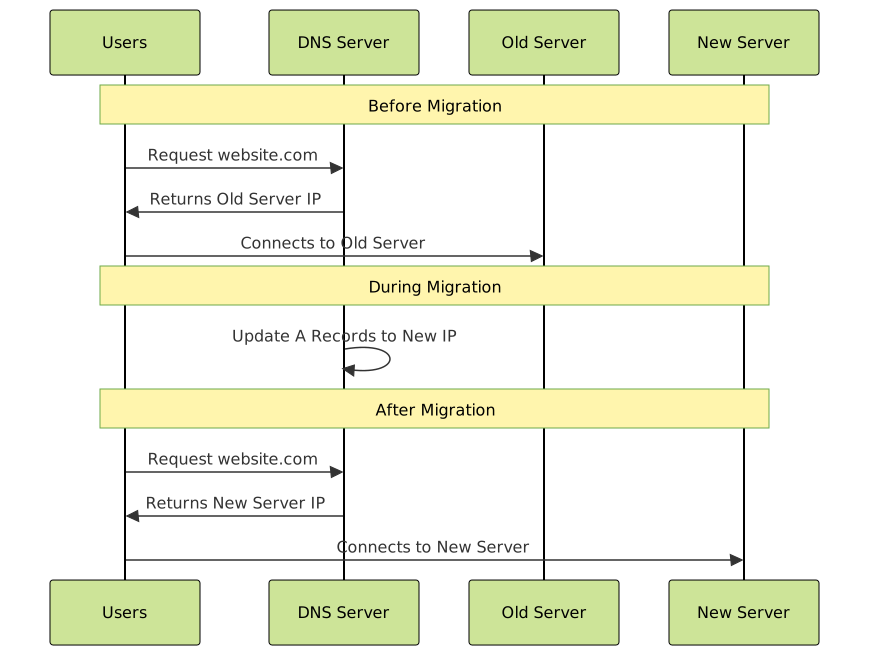
- ☐ Update A records to point to new server IP
- ☐ Update CNAME records for subdomains
- ☐ Update MX records if email hosting changes
- ☐ Monitor DNS propagation using tools like WhatsMyDNS
- ☐ Test website accessibility from multiple locations
Redirect Implementation
Proper redirect implementation is crucial for preserving SEO value. Here’s how to set up effective redirects:
# .htaccess example for 301 redirects
RewriteEngine On

# Redirect old blog structure to new
RewriteRule ^blog/([0-9]+)/([0-9]+)/([^/]+)/?$ /blog/$3 [R=301,L]

# Redirect old product pages
RewriteRule ^products/old-category/([^/]+)/?$ /shop/$1 [R=301,L]

# Redirect old contact page
RewriteRule ^contact-us/?$ /contact [R=301,L]
Phase 4: Post-Migration Monitoring (First 72 hours)
Critical Monitoring Tasks

- ☐ Hour 1: Verify DNS propagation is complete globally
- ☐ Hour 2: Test critical user paths (purchase flow, contact forms)
- ☐ Hour 4: Check Google Analytics for traffic patterns
- ☐ Hour 8: Submit updated sitemap to Search Console
- ☐ Day 1: Monitor server performance and error logs
- ☐ Day 2: Analyze organic search traffic recovery
- ☐ Day 3: Complete comprehensive functionality review
Search Engine Notification
- ☐ Submit new sitemap to Google Search Console
- ☐ Request re-indexing for high-priority pages
- ☐ Update Google My Business listing (if domain changed)
- ☐ Notify Bing Webmaster Tools of changes
- ☐ Update social media profiles with new URLs
Common Migration Pitfalls and How to Avoid Them
1. Redirect Chain Disasters
Problem: Multiple redirects slowing down page load times and confusing search engines.
Solution: Always redirect from the original URL directly to the final destination. Avoid redirect chains like: old-url → temp-url → new-url
2. Mixed Content Issues
Problem: HTTPS pages loading HTTP resources, causing browser security warnings.
Solution: Use protocol-relative URLs or update all internal links to HTTPS before migration.
3. Forgotten Subdomains
Problem: Main domain works but subdomains like blog.example.com or shop.example.com return errors.
Solution: Create a comprehensive subdomain inventory and test each one individually after migration.
Advanced Migration Strategies
Staged Migration Approach
For large websites, consider a phased migration approach to minimize risk:
- Phase 1: Migrate static pages and basic functionality
- Phase 2: Move blog and content sections
- Phase 3: Transfer e-commerce or complex interactive features
- Phase 4: Complete database-dependent features
CDN and Caching Considerations
- Clear CDN cache completely before migration
- Update CDN origin servers to point to new hosting
- Configure proper cache headers on new server
- Test CDN functionality with various file types
Traffic Recovery Timeline and Expectations
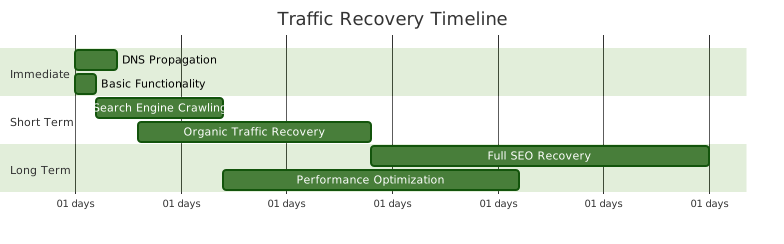
Understanding realistic recovery timelines helps manage expectations:
- 0-24 hours: DNS propagation, immediate traffic should flow normally
- 1-7 days: Search engines discover and crawl new setup
- 1-2 weeks: Organic traffic typically recovers to 80-90% of pre-migration levels
- 2-4 weeks: Full traffic recovery expected with proper implementation
- 1-3 months: Potential for improved performance and rankings with optimization
Emergency Rollback Plan
Always have a rollback strategy ready in case major issues arise:
Quick Rollback Steps
- Revert DNS records to original server IP addresses
- Re-enable original website from backup
- Clear CDN cache if applicable
- Monitor traffic recovery to original site
- Analyze migration issues for future retry
Decision Criteria for Rollback
- More than 50% traffic drop within 4 hours
- Critical functionality completely broken
- Security vulnerabilities discovered
- Major search engine penalties detected
Post-Migration Optimization
Performance Enhancements
Once your migration is stable, focus on improvements:
- Image Optimization: Implement WebP format and lazy loading
- Caching Strategy: Configure browser caching and server-side caching
- Code Optimization: Minify CSS, JavaScript, and HTML
- Database Optimization: Clean up unnecessary data and optimize queries
SEO Recovery Acceleration
- Submit individual high-priority pages for re-indexing
- Create fresh, high-quality content to attract crawlers
- Build high-quality backlinks to new URLs
- Optimize Core Web Vitals for better search rankings
- Monitor and fix any crawl errors promptly
Tools and Resources for Migration Success
Essential Migration Tools
- Screaming Frog SEO Spider: Comprehensive site crawling and analysis
- Google Search Console: Monitor search performance and crawl issues
- GTmetrix/PageSpeed Insights: Performance monitoring and optimization
- Pingdom/UptimeRobot: Uptime monitoring during and after migration
- WhatsMyDNS: Global DNS propagation checking
Backup and Recovery Tools
- UpdraftPlus (WordPress): Automated backup solutions
- Duplicator: Complete site migration and cloning
- rsync: File synchronization for server-level backups
- mysqldump: Database backup and restoration
Measuring Migration Success
Define clear success metrics to evaluate your migration:
Key Performance Indicators
- Traffic Recovery: 90%+ of pre-migration organic traffic within 2 weeks
- Search Rankings: Maintain or improve keyword positions within 30 days
- Site Performance: Page load times equal to or better than before
- User Experience: Bounce rate and conversion rates remain stable
- Technical Health: Zero critical errors in Search Console
Long-term Monitoring
Continue monitoring these metrics for 3-6 months post-migration:
- Organic search traffic trends
- Core Web Vitals performance
- Conversion rate optimization opportunities
- Server performance and uptime
- Security vulnerabilities and updates
Conclusion
Website migration doesn’t have to be a traffic-killing nightmare. With proper planning, systematic execution, and careful monitoring, you can successfully migrate your website while preserving or even improving your search rankings and user experience.
Remember that migration is not just about moving files from one server to another—it’s about preserving the digital assets and user trust you’ve built over time. Follow this comprehensive checklist, test thoroughly, and don’t rush the process. A successful migration will set the foundation for future growth and improved performance.
The key to migration success lies in preparation, testing, and having backup plans ready. Start your migration planning early, involve all stakeholders, and prioritize user experience throughout the process. With the right approach, your website migration can be a stepping stone to better performance, security, and scalability.





