
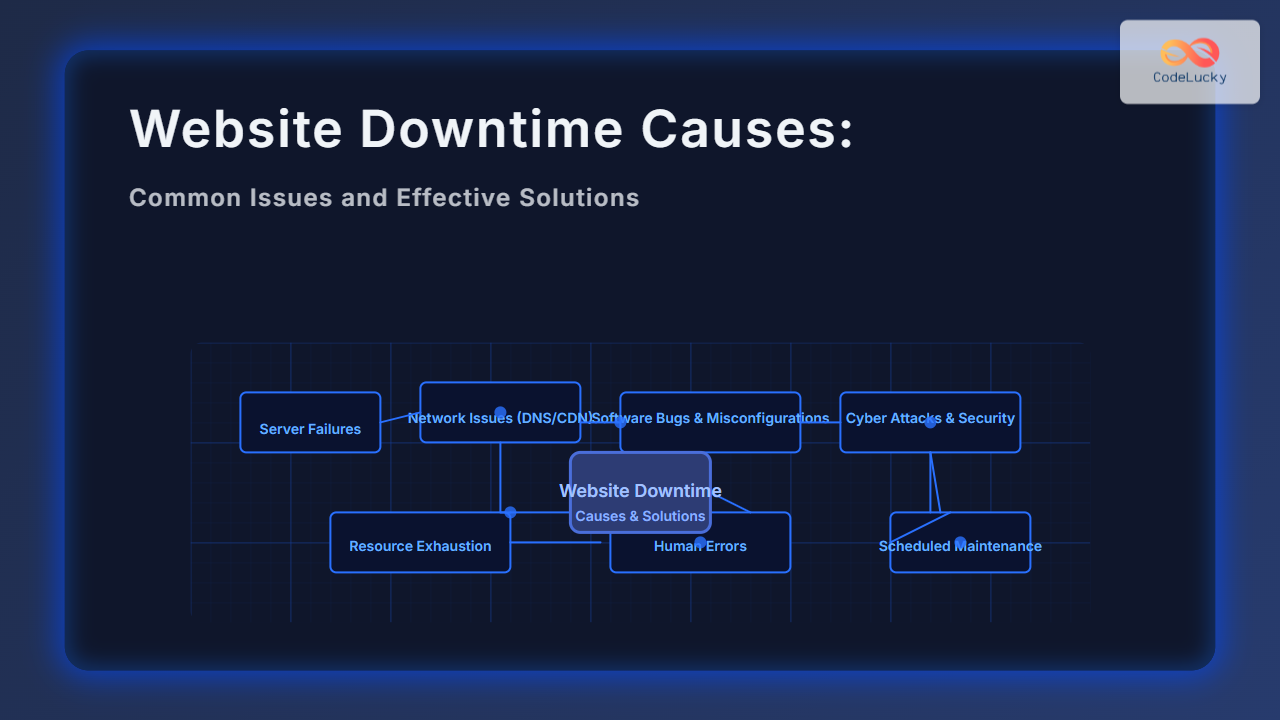
Website downtime can severely impact business operations, brand reputation, and user experience. Understanding the common causes of website downtime along with practical and technical solutions is vital for developers, IT teams, and website owners. This article delves deep into the typical issues behind downtime, illustrated with clear visual explanations and real-world troubleshooting examples.
What Is Website Downtime?
Website downtime refers to periods when a website is unavailable or inaccessible to users. This can result from server failures, network problems, software bugs, or scheduled maintenance. Downtime impacts user trust, SEO rankings, and can lead to direct revenue loss.
Common Causes of Website Downtime
Here are the primary reasons why websites go down:
- Server or Hosting Issues: Hardware failures, overloaded servers, or poor-quality hosting services.
- Network Problems: DNS failures, CDN issues, or ISP outages disrupt connectivity.
- Software Errors: Bugs in website code, misconfigurations, or CMS/plugin incompatibilities.
- Cyber Attacks: DDoS attacks, hacking attempts, or malware can disable websites.
- Resource Exhaustion: CPU, memory, or disk space limits exceeded causing crashes.
- Human Errors: Mistakes during deployment, configuration changes, or updates.
- Scheduled Maintenance: Planned downtime for updates, not always communicated effectively.
Detailed Breakdown with Examples and Solutions
1. Server or Hosting Failure
Shared servers or poorly managed hosting can cause server crashes when overloaded. For instance, a sudden spike in traffic might exhaust server resources, leading to website unavailability.

Solution: Opt for reliable hosting providers, consider dedicated or cloud servers with auto-scaling options. Use server monitoring tools like Nagios or New Relic to detect issues early.
2. Network Issues: DNS and CDN Problems
DNS failures happen when domain name servers fail to resolve the website’s address, breaking the link between domain and server IP. CDNs that distribute content globally might experience outages or misconfigurations causing partial or full downtime.
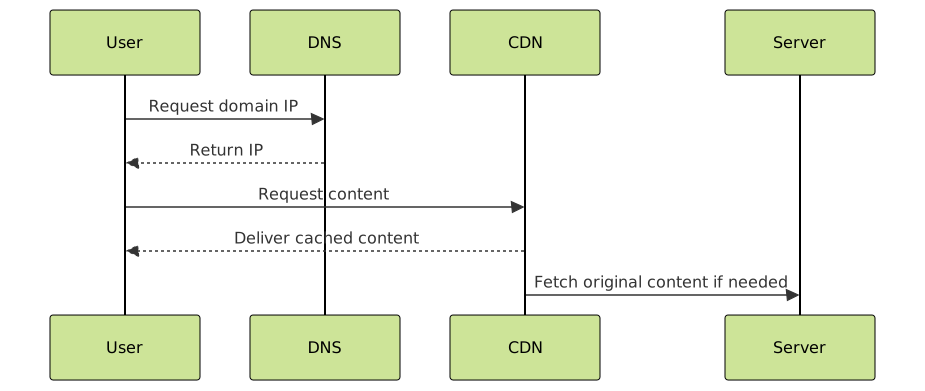
Solution: Use redundant DNS providers, regularly verify DNS records for accuracy, and monitor CDN latency and uptime. Services like Cloudflare can offer robust DNS with DDoS protection.
3. Software Bugs and Misconfiguration
Errors in website code, plugin conflicts, or improper server settings can crash or freeze a site. For instance, a CMS plugin update might introduce a bug causing PHP errors or redirect loops.
Example: A WordPress site showing “500 Internal Server Error” post-plugin update is typically due to PHP version conflicts or incompatibility.

Solution: Maintain a staging environment for testing updates. Use debugging tools, error logs, and roll back updates if issues occur. Keep CMS, plugins, and themes updated securely.
4. Cyber Attacks (DDoS, Hacking, Malware)
Distributed Denial of Service (DDoS) attacks flood the server with excessive traffic, causing outages. Hacks or malware can corrupt site files or databases.

Solution: Deploy firewalls, intrusion detection systems, and DDoS mitigation services. Regularly update security patches and perform site integrity scans.
5. Resource Exhaustion
High traffic, inefficient scripts, or memory leaks may exhaust server CPU, RAM, or disk space, leading to slowdowns or crashes.
Example: A web app with memory leaks will slow down over time and eventually cause a timeout or crash.
Solution: Optimize code, database queries, and use caching layers like Redis or Memcached. Set resource limits and monitor usage consistently.
6. Human Errors in Deployment or Configuration
Manual mistakes during updates, such as incorrect file permissions or incorrect DNS changes, can make sites unreachable.

Solution: Implement CI/CD pipelines with automated tests and configuration validation. Use version control to track changes and enable rollbacks.
Prevention and Monitoring: Keeping Your Website Up
The key to minimizing downtime is proactive prevention and fast detection.
- Use Uptime Monitoring Tools like Pingdom, UptimeRobot, or StatusCake to receive alerts when downtime occurs.
- Implement Redundancy: Use load balancers, backup servers, and multiple data centers.
- Have a Disaster Recovery Plan: Regular backups and clear restoration processes.
- Automate Health Checks: Set automated scripts or services to monitor server health and application responsiveness.
- Communicate Scheduled Maintenance: Notify users in advance with banners or temporary pages.
Interactive Example: Simulated Website Response Check
Use this simple JavaScript snippet in the browser console to monitor if a website is reachable via HTTP status:
function checkWebsiteStatus(url) {
  fetch(url, { method: 'HEAD' })
  .then(response => {
    if (response.ok) {
      console.log(`Website is UP: Status ${response.status}`);
    } else {
      console.log(`Website is DOWN: Status ${response.status}`);
    }
  })
  .catch(error => {
    console.log('Website is DOWN: Network Error or Unreachable');
  });
}

// Usage example: checkWebsiteStatus('https://www.example.com');
Conclusion
Website downtime stems from a variety of causes spanning hardware, network, software, security, and human errors. Each cause requires specific solutions ranging from better infrastructure and monitoring to automated deployments and security defenses. By understanding and addressing these issues comprehensively, website owners and developers can significantly improve uptime, enhance user trust, and protect business continuity.





