
Web hosting can seem overwhelming with its technical jargon and complex terminology. Whether you’re launching your first website or managing enterprise applications, understanding key hosting terms is crucial for making informed decisions about your web infrastructure.
This comprehensive guide breaks down essential web hosting concepts, from bandwidth and storage to advanced server configurations, helping you navigate the hosting landscape with confidence.
Core Web Hosting Infrastructure

Web hosting involves multiple components working together to deliver your website to visitors. The diagram above illustrates the basic flow from user request to response, highlighting the key infrastructure elements we’ll explore.
Bandwidth: Your Website’s Data Highway
Bandwidth refers to the amount of data that can be transferred between your website and its visitors within a specific timeframe, typically measured monthly. Think of it as the width of a highway – more lanes allow more traffic to flow simultaneously.
Understanding Bandwidth Measurements
- Gigabytes (GB): Standard measurement for most shared hosting plans
- Terabytes (TB): Common for VPS and dedicated servers (1 TB = 1,024 GB)
- Unlimited: Marketing term with fair usage policies behind the scenes
Bandwidth Calculation Example
Consider a website with these specifications:
- Average page size: 2 MB
- Monthly visitors: 10,000
- Average pages per visit: 3
Monthly bandwidth requirement:
2 MB × 3 pages × 10,000 visitors = 60,000 MB = 60 GB per month
Always plan for 20-30% overhead to account for growth and peak traffic periods, bringing the requirement to approximately 80 GB monthly.
Bandwidth vs. Speed: The Critical Difference

Many confuse bandwidth with connection speed. Bandwidth determines how much data you can transfer, while connection speed affects how quickly that data moves. A hosting plan might offer unlimited bandwidth but throttle speeds during peak usage.
Storage: Your Website’s Digital Warehouse
Storage space determines how much content your hosting account can hold, including website files, databases, emails, and backups.
Types of Storage in Web Hosting
Traditional Hard Disk Drives (HDD)
- Capacity: Higher storage volumes at lower costs
- Speed: Slower read/write operations
- Best for: File storage, backups, budget hosting
Solid State Drives (SSD)
- Performance: 10-100x faster than HDDs
- Reliability: No moving parts, lower failure rates
- Cost: Higher price per GB
- Best for: Database-driven websites, e-commerce platforms
NVMe SSD Storage
- Ultra-high speed: Next-generation SSD technology
- Performance: 6x faster than traditional SSDs
- Use cases: High-traffic websites, real-time applications
Storage Requirements by Website Type
| Website Type | Typical Storage Need | Key Considerations |
|---|---|---|
| Personal Blog | 1-5 GB | Text content, few images |
| Business Website | 5-20 GB | Professional images, documents |
| E-commerce Store | 20-100 GB | Product images, customer data |
| Media-Rich Site | 100+ GB | Videos, high-res images, downloads |
Uptime and Reliability Metrics
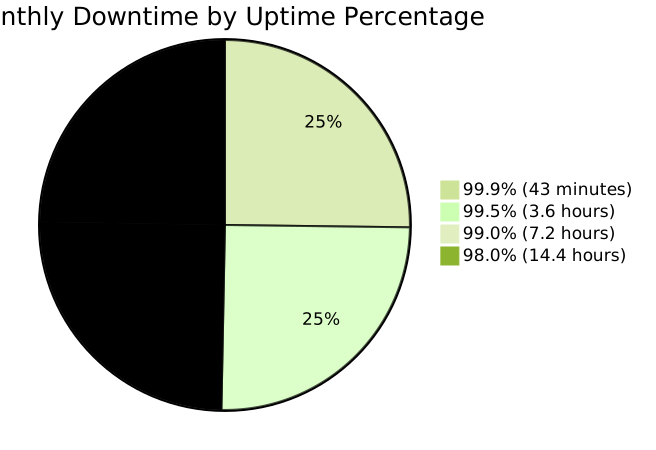
Uptime represents the percentage of time your website remains accessible to visitors. Even small differences in uptime percentages translate to significant downtime periods.
Service Level Agreements (SLA)
Hosting providers typically offer SLA guarantees:
- 99.9% uptime: Industry standard for quality hosting
- 99.95% uptime: Premium hosting expectation
- 99.99% uptime: Enterprise-grade reliability
Always verify SLA compensation policies – reputable hosts offer service credits for downtime exceeding guaranteed thresholds.
Server Resources and Performance
CPU (Central Processing Unit)
The CPU handles all computational tasks on your server. Modern hosting environments measure CPU allocation in several ways:
- CPU cores: Number of processing units
- CPU percentage: Portion of server CPU allocated to your account
- CPU seconds: Time-based allocation model
RAM (Random Access Memory)
RAM provides temporary storage for active processes and data. Insufficient RAM leads to slower performance and potential crashes during traffic spikes.
| RAM Allocation | Suitable For | Concurrent Users |
|---|---|---|
| 512 MB | Simple WordPress sites | 100-500 |
| 1-2 GB | Business websites | 500-2,000 |
| 4-8 GB | E-commerce platforms | 2,000-10,000 |
| 16+ GB | High-traffic applications | 10,000+ |
Domain and DNS Fundamentals
Domain Name System (DNS)
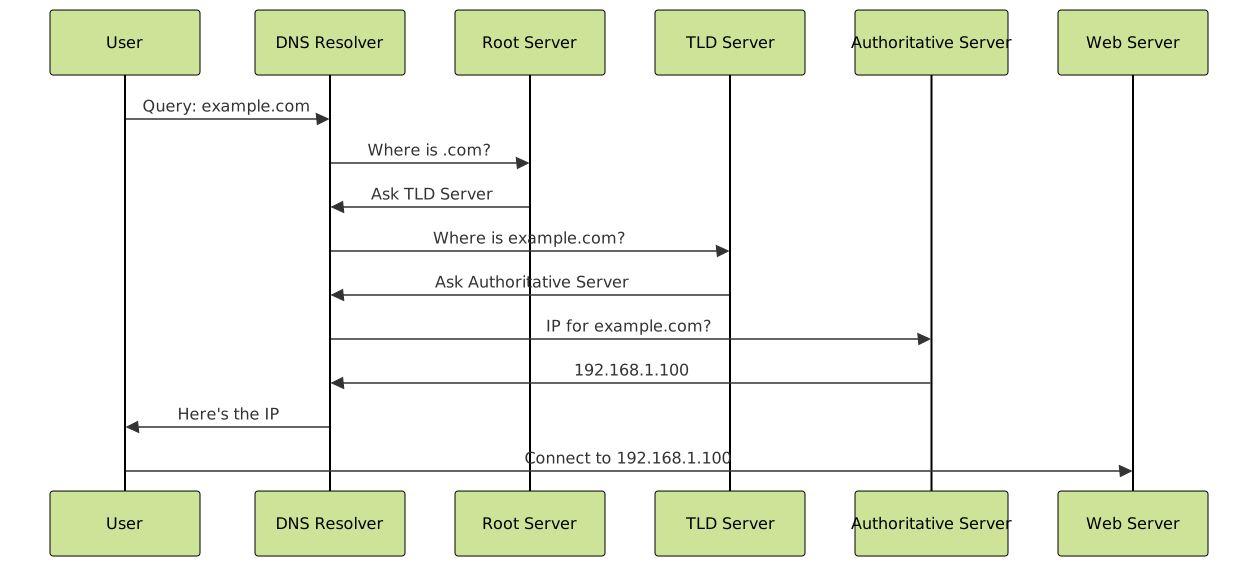
The Domain Name System translates human-readable domain names into IP addresses that computers use to locate servers.
DNS Record Types
- A Record: Points domain to IPv4 address
- AAAA Record: Points domain to IPv6 address
- CNAME Record: Creates domain aliases
- MX Record: Specifies email servers
- TXT Record: Stores text information for verification
Time to Live (TTL)
TTL determines how long DNS information remains cached. Lower TTL values (300-3600 seconds) allow faster DNS changes but increase DNS queries. Higher TTL values (86400+ seconds) improve performance but slow DNS updates.
Hosting Types and Architectures
Shared Hosting
Shared hosting places multiple websites on a single server, sharing resources like CPU, RAM, and bandwidth among all accounts.
Advantages:
- Cost-effective for beginners
- Managed server maintenance
- User-friendly control panels
Limitations:
- Resource contention with other sites
- Limited customization options
- Security risks from neighboring accounts
Virtual Private Server (VPS)
VPS hosting creates isolated virtual environments on physical servers, providing dedicated resources and greater control.

Dedicated Hosting
Dedicated servers provide complete physical server access, offering maximum performance and customization for high-demand applications.
Cloud Hosting
Cloud hosting distributes website resources across multiple interconnected servers, providing scalability and redundancy.
Security and SSL Certificates
SSL/TLS Encryption
SSL (Secure Sockets Layer) and its successor TLS (Transport Layer Security) encrypt data transmitted between browsers and servers.
SSL Certificate Types:
- Domain Validated (DV): Basic encryption, quick issuance
- Organization Validated (OV): Business verification required
- Extended Validation (EV): Highest trust level, green address bar
Security Features to Look For
- DDoS Protection: Defends against distributed attacks
- Web Application Firewall (WAF): Filters malicious traffic
- Regular Security Updates: Patches and vulnerability fixes
- Backup Systems: Automated data protection
Content Delivery Networks (CDN)
A Content Delivery Network distributes your website’s static content across multiple global servers, reducing load times for visitors worldwide.
CDN Benefits
- Improved Performance: Serves content from nearest location
- Reduced Server Load: Offloads static file delivery
- Better User Experience: Faster page load times globally
- Enhanced Reliability: Redundancy across multiple servers
Database Management
Database Types
MySQL: Most popular open-source database for web applications
PostgreSQL: Advanced open-source database with complex query support
MongoDB: NoSQL database for flexible data structures
Database Optimization
- Indexing: Improves query performance
- Query Optimization: Reduces server resource usage
- Connection Pooling: Manages database connections efficiently
- Caching: Stores frequent queries in memory
Control Panels and Management
Popular Control Panels
cPanel: Industry-standard control panel with intuitive interface
Plesk: Modern alternative with enhanced security features
DirectAdmin: Lightweight option with essential features
Key Management Features
- File manager for website content
- Database administration tools
- Email account management
- DNS zone editor
- SSL certificate installation
- Backup and restore functionality
Performance Optimization Technologies
Caching Mechanisms
Browser Caching: Stores static files locally on user devices
Server-Side Caching: Reduces database queries and processing
Object Caching: Stores frequently accessed data in memory
Compression Technologies
- Gzip Compression: Reduces file sizes by 70-90%
- Brotli Compression: Next-generation compression algorithm
- Image Optimization: WebP and AVIF formats for smaller images
Monitoring and Analytics
Essential Metrics to Track
- Response Time: How quickly server responds to requests
- Throughput: Requests processed per second
- Error Rates: Percentage of failed requests
- Resource Usage: CPU, RAM, and bandwidth consumption
Monitoring Tools
Server Monitoring: Tracks hardware performance and availability
Application Monitoring: Monitors website functionality and user experience
Log Analysis: Reviews server logs for issues and patterns
Scalability and Future Planning
Horizontal vs. Vertical Scaling
Vertical Scaling (Scale Up): Adding more power to existing servers
Horizontal Scaling (Scale Out): Adding more servers to distribute load
Planning for Growth
- Monitor traffic patterns and seasonal variations
- Implement load testing before traffic spikes
- Choose hosting providers with easy upgrade paths
- Consider cloud hosting for automatic scaling
Making Informed Hosting Decisions
Understanding these web hosting terms empowers you to make informed decisions about your website’s infrastructure. Consider your specific needs, growth projections, and technical requirements when evaluating hosting options.
Key factors to evaluate:
- Current and projected traffic volumes
- Storage requirements for content and databases
- Performance expectations and user experience goals
- Security requirements and compliance needs
- Budget constraints and cost-effectiveness
- Technical expertise and management preferences
Remember that hosting needs evolve with your website’s growth. Start with appropriate resources for your current situation, but choose providers that offer clear upgrade paths and scalable solutions for future expansion.
By mastering these fundamental concepts, you’ll navigate the web hosting landscape with confidence, ensuring your website performs optimally while staying within budget constraints.





