As your website grows, you’ll inevitably face the decision of whether to stick with shared hosting or upgrade to a Virtual Private Server (VPS). This comprehensive guide will help you understand when it’s time to make the transition and how to do it successfully.
What is VPS Hosting?
VPS (Virtual Private Server) hosting is a type of web hosting that uses virtualization technology to provide dedicated resources on a server with multiple users. Unlike shared hosting where resources are shared among all users, VPS hosting gives you guaranteed CPU, RAM, and storage allocation.

Shared Hosting vs VPS Hosting: Key Differences
Resource Allocation
Shared Hosting: Multiple websites share the same server resources (CPU, RAM, bandwidth). If one site experiences high traffic, it can affect all other sites on the server.
VPS Hosting: Each virtual server has dedicated resources that cannot be used by other websites, ensuring consistent performance.
Performance and Speed
VPS hosting typically offers 3-5x better performance than shared hosting due to:
- Guaranteed RAM allocation
- Dedicated CPU cores
- Isolated environment
- Better I/O performance
Cost Comparison
| Hosting Type | Monthly Cost Range | Best For |
|---|---|---|
| Shared Hosting | $2 – $15 | Small websites, blogs, portfolios |
| VPS Hosting | $20 – $100+ | Growing businesses, e-commerce, high-traffic sites |
Signs You Need to Upgrade from Shared Hosting

1. Website Loading Speed Issues
If your website takes more than 3 seconds to load consistently, it’s time to consider VPS hosting. Slow loading times can be caused by:
- Resource limitations on shared servers
- High server load from other websites
- Limited bandwidth allocation
2. Traffic Growth
Consider upgrading when you’re receiving:
- More than 10,000 monthly visitors
- Traffic spikes that cause downtime
- Consistent high concurrent user sessions
3. Need for Custom Software
VPS hosting allows you to install custom applications and software that aren’t available on shared hosting, including:
- Specific PHP versions or extensions
- Custom server configurations
- Specialized databases
- Development environments
4. Security Requirements
If your website handles sensitive data or requires enhanced security measures, VPS hosting provides:
- Isolated environment
- Custom firewall configurations
- Root access for security tools
- Better compliance capabilities
5. E-commerce Growth
Online stores benefit from VPS hosting when they experience:
- More than 100 orders per month
- Large product catalogs (1000+ products)
- Need for PCI compliance
- Custom payment integrations
Types of VPS Hosting
Managed VPS Hosting
Best for: Users who want VPS benefits without technical management
Features:
- Server maintenance handled by provider
- Automatic updates and security patches
- Technical support included
- Higher cost but less technical expertise required
Unmanaged VPS Hosting
Best for: Developers and technically savvy users
Features:
- Full root access and control
- Lower cost
- Self-managed updates and maintenance
- Requires technical knowledge
Cloud VPS Hosting
Best for: Websites with variable traffic patterns
Features:
- Scalable resources
- Pay-as-you-use pricing
- High availability
- Instant resource scaling
VPS Hosting Benefits
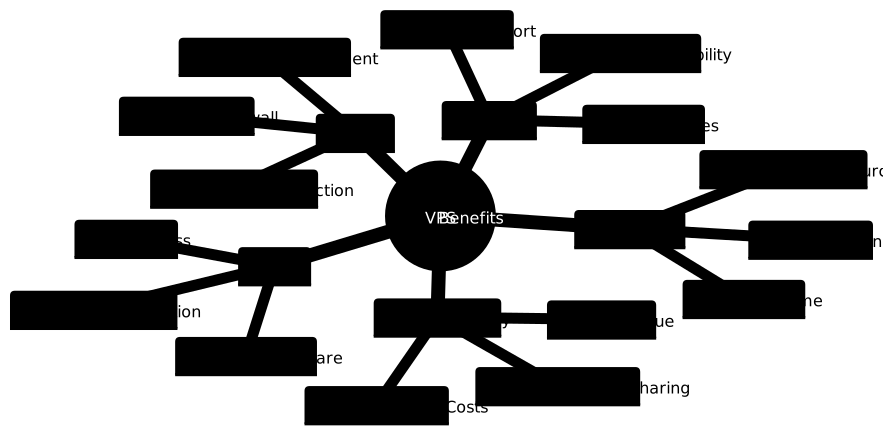
Enhanced Performance
VPS hosting delivers superior performance through:
- Dedicated RAM: Guaranteed memory allocation prevents slowdowns
- CPU Cores: Dedicated processing power for consistent performance
- SSD Storage: Faster read/write speeds compared to shared hosting
- Network Isolation: Your traffic doesn’t compete with other sites
Complete Control
With VPS hosting, you gain:
- Root access to install any software
- Ability to modify server configurations
- Custom security implementations
- Choice of operating system (Linux distributions, Windows)
Better Security
Security advantages include:
- Isolated server environment
- Custom firewall rules
- Ability to implement advanced security measures
- No risk from other users’ security vulnerabilities
How to Choose the Right VPS Plan
Assess Your Current Resources
Before selecting a VPS plan, analyze your current usage:
Resource Assessment Checklist:
- Current monthly bandwidth usage
- Peak concurrent visitors
- Database size and complexity
- Required storage space
- Specific software requirements
VPS Specifications Guide
| Website Type | RAM | CPU Cores | Storage | Monthly Visitors |
|---|---|---|---|---|
| Small Business Site | 1-2GB | 1-2 | 20-50GB | Up to 50K |
| E-commerce Store | 2-4GB | 2-4 | 50-100GB | 50K-200K |
| High-Traffic Blog | 4-8GB | 4-6 | 100-200GB | 200K-500K |
| Web Application | 8GB+ | 6+ | 200GB+ | 500K+ |
Key Features to Look For
- SSD Storage: Ensures faster data access and better performance
- Backup Services: Automated daily backups for data protection
- 24/7 Support: Essential for resolving technical issues quickly
- Scalability: Ability to upgrade resources without migration
- Control Panel: User-friendly interface for server management
- Network Uptime: Look for 99.9% uptime guarantees
Migration Process: From Shared to VPS
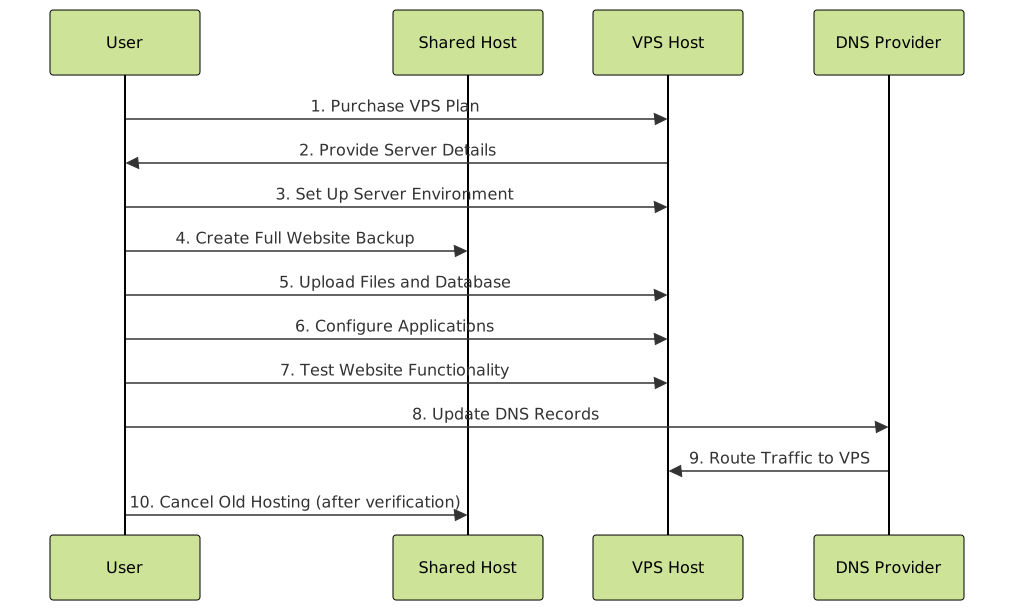
Pre-Migration Preparation
1. Choose Migration Timing
- Plan during low-traffic periods
- Avoid busy seasons or important events
- Allow 24-48 hours for DNS propagation
2. Create Complete Backup
- Download all website files via FTP
- Export databases using phpMyAdmin
- Save email accounts and settings
- Document current configurations
Step-by-Step Migration Process
Step 1: Server Setup
- Install required software stack (LAMP/LEMP)
- Configure web server (Apache/Nginx)
- Set up database server (MySQL/PostgreSQL)
- Install SSL certificates
Step 2: File Transfer
# Example: Using rsync for file transfer
rsync -avz /local/website/files/ user@vps-server:/var/www/html/

# Example: Database import
mysql -u username -p database_name < backup.sql
Step 3: Configuration
- Update database connection strings
- Configure virtual hosts
- Set proper file permissions
- Update paths and URLs
Step 4: Testing
- Test all website functionality
- Verify form submissions
- Check payment processing
- Validate SSL certificates
Step 5: DNS Migration
- Update A records to point to VPS IP
- Lower TTL values before migration
- Monitor DNS propagation
- Keep old hosting active during transition
VPS Management Essentials
Security Best Practices
Server Hardening:
- Change default SSH port
- Disable root login
- Set up key-based authentication
- Install fail2ban for intrusion prevention
Regular Maintenance:
- Apply security updates promptly
- Monitor server resource usage
- Review access logs regularly
- Implement automated backups
Performance Optimization
Web Server Optimization:
- Enable GZIP compression
- Configure caching headers
- Optimize database queries
- Use content delivery networks (CDN)
Monitoring Tools:
- Set up server monitoring (Nagios, Zabbix)
- Monitor website uptime
- Track resource usage trends
- Configure alert notifications
Cost Analysis: ROI of VPS Upgrade
Direct Cost Comparison
Annual Cost Example:
- Shared Hosting: $60-180/year
- VPS Hosting: $240-1200/year
- Additional Costs: Management tools, backups, monitoring
Value Benefits
Performance ROI:
- 50-80% improvement in page load times
- Better search engine rankings
- Increased user engagement and conversions
- Reduced bounce rates
Business Impact:
- Higher website availability (99.9%+ uptime)
- Ability to handle traffic spikes
- Professional email hosting
- Enhanced security for customer data
Common VPS Hosting Challenges
Technical Complexity
Challenge: VPS requires more technical knowledge than shared hosting.
Solutions:
- Choose managed VPS for beginners
- Use control panels like cPanel or Plesk
- Invest in learning basic server administration
- Consider hiring a system administrator
Resource Management
Challenge: Monitoring and optimizing server resources.
Solutions:
- Set up automated monitoring alerts
- Regular performance audits
- Implement caching solutions
- Optimize applications and databases
Security Responsibilities
Challenge: Increased security responsibilities with VPS.
Solutions:
- Follow security best practices consistently
- Keep all software updated
- Implement automated backup solutions
- Use security monitoring tools
Future-Proofing Your VPS Choice
Scalability Planning
When choosing a VPS provider, consider:
- Vertical Scaling: Easy resource upgrades (RAM, CPU, storage)
- Horizontal Scaling: Ability to add multiple servers
- Load Balancing: Traffic distribution capabilities
- Cloud Integration: Hybrid cloud solutions
Technology Evolution
Stay prepared for future needs:
- Choose providers with modern infrastructure
- Ensure compatibility with new technologies
- Plan for mobile traffic growth
- Consider containerization options (Docker, Kubernetes)
Conclusion
Upgrading from shared hosting to VPS hosting is a significant step that can dramatically improve your website’s performance, security, and scalability. The decision should be based on your current website needs, traffic patterns, and future growth plans.
Key indicators for making the switch include consistent slow loading times, growing traffic that causes performance issues, need for custom software installations, and enhanced security requirements. While VPS hosting requires a higher investment and more technical knowledge, the benefits in terms of performance, control, and reliability make it worthwhile for growing websites and businesses.
Remember to carefully plan your migration, choose the right VPS specifications for your needs, and implement proper security and maintenance practices. With the right approach, VPS hosting can provide the foundation for your website’s continued growth and success.
Quick Decision Framework:
- Stay with Shared Hosting: Less than 5,000 monthly visitors, simple static sites, tight budget
- Upgrade to VPS: 10,000+ monthly visitors, e-commerce site, need custom software, performance issues
- Consider Managed VPS: If you want VPS benefits without technical complexity