
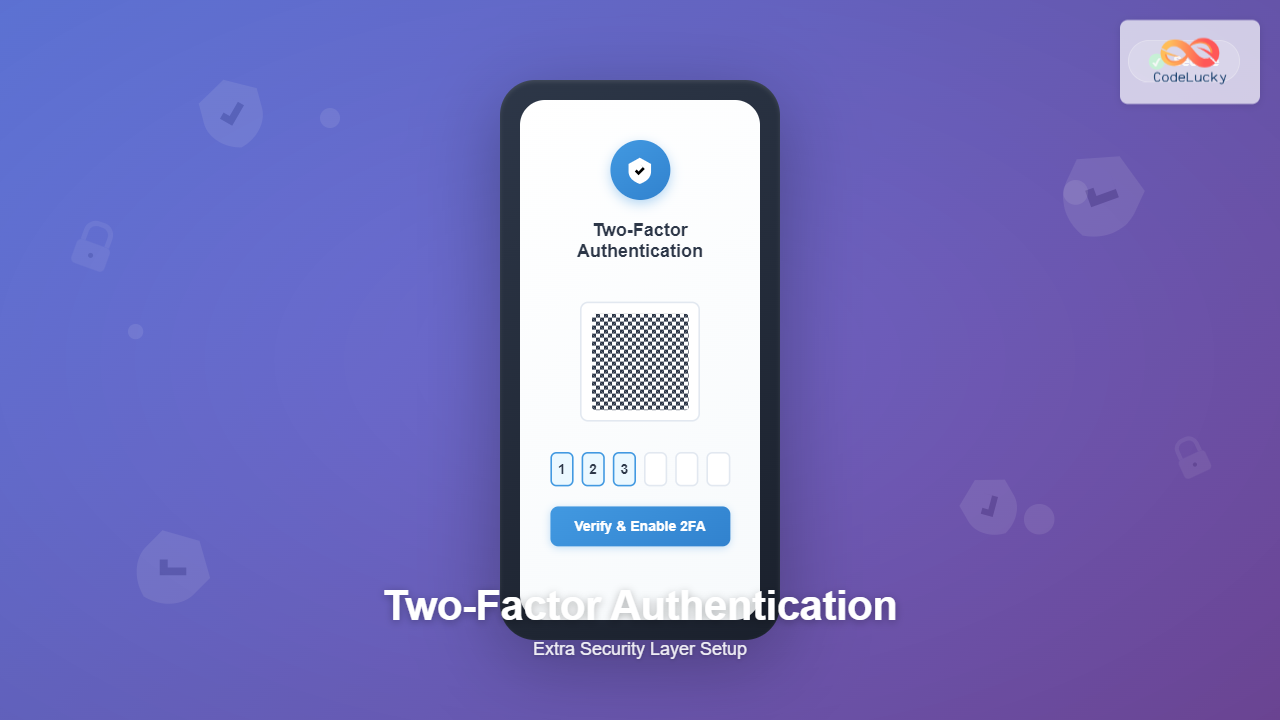
Two-Factor Authentication (2FA) has become a critical security measure in today’s digital landscape. With cyber threats increasing by 38% annually, implementing an additional security layer beyond passwords is no longer optional—it’s essential for protecting sensitive data and user accounts.
Understanding Two-Factor Authentication
Two-Factor Authentication is a security process that requires users to provide two different authentication factors to verify their identity. This approach significantly reduces the risk of unauthorized access, even if passwords are compromised.

The Three Authentication Factors
Authentication factors fall into three categories:
- Something you know: Passwords, PINs, security questions
- Something you have: Mobile device, hardware token, smart card
- Something you are: Fingerprint, facial recognition, retina scan
Types of Two-Factor Authentication
SMS-Based Authentication
SMS 2FA sends verification codes via text message to the user’s registered phone number. While widely adopted, it’s considered less secure due to potential SIM swapping attacks.
Example SMS 2FA Implementation:
// Node.js SMS 2FA implementation using Twilio
const twilio = require('twilio');
const crypto = require('crypto');

class SMS2FA {
    constructor(accountSid, authToken) {
        this.client = twilio(accountSid, authToken);
        this.codes = new Map(); // In production, use database
    }

    generateCode() {
        return crypto.randomInt(100000, 999999).toString();
    }

    async sendCode(phoneNumber, userId) {
        const code = this.generateCode();
        const expiry = Date.now() + 300000; // 5 minutes

        this.codes.set(userId, { code, expiry });

        try {
            await this.client.messages.create({
                body: `Your verification code is: ${code}`,
                from: '+1234567890', // Your Twilio number
                to: phoneNumber
            });
            return { success: true, message: 'Code sent successfully' };
        } catch (error) {
            return { success: false, error: error.message };
        }
    }

    verifyCode(userId, inputCode) {
        const storedData = this.codes.get(userId);

        if (!storedData) {
            return { valid: false, message: 'No code found' };
        }

        if (Date.now() > storedData.expiry) {
            this.codes.delete(userId);
            return { valid: false, message: 'Code expired' };
        }

        if (storedData.code === inputCode) {
            this.codes.delete(userId);
            return { valid: true, message: 'Code verified' };
        }

        return { valid: false, message: 'Invalid code' };
    }
}

// Usage example
const sms2fa = new SMS2FA('your_account_sid', 'your_auth_token');

// Send verification code
await sms2fa.sendCode('+1234567890', 'user123');

// Verify code
const result = sms2fa.verifyCode('user123', '123456');
console.log(result); // { valid: true/false, message: '...' }
Time-Based One-Time Password (TOTP)
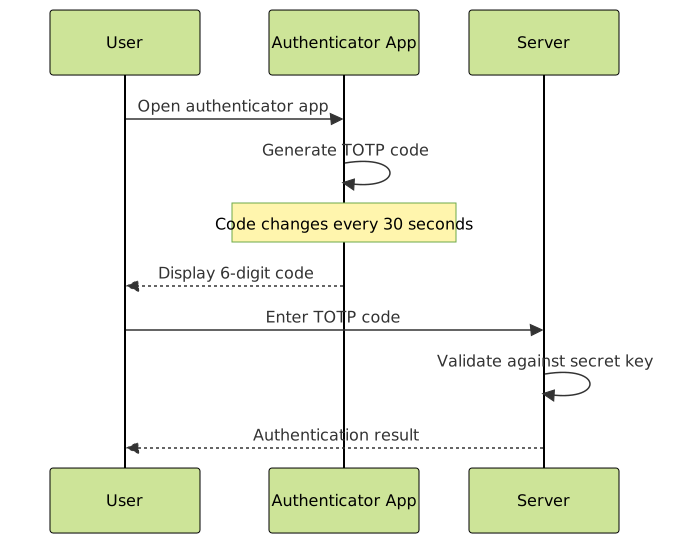
TOTP generates time-sensitive codes using authenticator apps like Google Authenticator or Authy. This method is more secure than SMS as it doesn’t rely on network transmission.
TOTP Implementation Example:
const speakeasy = require('speakeasy');
const QRCode = require('qrcode');

class TOTPAuthenticator {
    constructor(serviceName = 'CodeLucky') {
        this.serviceName = serviceName;
    }

    // Generate secret key for new user
    generateSecret(userEmail) {
        const secret = speakeasy.generateSecret({
            name: `${this.serviceName} (${userEmail})`,
            issuer: this.serviceName,
            length: 32
        });

        return {
            secret: secret.base32,
            qrCodeUrl: secret.otpauth_url
        };
    }

    // Generate QR code for easy setup
    async generateQRCode(otpauthUrl) {
        try {
            const qrCodeDataUrl = await QRCode.toDataURL(otpauthUrl);
            return qrCodeDataUrl;
        } catch (error) {
            throw new Error('Failed to generate QR code');
        }
    }

    // Verify TOTP token
    verifyToken(secret, token, window = 2) {
        return speakeasy.totp.verify({
            secret: secret,
            encoding: 'base32',
            token: token,
            window: window // Allow 2 time steps before/after current
        });
    }

    // Get current token (for testing)
    getCurrentToken(secret) {
        return speakeasy.totp({
            secret: secret,
            encoding: 'base32'
        });
    }
}

// Usage example
const totp = new TOTPAuthenticator('CodeLucky');

// Setup for new user
const userSetup = totp.generateSecret('[email protected]');
console.log('Secret:', userSetup.secret);
console.log('QR Code URL:', userSetup.qrCodeUrl);

// Generate QR code
const qrCode = await totp.generateQRCode(userSetup.qrCodeUrl);
console.log('QR Code Data URL:', qrCode);

// Verify token
const isValid = totp.verifyToken(userSetup.secret, '123456');
console.log('Token valid:', isValid);
Hardware Tokens
Hardware tokens like YubiKey provide the highest level of security by generating cryptographic keys that never leave the device. They support standards like FIDO2/WebAuthn.
Implementing 2FA in Web Applications
Frontend Implementation
Here’s a complete React component for handling 2FA authentication:
import React, { useState, useEffect } from 'react';
const TwoFactorAuth = ({ onVerificationSuccess, onVerificationError }) => {
const [step, setStep] = useState('setup'); // 'setup', 'verify'
const [qrCode, setQrCode] = useState('');
const [secret, setSecret] = useState('');
const [verificationCode, setVerificationCode] = useState('');
const [loading, setLoading] = useState(false);
const [error, setError] = useState('');
// Setup 2FA
const setup2FA = async () => {
setLoading(true);
try {
const response = await fetch('/api/2fa/setup', {
method: 'POST',
headers: { 'Content-Type': 'application/json' },
credentials: 'include'
});
const data = await response.json();
if (data.success) {
setQrCode(data.qrCode);
setSecret(data.secret);
setStep('verify');
} else {
setError(data.message);
}
} catch (err) {
setError('Setup failed. Please try again.');
} finally {
setLoading(false);
}
};
// Verify 2FA code
const verify2FA = async () => {
if (verificationCode.length !== 6) {
setError('Please enter a 6-digit code');
return;
}
setLoading(true);
try {
const response = await fetch('/api/2fa/verify', {
method: 'POST',
headers: { 'Content-Type': 'application/json' },
body: JSON.stringify({ token: verificationCode }),
credentials: 'include'
});
const data = await response.json();
if (data.success) {
onVerificationSuccess?.();
} else {
setError(data.message);
onVerificationError?.(data.message);
}
} catch (err) {
setError('Verification failed. Please try again.');
onVerificationError?.('Verification failed');
} finally {
setLoading(false);
}
};
useEffect(() => {
setup2FA();
}, []);
const handleCodeChange = (e) => {
const value = e.target.value.replace(/\D/g, '').slice(0, 6);
setVerificationCode(value);
setError('');
};
return (
{step === 'setup' && (
Setting up Two-Factor Authentication
{loading && Loading...}
)}
{step === 'verify' && (
Scan QR Code
Scan this QR code with your authenticator app:
{qrCode && (
 )}
)}
Or enter this secret key manually:
{secret}
{error && {error}}
)}
);
};
export default TwoFactorAuth;
Backend API Implementation
Here’s a comprehensive Express.js backend for 2FA:
const express = require('express');
const speakeasy = require('speakeasy');
const QRCode = require('qrcode');
const session = require('express-session');
const bcrypt = require('bcrypt');

const app = express();
app.use(express.json());
app.use(session({
    secret: 'your-session-secret',
    resave: false,
    saveUninitialized: false,
    cookie: { secure: false } // Set to true in production with HTTPS
}));

// Mock database - use a real database in production
const users = new Map();

// Middleware to check if user is authenticated
const requireAuth = (req, res, next) => {
    if (!req.session.userId) {
        return res.status(401).json({ success: false, message: 'Not authenticated' });
    }
    next();
};

// Setup 2FA endpoint
app.post('/api/2fa/setup', requireAuth, async (req, res) => {
    try {
        const userId = req.session.userId;
        const user = users.get(userId);

        if (!user) {
            return res.status(404).json({ success: false, message: 'User not found' });
        }

        // Generate secret
        const secret = speakeasy.generateSecret({
            name: `CodeLucky (${user.email})`,
            issuer: 'CodeLucky',
            length: 32
        });

        // Store temporary secret in session
        req.session.tempSecret = secret.base32;

        // Generate QR code
        const qrCodeDataUrl = await QRCode.toDataURL(secret.otpauth_url);

        res.json({
            success: true,
            qrCode: qrCodeDataUrl,
            secret: secret.base32
        });

    } catch (error) {
        console.error('2FA setup error:', error);
        res.status(500).json({ success: false, message: 'Setup failed' });
    }
});

// Verify 2FA code and enable 2FA
app.post('/api/2fa/verify', requireAuth, (req, res) => {
    try {
        const { token } = req.body;
        const userId = req.session.userId;
        const tempSecret = req.session.tempSecret;

        if (!tempSecret) {
            return res.status(400).json({ success: false, message: 'No setup in progress' });
        }

        // Verify token
        const verified = speakeasy.totp.verify({
            secret: tempSecret,
            encoding: 'base32',
            token: token,
            window: 2
        });

        if (verified) {
            // Enable 2FA for user
            const user = users.get(userId);
            user.twoFactorSecret = tempSecret;
            user.twoFactorEnabled = true;

            // Clear temporary secret
            delete req.session.tempSecret;

            res.json({ success: true, message: '2FA enabled successfully' });
        } else {
            res.status(400).json({ success: false, message: 'Invalid verification code' });
        }

    } catch (error) {
        console.error('2FA verification error:', error);
        res.status(500).json({ success: false, message: 'Verification failed' });
    }
});

// Login with 2FA
app.post('/api/login', async (req, res) => {
    try {
        const { email, password, twoFactorCode } = req.body;

        // Find user
        let user = null;
        for (const [id, userData] of users) {
            if (userData.email === email) {
                user = { id, ...userData };
                break;
            }
        }

        if (!user || !await bcrypt.compare(password, user.hashedPassword)) {
            return res.status(401).json({ success: false, message: 'Invalid credentials' });
        }

        // Check if 2FA is enabled
        if (user.twoFactorEnabled) {
            if (!twoFactorCode) {
                return res.json({
                    success: false,
                    requireTwoFactor: true,
                    message: '2FA code required'
                });
            }

            // Verify 2FA code
            const verified = speakeasy.totp.verify({
                secret: user.twoFactorSecret,
                encoding: 'base32',
                token: twoFactorCode,
                window: 2
            });

            if (!verified) {
                return res.status(401).json({ success: false, message: 'Invalid 2FA code' });
            }
        }

        // Login successful
        req.session.userId = user.id;
        res.json({ success: true, message: 'Login successful' });

    } catch (error) {
        console.error('Login error:', error);
        res.status(500).json({ success: false, message: 'Login failed' });
    }
});

// Disable 2FA
app.post('/api/2fa/disable', requireAuth, (req, res) => {
    try {
        const { password, twoFactorCode } = req.body;
        const userId = req.session.userId;
        const user = users.get(userId);

        if (!user) {
            return res.status(404).json({ success: false, message: 'User not found' });
        }

        // Verify password
        if (!bcrypt.compareSync(password, user.hashedPassword)) {
            return res.status(401).json({ success: false, message: 'Invalid password' });
        }

        // Verify 2FA code
        if (user.twoFactorEnabled) {
            const verified = speakeasy.totp.verify({
                secret: user.twoFactorSecret,
                encoding: 'base32',
                token: twoFactorCode,
                window: 2
            });

            if (!verified) {
                return res.status(401).json({ success: false, message: 'Invalid 2FA code' });
            }
        }

        // Disable 2FA
        user.twoFactorEnabled = false;
        delete user.twoFactorSecret;

        res.json({ success: true, message: '2FA disabled successfully' });

    } catch (error) {
        console.error('2FA disable error:', error);
        res.status(500).json({ success: false, message: 'Failed to disable 2FA' });
    }
});

app.listen(3000, () => {
    console.log('Server running on port 3000');
});
Security Best Practices

Rate Limiting Implementation
const rateLimit = require('express-rate-limit');
const MongoStore = require('rate-limit-mongo');

// 2FA verification rate limiting
const twoFactorLimit = rateLimit({
    store: new MongoStore({
        uri: 'mongodb://localhost:27017/ratelimit',
        collectionName: '2fa_attempts'
    }),
    windowMs: 15 * 60 * 1000, // 15 minutes
    max: 5, // Maximum 5 attempts per 15 minutes
    message: {
        success: false,
        message: 'Too many verification attempts. Please try again later.'
    },
    standardHeaders: true,
    legacyHeaders: false,
    keyGenerator: (req) => {
        // Rate limit per user session
        return req.session.userId || req.ip;
    }
});

// Apply to 2FA endpoints
app.use('/api/2fa/verify', twoFactorLimit);
Backup Codes System
const crypto = require('crypto');

class BackupCodes {
    static generate(count = 8) {
        const codes = [];
        for (let i = 0; i < count; i++) {
            // Generate 8-character backup code
            const code = crypto.randomBytes(4).toString('hex').toUpperCase();
            codes.push(code.match(/.{1,4}/g).join('-')); // Format: XXXX-XXXX
        }
        return codes;
    }

    static hash(codes) {
        return codes.map(code => ({
            hash: bcrypt.hashSync(code, 10),
            used: false
        }));
    }

    static verify(inputCode, hashedCodes) {
        for (let i = 0; i < hashedCodes.length; i++) {
            const codeData = hashedCodes[i];

            if (!codeData.used && bcrypt.compareSync(inputCode, codeData.hash)) {
                codeData.used = true; // Mark as used
                return true;
            }
        }
        return false;
    }
}

// Generate backup codes endpoint
app.post('/api/2fa/backup-codes', requireAuth, (req, res) => {
    try {
        const userId = req.session.userId;
        const user = users.get(userId);

        if (!user || !user.twoFactorEnabled) {
            return res.status(400).json({
                success: false,
                message: '2FA must be enabled first'
            });
        }

        // Generate new backup codes
        const backupCodes = BackupCodes.generate();
        user.backupCodes = BackupCodes.hash(backupCodes);

        res.json({
            success: true,
            backupCodes: backupCodes,
            message: 'Backup codes generated. Store them safely!'
        });

    } catch (error) {
        console.error('Backup codes generation error:', error);
        res.status(500).json({ success: false, message: 'Failed to generate backup codes' });
    }
});
Advanced 2FA Features
Remember Device Feature
const deviceFingerprint = require('device-fingerprint');

// Generate device fingerprint
const generateDeviceFingerprint = (req) => {
    const components = {
        userAgent: req.get('User-Agent'),
        acceptLanguage: req.get('Accept-Language'),
        acceptEncoding: req.get('Accept-Encoding'),
        ip: req.ip
    };

    return crypto
        .createHash('sha256')
        .update(JSON.stringify(components))
        .digest('hex');
};

// Remember device endpoint
app.post('/api/2fa/remember-device', requireAuth, (req, res) => {
    try {
        const userId = req.session.userId;
        const deviceFingerprint = generateDeviceFingerprint(req);
        const user = users.get(userId);

        if (!user.trustedDevices) {
            user.trustedDevices = [];
        }

        // Add device with expiry (30 days)
        const expiryDate = new Date();
        expiryDate.setDate(expiryDate.getDate() + 30);

        user.trustedDevices.push({
            fingerprint: deviceFingerprint,
            addedAt: new Date(),
            expiresAt: expiryDate,
            name: req.body.deviceName || 'Unknown Device'
        });

        res.json({ success: true, message: 'Device remembered for 30 days' });

    } catch (error) {
        console.error('Remember device error:', error);
        res.status(500).json({ success: false, message: 'Failed to remember device' });
    }
});

// Check if device is trusted
const isDeviceTrusted = (user, req) => {
    if (!user.trustedDevices) return false;

    const deviceFingerprint = generateDeviceFingerprint(req);
    const now = new Date();

    return user.trustedDevices.some(device =>
        device.fingerprint === deviceFingerprint &&
        new Date(device.expiresAt) > now
    );
};
Progressive 2FA Implementation

class RiskAssessment {
    static assessRisk(user, req, action) {
        let riskScore = 0;

        // Check IP address
        if (req.ip !== user.lastKnownIP) {
            riskScore += 30;
        }

        // Check location (simplified)
        const userAgent = req.get('User-Agent');
        if (userAgent !== user.lastKnownUserAgent) {
            riskScore += 20;
        }

        // Check action type
        const highRiskActions = ['change_password', 'add_payment_method', 'delete_account'];
        if (highRiskActions.includes(action)) {
            riskScore += 40;
        }

        // Check time since last login
        const hoursSinceLastLogin = (Date.now() - user.lastLogin) / (1000 * 60 * 60);
        if (hoursSinceLastLogin > 24) {
            riskScore += 15;
        }

        return {
            score: riskScore,
            level: riskScore < 25 ? 'low' : riskScore < 50 ? 'medium' : 'high'
        };
    }

    static getRequiredAuth(riskLevel, userSettings) {
        switch (riskLevel) {
            case 'low':
                return { required: false };
            case 'medium':
                return {
                    required: true,
                    methods: ['email'],
                    message: 'Email verification required for this action'
                };
            case 'high':
                return {
                    required: true,
                    methods: ['totp', 'sms', 'backup'],
                    message: 'Two-factor authentication required'
                };
            default:
                return { required: false };
        }
    }
}
Testing Your 2FA Implementation
Comprehensive testing is crucial for 2FA security. Here’s a testing framework:
const chai = require('chai');
const chaiHttp = require('chai-http');
const expect = chai.expect;

chai.use(chaiHttp);

describe('2FA Implementation Tests', () => {
    let agent;
    let userSecret;

    before(async () => {
        agent = chai.request.agent(app);

        // Create test user and login
        await agent
            .post('/api/register')
            .send({
                email: '[email protected]',
                password: 'testpassword123'
            });

        await agent
            .post('/api/login')
            .send({
                email: '[email protected]',
                password: 'testpassword123'
            });
    });

    describe('2FA Setup', () => {
        it('should generate QR code and secret', async () => {
            const res = await agent
                .post('/api/2fa/setup')
                .expect(200);

            expect(res.body).to.have.property('success', true);
            expect(res.body).to.have.property('qrCode');
            expect(res.body).to.have.property('secret');

            userSecret = res.body.secret;
        });

        it('should verify valid TOTP code', async () => {
            const token = speakeasy.totp({
                secret: userSecret,
                encoding: 'base32'
            });

            const res = await agent
                .post('/api/2fa/verify')
                .send({ token })
                .expect(200);

            expect(res.body).to.have.property('success', true);
        });

        it('should reject invalid TOTP code', async () => {
            const res = await agent
                .post('/api/2fa/verify')
                .send({ token: '000000' })
                .expect(400);

            expect(res.body).to.have.property('success', false);
        });
    });

    describe('Login with 2FA', () => {
        it('should require 2FA code for login', async () => {
            const res = await chai.request(app)
                .post('/api/login')
                .send({
                    email: '[email protected]',
                    password: 'testpassword123'
                });

            expect(res.body).to.have.property('requireTwoFactor', true);
        });

        it('should login with valid 2FA code', async () => {
            const token = speakeasy.totp({
                secret: userSecret,
                encoding: 'base32'
            });

            const res = await chai.request(app)
                .post('/api/login')
                .send({
                    email: '[email protected]',
                    password: 'testpassword123',
                    twoFactorCode: token
                })
                .expect(200);

            expect(res.body).to.have.property('success', true);
        });
    });

    describe('Backup Codes', () => {
        let backupCodes;

        it('should generate backup codes', async () => {
            const res = await agent
                .post('/api/2fa/backup-codes')
                .expect(200);

            expect(res.body).to.have.property('success', true);
            expect(res.body.backupCodes).to.be.an('array');
            expect(res.body.backupCodes).to.have.length(8);

            backupCodes = res.body.backupCodes;
        });

        it('should accept valid backup code for login', async () => {
            const res = await chai.request(app)
                .post('/api/login')
                .send({
                    email: '[email protected]',
                    password: 'testpassword123',
                    twoFactorCode: backupCodes[0]
                })
                .expect(200);

            expect(res.body).to.have.property('success', true);
        });

        it('should reject used backup code', async () => {
            const res = await chai.request(app)
                .post('/api/login')
                .send({
                    email: '[email protected]',
                    password: 'testpassword123',
                    twoFactorCode: backupCodes[0] // Already used
                })
                .expect(401);

            expect(res.body).to.have.property('success', false);
        });
    });

    after(() => {
        agent.close();
    });
});
User Experience Considerations
Smooth Onboarding Flow
Creating a user-friendly 2FA setup process is essential for adoption:
- Progressive disclosure: Show information step by step
- Clear instructions: Provide detailed setup guides
- Multiple options: Offer various 2FA methods
- Recovery planning: Emphasize backup codes importance
- Testing phase: Let users test before fully enabling
Error Handling and Recovery
const TwoFactorRecovery = {
    // Account recovery without 2FA device
    initiateAccountRecovery: async (email) => {
        const user = await findUserByEmail(email);
        if (!user) return { success: false, message: 'User not found' };

        // Generate recovery token
        const recoveryToken = crypto.randomBytes(32).toString('hex');
        const expiresAt = new Date(Date.now() + 24 * 60 * 60 * 1000); // 24 hours

        // Store recovery token
        await storeRecoveryToken({
            userId: user.id,
            token: recoveryToken,
            expiresAt,
            used: false
        });

        // Send recovery email
        await sendRecoveryEmail(user.email, recoveryToken);

        return { success: true, message: 'Recovery email sent' };
    },

    // Verify recovery token and reset 2FA
    processRecovery: async (token, newPassword) => {
        const recoveryData = await findRecoveryToken(token);

        if (!recoveryData || recoveryData.used || new Date() > recoveryData.expiresAt) {
            return { success: false, message: 'Invalid or expired recovery token' };
        }

        // Reset user's 2FA settings
        const user = await findUserById(recoveryData.userId);
        user.twoFactorEnabled = false;
        user.twoFactorSecret = null;
        user.backupCodes = null;
        user.trustedDevices = [];

        // Update password if provided
        if (newPassword) {
            user.hashedPassword = await bcrypt.hash(newPassword, 10);
        }

        // Mark recovery token as used
        recoveryData.used = true;

        await saveUser(user);
        await saveRecoveryToken(recoveryData);

        return { success: true, message: '2FA reset successfully. Please set up 2FA again.' };
    }
};
Monitoring and Analytics
Implement comprehensive logging and monitoring for your 2FA system:
const winston = require('winston');

// Configure logger
const logger = winston.createLogger({
    level: 'info',
    format: winston.format.combine(
        winston.format.timestamp(),
        winston.format.json()
    ),
    transports: [
        new winston.transports.File({ filename: 'logs/2fa-error.log', level: 'error' }),
        new winston.transports.File({ filename: 'logs/2fa-combined.log' })
    ]
});

class TwoFactorAnalytics {
    static logEvent(eventType, userId, metadata = {}) {
        const logData = {
            eventType,
            userId,
            timestamp: new Date().toISOString(),
            ...metadata
        };

        logger.info('2FA Event', logData);

        // Also send to analytics service
        this.sendToAnalytics(logData);
    }

    static logSetupEvent(userId, method, success) {
        this.logEvent('2fa_setup', userId, {
            method,
            success,
            action: 'setup'
        });
    }

    static logVerificationEvent(userId, method, success, attempts = 1) {
        this.logEvent('2fa_verification', userId, {
            method,
            success,
            attempts,
            action: 'verify'
        });
    }

    static logRecoveryEvent(userId, recoveryMethod) {
        this.logEvent('2fa_recovery', userId, {
            recoveryMethod,
            action: 'recovery'
        });
    }

    static async generateReport(startDate, endDate) {
        // Generate 2FA usage analytics
        const events = await this.getEvents(startDate, endDate);

        return {
            totalSetups: events.filter(e => e.eventType === '2fa_setup' && e.success).length,
            successfulVerifications: events.filter(e => e.eventType === '2fa_verification' && e.success).length,
            failedVerifications: events.filter(e => e.eventType === '2fa_verification' && !e.success).length,
            recoveryRequests: events.filter(e => e.eventType === '2fa_recovery').length,
            topMethods: this.calculateMethodUsage(events)
        };
    }

    static sendToAnalytics(data) {
        // Send to your analytics service (Google Analytics, Mixpanel, etc.)
        // This is a placeholder for your analytics implementation
    }
}

// Usage in your endpoints
app.post('/api/2fa/verify', requireAuth, (req, res) => {
    try {
        const { token } = req.body;
        const userId = req.session.userId;

        // ... verification logic ...

        if (verified) {
            TwoFactorAnalytics.logVerificationEvent(userId, 'totp', true);
            res.json({ success: true, message: '2FA enabled successfully' });
        } else {
            TwoFactorAnalytics.logVerificationEvent(userId, 'totp', false);
            res.status(400).json({ success: false, message: 'Invalid verification code' });
        }

    } catch (error) {
        TwoFactorAnalytics.logVerificationEvent(req.session.userId, 'totp', false);
        logger.error('2FA verification error:', error);
        res.status(500).json({ success: false, message: 'Verification failed' });
    }
});
Conclusion
Implementing Two-Factor Authentication significantly enhances your application’s security posture. By following the comprehensive guide above, you can create a robust 2FA system that protects user accounts while maintaining a smooth user experience.
Key takeaways:
- Choose appropriate 2FA methods based on your security requirements and user base
- Implement proper rate limiting and security measures
- Provide comprehensive backup and recovery options
- Test thoroughly and monitor system performance
- Focus on user experience to encourage adoption
- Keep security best practices in mind throughout implementation
Remember that 2FA is just one layer of a comprehensive security strategy. Combine it with other security measures like strong password policies, regular security audits, and user education for maximum protection.





