
Understanding Time Zone Challenges in Global Website Management
Operating websites that serve an international audience introduces complex challenges related to time zones. Visitors access your site from different regions with varying local times, daylight saving adjustments, and date formats. Without careful handling, this can lead to confusion, incorrect data display, scheduling errors, and poor user experience.
This article details time zone considerations in global website management and offers practical strategies and examples to handle them effectively.
Why Time Zone Management Matters
- Consistency in Data: Displaying timestamps, logs, and schedules uniformly is crucial.
- User Personalization: Localization of date/time enhances relevance and usability.
- Avoiding Errors: Scheduling tasks like content publishing, sales, and notifications rely on precise time handling.
- Legal and Compliance: Some deadlines and timestamps must respect local time zones.
Core Time Zone Concepts for Developers
- UTC (Coordinated Universal Time): The global standard reference time unaffected by daylight savings.
- Local Time Zones: Time offsets relative to UTC, e.g., UTC+5:30 for India.
- Daylight Saving Time (DST): Periodic clock adjustments in some regions that affect offsets.
- Time Zone Identifiers: Standardized IDs such as
America/New_YorkorEurope/London.
Best Practices for Time Zone Handling in Global Websites
1. Store All Dates in UTC
Internally, always save and process timestamps in UTC to avoid ambiguity. This ensures a uniform reference point for all backend operations.
const utcDate = new Date().toISOString(); // e.g. "2025-08-30T05:33:00.000Z"2. Convert to User’s Local Time at the Frontend
Convert and display times in the user’s local timezone using JavaScript or backend libraries that determine the user’s locale dynamically.
const localDate = new Date(utcDate);
console.log(localDate.toLocaleString()); // Outputs in user's local time format
3. Use Reliable Time Zone Libraries
Use libraries like moment-timezone, date-fns-tz, or native Intl APIs to handle conversion and DST automatically.
4. Handle Daylight Saving Time Automatically
Always rely on time zone-aware APIs or libraries instead of manual offset calculations to prevent errors during DST transitions.
5. Clearly Communicate Time Zone in UI
Show time zones or describe times contextually to prevent user confusion.
Example: Converting UTC to User’s Local Time (JavaScript)
function formatUserLocalTime(utcString) {
  const date = new Date(utcString);
  return date.toLocaleString(undefined, {
    year: 'numeric', month: 'short', day: 'numeric',
    hour: '2-digit', minute: '2-digit', second: '2-digit',
    timeZoneName: 'short'
  });
}

const utcTimestamp = "2025-08-30T12:00:00Z";
console.log(formatUserLocalTime(utcTimestamp));  // Output depends on user location
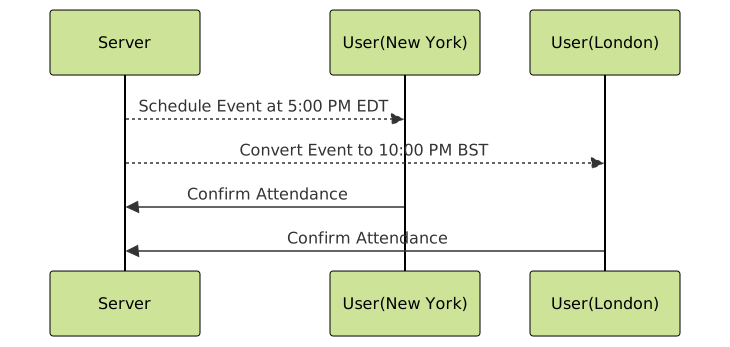
Mermaid Diagram: Basic Time Zone Conversion Flow

Interactive Consideration: Handling Scheduled Events
Schedules or events must trigger at correct local times globally. For example, a webinar scheduled for 5 PM New York time should trigger correctly for users in London or Tokyo.
Example: Backend Time Zone Conversion (Python with pytz)
from datetime import datetime
import pytz

utc = pytz.utc
ny = pytz.timezone('America/New_York')

# Current UTC time
utc_now = datetime.utcnow().replace(tzinfo=utc)

# Convert to New York time
ny_time = utc_now.astimezone(ny)
print(f"UTC Time: {utc_now}, New York Time: {ny_time}")
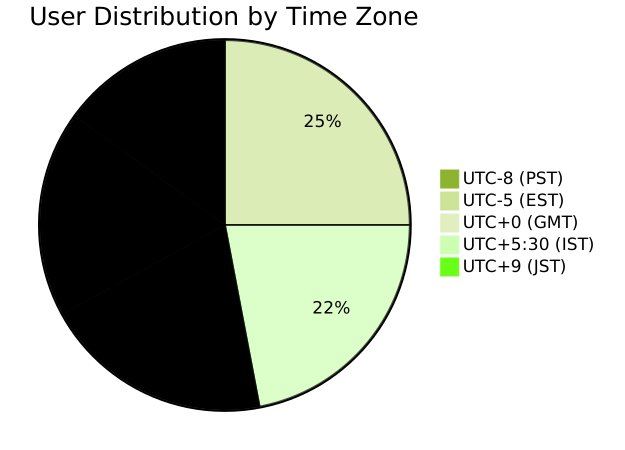
Visualizing Global Users by Time Zone
For website dashboards, showing user distribution by time zone helps tailor content and support.
Tips for SEO and Performance
- Use server headers to set cache and expire times according to UTC to synchronize caching globally.
- Implement hreflang tags combined with localized timestamps to improve international SEO.
- Use CDN and edge locations respecting local time zones for faster region-based content delivery.
Common Pitfalls to Avoid
- Storing and displaying dates in server’s local time instead of UTC causes inconsistency.
- Ignoring DST causes one-hour errors during changes.
- Hardcoding offsets instead of using time zone databases results in inaccuracies.
Summary
Effectively managing time zones in global websites demands centralizing time data storage in UTC, converting timestamps on the client side or localized backend processes, and using robust libraries to handle complexities like DST. Clear UI communication and anticipation of user diversity elevate user experience and trust. Incorporating these best practices ensures website functionality, performance, and SEO success worldwide.





