

Creating robust testing environments is crucial for reliable software delivery and maintaining application quality throughout the development lifecycle. QA and staging environments serve different but complementary roles in testing software before production release. This article explores the best practices for setting up and managing these environments effectively to minimize defects and deployment risks.
Understanding QA and Staging Environments
QA Environment is primarily where the Quality Assurance team conducts functional, regression, and exploratory testing. It mimics the development environment but focuses on verifying features and bug fixes before moving software forward. Staging Environment is the final testing ground that replicates the production environment almost exactly, used for performance, integration, and user acceptance testing (UAT).

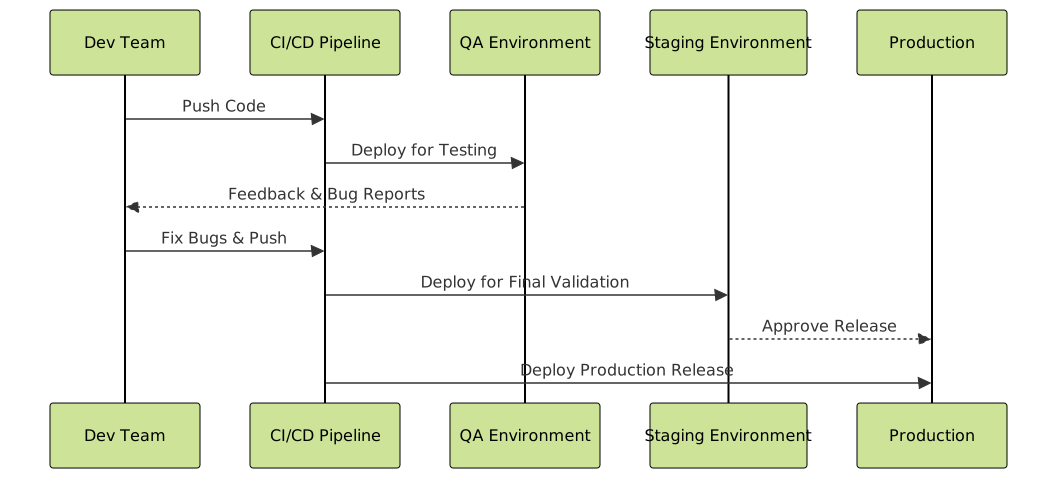
The flow above illustrates the typical software path through environments to production, emphasizing the role QA and staging play in catching errors early and validating readiness for real users.
Key Differences Between QA and Staging
| Aspect | QA Environment | Staging Environment |
|---|---|---|
| Purpose | Functional and regression testing | Production-like validation and performance testing |
| Data | Synthetic or partial production data | Full anonymized production data |
| Configuration | Similar to development, possibly less scaled | Mirrors production environment in hardware, software, and settings |
| Access | Dev and QA teams primarily | QA, product owners, and sometimes select end users |
Best Practices for QA Environment Setup
- Maintain environment parity: Align OS, database versions, middleware, and third-party integrations with development to reduce inconsistencies.
- Isolate test data: Use synthetic or cleansed copies of production data to avoid sensitive data leaks and ensure repeatable tests.
- Automate deployment: Use CI/CD pipelines for quick and reliable environment provisioning and updates.
- Enable comprehensive logging and monitoring: Facilitate rapid defect detection via centralized logs and dashboards.
- Empower QA with proper tooling: Include access to issue trackers, test management systems, and debugging utilities.
Best Practices for Staging Environment Setup
- Production replica: Ensure hardware, network configurations, software stacks, and environment variables mirror production exactly.
- Data anonymization: Use a full production data snapshot with sensitive data anonymized to simulate real-world conditions without privacy concerns.
- Performance and load testing: Incorporate capacity to run stress testing and scalability evaluations.
- Access control: Restrict access to authorized personnel for UAT and final validations.
- Rollback mechanisms: Test deployment rollback processes in staging to prepare for production failures.
Interactive Example: Simulating a Release Cycle with QA and Staging
Consider a feature deployed through continuous integration pipelines:
git checkout -b feature/new-login
# Development and unit tests
git push origin feature/new-login

# Automated deployment to QA environment
deploy --env=qa feature/new-login

# QA runs functional and regression tests
# Issues logged and fixes pushed

# Once approved by QA, deploy to staging
deploy --env=staging feature/new-login

# Run performance tests & UAT
# Final approval for production release
Mermaid Diagram: Deployment Workflow with QA and Staging
Common Pitfalls and How to Avoid Them
- Environment drift: Regularly refresh and audit environments to prevent configuration discrepancies.
- Inadequate data management: Periodically update test data sets to mimic production closer while respecting privacy.
- Manual deployments: Automate deployments to reduce human error and environment inconsistencies.
- Lack of monitoring in QA/Staging: Implement real-time monitoring to detect issues early.
- Skipping staging: Never bypass staging environment even for hotfixes to avoid untested production impact.
Summary
QA and staging environments are essential pillars for delivering high-quality software. The QA environment focuses on validating functionality early, while the staging environment provides a near-identical clone of production for final verification and performance testing. Following best practices around environment parity, data handling, automation, and monitoring ensures smoother releases and fewer production incidents.
Deploying this structured environment strategy supports DevOps goals, reduces risk, and improves overall software stability, ultimately enhancing user satisfaction and trust.





