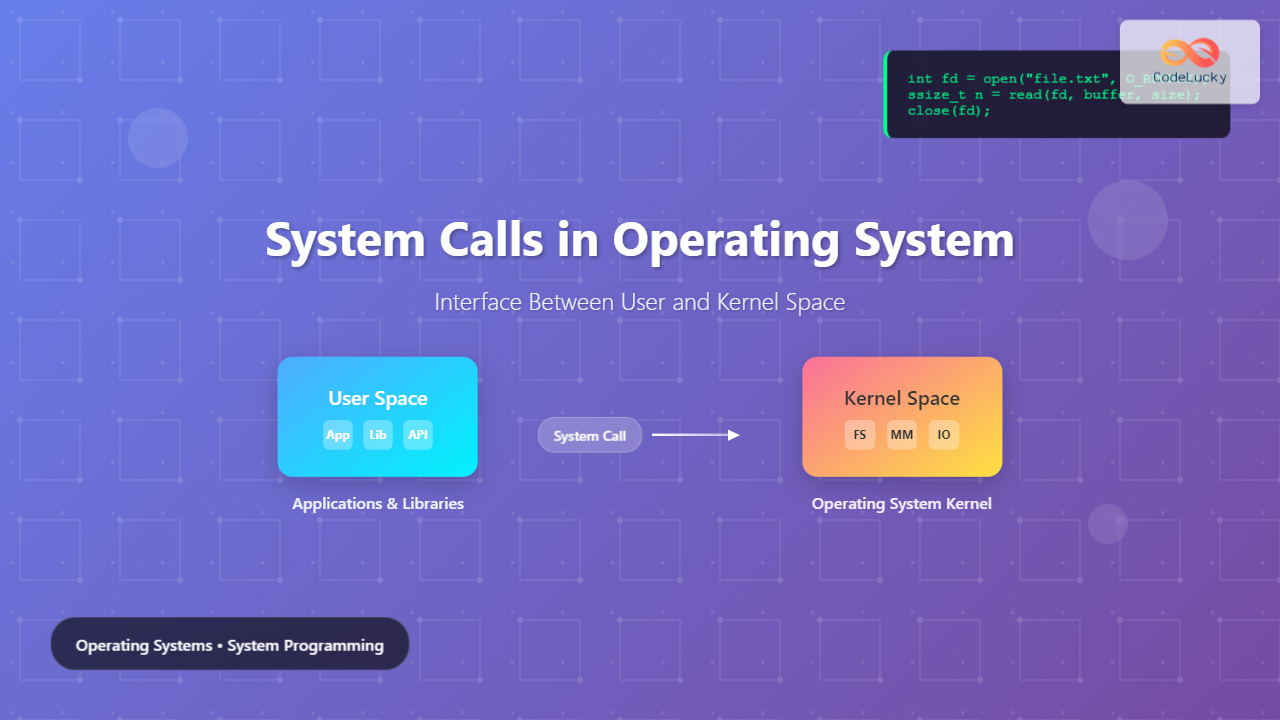
System calls serve as the fundamental bridge between user applications and the operating system kernel, enabling programs to request services like file operations, process management, and hardware access. Understanding system calls is crucial for system programmers and developers working with low-level system operations.
What Are System Calls?
A system call is a programmatic interface that allows user-space applications to request services from the operating system kernel. When a program needs to perform operations that require privileged access—such as reading files, creating processes, or accessing hardware—it must make a system call to transition from user mode to kernel mode.

User Space vs Kernel Space
Modern operating systems implement a clear separation between user space and kernel space to ensure system stability and security:
User Space
- Unprivileged execution: Applications run with limited permissions
- Memory protection: Each process has its own virtual memory space
- Restricted access: Cannot directly access hardware or kernel data structures
- Safe environment: Crashes don’t affect the entire system
Kernel Space
- Privileged execution: Full access to all system resources
- Hardware control: Direct access to CPU, memory, and I/O devices
- System management: Handles process scheduling, memory allocation, and device drivers
- Critical operations: Errors can cause system-wide failures

Types of System Calls
System calls are typically categorized into several groups based on their functionality:
1. Process Control System Calls
Manage process creation, termination, and execution control.
| System Call | Purpose | Example Usage |
|---|---|---|
fork() |
Create new process | Process duplication |
exec() |
Execute program | Replace process image |
wait() |
Wait for child process | Process synchronization |
exit() |
Terminate process | Clean process termination |
// Example: Creating a child process
#include <unistd.h>
#include <sys/wait.h>
#include <stdio.h>

int main() {
    pid_t pid = fork();  // System call to create child process

    if (pid == 0) {
        // Child process
        printf("Child process ID: %d\n", getpid());
        exit(0);
    } else if (pid > 0) {
        // Parent process
        printf("Parent process ID: %d\n", getpid());
        wait(NULL);  // Wait for child to complete
    }

    return 0;
}
2. File Management System Calls
Handle file operations including creation, reading, writing, and deletion.
| System Call | Purpose | Parameters |
|---|---|---|
open() |
Open file | pathname, flags, mode |
read() |
Read from file | fd, buffer, count |
write() |
Write to file | fd, buffer, count |
close() |
Close file | file descriptor |
lseek() |
Change file offset | fd, offset, whence |
// Example: File operations
#include <fcntl.h>
#include <unistd.h>
#include <string.h>

int main() {
    // Open file for writing
    int fd = open("example.txt", O_CREAT | O_WRONLY, 0644);

    if (fd != -1) {
        // Write data to file
        char data[] = "Hello, System Calls!";
        ssize_t bytes_written = write(fd, data, strlen(data));

        // Close file
        close(fd);

        printf("Written %zd bytes to file\n", bytes_written);
    }

    return 0;
}
3. Device Management System Calls
Control and interact with hardware devices and I/O operations.
- ioctl(): Device-specific control operations
- read()/write(): Device I/O operations
- mmap(): Memory-mapped I/O
4. Information Maintenance System Calls
Retrieve and modify system and process information.
// Example: Getting process information
#include <unistd.h>
#include <sys/types.h>
#include <stdio.h>

int main() {
    // Get current process ID
    pid_t pid = getpid();

    // Get parent process ID
    pid_t ppid = getppid();

    // Get user ID
    uid_t uid = getuid();

    printf("Process ID: %d\n", pid);
    printf("Parent Process ID: %d\n", ppid);
    printf("User ID: %d\n", uid);

    return 0;
}
5. Communication System Calls
Enable inter-process communication and network operations.
| Type | System Calls | Use Case |
|---|---|---|
| Pipes | pipe(), mkfifo() |
Local process communication |
| Message Queues | msgget(), msgsnd(), msgrcv() |
Structured message passing |
| Shared Memory | shmget(), shmat(), shmdt() |
Fast data sharing |
| Sockets | socket(), bind(), listen() |
Network communication |
System Call Implementation
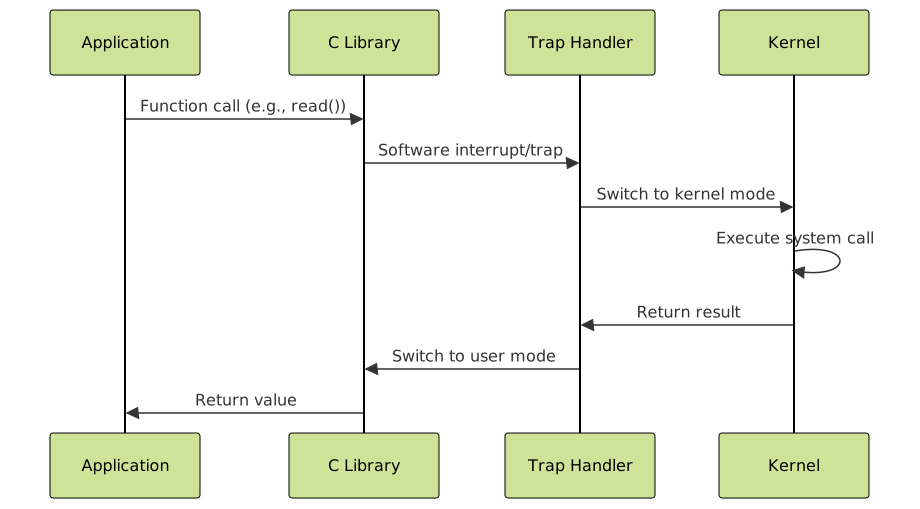
The system call mechanism involves several steps to transition from user mode to kernel mode safely:
Step-by-Step Process
- Application Call: Program calls a library function (like
printf()) - Library Wrapper: C library prepares parameters and invokes system call
- Trap Instruction: Software interrupt transfers control to kernel
- Mode Switch: CPU switches from user mode to kernel mode
- Kernel Execution: Kernel executes the requested operation
- Return: Results are returned and CPU switches back to user mode
System Call Interface in Different Operating Systems
Linux System Calls
Linux provides over 300 system calls, accessible through the syscall() interface:
// Direct system call invocation
#include <sys/syscall.h>
#include <unistd.h>

int main() {
    // Direct system call to write
    syscall(SYS_write, STDOUT_FILENO, "Hello from syscall\n", 19);
    return 0;
}
Windows System Calls
Windows uses Native API (ntdll.dll) as the system call interface:
// Windows API example
#include <windows.h>

int main() {
    HANDLE hFile = CreateFile(
        "example.txt",
        GENERIC_WRITE,
        0,
        NULL,
        CREATE_ALWAYS,
        FILE_ATTRIBUTE_NORMAL,
        NULL
    );

    if (hFile != INVALID_HANDLE_VALUE) {
        DWORD bytesWritten;
        WriteFile(hFile, "Hello Windows", 13, &bytesWritten, NULL);
        CloseHandle(hFile);
    }

    return 0;
}
Performance Considerations
System calls involve significant overhead due to mode switching and context changes:
Overhead Factors
- Mode switching: CPU state changes between user and kernel modes
- Parameter validation: Kernel validates all user-provided parameters
- Context switching: Save and restore processor state
- Memory protection: Address space switches and TLB flushes
Optimization Strategies
- Batch operations: Combine multiple operations into single calls
- Buffering: Use library buffering to reduce system call frequency
- Memory mapping: Use
mmap()for large file operations - Asynchronous I/O: Non-blocking operations to improve throughput

Error Handling in System Calls
Proper error handling is crucial when working with system calls:
// Comprehensive error handling example
#include <fcntl.h>
#include <errno.h>
#include <string.h>
#include <stdio.h>

int main() {
    int fd = open("nonexistent.txt", O_RDONLY);

    if (fd == -1) {
        // System call failed
        printf("Error opening file: %s\n", strerror(errno));

        // Handle specific error codes
        switch (errno) {
            case ENOENT:
                printf("File does not exist\n");
                break;
            case EACCES:
                printf("Permission denied\n");
                break;
            default:
                printf("Unknown error occurred\n");
                break;
        }

        return 1;
    }

    // File opened successfully
    close(fd);
    return 0;
}
Common Error Codes
| Error Code | Meaning | Common Causes |
|---|---|---|
| EINVAL | Invalid argument | Bad parameters passed to system call |
| EACCES | Permission denied | Insufficient privileges for operation |
| ENOENT | No such file or directory | File/directory doesn’t exist |
| ENOMEM | Out of memory | System resources exhausted |
| EBADF | Bad file descriptor | Invalid or closed file descriptor |
Advanced System Call Concepts
Virtual System Calls (vDSO)
Some frequently used system calls are implemented in user space for performance:
- gettimeofday(): Get current time without kernel transition
- clock_gettime(): High-resolution time access
- getcpu(): Get current CPU and NUMA node information
System Call Tracing
Tools for monitoring and debugging system calls:
# Using strace to trace system calls
strace -o trace.log ./myprogram

# Monitor specific system calls
strace -e trace=file ./myprogram

# Count system calls
strace -c ./myprogram
Security Considerations
System calls are critical attack surfaces that require careful security measures:
- Parameter validation: All user inputs must be thoroughly validated
- Privilege checking: Verify caller has necessary permissions
- Resource limits: Enforce quotas and rate limiting
- Audit logging: Log security-sensitive operations

Practical Examples and Use Cases
File Copy Implementation
// Efficient file copy using system calls
#include <fcntl.h>
#include <unistd.h>
#include <stdio.h>

#define BUFFER_SIZE 4096

int copy_file(const char *src, const char *dst) {
    int src_fd = open(src, O_RDONLY);
    if (src_fd == -1) {
        perror("Error opening source file");
        return -1;
    }

    int dst_fd = open(dst, O_CREAT | O_WRONLY | O_TRUNC, 0644);
    if (dst_fd == -1) {
        perror("Error creating destination file");
        close(src_fd);
        return -1;
    }

    char buffer[BUFFER_SIZE];
    ssize_t bytes_read, bytes_written;

    while ((bytes_read = read(src_fd, buffer, BUFFER_SIZE)) > 0) {
        bytes_written = write(dst_fd, buffer, bytes_read);
        if (bytes_written != bytes_read) {
            perror("Write error");
            break;
        }
    }

    close(src_fd);
    close(dst_fd);

    return (bytes_read == 0) ? 0 : -1;
}
Process Communication Example
// Parent-child communication using pipes
#include <unistd.h>
#include <string.h>
#include <stdio.h>

int main() {
    int pipefd[2];
    pid_t pid;

    // Create pipe
    if (pipe(pipefd) == -1) {
        perror("pipe");
        return 1;
    }

    pid = fork();
    if (pid == 0) {
        // Child process - reader
        close(pipefd[1]); // Close write end

        char buffer[100];
        ssize_t bytes_read = read(pipefd[0], buffer, sizeof(buffer) - 1);
        buffer[bytes_read] = '\0';

        printf("Child received: %s\n", buffer);
        close(pipefd[0]);
    } else {
        // Parent process - writer
        close(pipefd[0]); // Close read end

        const char *message = "Hello from parent!";
        write(pipefd[1], message, strlen(message));
        close(pipefd[1]);

        wait(NULL); // Wait for child
    }

    return 0;
}
Best Practices for System Call Usage
Design Guidelines
- Minimize system calls: Reduce frequency through buffering and batching
- Handle errors gracefully: Always check return values and handle errors
- Use appropriate abstractions: Prefer higher-level APIs when suitable
- Consider portability: Use POSIX-compliant calls for cross-platform code
Performance Tips
- Use vectored I/O:
readv()andwritev()for multiple buffers - Leverage asynchronous operations:
aio_read()andaio_write() - Implement connection pooling: Reuse resources like network connections
- Profile system call usage: Identify bottlenecks using profiling tools
Debugging and Monitoring System Calls
Debugging Tools
| Tool | Purpose | Usage Example |
|---|---|---|
| strace | Trace system calls | strace -f ./program |
| ltrace | Trace library calls | ltrace ./program |
| gdb | Debug programs | gdb --args ./program |
| perf | Performance analysis | perf record -e syscalls:* ./program |
Monitoring System Call Performance
# Monitor system call latency
perf trace -s ./myprogram

# Generate system call statistics
strace -c -S time ./myprogram

# Track specific system calls
strace -e trace=read,write,open,close ./myprogram
System calls form the critical foundation of operating system functionality, providing the essential interface between user applications and kernel services. Understanding their implementation, types, and proper usage is fundamental for system programming and developing efficient, reliable applications. By following best practices for error handling, performance optimization, and security considerations, developers can leverage system calls effectively while maintaining system stability and security.
Related Posts
Kernel in Operating System: Core Functions and Memory Management
The kernel stands as the fundamental cornerstone of any operating system, serving as the critical bridge between hardware components and...
Operating System Functions: Core Components and System Responsibilities
An operating system (OS) serves as the fundamental software layer that manages computer hardware resources and provides essential services to...
Operating System Architecture: Monolithic vs Microkernel Design Patterns
Introduction to Operating System Architecture Operating system architecture defines how the core components of an OS are organized and interact...
Exokernel: Application-level Resource Management Architecture in Operating Systems
Introduction to Exokernel Architecture The exokernel represents a revolutionary approach to operating system design that fundamentally challenges traditional kernel architectures....
Operating System Basics: Complete Guide to What is an OS and How it Works
An operating system (OS) is the fundamental software that manages computer hardware and software resources, acting as an intermediary between...
Microkernel Operating System: Modular Architecture for Enhanced System Reliability
What is a Microkernel Operating System? A microkernel operating system represents a minimalist approach to kernel design where only the...
Monolithic Kernel: Complete Guide to Traditional Kernel Architecture
What is a Monolithic Kernel? A monolithic kernel is a traditional kernel architecture where the entire operating system runs in...
Process Creation in OS: Fork, Exec and Process Spawning Complete Guide
Introduction to Process Creation in Operating Systems Process creation is one of the fundamental concepts in operating systems that enables...
Input Output Systems: Complete Guide to Device Management and I/O Operations
Input/Output (I/O) systems form the critical bridge between a computer's internal processing capabilities and the external world. These systems manage...
Process in Operating System: Complete Guide to Definition, States and Lifecycle
What is a Process in Operating System? A process is a program in execution that consists of the program code...
Message Passing: Complete Guide to Inter-Process Communication in Operating Systems
Message passing is a fundamental inter-process communication (IPC) mechanism that enables processes to exchange data and synchronize their activities in...

Device Drivers in Operating System: Complete Guide to Hardware Abstraction Layer
Device drivers serve as the critical bridge between your operating system and hardware components, forming what's known as the Hardware...