

What Are SSL Certificates?
SSL (Secure Sockets Layer) certificates are digital certificates that authenticate a website’s identity and enable encrypted communication between web browsers and servers. They serve as the foundation for HTTPS security, ensuring data transmitted between users and websites remains private and secure.
Think of SSL certificates as digital passports for websites. Just as a passport verifies your identity when traveling, SSL certificates verify a website’s legitimacy and establish secure communication channels.

HTTP vs HTTPS: Understanding the Difference
HTTP (HyperText Transfer Protocol)
HTTP is the standard protocol for transferring data between web browsers and servers. However, it has a critical flaw: all communication is unencrypted, making it vulnerable to interception and manipulation.
Key characteristics of HTTP:
- Port 80 (default)
- No encryption
- Data sent in plain text
- Vulnerable to man-in-the-middle attacks
- No identity verification
HTTPS (HTTP Secure)
HTTPS is HTTP with an added security layer provided by SSL/TLS encryption. It ensures data integrity, confidentiality, and server authentication.
Key characteristics of HTTPS:
- Port 443 (default)
- SSL/TLS encryption
- Data encrypted during transmission
- Protection against eavesdropping
- Server identity verification

How SSL Certificates Work
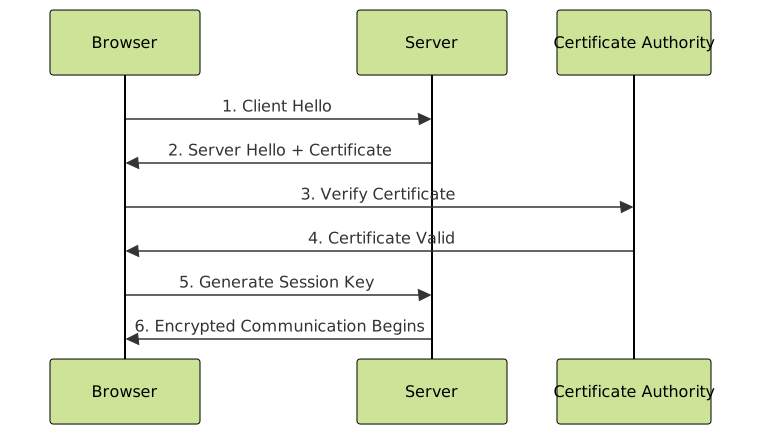
SSL certificates use asymmetric cryptography (public-key cryptography) to establish secure connections. Here’s the step-by-step process:
SSL Handshake Process
- Client Hello: Browser initiates connection and sends supported encryption methods
- Server Hello: Server responds with chosen encryption method and SSL certificate
- Certificate Verification: Browser verifies certificate authenticity with Certificate Authority
- Key Exchange: Both parties generate session keys for symmetric encryption
- Secure Communication: Data is encrypted using session keys
Example: SSL Certificate Information
When you click the padlock icon in your browser’s address bar, you can view SSL certificate details:
Certificate Details:
Issued to: example.com
Issued by: DigiCert Inc
Valid from: January 15, 2024
Valid until: January 15, 2025
Serial number: 03:4B:AC:25:B4...
Public key: RSA 2048 bits
Signature algorithm: SHA-256 with RSA
Types of SSL Certificates
By Validation Level
| Certificate Type | Validation Process | Identity Verification | Use Case |
|---|---|---|---|
| Domain Validated (DV) | Basic domain ownership | Domain only | Personal websites, blogs |
| Organization Validated (OV) | Domain + organization verification | Organization details | Business websites |
| Extended Validation (EV) | Rigorous legal/physical verification | Full legal entity | E-commerce, banking |
By Number of Domains
- Single Domain: Protects one specific domain (e.g., example.com)
- Wildcard: Protects main domain and all subdomains (e.g., *.example.com)
- Multi-Domain (SAN): Protects multiple different domains with one certificate
SSL Certificate Components
Public Key Infrastructure (PKI)
SSL certificates rely on PKI, which uses key pairs for encryption:
- Public Key: Shared openly, used for encryption
- Private Key: Kept secret by server owner, used for decryption

Certificate Authority (CA) Chain
SSL certificates follow a chain of trust:
- Root CA: Ultimate trusted authority (pre-installed in browsers)
- Intermediate CA: Bridges root CA and end-entity certificates
- End-Entity Certificate: The actual website certificate
Implementing SSL Certificates
Certificate Generation Process
Here’s how to generate a Certificate Signing Request (CSR):
# Generate private key
openssl genrsa -out private.key 2048

# Generate CSR
openssl req -new -key private.key -out certificate.csr

# Example CSR information
Country Name: US
State: California
City: San Francisco
Organization: Your Company
Organizational Unit: IT Department
Common Name: example.com
Email Address: [email protected]
Server Configuration Examples
Apache Configuration
<VirtualHost *:443>
    ServerName example.com
    DocumentRoot /var/www/html

    SSLEngine on
    SSLCertificateFile /path/to/certificate.crt
    SSLCertificateKeyFile /path/to/private.key
    SSLCertificateChainFile /path/to/ca-bundle.crt

    # Modern SSL configuration
    SSLProtocol all -SSLv2 -SSLv3 -TLSv1 -TLSv1.1
    SSLCipherSuite ECDHE-ECDSA-AES256-GCM-SHA384:ECDHE-RSA-AES256-GCM-SHA384
</VirtualHost>
Nginx Configuration
server {
    listen 443 ssl http2;
    server_name example.com;

    ssl_certificate /path/to/certificate.crt;
    ssl_certificate_key /path/to/private.key;

    # Modern SSL settings
    ssl_protocols TLSv1.2 TLSv1.3;
    ssl_ciphers ECDHE-ECDSA-AES256-GCM-SHA384:ECDHE-RSA-AES256-GCM-SHA384;
    ssl_prefer_server_ciphers off;

    # Security headers
    add_header Strict-Transport-Security "max-age=31536000; includeSubDomains" always;
    add_header X-Frame-Options DENY;
    add_header X-Content-Type-Options nosniff;
}
SSL Certificate Security Features
Encryption Algorithms
Modern SSL certificates use various encryption algorithms:
| Algorithm | Key Size | Security Level | Performance |
|---|---|---|---|
| RSA | 2048-4096 bits | High | Moderate |
| ECC (Elliptic Curve) | 256-384 bits | Very High | Excellent |
| DSA | 2048-3072 bits | High | Good |
Certificate Transparency
Certificate Transparency (CT) is a security mechanism that logs all SSL certificates publicly, helping detect:
- Unauthorized certificate issuance
- Malicious certificates
- Certificate authority compromises
Common SSL Certificate Issues
Certificate Errors and Solutions
| Error | Cause | Solution |
|---|---|---|
| Certificate Expired | Certificate past validity date | Renew certificate |
| Name Mismatch | Domain doesn’t match certificate | Use correct domain or wildcard certificate |
| Self-Signed Certificate | Certificate not from trusted CA | Use CA-issued certificate |
| Incomplete Chain | Missing intermediate certificates | Install complete certificate chain |
Testing SSL Configuration
Use these tools to verify SSL implementation:
# OpenSSL command line test
openssl s_client -connect example.com:443 -servername example.com

# Check certificate expiration
echo | openssl s_client -servername example.com -connect example.com:443 2>/dev/null | openssl x509 -noout -dates
Best Practices for SSL Implementation
Security Recommendations
- Use Strong Encryption: Minimum 2048-bit RSA or 256-bit ECC keys
- Enable HSTS: Force HTTPS connections with HTTP Strict Transport Security
- Disable Weak Protocols: Remove SSLv2, SSLv3, TLS 1.0, and TLS 1.1
- Regular Updates: Renew certificates before expiration
- Perfect Forward Secrecy: Use ephemeral key exchange methods
Performance Optimization
- HTTP/2 Support: Enable HTTP/2 for better performance with HTTPS
- OCSP Stapling: Reduce certificate validation latency
- Session Resumption: Cache SSL handshake data
- Certificate Compression: Reduce certificate size during handshake

Free vs Paid SSL Certificates
Free SSL Certificate Providers
- Let’s Encrypt: Automated, free DV certificates with 90-day validity
- Cloudflare: Free certificates for Cloudflare users
- Google Trust Services: Free certificates for Google Cloud users
When to Choose Paid Certificates
- Extended Validation (EV): For maximum trust indicators
- Organization Validation (OV): For business identity verification
- Warranty Protection: Financial protection against certificate issues
- Premium Support: Dedicated customer support
- Multi-year Validity: Longer certificate lifespans
Future of SSL/TLS Security
Emerging Technologies
- TLS 1.3: Improved security and performance
- Post-Quantum Cryptography: Protection against quantum computing threats
- Certificate Automation: ACME protocol for automatic certificate management
- DNS-based Authentication: DNS-over-HTTPS and DNS-over-TLS
Industry Trends
- Shorter Certificate Lifespans: Moving towards 90-day certificates
- Certificate Transparency Logs: Mandatory for all public certificates
- Zero-Trust Security: Every connection requires verification
- Automated Certificate Management: Reduced human intervention
SSL certificates are fundamental to modern web security, providing encryption, authentication, and data integrity. As cyber threats evolve, implementing proper SSL/TLS security with current best practices ensures your website and users remain protected. Whether using free certificates from Let’s Encrypt or premium certificates with extended validation, the key is maintaining proper configuration, regular updates, and following security best practices.
Remember that SSL certificate implementation is just one part of comprehensive web security. Combine it with other security measures like security headers, content security policies, and regular security audits for maximum protection.





