Understanding Service Level Agreements (SLAs) is critical when choosing a hosting provider for your website or application. An SLA defines the formal commitments and guarantees your host makes, assuring you of certain levels of service availability, performance, and support.
In this article, we will break down the key components of an SLA, what guarantees to expect, and how understanding these terms protects your web presence.
What is an SLA?
A Service Level Agreement (SLA) is a contract between a customer and a hosting provider that specifies the expected service parameters like uptime, response times, and support capabilities. It legally defines the minimum quality and reliability standards your host commits to maintaining.
In web hosting, SLAs primarily focus on uptime guarantees, meaning how often your website is guaranteed to be accessible without outages. Common SLA uptime targets are 99.9%, 99.99%, or even higher.

Key SLA Components Explained
1. Uptime Guarantee
The uptime guarantee defines the expected time your hosting service will be operational over a month or year.
For instance, a 99.9% uptime SLA means your site can be down for no more than about 43.2 minutes per month (calculated as (1 - 0.999) * 30 * 24 * 60 minutes).
Monthly Downtime Allowed (minutes) = (1 - Uptime%) × Total minutes in month

Example:
99.9% uptime = (1 - 0.999) × (30 × 24 × 60) = 43.2 minutes
2. Support Response and Resolution Time
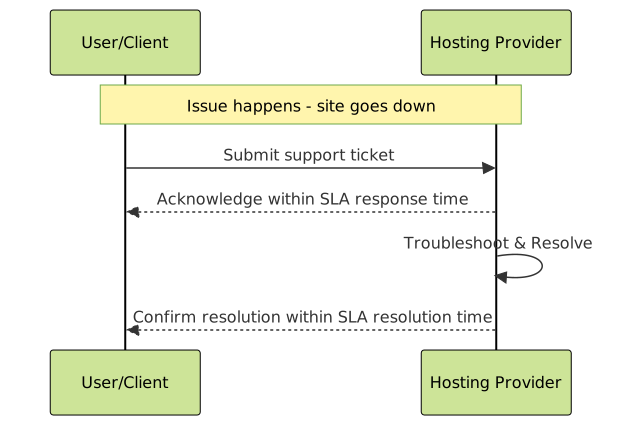
The SLA commits to a maximum response time after you submit a support request and often includes resolution time goals based on issue severity.
Example SLA clause:
- Critical issues: Response within 15 minutes, resolution within 4 hours
- Non-critical issues: Response within 1 hour, resolution within 24 hours
3. Data Backup and Recovery
Good SLAs specify data backup frequency, retention duration, and recovery guarantees, ensuring that your data can be restored after accidental loss.
How SLA Uptime Is Calculated and Its Impact
Uptime is typically monitored over a rolling 30-day period or monthly cycle. Hosts use monitoring tools to track service availability. For example:
- 99.9% uptime means approximately 43.2 minutes downtime allowed monthly.
- 99.99% uptime allows about 4.32 minutes downtime monthly.
- 99.999% uptime (“five nines”) allows less than 30 seconds downtime monthly.
Understanding how much downtime is acceptable lets you align your SLA choice with your website or business criticality.
Examples of SLA Guarantees
Here are examples of typical SLA guarantees and what they mean practically:
| Guarantee | Definition | Practical Meaning |
|---|---|---|
| 99.9% Uptime | Site guaranteed available 99.9% of the time | Up to 43.2 minutes downtime allowed/month |
| 24/7 Support | Support available anytime | Immediate help any time a problem occurs |
| Response Time 30 min | Host responds to issues within 30 minutes | Faster issue acknowledgment |
| Data Backup Daily | Host backs up data every 24 hours | Recent data recoverable if needed |
What If SLA Is Not Met?
SLAs usually define remediation steps if the host fails to meet the agreed SLAs. Common remedies include:
- Service credits (discounts on next billing cycle)
- Refunds
- Contract termination rights
However, these remedies rarely compensate for actual business losses due to downtime, so it’s important to pick a host with strong SLAs tailored to your needs.
How to Evaluate a Host’s SLA Before Signing
When reviewing SLAs, check for:
- Clear uptime metrics with specifics on measurement and exceptions (like scheduled maintenance)
- Support availability aligned with your business hours or needs
- Defined response and resolution times for different severities
- Backup guarantees and recovery assurances
- SLA breach consequences and how compensation is handled

Interactive Example: Calculate Monthly Downtime Allowed
Use this interactive snippet to calculate downtime allowed based on SLA uptime percentage and days in the month.
Conclusion
Understanding your hosting provider’s SLA is essential to ensure your website or application is reliable and that you know what guarantees protect you. Focus on uptime, support, backup, and the consequences of SLA breaches before committing to a host.
By knowing what your host guarantees, you can better plan your downtime tolerance, backup strategies, and choose the right provider for your business needs.