
What is Shared Hosting?
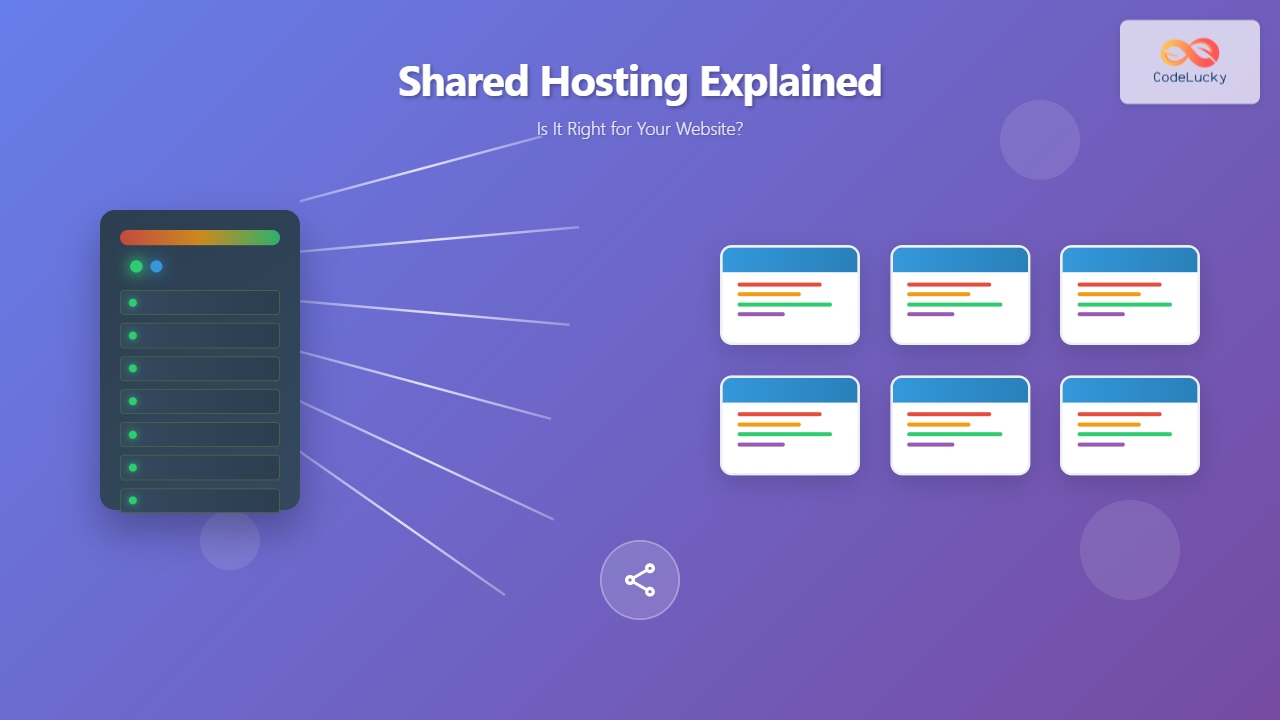
Shared hosting is a web hosting service where multiple websites share the same physical server and its resources, including CPU, RAM, storage space, and bandwidth. Think of it like living in an apartment building – you share the same infrastructure (electricity, plumbing, internet connection) with other tenants, but you have your own private space.
In shared hosting, a single server hosts dozens or even hundreds of websites simultaneously. Each website gets allocated a portion of the server’s resources, and the hosting provider manages the server maintenance, security updates, and technical configurations.

How Does Shared Hosting Work?
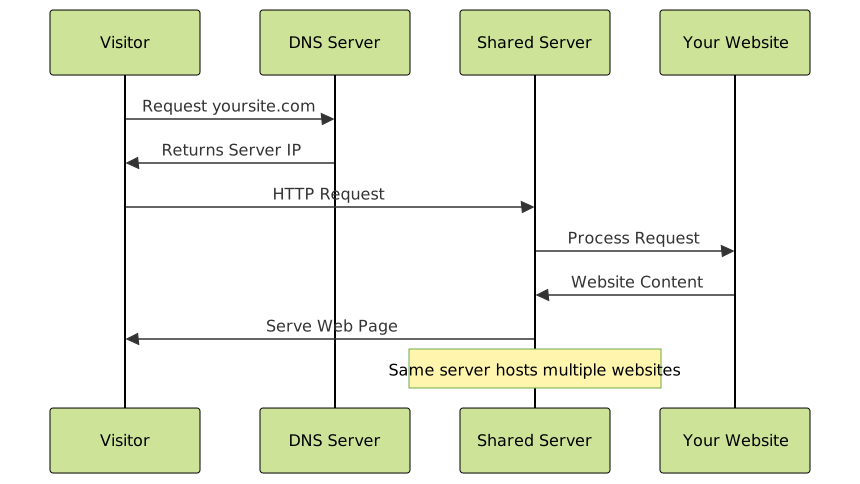
When you purchase shared hosting, your hosting provider allocates a portion of their server’s resources to your website. Here’s how the process typically works:
- Server Partitioning: The hosting provider divides the server into multiple hosting accounts using virtualization technology
- Resource Allocation: Each account receives a predetermined amount of disk space, bandwidth, and processing power
- Domain Management: Your domain name is pointed to the shared server’s IP address
- File Storage: Your website files are stored in a designated directory on the server
- Traffic Handling: When visitors access your site, the server processes their requests and serves your content
Types of Shared Hosting
Basic Shared Hosting
The most affordable option, suitable for simple websites with low traffic. Typically includes:
- 1-10 GB storage space
- Limited bandwidth (often “unlimited” but with fair usage policies)
- Basic email accounts
- Simple control panel access
- One-click application installations
Premium Shared Hosting
Enhanced shared hosting with better performance and additional features:
- More storage space (50-100 GB)
- Higher bandwidth allowances
- Advanced security features
- Priority customer support
- Performance optimization tools
Managed WordPress Hosting
Specialized shared hosting optimized specifically for WordPress websites:
- WordPress-specific server configurations
- Automatic WordPress updates
- Enhanced security for WordPress
- WordPress staging environments
- Specialized WordPress support
Advantages of Shared Hosting
Cost-Effectiveness
Affordability: Shared hosting is the most budget-friendly hosting option, with plans starting as low as $2-5 per month. The cost is distributed among multiple users sharing the same server resources.
Ease of Use
Beginner-Friendly: Most shared hosting providers offer user-friendly control panels like cPanel or custom dashboards that make website management simple for non-technical users.
Maintenance-Free
Managed Infrastructure: The hosting provider handles all server maintenance, security updates, software installations, and technical configurations. You can focus on creating content rather than managing servers.
Quick Setup
Instant Deployment: Most shared hosting accounts are activated immediately after purchase, allowing you to start building your website right away.
Technical Support
Professional Assistance: Shared hosting typically includes customer support to help with hosting-related issues, though the level of support varies between providers.
Disadvantages of Shared Hosting
Limited Resources
Resource Constraints: Since you’re sharing server resources with other websites, your site may experience slower performance during peak traffic periods or when other sites on the server consume more resources.
Performance Variability
Neighbor Effect: If another website on your server experiences high traffic or uses excessive resources, it can impact your website’s performance. This is often called the “bad neighbor” problem.
Security Concerns
Shared Vulnerabilities: While hosting providers implement security measures, sharing a server with multiple websites can potentially increase security risks if one site becomes compromised.
Limited Customization
Restricted Access: You cannot modify server configurations, install custom software, or access root-level settings, which limits advanced customization options.
Scalability Limitations
Growth Constraints: As your website grows, you may quickly outgrow shared hosting’s resource limitations, requiring an upgrade to more powerful hosting solutions.

Shared Hosting vs Other Hosting Types
| Feature | Shared Hosting | VPS Hosting | Dedicated Hosting | Cloud Hosting |
|---|---|---|---|---|
| Cost | $2-15/month | $20-80/month | $80-300/month | $10-50/month |
| Performance | Basic | Good | Excellent | Very Good |
| Resources | Shared | Dedicated Portion | Full Server | Scalable |
| Control | Limited | Moderate | Full Control | Moderate |
| Technical Skills | None Required | Basic-Intermediate | Advanced | Intermediate |
| Scalability | Limited | Good | Limited | Excellent |
Who Should Use Shared Hosting?
Perfect Candidates for Shared Hosting
Small Business Owners: Local businesses, restaurants, or service providers who need a simple online presence with basic information, contact details, and maybe a blog.
Personal Bloggers: Individuals starting a personal blog, hobby website, or portfolio site with modest traffic expectations (under 10,000 monthly visitors).
Startups and New Websites: New businesses testing their online presence before investing in more expensive hosting solutions.
Non-Profit Organizations: Community groups, charities, or educational organizations with limited budgets who need a functional website.
Students and Beginners: People learning web development or content management who want an affordable platform to practice and experiment.
When to Avoid Shared Hosting
High-Traffic Websites: Sites expecting more than 25,000 monthly visitors or experiencing traffic spikes should consider VPS or dedicated hosting.
E-commerce Stores: Online stores handling sensitive customer data and payment processing need enhanced security and performance that shared hosting may not provide.
Resource-Intensive Applications: Websites running complex applications, databases, or media-heavy content may require dedicated resources.
Mission-Critical Business Sites: Companies where website downtime directly impacts revenue should invest in more reliable hosting solutions.
Key Features to Look for in Shared Hosting
Essential Features
Adequate Storage Space: Look for at least 10-50 GB of SSD storage, depending on your website’s needs. SSD storage provides faster loading times compared to traditional HDD storage.
Bandwidth Allowance: While many providers offer “unlimited” bandwidth, understand the fair usage policies. For most small websites, 100 GB monthly bandwidth is sufficient.
Email Accounts: Ensure the plan includes professional email addresses ([email protected]) with adequate storage.
One-Click Installations: Look for easy installation of popular applications like WordPress, Joomla, or Drupal through tools like Softaculous.
SSL Certificate: Free SSL certificates should be included to secure your website and improve search engine rankings.
Performance Features
SSD Storage: Solid State Drives provide significantly faster data access compared to traditional hard drives, improving website loading speeds.
Content Delivery Network (CDN): Some providers include free CDN services to improve website loading times for global visitors.
Caching Solutions: Built-in caching mechanisms can significantly improve website performance by storing frequently accessed data.
Server Location: Choose a provider with servers geographically close to your target audience for better performance.
Security Features
Regular Backups: Automatic daily or weekly backups ensure your data is protected and can be restored if needed.
Malware Scanning: Built-in security scanning helps detect and remove malicious code from your website.
DDoS Protection: Basic protection against distributed denial-of-service attacks that could take your website offline.
Firewall Protection: Server-level firewalls help block malicious traffic before it reaches your website.
Shared Hosting Performance Optimization
Website Optimization Techniques
Image Optimization: Compress images using tools like TinyPNG or WebP format to reduce file sizes without sacrificing quality. Large images are one of the main causes of slow loading times on shared hosting.
Plugin Management: For WordPress sites, minimize the number of active plugins and choose lightweight, well-coded plugins. Deactivate and delete unused plugins to reduce server load.
Content Management: Use excerpts instead of full posts on your homepage, implement pagination for long content, and consider lazy loading for images and videos.
Database Optimization: Regularly clean your database by removing spam comments, post revisions, and unused data. Use plugins like WP-Optimize for WordPress sites.
Caching Strategies
Browser Caching: Configure your website to instruct browsers to store static files locally, reducing server requests for returning visitors.
Plugin Caching: Use caching plugins like W3 Total Cache or WP Rocket (for WordPress) to generate static versions of your dynamic pages.
CDN Implementation: Use services like Cloudflare (free tier available) to distribute your content globally and reduce server load.
Code Optimization
Minification: Reduce the size of CSS, JavaScript, and HTML files by removing unnecessary characters, spaces, and comments.
GZIP Compression: Enable GZIP compression on your server to reduce the size of files sent to browsers, typically achieving 70% size reduction.
Clean Code: Write efficient code and remove unused CSS and JavaScript to minimize resource usage.
Security Best Practices for Shared Hosting
Account Security
Strong Passwords: Use complex, unique passwords for your hosting account, FTP access, and website admin areas. Consider using a password manager.
Two-Factor Authentication: Enable 2FA on your hosting account and website admin areas when available to add an extra layer of security.
Regular Updates: Keep your website software, themes, and plugins updated to patch security vulnerabilities.
Website Protection
Security Plugins: Install reputable security plugins like Wordfence (for WordPress) to monitor and protect against threats.
File Permissions: Set appropriate file permissions (typically 644 for files and 755 for directories) to prevent unauthorized access.
Regular Backups: Create regular backups of your website files and database, storing them in multiple locations including off-site storage.
Monitoring: Regularly monitor your website for unusual activity, unexpected changes, or performance issues that might indicate security problems.
Pricing and Plans Analysis
Typical Pricing Structure
Entry-Level Plans: $2-5 per month, suitable for simple websites with basic features and limited resources.
Standard Plans: $5-10 per month, offering more storage, bandwidth, and additional features like free domain registration.
Premium Plans: $10-15 per month, including advanced features, priority support, and enhanced performance optimizations.
Hidden Costs to Consider
Renewal Rates: Many providers offer discounted introductory rates that increase significantly upon renewal. Always check the regular pricing before committing.
Add-On Services: Additional costs may include domain privacy protection, premium SSL certificates, advanced security features, or professional email services.
Migration Fees: Some providers charge for website migration services, while others offer free migration assistance.
Overage Charges: Be aware of potential charges for exceeding resource limits, though most reputable providers will contact you before applying overage fees.
How to Choose the Right Shared Hosting Provider
Research and Evaluation Process
Read Reviews: Research customer reviews on independent platforms, not just testimonials on the provider’s website. Look for patterns in complaints and praise.
Test Customer Support: Contact the provider’s support team with pre-sales questions to evaluate their response time and helpfulness.
Check Uptime Records: Look for providers guaranteeing at least 99.9% uptime and research their actual performance records.
Examine Terms of Service: Understand the provider’s resource usage policies, backup responsibilities, and cancellation terms.
Key Questions to Ask
- What are the actual resource limits (not just “unlimited”)?
- How many websites share each server?
- What happens if my website exceeds resource limits?
- What backup and recovery options are available?
- How easy is it to upgrade to a higher-tier plan?
- What security measures are implemented at the server level?
- Are there any restrictions on the type of content I can host?

Migration from Shared Hosting
When to Consider Upgrading
Performance Issues: If your website consistently loads slowly despite optimization efforts, or you’re receiving timeout errors during peak traffic periods.
Resource Limitations: When you frequently hit resource limits for CPU usage, memory, or bandwidth, resulting in temporary site suspensions.
Traffic Growth: If your website receives more than 25,000-50,000 monthly visitors consistently, it may be time to consider VPS or dedicated hosting.
Business Requirements: Growing businesses may need enhanced security, custom configurations, or compliance features not available in shared hosting.
Migration Planning
Choose New Hosting: Research and select a VPS, dedicated, or cloud hosting provider that meets your upgraded requirements.
Backup Everything: Create complete backups of your website files, databases, and email accounts before beginning migration.
Plan Timing: Schedule migration during low-traffic periods to minimize impact on your visitors and business operations.
DNS Management: Understand how to update DNS records and consider using a lower TTL before migration to speed up propagation.
Testing: Set up your website on the new hosting environment and thoroughly test all functionality before switching DNS.
Conclusion: Is Shared Hosting Right for You?
Shared hosting remains an excellent choice for many website owners, particularly those starting their online journey or operating small to medium-sized websites. Its combination of affordability, ease of use, and managed infrastructure makes it ideal for personal blogs, small business websites, portfolios, and non-profit organizations.
Choose shared hosting if:
- You’re building your first website or have limited technical experience
- Your budget is constrained and you need cost-effective hosting
- Your website receives less than 25,000 monthly visitors
- You prefer managed infrastructure without server administration responsibilities
- Your website doesn’t require custom server configurations or specialized software
Consider alternatives if:
- Your website handles sensitive data or processes payments
- You need guaranteed resources and consistent performance
- Your site requires custom server configurations or root access
- You experience frequent traffic spikes or high visitor volumes
- Website downtime directly impacts your business revenue
Remember that hosting needs can evolve as your website grows. Starting with shared hosting allows you to establish your online presence affordably while learning about your actual resource requirements. As your website develops and traffic increases, you can always upgrade to more powerful hosting solutions like VPS, dedicated servers, or cloud hosting.
The key to success with shared hosting lies in choosing a reputable provider, optimizing your website for performance, implementing proper security measures, and monitoring your resource usage. With the right approach, shared hosting can provide a solid foundation for your online presence while keeping costs manageable and technical complexity minimal.





