

Introduction to Server Optimization
Server optimization is crucial for maintaining high availability, performance, and resource efficiency in modern IT environments. Fine-tuning performance settings goes beyond basic server setup; it involves precise adjustments to system parameters, software configurations, and hardware utilization that can dramatically improve response times and capacity.
This comprehensive guide walks through the most effective techniques to optimize servers—including web servers, databases, and operating systems—with practical examples and visual aids for a clear understanding.
Key Areas to Focus on for Server Optimization
- Operating System Tuning: Kernel parameters, file systems, memory management.
- Web Server Configuration: Apache, Nginx, and caching strategies.
- Database Tuning: Query optimization, connection pooling, indexing.
- Network and Security Settings: Firewall rules, TLS optimization, load balancing.
Operating System Fine-Tuning
Operating system settings greatly influence how efficiently a server handles workloads. Here are critical areas to adjust:
1. Kernel Parameter Adjustments
Linux kernel parameters can be fine-tuned using sysctl to optimize performance aspects like networking and file handling.
sudo sysctl -w net.core.somaxconn=1024
sudo sysctl -w vm.swappiness=10
Here, net.core.somaxconn increases the queue length for incoming connections, beneficial for high traffic servers, and vm.swappiness controls swap use, limiting unnecessary disk I/O.

2. File Descriptor Limits
File descriptors define how many files or network sockets a process can open simultaneously. Increase limits to support more simultaneous users:
ulimit -n 655353. Disk I/O Optimization
Configure I/O scheduler to reduce latency:
echo deadline | sudo tee /sys/block/sda/queue/schedulerThe deadline scheduler prioritizes I/O requests ensuring fairness and reduced latency, which is crucial for databases.
Fine-Tuning Web Server Settings
Web servers are at the frontline of your application. Optimizing their configuration can significantly improve response times and resource efficiency.
Apache Performance Enhancements
Adjust the MPM (Multi-Processing Module) settings:
<IfModule mpm_worker_module>
    StartServers          4
    MinSpareThreads       25
    MaxSpareThreads       75
    ThreadLimit           64
    ThreadsPerChild       25
    MaxRequestWorkers     150
</IfModule>
This configuration balances server threads for concurrency without overloading memory.
Nginx Worker Process Configuration
Define worker processes and connection limits for better parallelism:
worker_processes auto;
worker_connections 1024;
This allows Nginx to handle thousands of simultaneous connections by leveraging CPU cores efficiently.
Caching Strategies
Implement server-level caching such as FastCGI Cache in Nginx or mod_cache in Apache to reduce load and improve response times for static content.
Database Performance Tuning
Database servers often become bottlenecks. Optimization strategies involve query tuning, indexing, and connection management.
Index Optimization Example
An efficient index can cut query time drastically:
CREATE INDEX idx_user_email ON users(email);This index accelerates searches on email columns by avoiding full table scans.
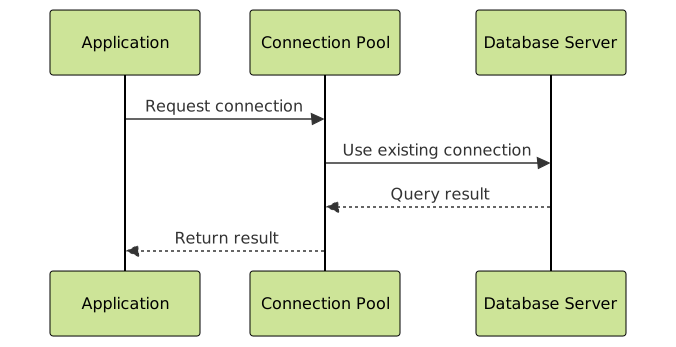
Connection Pooling
Use connection pools like PgBouncer for PostgreSQL to reduce overhead of establishing database connections:
Network and Security Settings
Optimizing network parameters and hardening security improves overall stability and throughput.
- Enable TCP Fast Open to reduce TCP handshake latency.
- Use Gzip compression for reducing payload size on HTTP responses.
- Apply firewall rules to limit unnecessary network traffic and mitigate attacks.
Interactive Example: Tuning Nginx Worker Connections
Below is a simulated interactive example of how increasing worker connections in Nginx can affect concurrent user handling capacity.
worker_processes auto;
worker_connections 1024; # Default setting
# Estimated Max Clients = worker_processes * worker_connections
If there are 4 CPU cores, max clients = 4 * 1024 = 4096 simultaneous connections.
Increase to 2048 connections:
worker_connections 2048;
Now max clients = 4 * 2048 = 8192 concurrent connections.
Summary
Server optimization is an ongoing process that involves tuning multiple layers—from operating system parameters, web server configurations, to database management and network settings. By understanding and adjusting these key settings, applications can achieve improved throughput, faster response times, and enhanced reliability.
This guide offers actionable steps and visual explanations to help system administrators and developers systematically fine-tune performance settings to their unique workload requirements.





