

Maintaining a healthy website is crucial for delivering seamless user experiences and achieving business goals. Server monitoring tools empower website owners and DevOps teams to track health parameters in real-time, quickly detect issues, and ensure optimal website performance. This comprehensive article explores leading server monitoring tools, their features, practical use cases, and visual explanations to help you choose and implement the right monitoring strategy for your websites.
What Is Server Monitoring and Why It Matters
Server monitoring involves continuously checking the health, availability, and performance of servers that host websites or applications. It tracks key metrics such as uptime, response time, CPU and memory usage, disk space, and network activity. Without monitoring, website downtime or slow performance can go unnoticed, affecting user satisfaction and revenue. Early detection of anomalies helps avert bigger outages and improves reliability.
Key Features to Look for in Server Monitoring Tools
- Uptime Monitoring: Track if your website is reachable and online.
- Response Time Measurement: Measure how fast your server responds to requests.
- Resource Usage Tracking: Monitor CPU, memory, disk utilization for capacity planning.
- Alerts and Notifications: Immediate alerts via email, SMS, or messaging apps upon detecting problems.
- Detailed Reporting and Analytics: Historical data trends to analyze performance over time.
- Integration Capabilities: Compatibility with existing DevOps and incident management workflows.
Popular Server Monitoring Tools Overview
| Tool | Type | Key Features | Best For |
|---|---|---|---|
| Nagios | Open Source | Comprehensive server & network monitoring, alerting, plugin architecture | Enterprise-grade infrastructure monitoring |
| Zabbix | Open Source | Detailed metrics, trend analysis, visualizations, auto-discovery | Large environments needing advanced customization |
| New Relic | Commercial SaaS | Application performance, real-time analytics, infrastructure monitoring | Developers & DevOps seeking full-stack monitoring |
| Pingdom | Commercial SaaS | Simple uptime checks, real user monitoring, alerts | Website owners wanting easy uptime monitoring |
| Datadog | Commercial SaaS | Unified logs, metrics, traces, customizable dashboards | Cloud-native infrastructure monitoring & observability |
How Server Monitoring Works: Visualizing the Flow

This diagram illustrates the basic flow of data in server monitoring systems. The monitored servers continuously send health and performance metrics to the monitoring tool, which processes and visualizes data. Alert notifications are sent to responsible personnel for immediate action.
Practical Example: Using Pingdom to Monitor Website Uptime
Pingdom is a user-friendly online service designed primarily for uptime and performance monitoring. Here’s how to set up a basic uptime check:
1. Sign up at Pingdom and log in.
2. Navigate to 'Uptime Monitoring' > 'Add Check'.
3. Enter your website URL (e.g., https://www.example.com).
4. Choose the check interval (e.g., 1 minute to 5 minutes).
5. Configure alert notification preferences.
6. Save the check and monitor your website status on the dashboard.
Visual Output Example:

Interactive Threshold Alert Logic Diagram

This state diagram shows the threshold alert mechanism in most monitoring tools. When a metric, like response time, crosses a predefined threshold, an alert triggers notification until the metric returns to normal.
Advanced Server Monitoring with Zabbix: Example of CPU Usage Triggers
Zabbix allows defining triggers for specific metrics like CPU usage. For instance, alerting when CPU usage exceeds 80% for more than 5 minutes is common.
Trigger expression example:

{server:system.cpu.util[,idle].avg(300)}>20

This means the average CPU idle time over the last 5 minutes (300 seconds) is less than 20%, indicating high CPU usage.
Visualizing CPU Usage Monitoring Concept
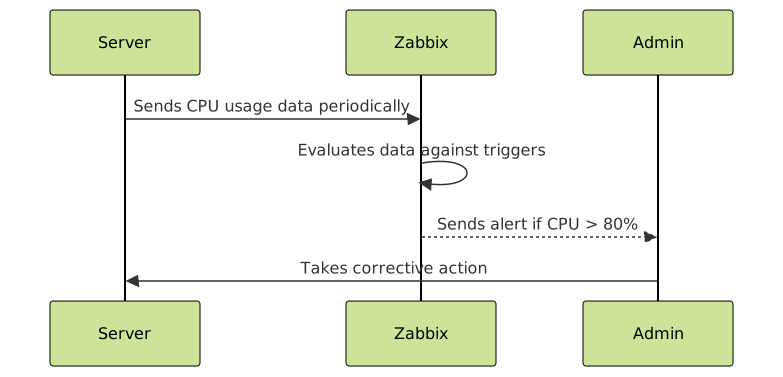
This sequence diagram illustrates how server metrics are continuously evaluated and how alerts flow to admins for resolution.
Best Practices for Effective Server Monitoring
- Define meaningful thresholds: Avoid alert fatigue by setting realistic limits.
- Regularly review reports: Analyze historical data trends for performance tuning.
- Automate incident response: Integrate monitoring with ticketing and remediation tools.
- Monitor user experience: Include real user monitoring (RUM) alongside backend metrics.
- Use multiple monitoring types: Combine synthetic, uptime, and resource tracking for full coverage.
Conclusion
Server monitoring tools are essential for maintaining a healthy website environment, minimizing downtime, and enhancing user satisfaction. Choosing the right tool depends on specific needs—from simple uptime checks to complex infrastructure monitoring with alerting and analytics. By combining efficient monitoring setups with best practices, teams can proactively manage site health and deliver reliable web services.





