

Introduction to Server Maintenance
In today’s digitally-driven world, server reliability directly influences business continuity and user experience. Server maintenance ensures optimal performance, security, and uptime. However, server interruptions happen in two primary forms: planned downtime and unexpected outages. Understanding the differences, causes, and management strategies for each is crucial for IT professionals, DevOps teams, and businesses relying on their IT infrastructure.
What is Planned Downtime?
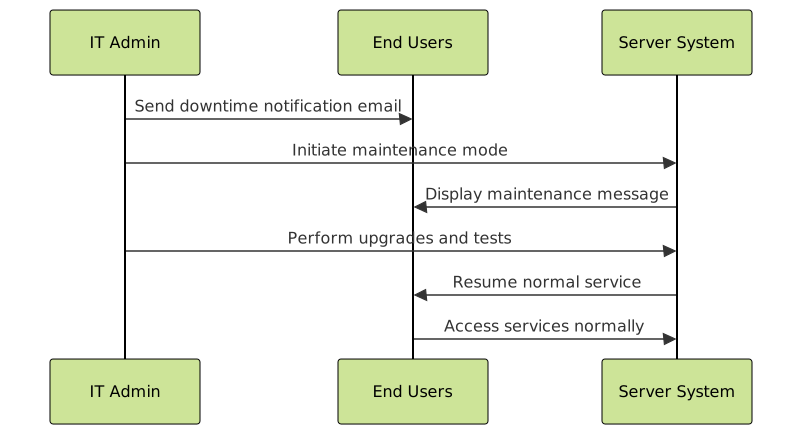
Planned downtime refers to intentional interruptions made to a server or system to perform maintenance operations. These may include software updates, hardware replacements, patches installation, or system upgrades. Since these are anticipated and communicated ahead of time, organizations can prepare stakeholders, schedule activities during low-traffic hours, and mitigate the impact on users.
Example:
Scheduled Maintenance Window: Saturday, 1 AM - 3 AM UTCDuring this window, a company might upgrade their database servers, reboot services, or deploy critical security patches.

What are Unexpected Outages?
Unexpected outages are unplanned interruptions caused by sudden failures such as hardware breakdowns, software bugs, cyberattacks, or network issues. These events can severely disrupt services without warning, often leading to frustration and loss of user trust.
Example:
Unexpected outage detected: Disk failure on primary database server at 2:17 PM UTCThis forces emergency response actions like failover to backups or rerouting traffic while repairs are made.

Key Differences Between Planned Downtime and Unexpected Outages
| Aspect | Planned Downtime | Unexpected Outages |
|---|---|---|
| Nature | Scheduled, intentional | Unplanned, accidental |
| Notification | Advanced notice provided | No prior notice |
| Impact on Users | Minimized via scheduling | Sudden disruption, high impact |
| Cause | Maintenance, upgrades, patches | Hardware failure, bugs, attacks |
| Response | Controlled process with testing | Emergency incident management |
Examples of Planned Downtime
- Database Upgrade: Migrating data to a new schema requiring system pauses.
- Security Patch Deployment: Applying critical patches on application servers.
- Hardware Replacement: Swapping faulty storage drives with minimal disruption.
Examples of Unexpected Outages
- Power Failure: Data center experiences blackout causing server shutdown.
- Software Bug: Unexpected error triggers application crash leading to downtime.
- Cyberattack: Distributed Denial of Service (DDoS) overwhelms server resources.
How to Minimize Impact of Both Types
Effective strategies include:
- For Planned Downtime: Communicate transparently, choose off-peak hours, prepare rollback plans, and use maintenance mode notifications on websites.
- For Unexpected Outages: Implement robust monitoring with real-time alerts, create comprehensive incident response plans, maintain redundancies and backups, and conduct regular disaster recovery drills.
Best Practices for Server Maintenance Management
- Document Maintenance Procedures: Keep detailed maintenance manuals and checklists.
- Automate Where Possible: Use scripts and configuration management tools to reduce human error.
- Schedule Regular Maintenance Windows: Establish consistent maintenance times users expect.
- Implement High Availability Solutions: Use clustering, load balancing, and failover systems to reduce downtime risks.
- Perform Post-Maintenance Reviews: Analyze completed work, outcomes, and user feedback for continuous improvement.
Interactive Maintenance Status Example (HTML/JavaScript)
This snippet simulates a maintenance status dashboard showing active planned downtimes and alerts for unexpected outages:
<!DOCTYPE html>
<html lang="en">
<head>
  <meta charset="UTF-8">
  <title>Maintenance Status Dashboard</title>
  <style>
    body {font-family: Arial, sans-serif; margin: 20px;}
    .status {padding: 10px; border-radius: 5px; width: 300px;}
    .planned {background-color: #f9f5d7; border: 1px solid #e1d96f; color: #7f6f00;}
    .unexpected {background-color: #f9d6d6; border: 1px solid #e16f6f; color: #7f0000;}
  </style>
</head>
<body>
  <h3>Server Maintenance Status</h3>
  <div id="statusBox" class="status">Loading status...</div>

  <script>
    const statusBox = document.getElementById('statusBox');
    // Simulated statuses
    const statuses = [
      {type: 'planned', message: 'Planned maintenance scheduled: Today 10 PM - 11 PM'},
      {type: 'unexpected', message: 'Unexpected outage: Network failure detected!'}
    ];
    let currentIndex = 0;

    function updateStatus() {
      const status = statuses[currentIndex];
      statusBox.textContent = status.message;
      statusBox.className = 'status ' + status.type;
      currentIndex = (currentIndex + 1) % statuses.length;
    }

    // Update every 5 seconds
    updateStatus();
    setInterval(updateStatus, 5000);
  </script>
</body>
</html>
Conclusion
Understanding planned downtime and unexpected outages is fundamental for maintaining server health and minimizing service disruption. By proactively scheduling and communicating planned maintenance and having strong incident response mechanisms, organizations can uphold reliability and user trust. Leveraging automation, monitoring, and high availability further strengthens infrastructure resilience.
Implementing these practices ensures servers stay performant, secure, and available, balancing necessary maintenance with the ever-present risk of unpredictable outages.





