
In today’s rapidly evolving digital landscape, manual security monitoring is no longer sufficient to protect applications from sophisticated threats. Automated security plugins and tools have become essential components of modern development workflows, providing continuous protection, real-time threat detection, and proactive vulnerability management.
This comprehensive guide explores the world of automated security solutions, from implementation strategies to advanced configuration techniques that will transform your application’s security posture.
Understanding Automated Security Protection
Automated security protection refers to the use of software tools and plugins that continuously monitor, detect, and respond to security threats without manual intervention. These solutions integrate seamlessly into development pipelines, providing 24/7 security coverage while reducing human error and response times.

Key Benefits of Automated Security Tools
- Continuous Monitoring: 24/7 surveillance of application vulnerabilities and threats
- Rapid Response: Immediate threat mitigation and incident response
- Scalability: Protection that grows with your application infrastructure
- Cost Efficiency: Reduced need for manual security audits and monitoring
- Compliance: Automated adherence to security standards and regulations
Essential Categories of Security Plugins
1. Web Application Firewalls (WAF)
Web Application Firewalls act as the first line of defense, filtering malicious traffic before it reaches your application. Modern WAF solutions offer automated rule updates and machine learning-based threat detection.
Popular WAF Solutions:
# Example: Cloudflare WAF Configuration
security_level: high
bot_fight_mode: enabled
rules:
  - rule_id: "100001"
    action: "block"
    expression: "(http.request.uri contains \"../\")"
  - rule_id: "100002"
    action: "challenge"
    expression: "(cf.threat_score gt 10)"
2. Static Application Security Testing (SAST)
SAST tools analyze source code to identify security vulnerabilities during the development phase, enabling shift-left security practices.
Implementation Example:
// Example: ESLint Security Plugin Configuration
module.exports = {
  plugins: ['security'],
  extends: ['plugin:security/recommended'],
  rules: {
    'security/detect-object-injection': 'error',
    'security/detect-non-literal-fs-filename': 'error',
    'security/detect-eval-with-expression': 'error',
    'security/detect-buffer-noassert': 'error'
  }
};
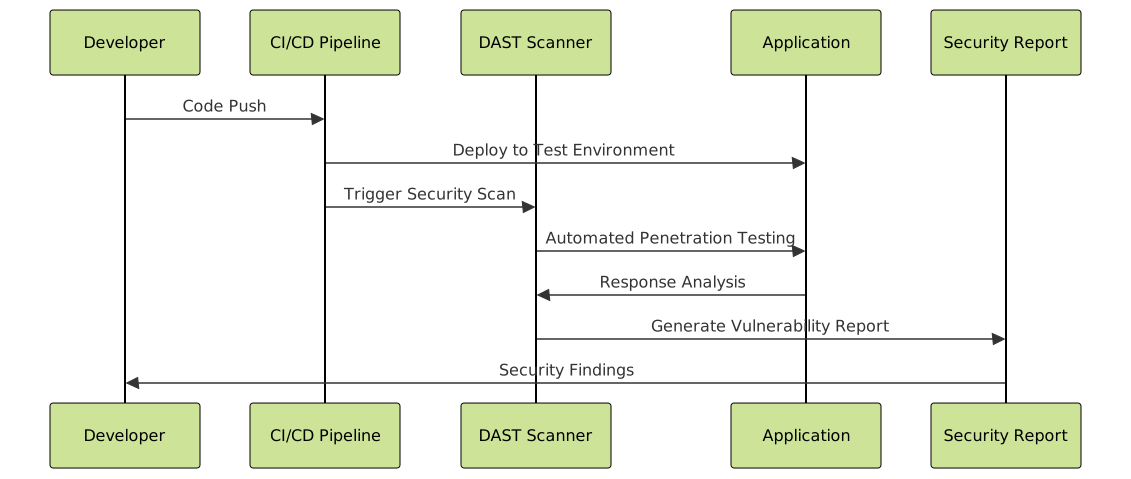
3. Dynamic Application Security Testing (DAST)
DAST tools test running applications to identify runtime vulnerabilities and security misconfigurations.
Implementing Security Automation in CI/CD
Integrating security tools into your continuous integration and deployment pipeline ensures that security checks occur automatically with every code change.
GitHub Actions Security Workflow
name: Security Scan
on: [push, pull_request]

jobs:
  security-scan:
    runs-on: ubuntu-latest
    steps:
      - uses: actions/checkout@v3

      - name: Run SAST Scan
        uses: securecodewarrior/github-action-add-sarif@v1
        with:
          sarif-file: 'security-scan-results.sarif'

      - name: Dependency Check
        run: |
          npm audit --audit-level high
          npm audit fix

      - name: Container Security Scan
        uses: aquasecurity/trivy-action@master
        with:
          image-ref: 'myapp:latest'
          format: 'sarif'
          output: 'trivy-results.sarif'
Security Pipeline Configuration

Advanced Security Plugin Configurations
Real-time Threat Detection
Modern security plugins leverage machine learning and behavioral analysis to detect anomalous activities in real-time.
# Example: Anomaly Detection Configuration
class SecurityMonitor:
    def __init__(self):
        self.threat_threshold = 0.75
        self.ml_model = load_security_model()

    def analyze_request(self, request):
        features = self.extract_features(request)
        threat_score = self.ml_model.predict(features)

        if threat_score > self.threat_threshold:
            self.trigger_security_response(request, threat_score)

        return threat_score

    def trigger_security_response(self, request, score):
        # Automated response actions
        self.block_ip(request.remote_addr)
        self.send_alert(f"High threat detected: {score}")
        self.log_incident(request, score)
Multi-layered Protection Strategy
{
  "security_layers": {
    "network_layer": {
      "ddos_protection": true,
      "geo_blocking": ["suspicious_countries"],
      "rate_limiting": {
        "requests_per_minute": 100,
        "burst_limit": 20
      }
    },
    "application_layer": {
      "input_validation": true,
      "output_encoding": true,
      "csrf_protection": true,
      "sql_injection_prevention": true
    },
    "data_layer": {
      "encryption_at_rest": true,
      "encryption_in_transit": true,
      "access_logging": true,
      "data_masking": true
    }
  }
}
Popular Security Tools and Plugins
Open Source Solutions
| Tool | Category | Primary Function | Integration |
|---|---|---|---|
| OWASP ZAP | DAST | Penetration Testing | CI/CD, IDE |
| SonarQube | SAST | Code Quality & Security | Git, IDEs |
| Bandit | SAST | Python Security Linting | Pre-commit Hooks |
| Semgrep | SAST | Multi-language Security | GitHub Actions |
Enterprise Solutions
- Veracode: Comprehensive application security platform
- Checkmarx: Static and interactive application security testing
- Synopsys: Software composition analysis and SAST
- Rapid7: Dynamic application security testing
Configuration Best Practices
1. Gradual Implementation
Start with basic security plugins and gradually introduce more sophisticated tools to avoid overwhelming your development team.
# Phase 1: Basic Security
npm install --save-dev eslint-plugin-security
npm install --save-dev audit-ci

# Phase 2: Advanced Scanning
npm install --save-dev @snyk/protect
npm install --save-dev retire

# Phase 3: Comprehensive Protection
npm install --save-dev semgrep
npm install --save-dev nodejsscan
2. Custom Rule Configuration
# Custom Security Rules
security_rules:
  authentication:
    - require_mfa: true
    - session_timeout: 30m
    - password_complexity: high

  authorization:
    - rbac_enabled: true
    - least_privilege: true
    - access_review_interval: 90d

  data_protection:
    - pii_encryption: true
    - data_retention_policy: 2y
    - audit_logging: comprehensive

Monitoring and Alerting
Real-time Security Dashboard
// Security Dashboard Component
class SecurityDashboard {
    constructor() {
        this.metrics = {
            threats_blocked: 0,
            vulnerabilities_found: 0,
            compliance_score: 0,
            uptime_percentage: 99.9
        };
        this.initializeWebSocket();
    }

    initializeWebSocket() {
        this.ws = new WebSocket('wss://security-api.example.com');
        this.ws.onmessage = (event) => {
            const securityEvent = JSON.parse(event.data);
            this.handleSecurityEvent(securityEvent);
        };
    }

    handleSecurityEvent(event) {
        switch(event.type) {
            case 'threat_detected':
                this.updateThreatCounter(event.data);
                break;
            case 'vulnerability_found':
                this.logVulnerability(event.data);
                break;
            case 'compliance_update':
                this.updateComplianceScore(event.data);
                break;
        }
    }
}
Alert Configuration
{
  "alert_rules": {
    "critical_vulnerabilities": {
      "threshold": 1,
      "notification_channels": ["email", "slack", "pagerduty"],
      "escalation_time": "5m"
    },
    "authentication_failures": {
      "threshold": 5,
      "time_window": "1m",
      "action": "temporary_ip_block"
    },
    "suspicious_activity": {
      "ml_confidence": 0.8,
      "notification_channels": ["security_team"],
      "require_investigation": true
    }
  }
}
Performance Optimization
Security tools can impact application performance. Implementing smart optimization strategies ensures robust protection without performance degradation.
Caching Security Decisions
import redis
from functools import wraps

class SecurityCache:
    def __init__(self):
        self.redis_client = redis.Redis(host='localhost', port=6379, db=0)
        self.cache_ttl = 300  # 5 minutes

    def cached_security_check(self, func):
        @wraps(func)
        def wrapper(*args, **kwargs):
            cache_key = f"security:{func.__name__}:{hash(str(args))}"
            cached_result = self.redis_client.get(cache_key)

            if cached_result:
                return json.loads(cached_result)

            result = func(*args, **kwargs)
            self.redis_client.setex(
                cache_key,
                self.cache_ttl,
                json.dumps(result)
            )
            return result
        return wrapper
Compliance and Reporting
Automated security tools must generate comprehensive reports for compliance audits and security assessments.

Automated Compliance Reporting
class ComplianceReporter:
    def __init__(self):
        self.frameworks = {
            'GDPR': GDPRCompliance(),
            'SOC2': SOC2Compliance(),
            'ISO27001': ISO27001Compliance()
        }

    def generate_compliance_report(self, framework, period):
        compliance_engine = self.frameworks.get(framework)
        if not compliance_engine:
            raise ValueError(f"Unsupported framework: {framework}")

        security_events = self.fetch_security_events(period)
        report = compliance_engine.generate_report(security_events)

        return {
            'framework': framework,
            'period': period,
            'compliance_score': report['score'],
            'findings': report['findings'],
            'recommendations': report['recommendations'],
            'generated_at': datetime.utcnow().isoformat()
        }
Future Trends in Security Automation
The landscape of automated security is rapidly evolving with emerging technologies and methodologies:
- AI-Powered Threat Detection: Machine learning models for predictive security
- Zero Trust Architecture: Automated verification for every access request
- Quantum-Safe Cryptography: Preparation for post-quantum security
- DevSecOps Integration: Security as native part of development workflow
- Cloud-Native Security: Container and serverless-specific protection
Implementation Roadmap
Successfully implementing automated security protection requires a structured approach:
- Assessment Phase: Evaluate current security posture and identify gaps
- Tool Selection: Choose appropriate security plugins based on technology stack
- Pilot Implementation: Deploy tools in non-production environment
- Integration: Incorporate security automation into CI/CD pipeline
- Monitoring Setup: Configure alerting and dashboard systems
- Team Training: Educate development team on security practices
- Continuous Improvement: Regular review and optimization of security measures
Automated security plugins and tools represent a fundamental shift in how we approach application security. By implementing comprehensive protection strategies, organizations can significantly reduce their attack surface while maintaining development velocity. The key to success lies in choosing the right combination of tools, properly configuring them for your specific environment, and continuously monitoring and improving your security posture.
Remember that security automation is not a set-and-forget solution—it requires ongoing maintenance, updates, and optimization to remain effective against evolving threats. Start with the basics, gradually implement more sophisticated tools, and always prioritize the security practices that provide the greatest risk reduction for your specific use case.





