
Ruby on Rails (Rails) remains one of the most powerful and popular web application frameworks for building scalable, maintainable, and robust applications quickly. However, hosting and deploying Rails applications can be challenging for newcomers and even experienced developers looking to optimize performance and reliability.
This comprehensive guide explores Ruby on Rails hosting with a focus on how to deploy Rails applications in production environments safely and efficiently. It covers environment setup, deployment pipelines, server options, scaling techniques, and practical examples with visual aids to ensure clarity throughout the process.
Understanding Ruby on Rails Deployment
Deployment means making your Rails application live on a server so users can access it through a domain or IP address. Rails deployment involves packaging your code, configuring dependencies (Ruby version, gems, database), managing assets, and ensuring proper environment variables are set.
Unlike static sites, Rails apps require:
- A Ruby runtime environment
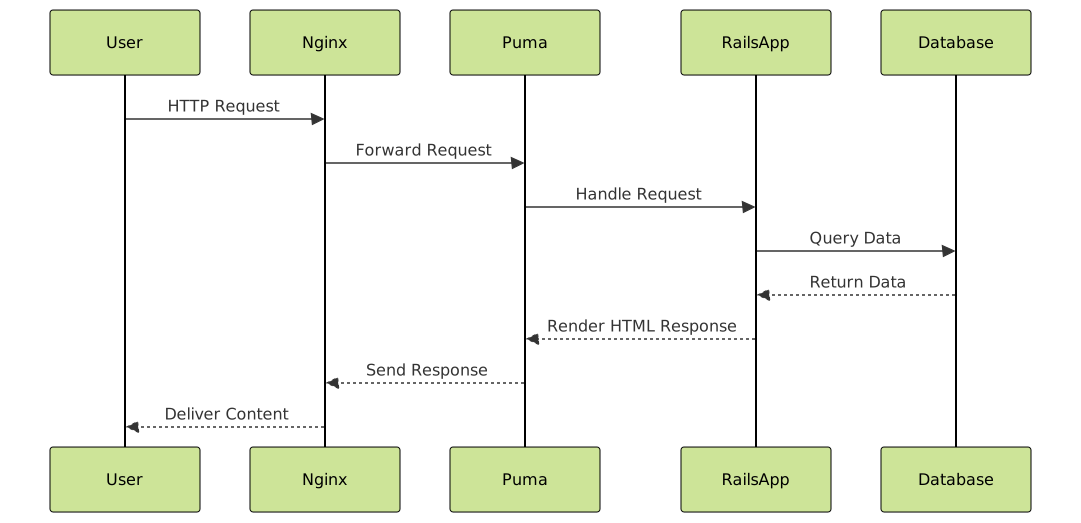
- A web server like Puma or Unicorn
- A database such as PostgreSQL, MySQL, or SQLite (typically PostgreSQL for production)
- A reverse proxy or HTTP server like Nginx or Apache
Choosing a Hosting Platform for Rails
Rails applications can be hosted on multiple platforms depending on requirements such as cost, scalability, and control:
- Platform-as-a-Service (PaaS): Providers like
Heroku,Render, orAWS Elastic Beanstalkoffer easy deployments with minimal server management. - Infrastructure-as-a-Service (IaaS): You can use virtual private servers (VPS) like
DigitalOceanorLinodefor full control over the environment. - Container-based Hosting: Using Docker with Kubernetes or managed container services is popular for complex applications requiring container orchestration.
Step-by-Step Rails Deployment Example Using Capistrano and VPS
For developers using VPS (e.g., DigitalOcean), Capistrano is a robust, popular deployment automation tool. Below is a sample workflow:
1. Server Setup
- Provision Ubuntu server
- Install Ruby with RVM or rbenv
- Install PostgreSQL and create database/user
- Install Nginx
- Set up SSH key for secure access
2. Rails App Preparation
# Gemfile additions
gem 'capistrano', '~> 3.16'
gem 'capistrano-rails', '~> 1.6'
gem 'capistrano-passenger', '~> 0.2.0'
Run bundle install and initialize Capistrano:
$ bundle exec cap install3. Capistrano Configuration
# config/deploy.rb
set :application, 'my_rails_app'
set :repo_url, '[email protected]:username/my_rails_app.git'

set :deploy_to, '/var/www/my_rails_app'
set :branch, 'main'
set :linked_files, %w{config/database.yml config/master.key}
set :linked_dirs, %w{log tmp/pids tmp/cache vendor/bundle public/system}

namespace :deploy do
  after :publishing, :restart
  task :restart do
    invoke 'passenger:restart'
  end
end
4. Deploy Command
$ cap production deployThis automates fetching the latest code, installing gems, precompiling assets, migrating the database, and restarting services.
5. Verify Deployment
Visit your server’s domain or IP in a browser and see your Rails app live and functioning. For example, a simple homepage might display:
<h1>Welcome to My Rails App</h1>
<p>This app is running on Ruby on Rails!</p>
Optimizing Production Environment
Key production environment configurations to keep your Rails app performant and reliable include:
- Environment Variables: Use dotenv or server environment configs to hide secrets like database passwords and API keys.
- Background Jobs: Use Sidekiq or Delayed Job to handle long-running tasks asynchronously.
- Caching: Enable fragment caching, page caching, or action caching with Redis or Memcached for faster response times.
- Reverse Proxy: Use Nginx to handle SSL termination, gzip compression, and serve static assets efficiently.
Interactive Deployment Tools and Monitoring
Modern Rails deployments benefit hugely from integration with CI/CD tools such as GitHub Actions, GitLab CI, or CircleCI. These tools automate tests and deployments on every push, ensuring stability.
Real-time monitoring tools like New Relic or Scout help track app performance and errors after deployment, providing crucial feedback for ongoing optimization.
Comparing Hosting Platforms
| Platform | Ease of Use | Control | Cost | Scalability |
|---|---|---|---|---|
| Heroku | Very Easy | Limited | Moderate to High | Automatic |
| DigitalOcean VPS | Moderate | Full | Low to Moderate | Manual |
| AWS Elastic Beanstalk | Moderate | High | Variable | High |
| Docker/Kubernetes | Complex | Full | Variable | Highly Scalable |
Wrapping Up
Hosting and deploying Ruby on Rails applications involves careful preparation of the server environment, code setup, and deployment automation to achieve production readiness. Leveraging tools like Capistrano, Puma, and Nginx, combined with robust hosting platforms and CI/CD pipelines, ensures smooth and scalable Rails deployments.
Following best practices for environment configuration, security, and monitoring will keep Rails apps performant and reliable for end-users.





