
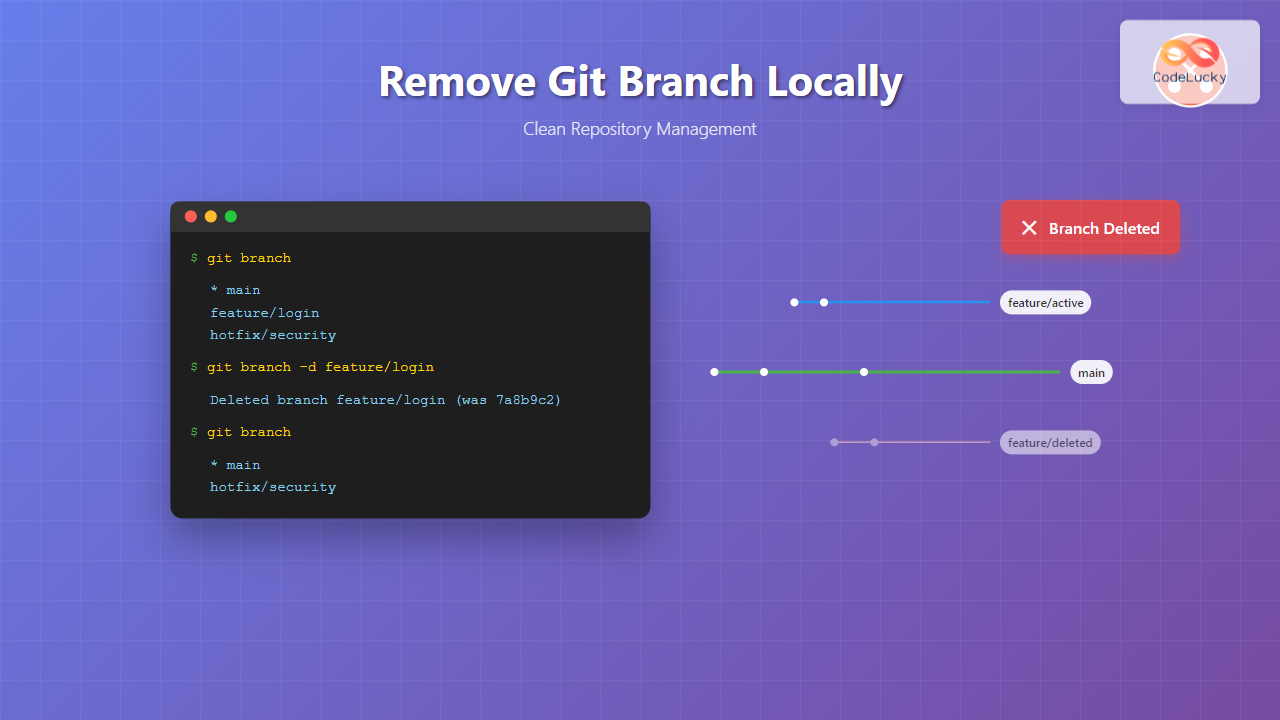
Managing Git branches effectively is crucial for maintaining a clean and organized repository. One essential skill every developer needs is knowing how to remove Git branches locally when they’re no longer needed. This comprehensive guide will walk you through various methods to delete local branches safely and efficiently.
Understanding Git Branches Before Deletion
Before diving into branch deletion, it’s important to understand what Git branches represent and when you should consider removing them.

Git branches are lightweight, movable pointers to specific commits. When you create a branch, you’re essentially creating a new line of development that diverges from the main codebase. Once a feature branch has been merged back into the main branch, it often becomes redundant and can be safely deleted to keep your local repository clean.
Prerequisites and Safety Checks
Before removing any branch, ensure you have the necessary preparations in place:
- Verify branch status: Check if the branch has been merged or if it contains important uncommitted changes
- Switch to a different branch: You cannot delete the branch you’re currently on
- Backup important work: If the branch contains unmerged changes you might need later
Checking Your Current Branch
First, let’s see which branch you’re currently on:
git branchExpected Output:
  feature/user-authentication
* main
  hotfix/security-patch
The asterisk (*) indicates your current branch. In this example, you’re on the main branch.
Method 1: Standard Branch Deletion
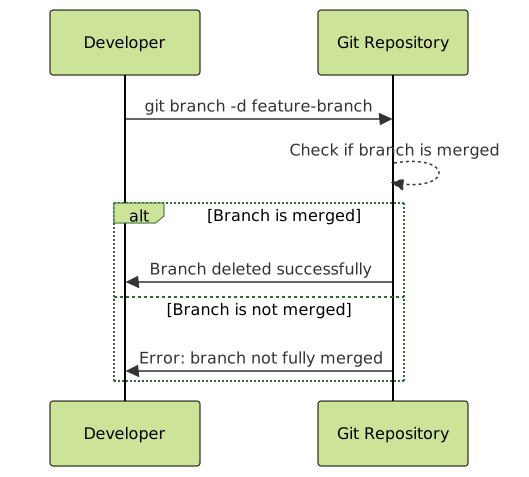
The most common way to delete a local Git branch is using the -d flag, which performs a “safe” deletion.
Syntax
git branch -d <branch-name>Example
Let’s delete a feature branch that has been merged:
git branch -d feature/user-authenticationExpected Output:
Deleted branch feature/user-authentication (was 7a8b9c2).
When Safe Deletion Fails
If the branch contains unmerged changes, Git will prevent deletion:
git branch -d feature/incomplete-featureOutput:
error: The branch 'feature/incomplete-feature' is not fully merged.
If you are sure you want to delete it, run 'git branch -D feature/incomplete-feature'.
Method 2: Force Deletion
When you need to delete a branch regardless of its merge status, use the force deletion flag.
Syntax
git branch -D <branch-name>Alternative syntax:
git branch --delete --force <branch-name>Example
git branch -D feature/abandoned-experimentExpected Output:
Deleted branch feature/abandoned-experiment (was 3f4e5a1).
⚠️ Warning: Force deletion permanently removes the branch and any unmerged changes. Use this command carefully and only when you’re certain you don’t need the branch’s content.
Method 3: Deleting Multiple Branches
You can delete multiple branches in a single command:
git branch -d branch1 branch2 branch3Example
git branch -d feature/login feature/logout hotfix/typo-fixExpected Output:
Deleted branch feature/login (was 2b3c4d5).
Deleted branch feature/logout (was 6e7f8g9).
Deleted branch hotfix/typo-fix (was 1a2b3c4).
Advanced Branch Management
Listing Merged Branches
To see which branches have been merged and are safe to delete:
git branch --mergedExample Output:
  feature/completed-task
* main
  hotfix/security-patch
Bulk Deletion of Merged Branches
You can combine commands to delete all merged branches except main:
git branch --merged | grep -v "\*\|main\|master" | xargs -n 1 git branch -d
Interactive Branch Selection
For a more controlled approach, you can use this script to interactively select branches for deletion:
for branch in $(git branch --merged | grep -v "\*\|main\|master"); do
    read -p "Delete branch '$branch'? (y/n): " -n 1 -r
    echo
    if [[ $REPLY =~ ^[Yy]$ ]]; then
        git branch -d "$branch"
    fi
done
Common Scenarios and Solutions
Scenario 1: Deleting Current Branch
If you try to delete the branch you’re currently on:
git branch -d feature/current-workOutput:
error: Cannot delete branch 'feature/current-work' checked out at '/path/to/repo'
Solution: Switch to a different branch first:
git checkout main
git branch -d feature/current-work
Scenario 2: Branch with Unpushed Commits
When deleting a branch with unpushed commits, Git will warn you:
git branch -d feature/unpushed-changesOutput:
error: The branch 'feature/unpushed-changes' is not fully merged.
Evaluate whether you need those changes before using force deletion.
Best Practices for Branch Deletion
1. Regular Cleanup
Perform branch cleanup regularly to maintain repository hygiene:
- Weekly cleanup of merged feature branches
- Monthly review of long-running branches
- Immediate deletion of hotfix branches after deployment
2. Verification Before Deletion
Always verify branch status before deletion:
# Check branch status
git status

# View branch history
git log --oneline feature/branch-name

# Check if merged
git branch --merged | grep branch-name
3. Documentation and Communication
Before deleting shared branches:
- Communicate with team members
- Document the reason for deletion
- Ensure all relevant changes are merged

Troubleshooting Common Issues
Issue 1: “Branch not found” Error
git branch -d non-existent-branchOutput:
error: branch 'non-existent-branch' not found.
Solution: List all branches to verify the exact name:
git branch -aIssue 2: Permission Errors
If you encounter permission errors, ensure you have proper repository access and that no files are locked by other processes.
Issue 3: Recovering Deleted Branches
If you accidentally deleted a branch, you can recover it using the reflog:
# Find the commit hash
git reflog

# Recreate the branch
git branch recovered-branch <commit-hash>
Integration with Git Workflows
Branch deletion fits into common Git workflows:
Feature Branch Workflow
- Create feature branch:
git checkout -b feature/new-feature - Develop and commit changes
- Merge to main:
git checkout main && git merge feature/new-feature - Delete feature branch:
git branch -d feature/new-feature
Gitflow Workflow
In Gitflow, branch deletion happens at specific points:
- Feature branches: Deleted after merging to develop
- Release branches: Deleted after merging to main and develop
- Hotfix branches: Deleted after merging to main and develop
Conclusion
Removing Git branches locally is a fundamental skill for maintaining a clean and efficient repository. Whether you’re using the safe deletion method with -d or the force deletion with -D, understanding when and how to delete branches will improve your Git workflow significantly.
Remember these key points:
- Always verify branch status before deletion
- Use
-dfor safe deletion of merged branches - Use
-Donly when you’re certain about force deletion - Regularly clean up merged branches to maintain repository hygiene
- Communicate with your team before deleting shared branches
By following these practices and examples, you’ll be able to manage your Git branches effectively and maintain a clean, organized repository that enhances your development workflow.





