

Reading a file line-by-line into a list is a fundamental task in Python programming. Whether you’re processing log files, parsing data, or working on any data analysis project, mastering this technique can significantly enhance your workflow. This guide thoroughly explains how to read a file line-by-line into a list using Python, complete with examples, explanations, and visual aids.
Why Read a File Line-by-Line into a List?
Reading a file line-by-line instead of loading the entire file content at once conserves memory and allows you to process large files efficiently. Storing these lines in a list makes the data easily accessible for further manipulation or analysis.
Basic Python Approach: Using readlines()
The most straightforward method to read a file into a list is using Python’s built-in readlines() method. This reads all lines at once into a list, where each element represents a single line including the newline character.
with open('example.txt', 'r') as file:
    lines = file.readlines()

print(lines)
Output example:
['First line\n', 'Second line\n', 'Third line\n']The newline characters \n are preserved in each line, which you may want to remove for cleaner data processing.
Removing Trailing Newline Characters
To strip the newline characters, a common approach is to use list comprehension combined with strip() or rstrip() methods:
with open('example.txt', 'r') as file:
    lines = [line.rstrip('\n') for line in file]

print(lines)
Visual explanation with Mermaid Diagram:

Using a Loop to Read Lines
If you prefer explicit iteration, you can read the file line-by-line inside a loop, manually appending each stripped line to a list:
lines = []
with open('example.txt', 'r') as file:
    for line in file:
        lines.append(line.strip())

print(lines)
This method works well and is easy to read, especially when additional line processing is needed before adding to the list.
Understanding File Iterators in Python
Files in Python can be directly iterated in a for loop, reading one line at a time. This is memory efficient because it doesn’t load the entire file upfront.
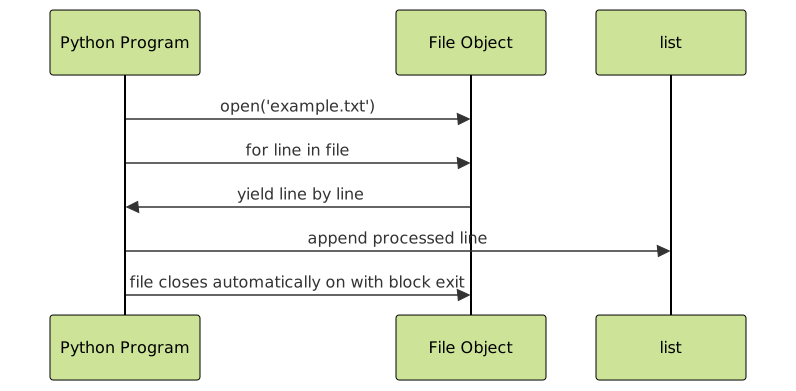
Example with Interactive Code Explanation
Imagine a file example.txt with the following content:
Python
is
fun
The following snippet reads it line-by-line into a list without newline characters:
lines = []
with open('example.txt', 'r') as file:
    for line in file:
        cleaned_line = line.strip()  # clean trailing spaces and newline
        lines.append(cleaned_line)

print(lines)
Output:
['Python', 'is', 'fun']Advanced: Reading Large Files with Generator
For very large files, it’s often better to avoid loading all lines into a list and instead process them on-the-fly using generators:
def read_file_generator(filename):
    with open(filename, 'r') as file:
        for line in file:
            yield line.rstrip('\n')

for line in read_file_generator('example.txt'):
    print(line)
This method reads each line as needed, saving memory especially for huge files.
Summary of Methods
| Method | Description | When to Use |
|---|---|---|
| readlines() | Reads entire file lines into list at once. | Small files; simple use cases. |
| List Comprehension with file iterator | Reads file line-by-line, strips newline, stores in list. | Efficient and clean line processing. |
| Loop with append | Explicit loop with processing, appending lines to list. | When additional processing is needed. |
| Generator | Yields lines one by one for processing without loading all lines. | Large files or streaming data. |
Tips for Robust File Reading
- Always use the
withstatement to open files; it handles closing automatically even if errors occur. - Strip lines to prevent trailing newline issues when manipulating strings.
- Handle exceptions such as
FileNotFoundErrorto make your program robust.
Conclusion
Reading files line-by-line into a list in Python is straightforward yet versatile. Depending on file size and needs, choose the appropriate method from readlines(), list comprehension, loops, or generators. These techniques form a foundation for processing file data efficiently in Python.





